
Introduction
This manual provides detailed instructions for the installation, operation, and maintenance of your Jadisi 9000W Solar Street Lights Outdoor. Please read this manual carefully before use to ensure proper function and longevity of the product.
Product Components
The package includes the following items:
- Solar Street Light unit
- Remote Control
- Mounting Bracket
- Screws and Anchors
- Wrench
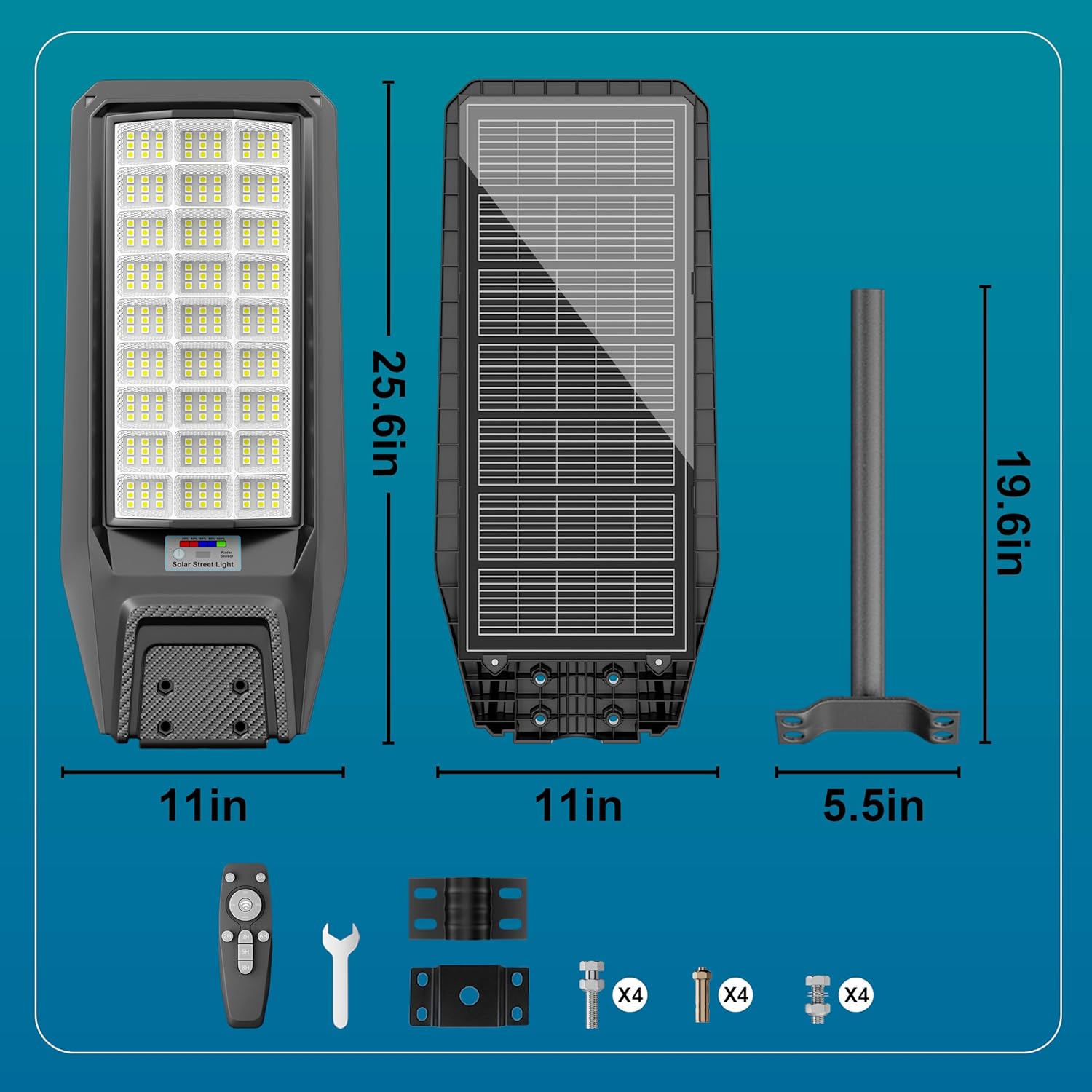
Image: Contents of the Jadisi Solar Street Light package, showing the light fixture, remote control, mounting pole, and installation hardware.
Setup and Installation
The Jadisi Solar Street Light can be installed on a wall or a pole. Ensure the solar panel faces direct sunlight for optimal charging.
1. Choose an Installation Location
- Select a location that receives at least 6-8 hours of direct sunlight daily.
- The recommended installation height is between 10-26 feet (3-8 meters) for optimal lighting coverage.

Image: Illustration demonstrating the recommended installation height (10-26 ft) and maximum lighting area (3500 sq. ft) for the solar street light.
2. Mounting the Light
- Attach the mounting bracket to the desired surface (wall or pole) using the provided screws and anchors. Ensure it is securely fastened.
- Slide the solar street light onto the mounting bracket and secure it with the included bolts and wrench.
- Adjust the angle of the light to ensure the solar panel receives maximum sunlight and the light illuminates the desired area.

Image: Visual guide for mounting the solar street light, showing both wall-mount and pole-mount configurations.
3. Initial Charging
Before first use, allow the solar light to charge for at least 6-8 hours in direct sunlight. The light will automatically turn on at dusk and turn off at dawn.

Image: Depiction of the solar street light's dusk-to-dawn functionality, showing it charging during the day (6-8 hours) and illuminating at night (18-20 hours).
Operating Instructions
The Jadisi Solar Street Light features multiple operating modes controlled by the included remote.
Remote Control Functions
The remote control allows you to select different lighting modes and adjust brightness.
- On/Off Button: Turns the light on or off.
- Motion Sensor Mode (Mode 1): The light maintains 30% brightness and automatically increases to 100% brightness when motion is detected. It returns to 30% after approximately 20 seconds of no motion.
- Constant Lighting Mode (Mode 2): The light stays on at a constant brightness. You can adjust the brightness level (25%, 50%, 75%, 100%) using the dedicated buttons.
- Timed Lighting Mode (Mode 3): Set the light to operate for a specific duration (2h, 3h, 5h, 6h, 8h). After the set time expires, the light will revert to its operating mode before the timer was initiated.
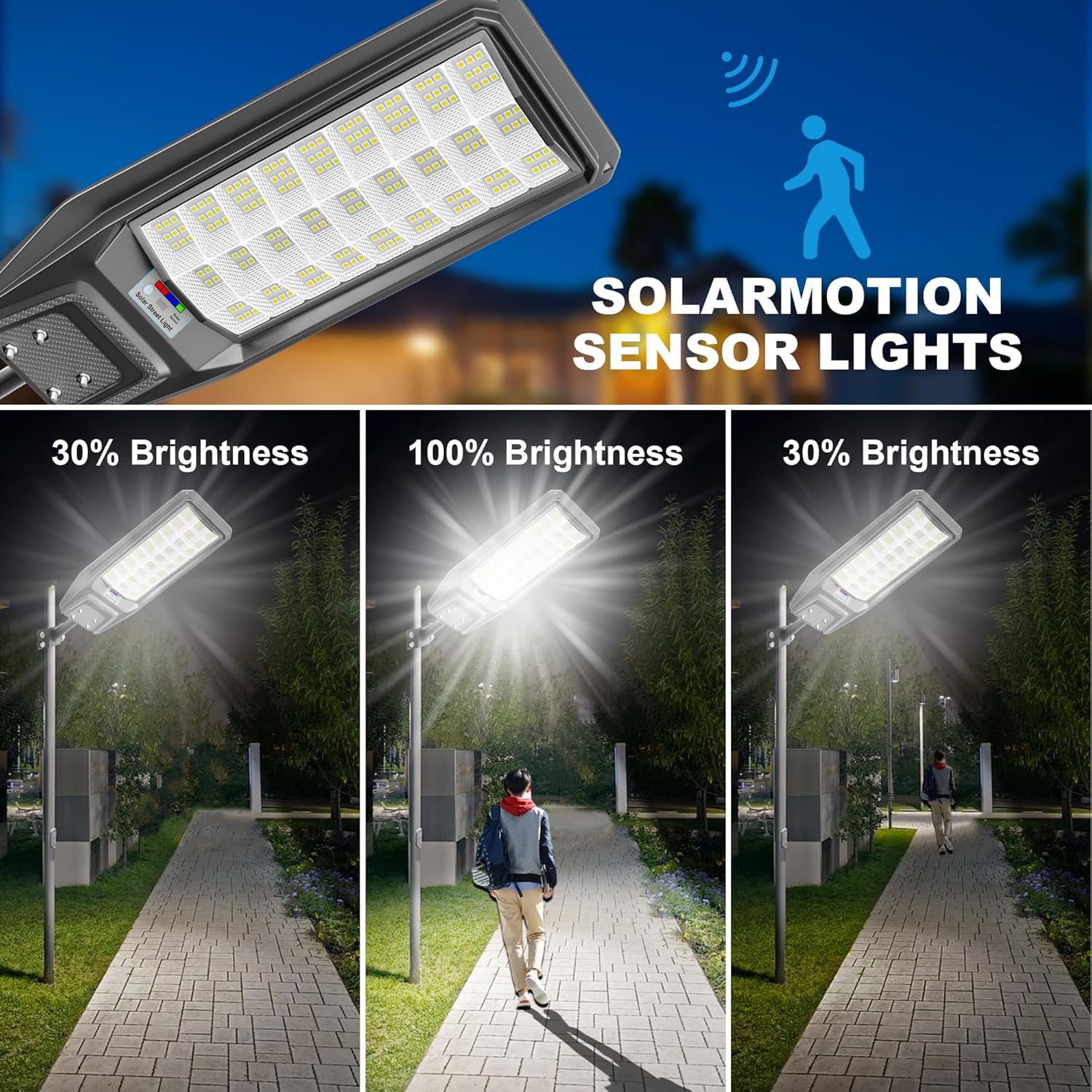
Image: Visual representation of the motion sensor mode, showing the light at 30% brightness, increasing to 100% when a person is detected, and returning to 30% after they leave.

Image: Examples of the solar street light's adjustable brightness settings, showing 25%, 50%, 75%, and 100% illumination levels.

Image: A visual demonstrating the timed lighting function, where the light operates for a user-defined duration.
Remote Control Range
For optimal performance, operate the remote control within close proximity to the light unit.
Maintenance
Regular maintenance ensures the longevity and optimal performance of your solar street light.
- Cleaning the Solar Panel: Periodically wipe the solar panel surface with a soft, damp cloth to remove dust, dirt, or debris. A clean panel ensures efficient charging.
- Battery: The internal battery is designed for long-term use. Avoid disassembling the unit.
- Environmental Factors: Ensure the light is free from obstructions like tree branches or heavy snow that might block sunlight or the light output.
Troubleshooting
If you encounter issues with your Jadisi Solar Street Light, refer to the following common solutions:
| Problem | Possible Cause | Solution |
|---|---|---|
| Light does not turn on at night. | Insufficient charging during the day. | Ensure the solar panel is in direct sunlight for 6-8 hours. Clean the solar panel. |
| Light is dim or flickers. | Low battery charge or dirty solar panel. | Allow for a full day's charge. Clean the solar panel. |
| Motion sensor is not working correctly. | Sensor obstructed or incorrect mode selected. | Clear any obstructions around the sensor. Ensure Mode 1 (Motion Sensor Mode) is selected via the remote. |
| Remote control is unresponsive. | Remote battery low or out of range. | Replace the AAA battery in the remote. Operate the remote closer to the light unit. |
Specifications
| Feature | Detail |
|---|---|
| Model | CX-TW27A |
| Brand | Jadisi |
| Power Source | Solar Powered |
| Light Source Type | LED |
| Brightness | 250,000 Lumen |
| Color Temperature | 7000 Kelvin |
| Material | Acrylonitrile Butadiene Styrene |
| Product Dimensions | 28.3"L x 6.7"W x 18"H |
| Item Weight | 17.16 pounds |
| Water Resistance Level | IP67 Waterproof |
| Control Method | Remote |
| Special Features | Motion Sensor, Dusk to Dawn, Adjustable Height |
| Remote Battery | 1 AAA battery (included) |
| Charging Time | 5-6 hours (direct sunlight) |
| Working Time | 22-26 hours (on full charge) |
Warranty and Support
This product comes with a limited warranty. For specific warranty details, please refer to the product packaging or contact customer support.
For any questions, technical assistance, or support, please contact our service team. We provide 48-hour online service to assist you with any issues.
You can also visit the official Jadisi store for more information: Jadisi Store