
Zalman P50
Zalman P50 ATX Mid-Tower Premium PC Case User Manual
Model: P50 | Brand: Zalman
Introduction
This manual provides detailed instructions for the installation, operation, and maintenance of your Zalman P50 ATX Mid-Tower Premium PC Case. The Zalman P50 is designed for optimal component compatibility and ease of assembly, featuring panoramic tempered glass panels, hinged cable management doors, and support for back-connect motherboards. Please read this manual thoroughly before beginning your PC build.
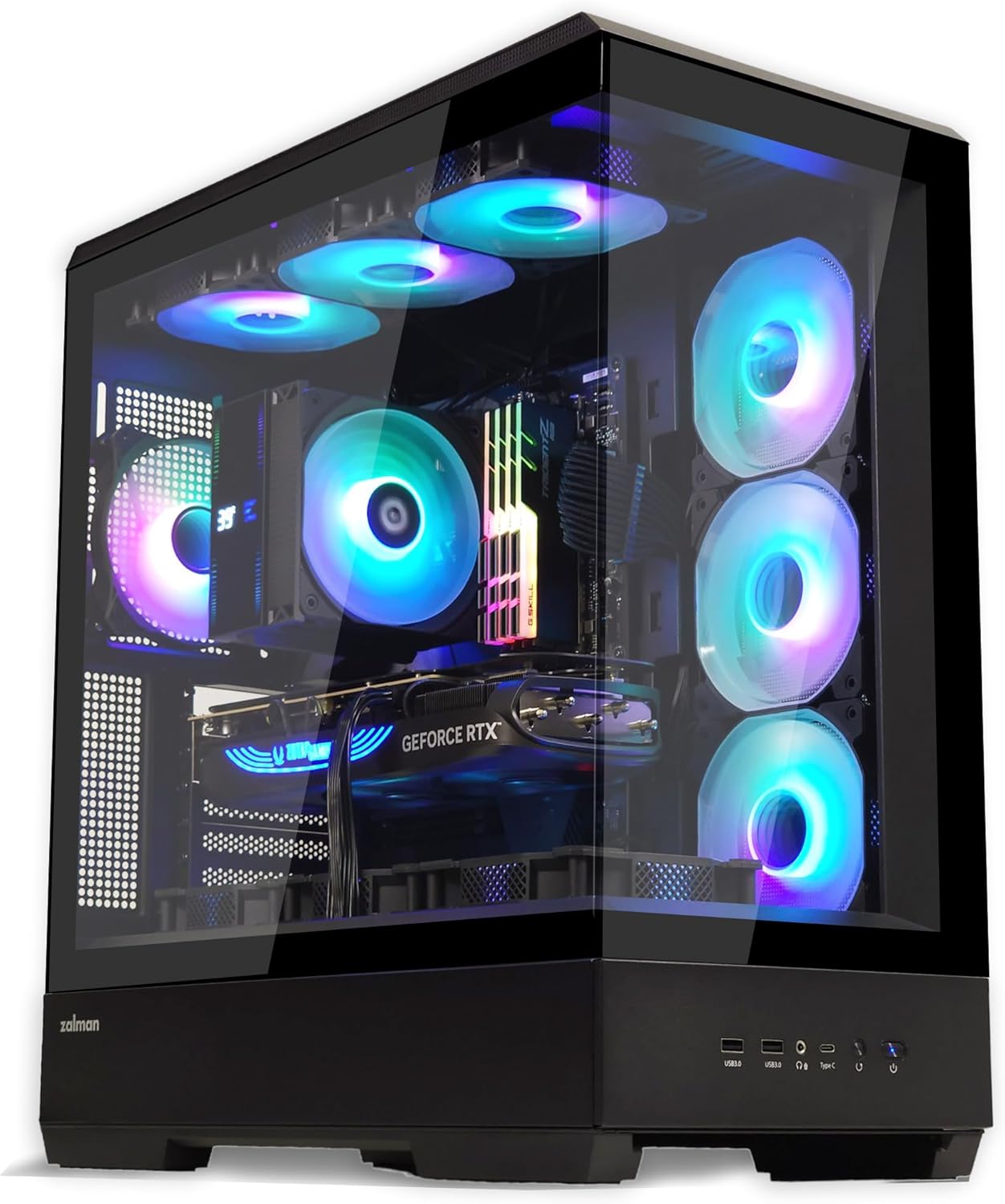
Image: The Zalman P50 PC case showcasing its panoramic tempered glass and internal components with vibrant RGB lighting.
Key Features
- Panoramic Tempered Glass: Provides an unobstructed view of your internal components.
- Tool-Free Design: Enables easy removal of top, side, and back panels for simplified access and maintenance.
- Hinged Cable Management Doors: Cabinet swing doors located at the rear of the chassis facilitate organized cable routing and a clean aesthetic.
- Back-Connect Motherboard Compatibility: Designed to support next-generation motherboards with reverse layout connectors.
- Versatile GPU Setup: Features rotatable PCI slots for vertical GPU mounting and includes a VGA anti-sag bracket. Supports GPUs up to 435mm in length.
- Optimal Cooling Support: Accommodates up to ten 120mm fans and supports top and side 360mm radiators. Note: This is a barebones case and does not include pre-installed fans.
Setup and Installation
1. Panel Removal (Tool-Free Design)
The Zalman P50 features a completely tool-free design for easy access to internal components. To remove the top, side, or back panels, simply unlatch them and lift away. This design simplifies the installation and maintenance process.

Image: Illustration demonstrating the effortless, tool-free removal of the top, side, and back panels of the Zalman P50 chassis.
Important: Avoid lifting the PC by the top panel once components are installed, as it is designed for easy removal.
2. Motherboard Installation (Back-Connect Ready)
The P50 case is compatible with ATX motherboards and is specifically designed to support back-connect (BTF) motherboards, allowing for a cleaner front aesthetic by routing cables to the rear. Install your motherboard onto the pre-installed standoffs.

Image: Visual representation of the Zalman P50's compatibility with back-connect motherboards, highlighting the cable routing areas.
3. GPU Installation (Rotatable PCI Slots)
The case features rotatable PCI slots, enabling both horizontal and vertical GPU mounting. To mount your GPU vertically, rotate the PCI slot bracket. An included VGA anti-sag bracket provides additional support for heavy graphics cards.

Image: The rotatable PCI slot mechanism within the Zalman P50 case, illustrating support for vertical GPU installation.
4. Cable Management
The Zalman P50 offers ample cable management space with 25mm depth behind the motherboard tray and hinged cable management doors. Utilize the integrated cable tie-down points and the swing doors to route and conceal cables for a clean build.

Image: A sequence of images illustrating the hinged cable management doors and the generous 25mm cable routing space behind the motherboard tray.
5. Cooling System Installation
The P50 supports various cooling configurations. Install fans or radiators according to your cooling needs.
- Fan Support: Up to ten 120mm fans can be installed.
- Radiator Support: Supports up to 360mm radiators on both the top and side panels.

Image: Detailed diagrams illustrating the fan and AIO radiator mounting options and sizes supported by the Zalman P50 case.
Operating the Case (Front I/O Ports)
The Zalman P50 features convenient front I/O ports for easy connectivity.

Image: A detailed view of the Zalman P50's front I/O panel, indicating the location of each port and button.
- (a) 2 x USB 3.0: For high-speed data transfer.
- (b) 3.5mm AUX: For audio input/output (headphone/microphone).
- (c) USB Type-C: Modern reversible connector for various devices.
- (d) Reset / LED: Reset button, often doubles as an LED control button.
- (e) Power: System power button.
Maintenance
Regular maintenance helps ensure optimal performance and longevity of your PC case.
- Dust Filters: Periodically remove and clean the dust filters to maintain good airflow and prevent dust buildup inside the case.
- Exterior Cleaning: Use a soft, damp cloth to wipe down the exterior surfaces, including the tempered glass panels. Avoid abrasive cleaners.
- Internal Cleaning: With the system powered off and unplugged, use compressed air to clear dust from internal components and fan blades.
- Panel Re-installation: Ensure all panels are securely re-latched after maintenance to prevent dust ingress and maintain structural integrity.
Troubleshooting
This section addresses common issues related to PC case assembly and functionality.
- System Not Powering On:
- Ensure the front panel power switch cable is correctly connected to the motherboard's front panel header.
- Verify the power supply unit (PSU) is properly installed and switched on.
- Poor Airflow/Overheating:
- Check if all installed fans are spinning correctly and oriented for optimal airflow (intake/exhaust).
- Clean dust filters and internal components.
- Ensure no cables are obstructing airflow paths.
- Front I/O Ports Not Working:
- Confirm that the USB, audio, and Type-C cables from the front panel are securely connected to the corresponding headers on your motherboard.
- Panels Not Closing Securely:
- Check for any internal components or cables obstructing the panel's closing mechanism.
- Ensure the panel is aligned correctly before attempting to close and latch it.
Specifications
| Feature | Detail |
|---|---|
| Model Name | P50 |
| Case Type | Mid Tower |
| Dimensions (L x W x H) | 18.9" x 9.45" x 20.16" (480mm x 240mm x 512mm) |
| Weight | 24 Pounds (10.89 kg) |
| Material | Tempered Glass, Alloy Steel |
| Motherboard Compatibility | ATX (Back-Connect compatible) |
| Max GPU Length | 435mm |
| Max CPU Cooler Height | 178mm |
| Power Supply Mounting Type | Bottom Mount |
| Front I/O Ports | 2 x USB 3.0, 1 x 3.5mm AUX, 1 x USB Type-C, Power Button, Reset/LED Button |
| Fan Support | Up to 10 x 120mm fans |
| Radiator Support | Top: Up to 360mm, Side: Up to 360mm |
| Cable Management Space | 25mm (behind motherboard tray) |
Warranty and Support
Zalman products are manufactured to high quality standards. For warranty information, technical support, or service inquiries, please refer to the official Zalman website or contact their customer support directly. Keep your proof of purchase for warranty claims.
Zalman Official Website: www.zalman.com