
Blue Echo Care BEC-BTE-HYK-V1
Blue Echo Care Rechargeable In-the-Ear (ITE) Hearing Aids User Manual
Model: BEC-BTE-HYK-V1
Brand: Blue Echo Care
1. Introduction and Overview
Thank you for choosing Blue Echo Care Rechargeable In-the-Ear (ITE) Hearing Aids. These discreet and comfortable hearing aids are designed to provide enhanced hearing clarity with advanced noise reduction technology and a long-lasting rechargeable battery. This manual will guide you through the setup, operation, and maintenance of your new hearing aids to ensure an optimal listening experience.

Image 1.1: Blue Echo Care ITE Hearing Aids and Charging Case. The image displays the compact charging case with two hearing aids nestled inside, alongside detailed views of a single hearing aid from different angles, highlighting its discreet design and components.
2. What's Included
Your Blue Echo Care Hearing Aid package includes the following components:
- Two (2) Hearing Aids (one for each ear)
- Dual Charging Station
- Charging Cord
- Variety of Ear Domes (to fit all ear shapes and sizes)
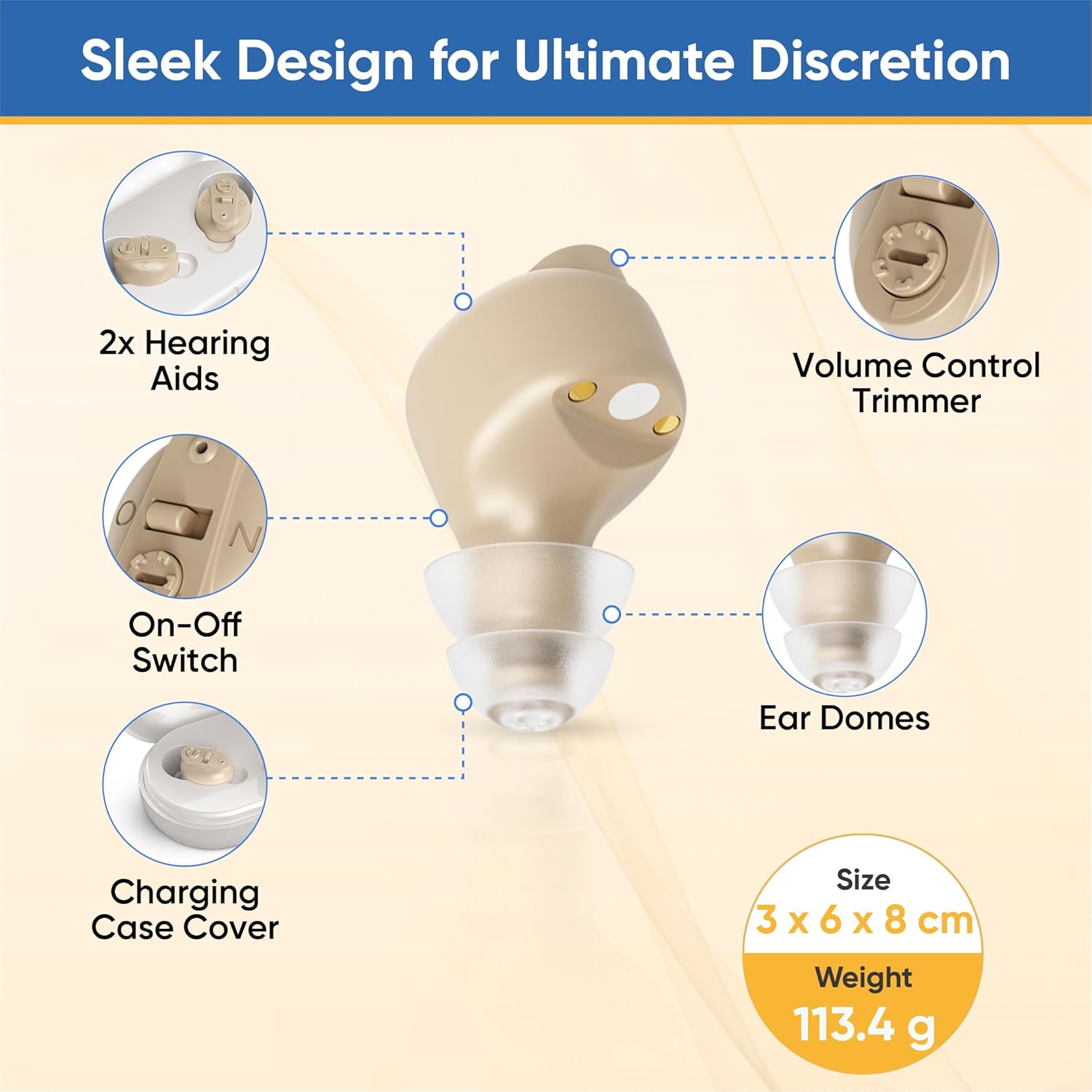
Image 2.1: Exploded view of the hearing aid components. This diagram illustrates the main parts of the hearing aid, including the volume control trimmer, on-off switch, ear domes, and the charging case cover, providing a clear understanding of each element.
3. Setup and First Use
Follow these steps for initial setup and first use of your hearing aids:
- Charge the Hearing Aids: Before first use, fully charge both hearing aids using the provided dual charging station and charging cord. The LED indicator on the charging station will show charging status.
- Select Ear Domes: Choose the appropriate size of ear dome from the variety provided. The correct size should feel comfortable and create a secure seal in your ear canal.
- Insert Hearing Aids: Gently insert the hearing aid into your ear. Ensure it sits snugly and comfortably. The discreet ITE design is intended for a natural fit.
- Power On: Locate the On-Off switch on the hearing aid and switch it to the 'On' position. There may be a short delay before the hearing aid activates, allowing you time to position it without feedback.

Image 3.1: Step-by-step guide for navigating the hearing aids. This visual guide demonstrates how to take the hearing aids from the charging case, choose ear dome sizes, gently insert them, and use the intuitive controls for adjustment.
4. Operating Instructions
Your Blue Echo Care hearing aids feature user-friendly controls for an optimal hearing experience.
4.1 Volume Control
Adjust the volume using the small volume control trimmer located on the hearing aid. Use a small tool (if provided, or a suitable small, non-sharp object) to gently turn the dial to increase or decrease the sound amplification to your preferred level.
4.2 Noise Reduction Technology
The hearing aids are equipped with state-of-the-art noise reduction technology designed to reduce background noise and enhance speech clarity. This feature operates automatically to adapt to your environment, allowing you to hear conversations more clearly in various settings, from quiet rooms to noisy environments.

Image 4.1: Innovative Noise Reduction Technology. This image visually represents how the hearing aids eliminate background noise and enhance speech clarity, leading to a natural listening experience.
4.3 Battery Life and Charging
The built-in rechargeable battery provides extended use, ensuring you're always connected. A full charge can provide up to 24 hours of continuous use. Place the hearing aids in the dual charging station when not in use or when the battery is low. The charging station features LED indicators to show charging status.
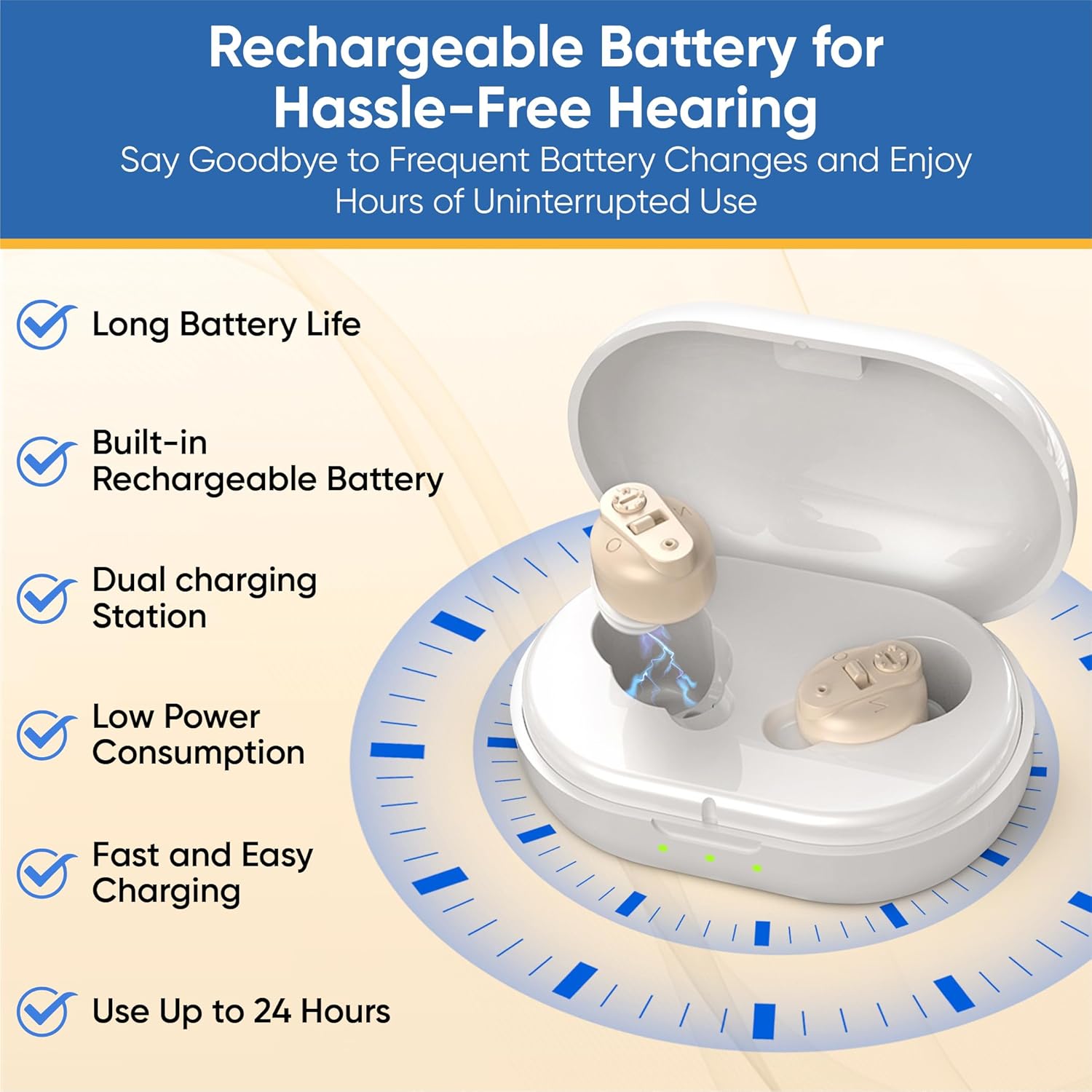
Image 4.2: Rechargeable Battery for Hassle-Free Hearing. This image shows the hearing aids in their charging case, emphasizing features like long battery life, built-in rechargeable battery, dual charging station, and fast charging.
5. Maintenance
Proper maintenance ensures the longevity and optimal performance of your hearing aids.
- Daily Cleaning: Gently wipe the hearing aids with a soft, dry cloth after each use to remove earwax and debris.
- Ear Dome Care: Regularly check the ear domes for wax buildup. Replace ear domes if they become stiff, discolored, or damaged.
- Storage: Store your hearing aids in their charging case when not in use to protect them from dust and damage, and to keep them charged.
- Avoid Moisture: While designed to be moisture-resistant, avoid exposing the hearing aids to excessive moisture, such as showering or swimming.
6. Troubleshooting
If you experience issues with your hearing aids, please refer to the following common troubleshooting tips:
| Problem | Possible Cause | Solution |
|---|---|---|
| No Sound or Low Sound | Battery is low or depleted Ear dome is clogged with earwax Volume is set too low | Charge the hearing aids fully Clean or replace the ear dome Increase the volume using the trimmer |
| Feedback (Whistling Sound) | Hearing aid not inserted properly Ear dome is too small or damaged Volume is too high | Re-insert the hearing aid securely Try a larger or new ear dome Decrease the volume |
| Sound is Distorted | Low battery Ear dome clogged Moisture inside the device | Charge the hearing aids Clean or replace the ear dome Place in a dry environment or contact support |
If the problem persists after trying these solutions, please contact Blue Echo Care customer support.
7. Specifications
- Model Name: Blue Echo Care (BEC-BTE-HYK-V1)
- Type: In-the-Ear (ITE)
- Power Source: Battery Powered (Rechargeable)
- Control Type: Button Control (Volume Trimmer, On/Off Switch)
- Material: Silicone (Ear Domes)
- Color: Skin Tone
- Product Dimensions: Approximately 3 x 6 x 8 cm
- Weight: Approximately 150 g
- Manufacturer: Blue Echo Care
- Country of Origin: Canada
8. Warranty and Support
For product support, inquiries, or warranty information, please contact Blue Echo Care directly.
- Email: support@blueechocare.com
- Phone: 1 (855) 860-3404
Legal Disclaimer: Actual product packaging and materials may contain more and different information than what is shown on our website. We recommend that you do not rely solely on the information presented and that you always read labels, warnings, and directions before using or consuming a product.
Related Documents - BEC-BTE-HYK-V1
 |
Ballu Apollo Transformer Inverter Manual and Specifications Comprehensive guide for Ballu Apollo Transformer Inverter models, including installation, operation, and warranty information. Features technical specifications and mounting details. |
 |
JP EnErG Pro Brushless ESC Instruction Manual User manual for the JP EnErG Pro Brushless Electronic Speed Controller (ESC). Covers specifications, features, connection, user programmable settings, safety precautions, and troubleshooting for RC models. |
 |
SoloGood F722 V1.0 FC: High-End Flight Controller for Drones Detailed specifications, features, and setup guide for the SoloGood F722 V1.0 FC, a high-performance flight controller designed for building X8 drones. Learn about its main control chip, onboard OSD, barometer, black box, dual BEC, and LED status indicators. Includes wiring diagrams and Betaflight configuration instructions. |
 |
BEC AirConnect 8231 5G CBRS Outdoor Router Quick Start Guide Quick Start Guide for the BEC AirConnect 8231 5G CBRS Outdoor Router, covering installation, hardware overview, mounting, setup, and troubleshooting. |
 |
MateStar Convector Heater User Manual User manual for the MateStar Convector Heater by Ballu technology, covering installation, operation, programming, safety, and maintenance for models BEC/EVI-1500, BEC/EVI-1800, and BEC/EVI-2200 EU. |
 |
DYS Airplane ESC User Manual: Features, Specifications, and Programming Guide Comprehensive user manual for DYS Brushless Electronic Speed Controllers (ESC) for model aircraft. This guide details features, specifications, throttle calibration, programming options, and essential safety precautions. |
Ask a question about this manual
Ask about setup, troubleshooting, compatibility, parts, safety, or missing instructions. Manuals+ will review the question and use this page’s manual context to help answer it.