
1. Introduction
This manual provides essential information for the setup, operation, and maintenance of your AtomMan G7 Ti Mini PC. Please read thoroughly to ensure optimal performance and longevity of your device.
2. What's in the Box
- 1x G7 Ti Mini PC
- 1x HDMI Cable
- 1x US Power Adapter
- 1x Manual
3. Product Features
3.1. Powerful Performance
The AtomMan G7 Ti Mini PC is equipped with an Intel Core i9-14900HX Processor, featuring 24 Cores and 32 Threads with speeds up to 5.8GHz. This configuration supports demanding computing tasks, multitasking, gaming, image, and video editing.

Image: Detailed view of the Intel Core i9-14900HX Processor, highlighting its core count, threads, and clock speed.
3.2. Advanced Graphics
Featuring a GeForce RTX 4070 8G Graphics card, the G7 Ti supports ray tracing and DLSS 3 for realistic visuals and enhanced gaming performance. The Ada architecture optimizes light behavior reproduction and AI-generated frames for efficient high-performance gaming.
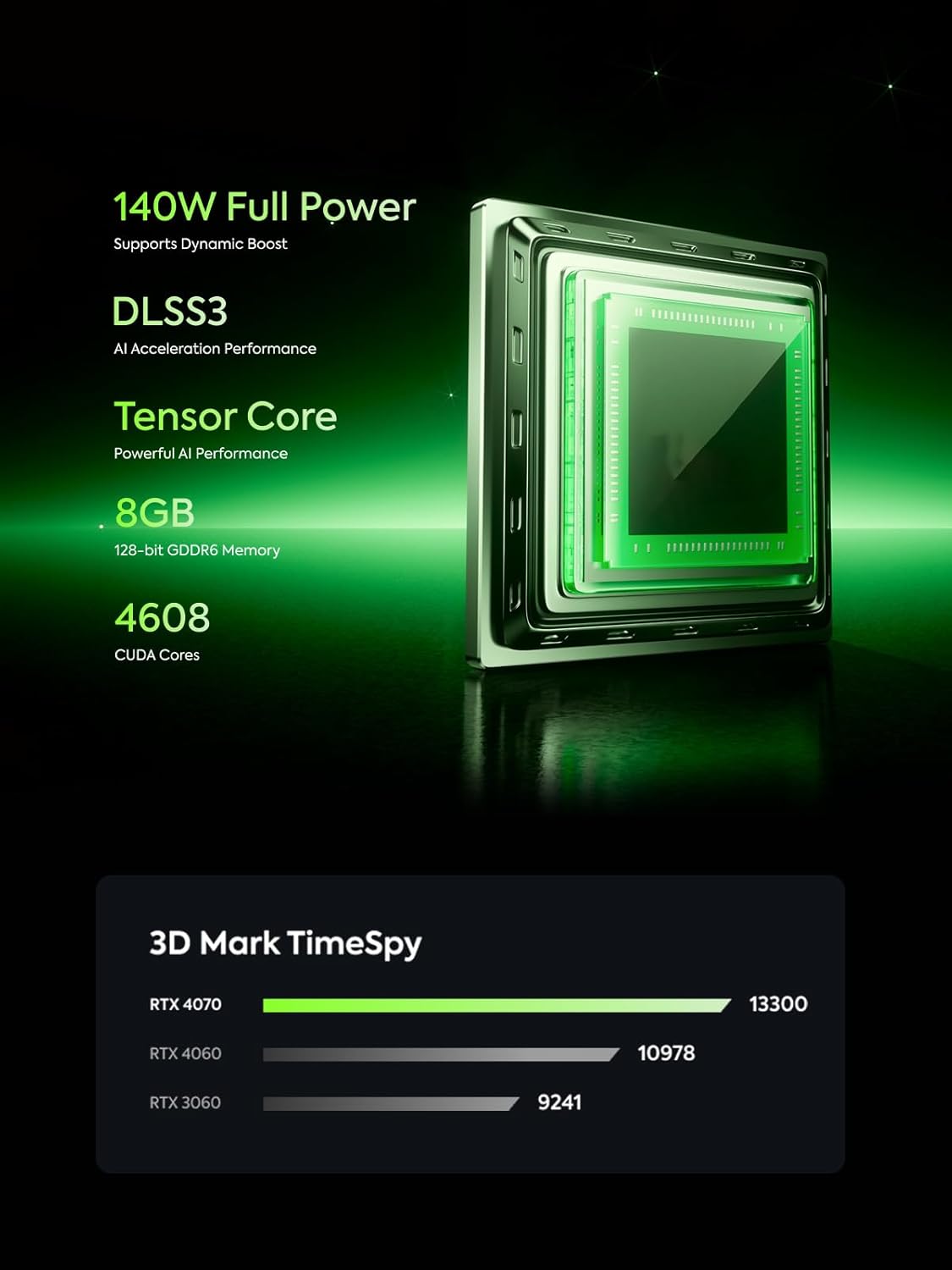
Image: Visual representation of the GeForce RTX 4070 8G Graphics card, emphasizing its capabilities.
3.3. Efficient Cooling System
The device incorporates a Cold Wave Pro Cooling System, utilizing patented technology to support full system performance up to 180W. This system includes dual fans, a silent fan operating at 4400 RPM, and 5 sets of heat dissipation copper pipes for effective thermal management.

Image: Exploded view of the Cold Wave Pro Cooling System, showing internal components like fans and copper pipes.
3.4. Connectivity and Ports
The G7 Ti Mini PC offers comprehensive connectivity with 1x HDMI 2.1 and 1x USB4 outputs for dual Ultra HD screen support, enhancing work efficiency. It includes an RJ45 Port for wired connections and Wi-Fi 7 / BT5.4 for high-speed wireless connectivity. Wi-Fi 7 features an upgraded 16x16 spatial stream for significantly increased network speed compared to traditional Wi-Fi 6.

Image: Front and rear views of the AtomMan G7 Ti Mini PC, detailing all available ports and buttons.
3.5. Large and Expandable Storage
This micro computer comes with 32GB DDR5 RAM (dual SODIMM slots, expandable up to 96GB at 5600 MT/s) and a 1TB M.2 2280 PCIe4.0 SSD (with two SSD slots, expandable up to 4TB). An additional SD Card slot is available for further storage expansion, ensuring smooth software operation and ample space for large files.
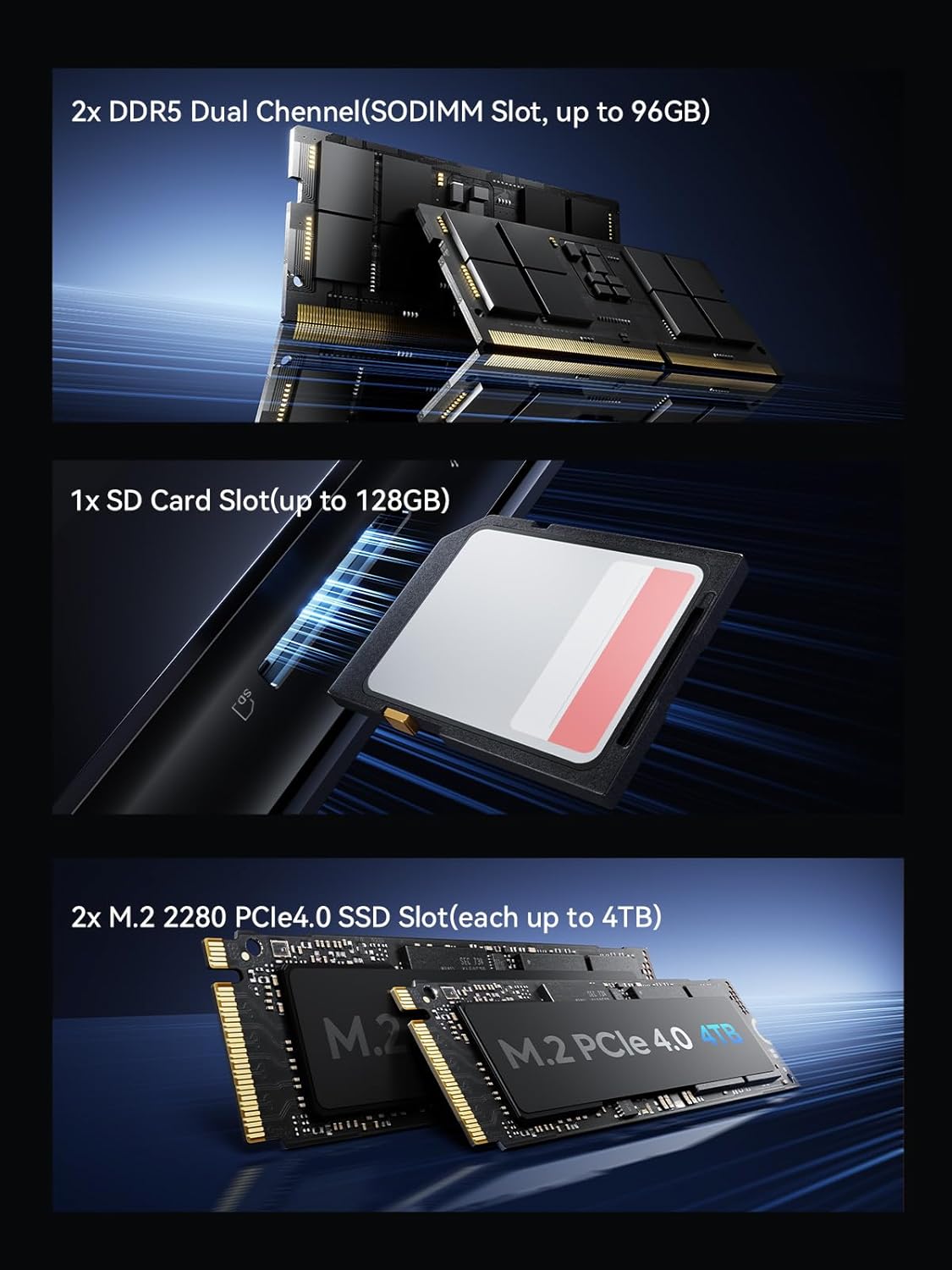
Image: Visual representation of the DDR5 RAM, M.2 PCIe4.0 SSD slots, and SD card slot for storage expansion.
3.6. Dedicated Control Center
The AtomMan G7 Ti Mini PC features a dedicated control center for managing operating modes, hardware checks, and quick cooling with a single click. It also includes a new graphical BIOS interface for enhanced user experience, comprehensive configuration options, and improved security management.
4. Setup Guide
- Connect to Power: Plug the US Power Adapter into the DC IN port on the Mini PC and then into a power outlet.
- Connect to Display: Use the provided HDMI cable to connect the Mini PC to your monitor. For dual display setup, use the USB4 port with a compatible display cable.
- Connect Peripherals: Attach your keyboard, mouse, and any other USB devices to the available USB ports.
- Network Connection: For wired internet, connect an Ethernet cable to the RJ45 port. For wireless, ensure your Wi-Fi 7 network is active.
5. Operating Instructions
- Power On/Off: Press the power button on the front of the Mini PC to turn it on or off.
- Operating Modes: Utilize the dedicated control center to switch between different operating modes (e.g., performance, balanced, quiet) to optimize for your current task.
- BIOS Access: Refer to the manual for specific key presses during startup to access the graphical BIOS interface for advanced settings.
6. Maintenance
- Dust Cleaning: Regularly clean the air vents and exterior of the Mini PC with a soft, dry cloth to prevent dust buildup and maintain optimal cooling.
- Software Updates: Keep your operating system and drivers updated to ensure system stability and performance.
- Storage Management: Periodically check your storage usage and delete unnecessary files to free up space.
7. Troubleshooting
- No Power: Ensure the power adapter is securely connected to both the Mini PC and a working power outlet.
- No Display: Verify that the HDMI or USB4 cable is correctly connected to both the Mini PC and the monitor. Try a different cable or monitor if available.
- Network Issues: For wired connections, check the Ethernet cable. For Wi-Fi, ensure the network is active and the Mini PC is within range. Restarting the PC or router may resolve temporary connectivity issues.
- Overheating: Ensure the Mini PC has adequate ventilation and is not placed in an enclosed space. Use the dedicated control center to activate quick cooling if available.
8. Specifications
| Feature | Detail |
|---|---|
| Processor | Intel Core i9-14900HX (24 Cores, 32 Threads, up to 5.8GHz) |
| Graphics Coprocessor | GeForce RTX 4070 8G |
| RAM | 32 GB DDR5 (Dual SODIMM Slots, up to 96GB, 5600 MT/s) |
| Storage | 1 TB M.2 2280 PCIe4.0 SSD (Two SSD Slots, up to 4TB) |
| Video Outputs | 1x HDMI2.1, 1x USB4 (Dual Ultra HD screens) |
| Wireless Connectivity | Wi-Fi 7, Bluetooth 5.4 |
| Wired Connectivity | RJ45 Port |
| Operating System | OS |
| Item Weight | 9.86 pounds |
| Item Model Number | G7 Ti |
9. Warranty and Support
The AtomMan G7 Ti Mini PC comes with a manufacturer's warranty. For specific warranty terms and conditions, please refer to the warranty card included in your product packaging or contact AtomMan customer support. For technical assistance or support, please visit the official AtomMan website or contact their customer service team.