
Lian Li LANCOOL 207
LIAN LI LANCOOL 207 Compact ATX RGB Gaming Computer Case Instruction Manual
Model: LANCOOL 207 (LAN207RX)
1. Introduction and Overview
The LIAN LI LANCOOL 207 is a compact ATX computer chassis designed for optimal airflow and component compatibility. It features mesh panels for enhanced ventilation, pre-installed ARGB and PWM fans, a USB Type-C port, and a tempered glass side panel. This manual provides detailed instructions for assembly, operation, maintenance, and troubleshooting.

Image: Front-side view of the LIAN LI LANCOOL 207 computer case in black, showcasing the tempered glass side panel and two front ARGB fans.
Key Features:
- ATX Layout Compatibility: Supports ATX motherboards and up to a 360mm radiator for advanced cooling setups.
- Optimized Airflow: Features large mesh panels on the front, top, and bottom, along with pre-installed fans for superior cooling performance.
- Pre-installed Fans: Includes two 140mm ARGB front fans and two 120mm PWM bottom fans for direct GPU cooling.
- Front-Mounted PSU: Innovative design with a front-mounted power supply unit for easier access and improved cable management.
- GPU Anti-Sag Bracket: An adjustable bracket is included to prevent graphics card sagging.
2. Setup Guide
2.1 Component Installation Overview
The LANCOOL 207 is designed for straightforward component installation. Ensure all components are compatible with the case dimensions and specifications before beginning assembly.
2.2 Motherboard Installation
The case supports standard ATX (max width 244mm), M-ATX, and ITX motherboards. The offset motherboard tray design provides additional clearance for cooling solutions.

Image: Diagram illustrating the supported motherboard sizes (ITX, M-ATX, ATX) within the LANCOOL 207 chassis.
2.3 Power Supply Unit (PSU) Installation
The PSU is strategically placed at the front of the chassis. An adapter cable is provided to route power to the rear, allowing connector ports to face outwards for convenient cable connection. The case supports PSUs up to 160mm in length.
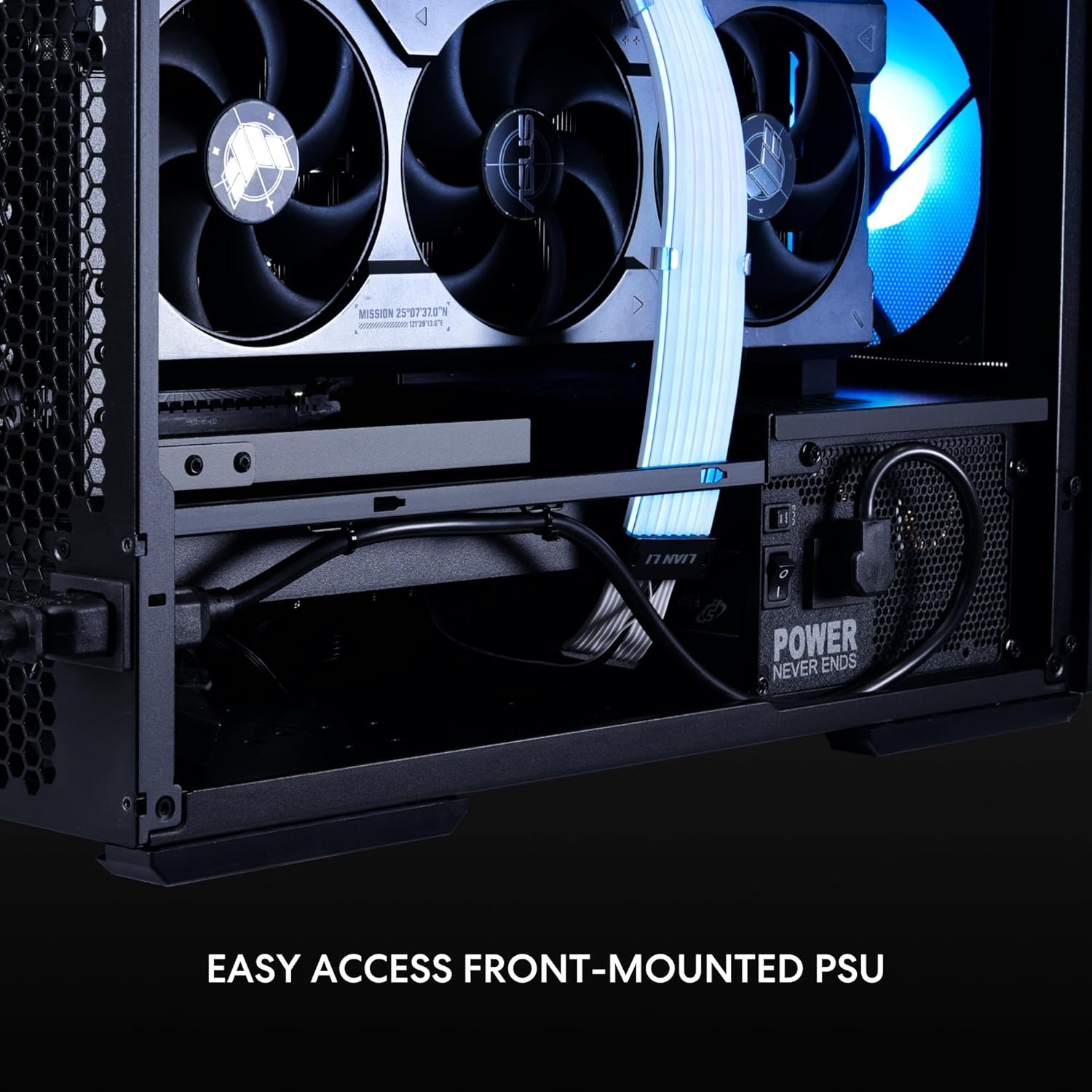
Image: Close-up view of the front-mounted PSU installation area, highlighting the easy access design.
The LANCOOL 207 offers PSU mounting with the fan oriented either upward or downward. For traditional PSUs with the fan facing downward, CPU connector ports are typically at the top right corner. For seamless angled cable routing, a 600mm long CPU cable is recommended. If your CPU cable is shorter than 600mm, refer to the Lian Li website FAQ for routing tips.

Image: Diagrams showing different PSU fan orientations and recommended cable routing for the CPU EPS cable.
2.4 Graphics Card (GPU) Installation
The chassis supports graphics cards up to 410mm in length. An adjustable GPU anti-sag bracket is pre-installed to provide support and prevent damage to your graphics card.

Image: Close-up view of the adjustable GPU anti-sag bracket within the case interior.

Image: Diagram showing various GPU lengths (285-315mm, 316-345mm, 346-375mm) supported by the adjustable anti-sag bracket.
2.5 Cable Management
The LANCOOL 207 features an innovative layout with a well-organized cable management system primarily located at the front of the second chamber. This includes routing for EPS cables, multiple Velcro straps, a grommet for the 24-PIN motherboard cable, and space for two hard drives.

Image: Rear interior view of the case highlighting cable routing points, Velcro straps, and drive bays for efficient cable management.
3. Operating Instructions
3.1 Airflow and Cooling
The LANCOOL 207 is engineered for superior cooling performance. It features comprehensive mesh panels on the front, top, and bottom to maximize airflow. Four high-performance fans are pre-installed:
- Two 140x140x30mm ARGB fans at the front, with infinity mirrors, reaching speeds up to 1900 RPM.
- Two 120x120x25mm PWM fans at the bottom, with 11 blades, reaching speeds up to 1950 RPM, providing direct cooling to the GPU.

Image: Diagram illustrating the airflow path within the LANCOOL 207 case, showing cool air intake from front and bottom, and hot air exhaust from top and rear.
The offset motherboard tray design allows for a 360mm radiator to be installed at the top in a push-pull configuration, further enhancing cooling efficiency.

Image: Interior view of the case showing a 360mm radiator installed at the top, demonstrating compatibility.
3.2 Front Panel Connectivity
The front panel provides convenient access to essential ports, including a USB Type-C port and two USB 2.0 ports.
4. Maintenance
4.1 Cleaning Mesh Panels
To maintain optimal airflow and cooling performance, regularly clean the mesh panels on the front, top, and bottom of the case. Use a soft brush or compressed air to remove dust buildup. For best results, remove the front mesh panel for thorough cleaning.
4.2 Fan Cleaning
Over time, dust can accumulate on fan blades, reducing efficiency. Periodically clean the pre-installed fans using compressed air. Ensure the system is powered off and unplugged before cleaning.
5. Troubleshooting
5.1 Fan Replacement
If a fan requires replacement, follow these steps:
Upper Front Fan Replacement:
- Remove the front mesh panel, side cover, and front panel plastic piece.
- Loosen screws and disconnect the daisy-chain cable.
- Remove fan cables and the old fan.
- Install the new fan, reconnect cables securely, and tighten screws.
- Reattach the plastic piece, mesh panel, and side cover.
Lower Front Fan Replacement:
- Remove the front mesh panel.
- Loosen screws and disconnect the daisy-chain cable.
- Replace the fan, reconnect cables securely, and tighten screws.
5.2 General Issues
- No Power: Ensure all power cables (PSU to wall, PSU to components) are securely connected. Check the power switch on the PSU.
- Fans Not Spinning: Verify fan cables are correctly connected to the motherboard or fan controller. Check BIOS settings for fan control.
- Component Not Detected: Re-seat the component (e.g., GPU, RAM) and ensure all necessary power cables are connected.
6. Specifications
| Feature | Detail |
|---|---|
| Brand | Lian Li |
| Model Name | Lancool 207 Black |
| Item Model Number | LAN207RX |
| Case Type | Desktop |
| Motherboard Compatibility | ATX, M-ATX, ITX |
| Dimensions (LxWxH) | 17.9 x 8.62 x 17.9 inches (455.6 x 219 x 456 mm) |
| Item Weight | 19.95 pounds (approx. 9.05 kg) |
| Material | SECC Steel, Tempered Glass |
| Color | Black |
| Pre-installed Front Fans | 2x 140mm ARGB (1900 RPM max) |
| Pre-installed Bottom Fans | 2x 120mm PWM (1950 RPM max) |
| Radiator Support (Top) | Up to 360mm |
| GPU Length Support | Up to 410mm |
| PSU Length Support | Up to 160mm (Front Mount) |
| Front I/O Ports | 1x USB Type-C, 2x USB 2.0 |

Image: Diagram showing the external dimensions of the LANCOOL 207 case in millimeters.
7. Warranty and Support
7.1 Product Warranty
For detailed warranty information, please refer to the official Lian Li website or the warranty card included with your product. Keep your proof of purchase for warranty claims.
7.2 Customer Support
If you encounter any issues or have questions regarding your LIAN LI LANCOOL 207 case, please visit the official Lian Li support page or contact their customer service department. You can often find FAQs, driver downloads, and contact information on their website.
For additional resources, you may visit the Lian Li Store on Amazon.
8. Official Product Videos
No official seller instruction videos are available in the provided data. Please refer to the text instructions and diagrams.
Related Documents - LANCOOL 207
 |
LIAN LI LANCOOL 206 PC Case Installation Guide This document provides a comprehensive installation guide for the LIAN LI LANCOOL 206 ATX PC case. It covers component identification, hardware installation steps, fan and radiator support, I/O port functions, and hardware clearance specifications. |
 |
LIAN LI LANCOOL II MESH RGB PC Case Installation Guide Detailed installation guide for the LIAN LI LANCOOL II MESH RGB PC case, covering component identification, hardware installation, panel removal, fan and radiator mounting, I/O port functions, and clearance specifications. |
 |
LIAN LI LANCOOL II PC Case Installation Guide Comprehensive installation guide for the LIAN LI LANCOOL II PC case, detailing component installation, cable management, and hardware clearance. Learn how to assemble your LANCOOL II chassis with ease. |
 |
LIAN-LI LANCOOL II MESH Installation Manual Detailed installation guide for the LIAN-LI LANCOOL II MESH PC case, covering component identification, installation procedures for various hardware, cable management, cooling solutions, and optional accessories. |
 |
Lian Li PC-O11DW 011 DYNAMIC Case & UNI FAN SL120 RGB Fan Installation Guide Comprehensive installation guide for the Lian Li PC-O11DW 011 DYNAMIC ATX Mid Tower Gaming Computer Case and Lian Li UNI FAN SL120 RGB ARGB PWM Fans, covering component identification, installation steps, and connectivity. |
 |
LIAN LI LANCOOL II MESH RGB PERFORMANCE PC Case Installation Guide Detailed installation guide for the LIAN LI LANCOOL II MESH RGB PERFORMANCE PC case. Covers component identification, hardware installation steps for motherboards, PSUs, storage drives, fans, radiators, and cable management, along with information on optional kits and hardware clearances. |
Ask a question about this manual
Ask about setup, troubleshooting, compatibility, parts, safety, or missing instructions. Manuals+ will review the question and use this page’s manual context to help answer it.