1. Introduction
This manual provides essential information for the proper use, setup, and maintenance of your BABIQT Mifare Ultralight C ULC Keyfobs. These keyfobs are designed for secure and convenient access control in various environments, utilizing 13.56 MHz RFID technology.

Image 1.1: A group of BABIQT Mifare Ultralight C keyfobs with attached keyrings. This image displays a set of gray, teardrop-shaped Mifare Ultralight C keyfobs, each equipped with a metal keyring, ready for integration into an access system.
2. Product Features
The BABIQT Mifare Ultralight C ULC Keyfobs offer a range of features for reliable access control:
- Quantity: Available in packs of 10.
- Material: Constructed from durable ABS material, providing waterproof, drop-proof, and high-temperature resistant properties for extended service life.
- Protocol: Strictly adheres to the ISO14443A protocol. Ensure your card reader supports this protocol and Ultralight C extended instructions (e.g., 3DES certification).
- Chip: Integrates the Mifare Ultralight C MF0ICU2 chip.
- Frequency: Operates at a working frequency of 13.56 MHz.
- Memory: Features 192-bytes of usable memory.
- Anti-cloning: Supports anti-cloning through a unique 7-byte Serial Number for each device, which cannot be altered or rewritten.
- Programmable Area: Includes a 32-bit user programmable OTP (One-Time Programmable) area.
- Locking Function: Field programmable read-only locking function per page for the first 512-bit.

Image 2.1: BABIQT Mifare Ultralight C Keyfobs highlighting smart sensing, safety, and 13.56MHz frequency. This image illustrates the key features of the Mifare Ultralight C keyfobs, including smart sensing capability, secure operation, and its operating frequency of 13.56 MHz, shown alongside keyfobs on a wooden surface.
3. Product Specifications

Image 3.1: Detailed product specifications of the Mifare Ultralight C keyfob, including dimensions and internal components. This graphic provides precise dimensions of the keyfob (40mm x 30mm x 4mm) and labels its internal components: thickened coil, epoxy resin glue, chip, ABS material, and iron ring.
| Specification | Detail |
|---|---|
| Chip Type | Mifare Ultralight C (MF0ICU2) |
| Operating Frequency | 13.56 MHz |
| Memory | 192-bytes usable memory |
| Serial Number | Unique 7-byte, non-rewritable |
| Dimensions | 40mm x 30mm x 4mm (1.57 x 1.18 x 0.16 inches) |
| Material | ABS (Waterproof, drop-proof, high temperature resistant) |
| Protocol | ISO14443A |
| Weight | Approximately 1.41 ounces (for the pack of 10) |

Image 3.2: Diagram showing the front, internal chip, and back view of a Mifare Ultralight C keyfob. A detailed diagram presenting the external appearance (front and back) and the internal structure of the keyfob, revealing the embedded chip and coil.
4. Setup and Programming
These keyfobs are designed for integration into existing access control systems. They cannot be directly copied or cloned from other cards due to their unique serial number and security features. Programming typically involves the following steps:
- System Compatibility Check: Ensure your access control system and card reader support the ISO14443A protocol and Mifare Ultralight C extended instructions (e.g., 3DES certification). Verify that your system operates at the 13.56 MHz frequency.
- Authorization Process: The unique identification serial number of each keyfob must be entered into your access control system's database. This process is typically performed by system administrators or managers using specialized card reader devices and management software.
- Permission Assignment: Once registered, the keyfob's serial number can be associated with specific personnel and assigned regional access permissions (e.g., access to certain floors, rooms, or entry points).
- Activation: After successful registration and permission assignment, the keyfob will be active and ready for use within the authorized access control system.
Important Note: These keyfobs require authorization within an access control system and cannot directly copy information from other cards or systems. Some access control/door lock systems (e.g., SAFLOK, KABA) may require a special key format and cannot directly reuse cards from other systems.
5. Operation
Operating the Mifare Ultralight C keyfob is straightforward once it has been properly programmed into your access control system:
- Presentation: Hold the keyfob close to the designated RFID reader on the access point (e.g., door lock, turnstile, gate).
- Verification: The reader will scan the keyfob's unique serial number and verify it against the system's database for authorized access.
- Access Granted/Denied: If authorized, the access point will unlock or grant entry. If unauthorized, access will be denied.
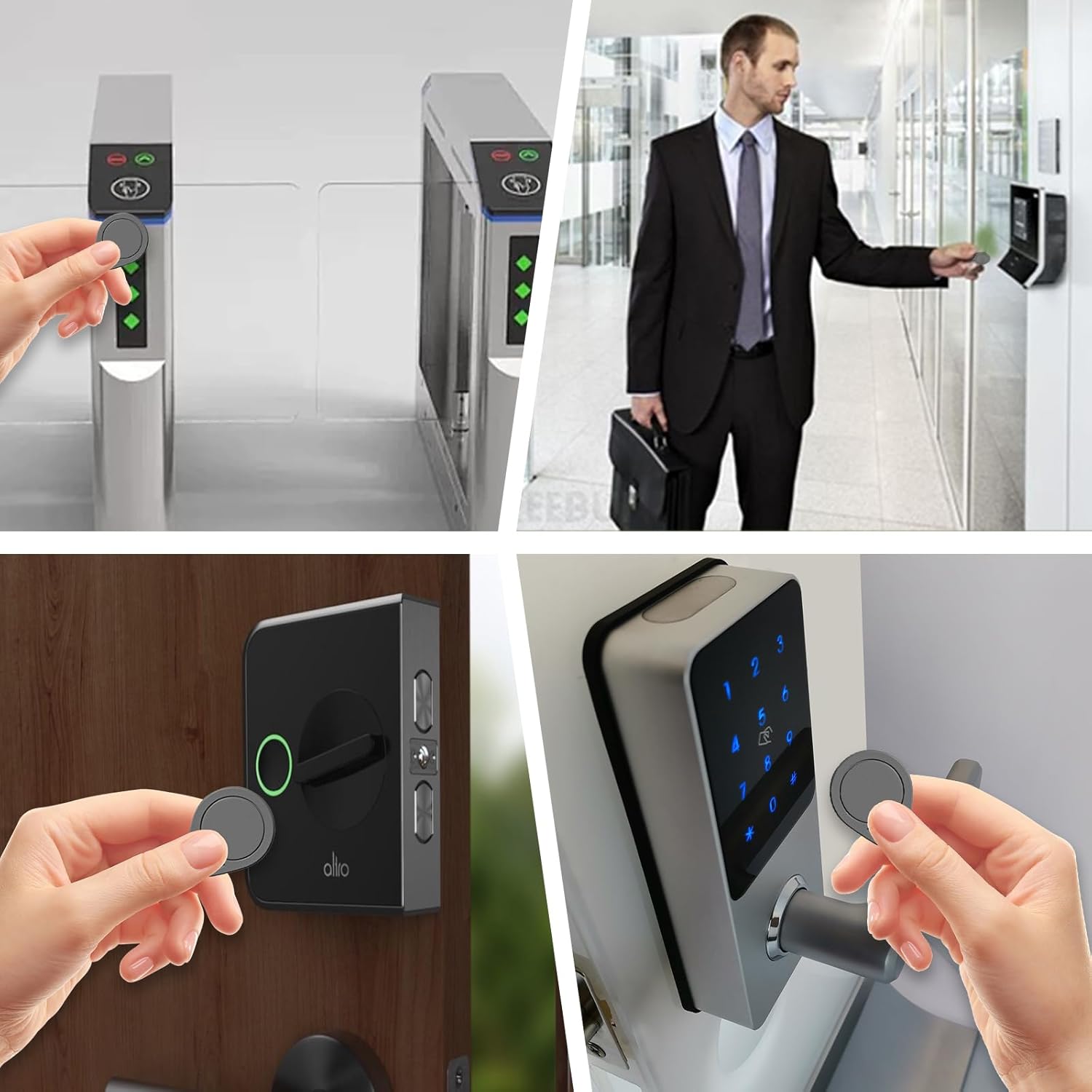
Image 5.1: Examples of Mifare Ultralight C keyfobs used in various access control scenarios. A collage demonstrating the practical application of the keyfobs for access control, including entry through turnstiles, office doors, and residential smart locks.

Image 5.2: A hand presenting a Mifare Ultralight C keyfob to an outdoor gate lock for access. An image showing a user interacting with a modern gate lock using a Mifare Ultralight C keyfob to gain entry.
6. Compatibility
The BABIQT Mifare Ultralight C ULC Keyfobs are designed for broad compatibility with modern access control systems:
- Compatible Systems: These keyfobs are compatible with newly upgraded SAFLOK, KABA, ONITY, and SALTO Locks.
- Incompatible Systems: They are NOT compatible with AMIIBO devices or 125kHz RFID readers.
- Frequency Requirement: Always ensure that your lock system operates at the same 13.56 MHz frequency as these keyfobs for proper functionality.

Image 6.1: BABIQT Ultralight C RFID Key Fob compatibility with KABA, SAFLOK, ONITY, and SALTO locks. This image explicitly states the compatibility of the Ultralight C RFID key fobs with upgraded security systems from KABA, SAFLOK, ONITY, and SALTO, featuring two keyfobs.
7. Maintenance and Care
To ensure the longevity and optimal performance of your BABIQT Mifare Ultralight C Keyfobs, follow these care guidelines:
- Temperature Exposure: Avoid long-term exposure to high temperatures (above 60℃ or 140℉), as this may lead to chip failure.
- Humidity: Protect the keyfobs from prolonged exposure to high humidity, which can also affect chip performance.
- Cleaning: Clean the keyfobs with a soft, dry cloth. Avoid harsh chemicals or abrasive materials.
- Physical Damage: While drop-proof, avoid excessive force or intentional damage to the keyfobs.
8. Troubleshooting
If you encounter issues with your keyfobs, consider the following troubleshooting steps:
- Keyfob Not Working:
- Verify that the keyfob has been correctly programmed and authorized within your access control system.
- Ensure the access control system and reader are compatible with Mifare Ultralight C (13.56 MHz, ISO14443A protocol).
- Check if the keyfob has been exposed to extreme temperatures or humidity, which could cause chip failure.
- Confirm that the reader is functioning correctly. Try another authorized keyfob if available.
- Unable to Program Keyfob:
- Ensure your programming device or software supports the Mifare Ultralight C MF0ICU2 chip and its specific requirements (e.g., 3DES certification for extended instructions).
- Remember that the unique 7-byte Serial Number cannot be changed or rewritten. Programming involves registering this existing serial number.
- Some systems (like SAFLOK, KABA) may require specific formats or procedures; consult your system's documentation.
- Reading Serial Number: Apps like NFC Tools or NFC TagInfo can read the Serial Number of the ULC keyfobs for verification.
9. Warranty and Support
BABIQT is committed to customer satisfaction. If you are not satisfied with your Mifare ULC key tags for any reason, please do not hesitate to contact us. We will endeavor to resolve any issues and ensure your satisfaction.
For support or warranty inquiries, please refer to the contact information provided with your purchase or visit the official BABIQT store page.