
JecoEV Type 2 to Customized plug
JecoEV Portable EV Type 2 Charger User Manual
Model: Type 2 to Customized Plug
Introduction
This user manual provides essential information for the safe and efficient operation of your JecoEV Portable Type 2 IEC 62196-2 EV Charger. Please read this manual thoroughly before using the product and retain it for future reference. This charger is designed to offer flexible and convenient charging for electric vehicles, suitable for various environments.

Figure 1: Overview of the JecoEV Portable EV Charger and included accessories.
Product Components
The JecoEV Portable EV Charger system consists of the following main components:
- Portable Control Box: The central unit for managing charging parameters and displaying status.
- Type 2 Charger Connector: The plug that connects to your electric vehicle's charging port.
- Customized Plug: The power plug that connects to the electrical outlet.
- Charging Cable: The cable connecting the control box to the vehicle connector and the power plug.
- Carrying Bag: For convenient storage and transport of the charger.
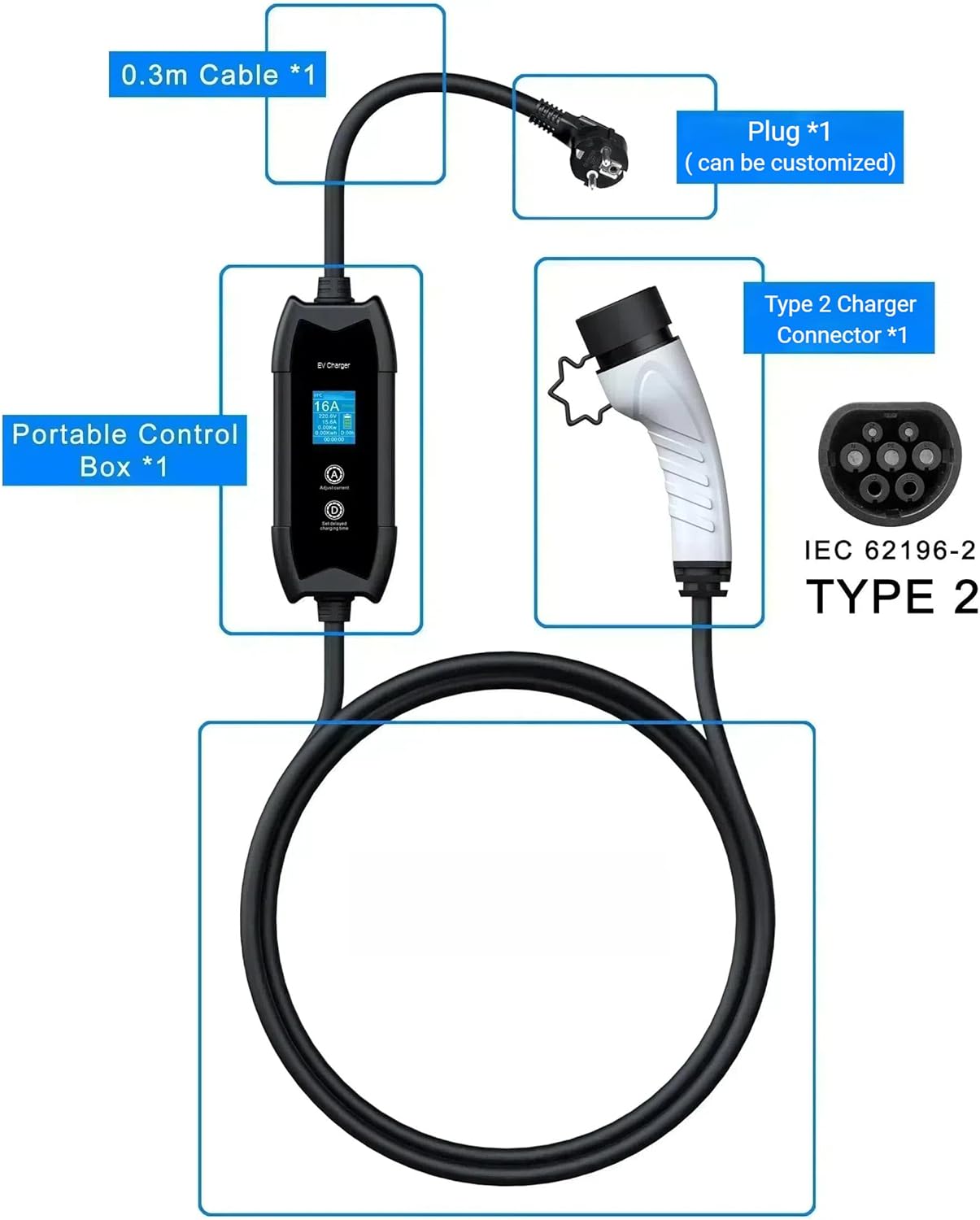
Figure 2: Diagram illustrating the main components of the charger.
Setup and Installation
Follow these steps to set up your JecoEV Portable EV Charger:
- Unpack the Charger: Carefully remove the portable EV charger and all accessories from the carrying bag.
- Inspect for Damage: Before each use, visually inspect the charger, cables, and plugs for any signs of damage, wear, or corrosion. Do not use the charger if any damage is observed.
- Select a Suitable Location: Ensure the charging location is dry, well-ventilated, and away from flammable materials. The charger is rated IP65 for protection against dust and water jets, making it suitable for indoor and outdoor use in various climates, including rainy, snowy, and sunny conditions.
- Connect to Power Outlet: Insert the customized power plug firmly into a compatible electrical outlet. Ensure the outlet meets the charger's input power requirements (85-264V).
- Prepare Vehicle: Ensure your electric vehicle is turned off and the charging port is accessible.

Figure 3: The charger is designed for indoor/outdoor use in various climates.
Operating Instructions
Operating the JecoEV Portable EV Charger is straightforward:
- Connect to Vehicle: Insert the Type 2 charger connector into your vehicle's charging port until it clicks securely into place.
- Power On: The charger will automatically power on once connected to both the power outlet and the vehicle. The LCD screen on the portable control box will illuminate.
- Adjust Charging Current (Optional):
Press button A (Adjust current) on the control box to cycle through available charging current options: 8A, 10A, 13A, 16A. Select the desired current based on your vehicle's requirements and power supply capacity. The charger will remember the last selected current for future use.
- Set Delayed Charging Time (Optional):
Press button D (Set delayed charging time) to set a delay before charging begins. You can adjust the delay from 1 to 15 hours. This feature is useful for off-peak charging.
- Monitor Charging Status: The LCD screen provides real-time information including:
- Real-Time Temperature
- Selectable Current
- Charging Voltage
- Charging Current
- Real-Time Power
- Power Consumption
- Charging Status (e.g., "Ready")
- Set Delayed Charging Time
- Charging Time
- Charging Completion: Charging will automatically stop when your vehicle's battery is full or when the set charging time is reached.
- Disconnecting: First, disconnect the Type 2 connector from your vehicle. Then, unplug the customized power plug from the electrical outlet.

Figure 4: Adjustable Current and Delayed Charging Time functions.

Figure 5: Introduction to LCD Screen Functions.
Safety Features and Protection
The JecoEV Portable EV Charger is equipped with multiple safety features to ensure secure and reliable charging:
- Short Circuit Protection: Prevents damage from electrical shorts.
- Leakage Current Protection: Type A AC 30mA (50Hz) / 20mA (60Hz) protection.
- Over Voltage and Under Voltage Protection: Safeguards against unstable power supply.
- Over and Under Frequency Protection: Maintains stable operation with varying power frequencies.
- Over Current Protection: Prevents excessive current flow.
- Over Temperature Protection:
- Automatic current reduction if temperature exceeds 70°C.
- Automatic cut-off within 0.2 seconds if temperature reaches 85°C.
- Automatic start charging when temperature is below 65°C.
- Ground Protection: Ensures proper grounding for safety.
- Lightning Protection: Protects against lightning strikes.

Figure 6: Comprehensive protection features of the charger.
Maintenance and Care
Proper maintenance ensures the longevity and safe operation of your charger:
- Cleaning: Use a soft, dry cloth to clean the exterior of the charger. Do not use abrasive cleaners or solvents. Ensure the charger is unplugged before cleaning.
- Storage: When not in use, store the charger in its carrying bag in a cool, dry place, away from direct sunlight and extreme temperatures (-40°C to +80°C).
- Cable Management: Avoid kinking, twisting, or driving over the cable. Always coil the cable loosely when storing.
- Inspection: Regularly inspect the cable, plugs, and control box for any signs of damage, cuts, cracks, or discoloration. If any damage is found, discontinue use immediately and contact customer support.
- Durability: The charger is made of high-quality PC+ASA material, designed to withstand impacts, such as being rolled over by a 2-ton vehicle and drops from 1 meter. However, avoid intentional abuse.

Figure 7: Charger durability features.

Figure 8: High-quality materials used in the charger construction.
Troubleshooting
If you encounter issues with your JecoEV Portable EV Charger, refer to the following common problems and solutions:
| Problem | Possible Cause | Solution |
|---|---|---|
| Charger not powering on. | No power from outlet; loose connection; charger fault. | Check power outlet with another device. Ensure both ends of the charger are securely plugged in. If problem persists, contact support. |
| Charging not starting. | Vehicle not ready for charging; delayed charging time set; fault in charger or vehicle. | Ensure vehicle is ready to accept charge. Check if a delayed charging time is active on the LCD. Disconnect and reconnect the charger. |
| LCD screen displays error code/message. | Internal fault; protection mechanism activated (e.g., over-temperature). | Note the error code/message. Disconnect the charger, wait a few minutes, and reconnect. If the error persists, refer to the specific error code in a more detailed manual (if available) or contact support. |
| Slow charging. | Low current setting; vehicle limitation; power supply issue. | Adjust the charging current to a higher setting (e.g., 16A) using button A. Verify your vehicle's charging capabilities. Ensure the power outlet can supply the desired current. |
For issues not covered here, or if troubleshooting steps do not resolve the problem, please contact JecoEV customer support.
Specifications
Detailed technical specifications for the JecoEV Portable EV Charger:
| Parameter | Value |
|---|---|
| Standard | Type 2 IEC 62196-2 |
| Rated Power | 3.5 kW |
| Input Power | 85-264 V |
| Charging Current | 8A / 10A / 13A / 16A (Variable) |
| Number of Phases | Single Phase |
| Cable Length | 5-metre (16.4 ft) |
| Protection Level | IP65 |
| Mechanical Life | Plugging and Unplugging >10000 times |
| Operating Temperature | -30°C to +55°C (-22°F to +131°F) |
| Storage Temperature | -40°C to +80°C |
| Operating Humidity | 5% ~ 95% |
| Certificates | CE, FCC, UKCA |
| Item Weight | 2 kg (4.4 lbs) |
| Product Dimensions | 3.46 x 1.85 x 8.46 inches |
| Manufacturer Part Number | JecoEV0112 |
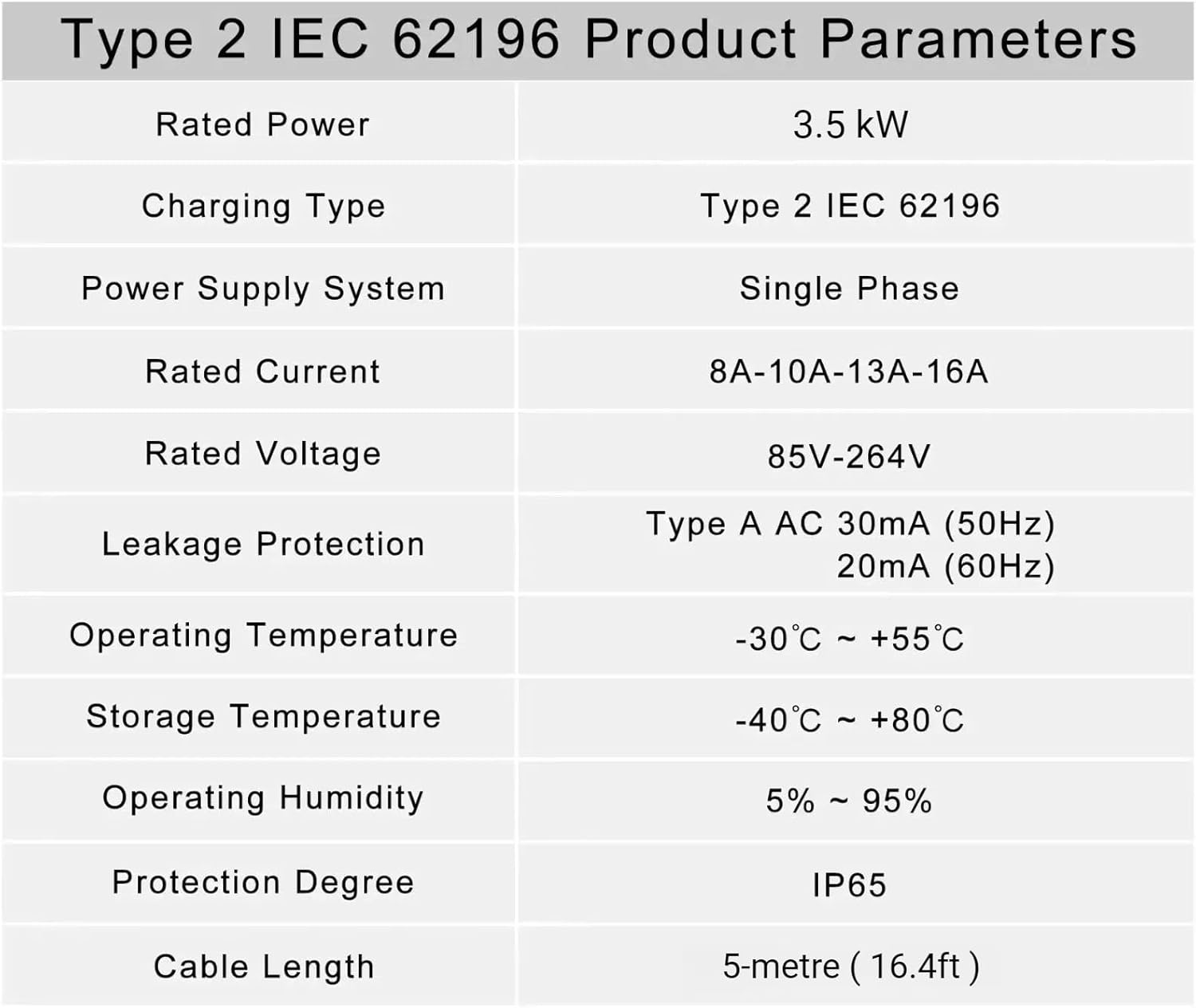
Figure 9: Product Parameters table.
What's in the Box
- 1 x Portable EV Charger
- 1 x Carrying Bag
Warranty and Support
For warranty information or technical support, please contact JecoEV customer service through the retailer where the product was purchased. Please have your product model number (Type 2 to Customized plug) and manufacturer part number (JecoEV0112) ready when contacting support.
While specific warranty details are not provided in this manual, JecoEV is committed to providing quality products and support.
Ask a question about this manual
Ask about setup, troubleshooting, compatibility, parts, safety, or missing instructions. Manuals+ will review the question and use this page’s manual context to help answer it.