
1. Introduction
Thank you for choosing the Groov-e Harmony Wireless Bluetooth Headphones. This manual provides essential information for setting up, operating, and maintaining your headphones to ensure optimal performance and longevity. Please read this manual thoroughly before use.
Key Features:
- 40mm Neodymium drivers for premium sound
- Active Noise Cancelling (ANC) technology blocks out external noise
- Bluetooth or Corded connectivity for versatile use
- Up to 25 hours wireless music playback
- 3.5mm headphone jack for corded audio playback
- Voice assistant enabled
- Super bass audio enhancement
- Soft, on-ear cushions for long listening comfort
- Swivel ear cups for portability and comfort
- Built-in microphone for hands-free calls
What's in the Box:
- Groov-e Harmony Wireless Bluetooth Headphones
- Charging Cable
- 3.5mm Audio Cable
- User Manual (this document)
2. Product Overview
Familiarize yourself with the components and controls of your Groov-e Harmony headphones.
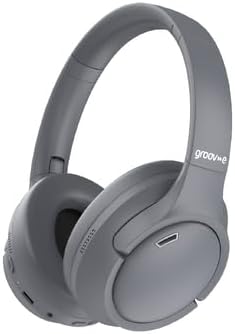
Figure 2.1: Groov-e Harmony Headphones (Unfolded)
This image displays the Groov-e Harmony wireless headphones in their unfolded, ready-to-use state. The headphones are grey with soft on-ear cushions and an adjustable headband. The Groov-e logo is visible on the headband.

Figure 2.2: Headphone Controls
A close-up side view of the right ear cup, highlighting the control buttons and ports. These include the power button, volume controls, ANC switch, 3.5mm audio jack, and USB charging port.

Figure 2.3: Folded Headphones
This image shows the headphones in their compact, folded position, demonstrating the swivel ear cups designed for easy storage and portability.
3. Setup
3.1 Charging the Headphones
Before first use, fully charge your headphones. Connect the provided USB charging cable to the charging port on the headphones and the other end to a USB power source (e.g., computer USB port, wall adapter). The LED indicator will show charging status and turn off or change color when fully charged.
3.2 Bluetooth Pairing
- Ensure the headphones are turned off.
- Press and hold the Power button for approximately 5-7 seconds until the LED indicator flashes blue and red alternately, indicating pairing mode.
- On your device (smartphone, tablet, computer), enable Bluetooth and search for available devices.
- Select "Groov-e Harmony" from the list of found devices.
- Once paired, the LED indicator will flash blue slowly, and you will hear an audible confirmation.
If pairing fails, turn off the headphones and repeat the steps. The headphones will automatically attempt to reconnect to the last paired device when powered on.
3.3 Wired Connection
To use the headphones in wired mode, connect one end of the provided 3.5mm audio cable to the headphone's audio jack and the other end to your audio source's 3.5mm output. The headphones will function passively without requiring power in wired mode.
4. Operating Instructions
4.1 Power On/Off
- Power On: Press and hold the Power button for 2-3 seconds until the LED indicator flashes blue.
- Power Off: Press and hold the Power button for 3-4 seconds until the LED indicator turns off.
4.2 Music Playback
- Play/Pause: Press the Multi-function button (often the Power button or a dedicated Play/Pause button) once.
- Next Track: Press and hold the Volume Up (+) button.
- Previous Track: Press and hold the Volume Down (-) button.
- Volume Up: Short press the Volume Up (+) button.
- Volume Down: Short press the Volume Down (-) button.
4.3 Call Management
- Answer/End Call: Press the Multi-function button once.
- Reject Call: Press and hold the Multi-function button for 2 seconds.
- Redial Last Number: Double-press the Multi-function button.
4.4 Active Noise Cancelling (ANC)
Locate the ANC switch on the ear cup. Slide the switch to the "ON" position to activate Active Noise Cancelling. The ANC LED indicator will illuminate. Slide the switch to "OFF" to deactivate ANC. ANC can be used independently or simultaneously with Bluetooth audio.
4.5 Voice Assistant
To activate your device's voice assistant (e.g., Siri, Google Assistant), triple-press the Multi-function button. Ensure your device is connected and its voice assistant feature is enabled.
5. Maintenance
5.1 Cleaning
Wipe the headphones with a soft, dry, lint-free cloth. Do not use abrasive cleaners, alcohol, or chemical solvents. Avoid getting moisture into any openings.
5.2 Storage
When not in use, store the headphones in a cool, dry place, away from direct sunlight and extreme temperatures. The swivel ear cups allow for compact folding for easier storage and transport.
5.3 Battery Care
To preserve battery life, charge the headphones regularly, even if not used frequently. Avoid fully discharging the battery for extended periods. Do not expose the battery to excessive heat or dispose of it in fire.
6. Troubleshooting
| Problem | Possible Cause | Solution |
|---|---|---|
| Headphones do not power on. | Low battery. | Charge the headphones fully. |
| Cannot pair with device. | Headphones not in pairing mode; Device Bluetooth off; Too far from device. | Ensure headphones are in pairing mode (flashing blue/red). Turn on device Bluetooth. Move headphones closer to device (within 10 meters). |
| No sound or low volume. | Volume too low; Incorrect audio source; Headphones not connected. | Increase headphone and device volume. Ensure correct audio output is selected on your device. Re-pair or reconnect the audio cable. |
| ANC not working effectively. | ANC switch off; Environmental noise too high. | Ensure ANC switch is ON. ANC is most effective against low-frequency, constant noise. |
7. Specifications
| Feature | Detail |
|---|---|
| Model Name | Harmony |
| Item Model Number | GVBT1600GY |
| Connectivity Technology | Wireless (Bluetooth), Wired (3.5mm Jack) |
| Wireless Communication Technology | Bluetooth |
| Ear Placement | On Ear |
| Form Factor | On Ear |
| Noise Control | Active Noise Cancellation |
| Headphone Jack | 3.5 mm Jack |
| Colour | Grey |
| Manufacturer | Groov-e |
| Package Dimensions | 23 x 17.5 x 8.5 cm |
| Item Weight | 380 g |
| Battery Life (Wireless) | Up to 25 hours |
8. Warranty and Support
For warranty information and customer support, please refer to the warranty card included with your product or visit the official GROOVE BY AEROSPACED website. Keep your proof of purchase for warranty claims.
If you encounter any issues not covered in this manual, please contact GROOVE BY AEROSPACED customer service for assistance.