
Introduction
This manual provides comprehensive instructions for the assembly, operation, maintenance, and troubleshooting of your ERLEJIA Vanity Desk. This product features an integrated mirror with LED lighting, an RGB lighting cabinet, a power outlet with USB ports, and an accompanying stool. Please read this manual thoroughly before assembly and use to ensure safe and correct operation.

Image 1: Complete ERLEJIA Vanity Desk setup, showing the desk, mirror with lights, RGB cabinet, power outlet, and stool.
Safety Instructions
- Ensure all components are present and undamaged before beginning assembly. Do not use if any parts are missing or broken.
- Assemble the vanity desk on a soft, clean surface to prevent scratches.
- Follow all assembly steps in the provided assembly guide (not included in this document, refer to packaging).
- Do not overtighten screws during assembly to avoid damaging the material.
- Keep electrical components (lights, power outlet) away from water and moisture.
- Only use the power outlet for devices within its specified voltage and current limits (125V/12A).
- Do not attempt to modify or repair the electrical components yourself. Contact qualified personnel for service.
- Keep small parts and packaging materials away from children to prevent choking hazards.
- Place the vanity desk on a stable, level surface to prevent tipping.
Package Contents
The ERLEJIA Vanity Desk package typically includes the following main components. Please verify all parts against the detailed parts list provided in your product packaging before assembly.
- Vanity Desk Frame and Panels
- Mirror with Integrated LED Lights
- RGB Lighting Cabinet
- Stool
- Drawers and Sliding Rails
- Power Strip with AC Outlets and USB Ports
- Hair Dryer Holder
- Assembly Hardware (screws, connectors, etc.)
- Instruction Manual (this document)
Setup and Assembly
Assembly of the ERLEJIA Vanity Desk requires following the step-by-step instructions provided in the separate assembly guide included with your product. Each component is typically labeled with numbers or letters to facilitate identification during the process.
- Unpack and Identify Parts: Carefully unpack all components and lay them out on a protected surface. Refer to the parts list in your assembly guide to ensure all pieces are present.
- Assemble the Main Desk Frame: Follow the guide to connect the main desk panels using the provided hardware.
- Install Drawers: Assemble the drawers and install the sliding rails onto the desk frame. Insert the drawers into their respective slots.
- Attach Mirror and Cabinet: Secure the mirror unit and the RGB lighting cabinet to the desk according to the instructions. Ensure all electrical connections for the lights and cabinet are properly routed and secured.
- Install Power Outlet and Hair Dryer Holder: Mount the power strip and hair dryer holder in their designated positions. Connect the power strip to a wall outlet.
- Assemble Stool: Assemble the stool using the provided hardware.
- Final Check: Verify that all screws are tightened, and the vanity desk is stable before use.

Image 2: Dimensional diagram of the vanity desk and stool, illustrating key measurements for planning placement.

Image 3: Close-up view of the vanity desk's drawer design, showing a large drawer with partition board and drawers with sliding rails.
Operating Instructions
LED Mirror Lights
The mirror is equipped with LED bulbs that offer adjustable brightness and three distinct lighting modes to suit various needs.
- Power On/Off: Locate the touch sensor on the mirror to turn the lights on or off.
- Change Lighting Mode: Press the "M" button on the touch sensor to cycle through the three color modes: Cold Light (6000K), Cool Light (5000K), and Warm Light (4000K).
- Adjust Brightness: Press and hold the "+" or "-" button on the touch sensor to adjust the brightness level. There are 10 adjustable brightness levels.

Image 4: Illustration of the LED mirror lights, demonstrating the three color modes (Cold, Cool, Warm) and 10 brightness adjustment levels.
RGB Lighting Cabinet
The integrated cabinet features an RGB lighting system, offering a wide range of colors and dynamic lighting effects.
- Control: The RGB lighting system is controlled via a dedicated switch or remote control (if included).
- Color Selection: Choose from over 60,000 static colors.
- Lighting Modes: Select from multiple dynamic lighting modes.
- Brightness and Speed Adjustment: Adjust the brightness and speed of dynamic modes as desired.

Image 5: Diagram detailing the features of the smart RGB ambient light, including 360° RF wireless remote control, touch sensor, over 60,000 colors, brightness adjustment, mode adjustment, and speed adjustment.
Integrated Power Outlet and USB Ports
The vanity desk includes a power strip with two standard AC plug sockets and two USB ports for convenient charging and powering of electronic devices.
- AC Outlets: Use the two 125V/12A AC outlets for hair dryers, curling irons, or other small appliances.
- USB Ports: Use the two USB ports to charge smartphones, tablets, or other USB-powered devices.
- Safety: Ensure the total power draw of connected devices does not exceed the specified limits.

Image 6: Close-up view of the integrated power outlet with two AC sockets and two USB ports, along with the hair dryer holder. UL certification is also indicated.
Storage Features
The vanity desk is designed with ample storage to organize various items.
- Drawers: Includes six drawers, with one large drawer featuring a partition board for organized storage of cosmetics and accessories, and two hidden drawers for discreet storage.
- Open Shelves: Five open shelves provide easy access storage for frequently used items.
- Jewelry Armoire: The RGB cabinet also functions as a jewelry armoire with six metal hooks for hanging earrings and necklaces.
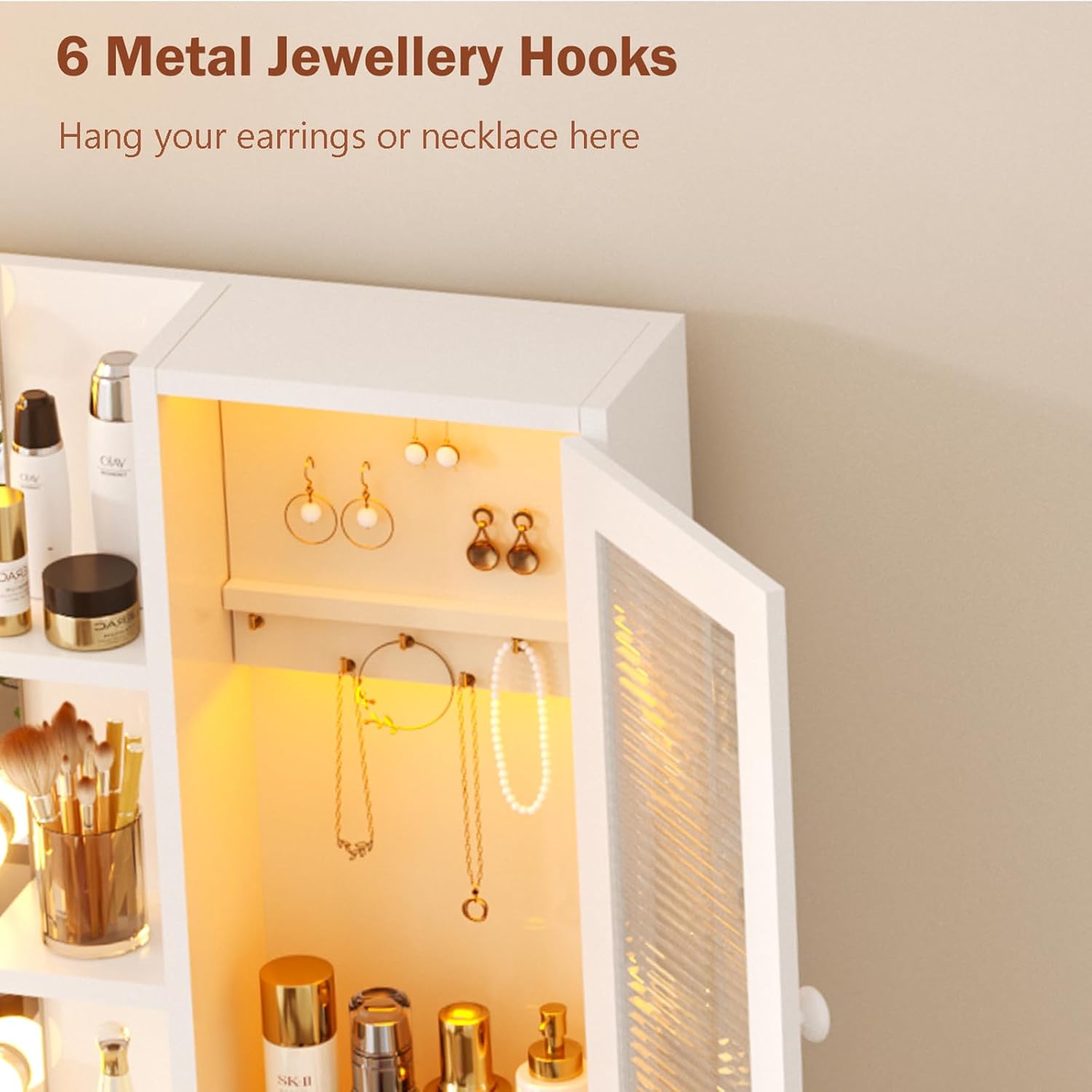
Image 7: Close-up view of the vanity cabinet interior, showing six metal jewelry hooks designed for organizing earrings and necklaces.

Image 8: Overhead view of the vanity desk with multiple drawers and storage compartments open, demonstrating its storage capacity for various items.
Maintenance
- Cleaning: Wipe surfaces with a soft, damp cloth. Avoid abrasive cleaners or harsh chemicals that may damage the finish.
- Mirror Care: Clean the mirror with a glass cleaner and a lint-free cloth. Do not spray cleaner directly onto the mirror, especially near electrical components.
- Electrical Components: Ensure all electrical connections remain secure. Do not immerse electrical parts in water.
- Hardware: Periodically check and tighten any loose screws or fittings to maintain stability.
- Stool: Clean the stool fabric according to its material care instructions.
Troubleshooting
| Problem | Possible Cause | Solution |
|---|---|---|
| LED Mirror Lights not working |
|
|
| RGB Cabinet Lights not working |
|
|
| Power Outlets/USB ports not working |
|
|
| Desk feels unstable after assembly |
|
|
Specifications
| Feature | Detail |
|---|---|
| Brand | ERLEJIA |
| Model Number | SZT-MOLI |
| Product Dimensions | 35.43"D x 15.74"W x 55.9"H |
| Item Weight | 31.5 pounds |
| Frame Material | Engineered Wood |
| Seat Material Type (Stool) | Plastic (with foam pads) |
| Assembly Required | Yes |
| Mirror Lights | LED, 10 brightness levels, 3 color modes (6000K, 5000K, 4000K) |
| Cabinet Lighting | RGB, 60,000+ static colors, multiple dynamic modes |
| Power Outlet | 2 AC Outlets (125V/12A), 2 USB Ports, 4.9-foot power cord, UL Certified |
| Storage | 6 Drawers (1 large with partition, 2 hidden), 5 Open Shelves, 1 RGB Cabinet with Jewelry Armoire (6 metal hooks) |
Warranty and Support
For information regarding warranty coverage, product support, or to report missing/damaged parts, please refer to the contact information provided in your product packaging or visit the official ERLEJIA website. Please have your model number (SZT-MOLI) and purchase details available when contacting support.
Important Note on Videos
While the product listing indicates the presence of videos, specific embeddable video URLs with creator type "Seller" were not provided in the available data. Therefore, no product videos could be integrated into this manual.