Introduction
The DNTGVUP 3-in-1 Wireless Charging Station provides a consolidated charging solution for your mobile phone, Apple Watch, and wireless earbuds. This device is designed to reduce cable clutter and simplify the charging process for multiple compatible devices simultaneously.
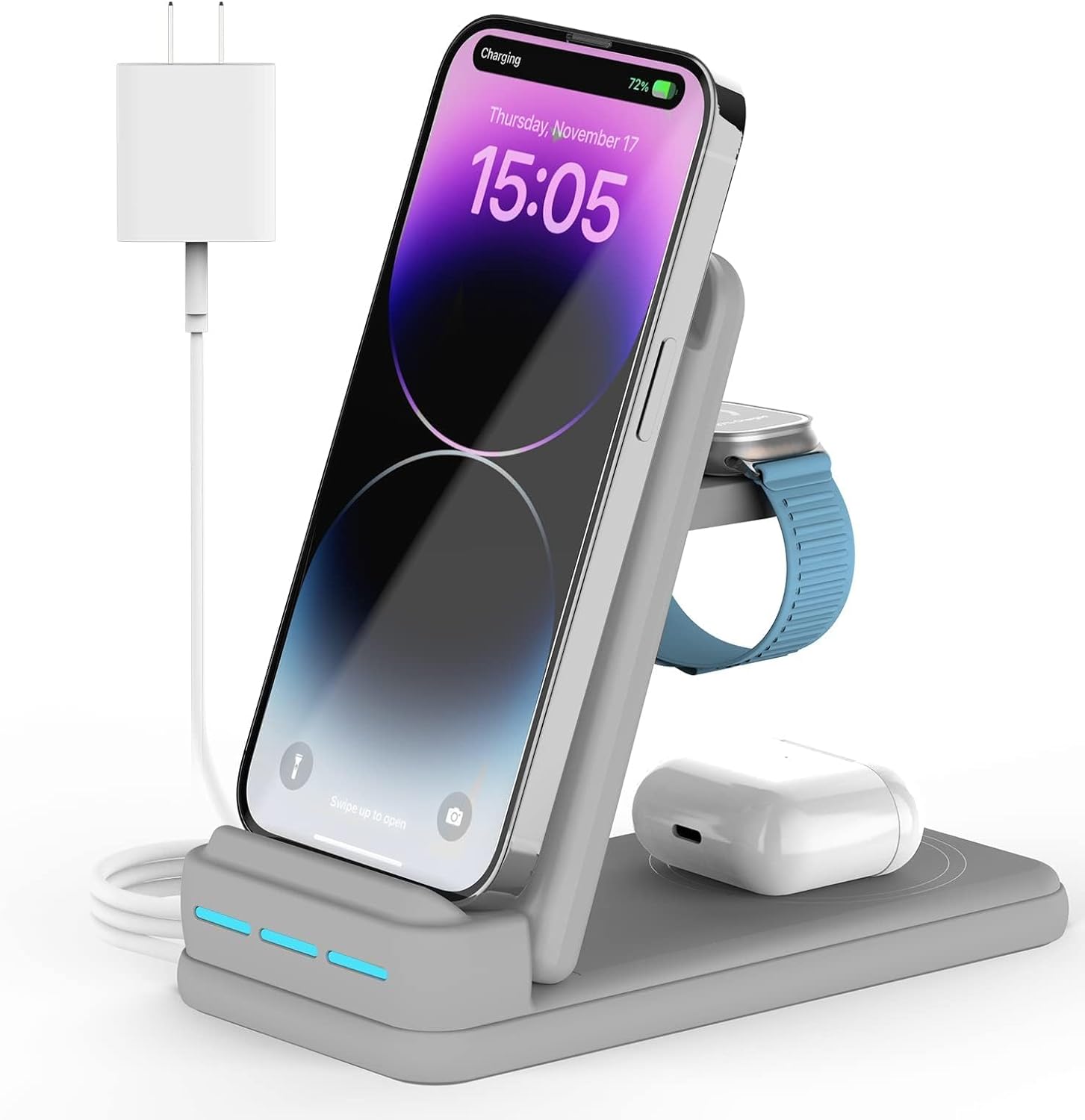
Image: The DNTGVUP 3-in-1 Wireless Charging Station, shown in grey, actively charging an iPhone, an Apple Watch, and a pair of AirPods. A power adapter and USB-C cable are connected to the unit.
What's in the Box
- DNTGVUP 3-in-1 Wireless Charging Station
- USB-C Cable
Note: A 9V, 2A QC3.0 charging adapter is recommended for optimal fast charging performance and may be included or sold separately.
Product Features
- 3-in-1 Charging: Simultaneously charges a compatible smartphone, Apple Watch, and wireless earbuds.
- Fast Charging: Supports 7.5W to 15W for smartphones, 3W for AirPods, and 2.5W for Apple Watch, when used with a QC3.0 adapter.
- Thoughtful Design: Features dual charging coils for vertical or horizontal phone charging, non-slip silicone base, and anti-static silicone on the phone charging area. The unit is foldable for portability.
- Case Friendly: Capable of charging phones with protective cases up to 0.2 inches (5mm) thick.
- Multiple Protection: Includes overheat, overcurrent, overvoltage, and short circuit protection. Features metal foreign object detection with a flashing indicator.
- Charging Indicators: Three LED indicators display the charging status for each device: left for watch, middle for earphones, right for phone.

Image: An internal view of the DNTGVUP charging station highlighting its safety features, including UL certification, an intelligent chip, overcharge protection, and over-temperature protection.
Setup Instructions
- Unpack: Carefully remove the charging station and USB-C cable from the packaging.
- Connect Power: Insert the USB-C cable into the charging port on the back of the DNTGVUP charging station. Connect the other end of the USB-C cable to a compatible power adapter (a 9V, 2A QC3.0 adapter is recommended for optimal performance).
- Plug In: Plug the power adapter into a wall outlet. The LED indicators on the charging station may briefly illuminate to confirm power connection.
- Position: Place the charging station on a flat, stable surface.
Operating Instructions
Charging Your Devices
- Smartphone Charging:
- Place your compatible smartphone on the upright charging pad. Ensure the phone is centered on the charging area.
- The phone can be charged in either vertical or horizontal orientation.
- The right LED indicator will illuminate when the phone is charging.
- For optimal charging efficiency and to prevent device overheating, consider using an official phone case or removing the phone case if it exceeds 0.2 inches (5mm) thickness.
- Apple Watch Charging:
- Place your compatible Apple Watch on the designated watch charging area.
- For better charging efficiency, roll up the watch strap to ensure better contact with the charging area.
- The left LED indicator will illuminate when the watch is charging.
- Earbuds Charging:
- Place your compatible wireless earbuds (with wireless charging case) on the flat charging pad at the base of the station.
- Ensure the earbuds case is centered on the charging area.
- The middle LED indicator will illuminate when the earbuds are charging.

Image: The DNTGVUP charging station simultaneously charging an iPhone, Apple Watch, and AirPods. The iPhone is shown in a vertical orientation, displaying a video call, demonstrating multi-device charging and usability.
Important Considerations
- Case Thickness: The charger supports cases up to 0.2 inches (5mm) thick. Thicker cases may prevent charging.
- Foreign Objects: Remove credit cards, magnetic attachments, metal rings, or other metal objects from your phone case or between your phone and the charger before placing it on the charging pad. These can interfere with charging and potentially damage the device or charger.
- Power Adapter: Use a QC3.0 compatible power adapter (9V/2A) for optimal fast charging. Using a lower-power adapter may result in slower charging or inability to charge all devices simultaneously.

Image: An illustration demonstrating that phone cases up to 0.2 inches (5mm) thick are compatible with the wireless charger.

Image: An illustration advising against placing grips, stands, metal objects, credit cards, or magnetic objects between the phone and the charger.

Image: A diagram illustrating key considerations for protecting device battery and charger lifespan, including proper phone case usage, Apple Watch strap positioning, and recommended power adapter types (9V/2A adapter vs. USB power strip or computer USB).
Compatibility
The DNTGVUP 3-in-1 Wireless Charging Station is compatible with a wide range of devices:
- iPhones: iPhone 16/16 Plus/16 Pro/16 Pro Max, iPhone 15/15 Plus/15 Pro/15 Pro Max, iPhone 14/14 Plus/14 Pro/14 Pro Max, iPhone 13/13 Pro/13 Pro Max/13 mini, iPhone 12/12 Pro/12 Pro Max/12 mini, iPhone 11/11 Pro/11 Pro Max, iPhone SE (2nd & 3rd Generation), iPhone XS MAX/XS/XR/X/8/8 Plus.
- Samsung Galaxy: S Series (S6-S24/Ultra/+/5G/e/edge/edge+), Note Series (Note 5-Note 10, Note 10+, Note 20, Note 20 Ultra), and other wireless charging compatible Android phones.
- Apple Watch: Series 10, 9, 8, 7, 6, SE (1st & 2nd Generation), 5, 4, 3, 2, Ultra, Ultra 2.
- AirPods: AirPods 4, 3, 2, Pro2 (with wireless charging case). Not compatible with AirPods 1.

Image: A visual representation of the DNTGVUP charging station's wide compatibility, showing icons for iPhone 8 and above, Apple Watch Series 2-8/SE, and AirPods 2/3/Pro.
Maintenance
- Cleaning: Disconnect the power before cleaning. Use a soft, dry cloth to wipe the surface of the charging station. Do not use liquid cleaners or abrasive materials.
- Storage: When not in use, store the charging station in a cool, dry place, away from direct sunlight and extreme temperatures. The foldable design allows for compact storage.
- Handling: Avoid dropping or subjecting the device to strong impacts.
Troubleshooting
- Device not charging:
- Ensure the charging station is properly connected to a working power outlet using the provided USB-C cable and a compatible power adapter (9V/2A QC3.0 recommended).
- Verify that your device is placed correctly and centered on the respective charging area.
- Remove any metal objects, credit cards, or magnetic attachments from your phone case or between your device and the charger.
- Check if your phone case is thicker than 0.2 inches (5mm). If so, remove the case and try again.
- Confirm your device supports wireless charging.
- If the LED indicator is flashing, it may indicate a foreign object detection or an error. Remove the device and check for obstructions.
- Slow charging:
- Ensure you are using a 9V, 2A QC3.0 power adapter. Lower power adapters may result in slower charging speeds.
- Avoid charging multiple devices simultaneously if using a lower-power adapter.
- Ensure proper placement of devices on the charging coils.
- Overheating:
- Ensure there is adequate ventilation around the charging station.
- Remove any thick phone cases that might trap heat.
- Avoid charging in direct sunlight or hot environments.
Specifications
| Model Number | DGOQ0068 |
| Product Dimensions | 5.7 x 2.75 x 1.18 inches |
| Item Weight | 0.176 ounces |
| Input Voltage | 110 Volts (AC) |
| Amperage | 2 Amps |
| Connector Type | Wireless (USB-C for power input) |
| Color | Grey |
| Manufacturer | Dongguan City Aoqi Electronics Technology Co., Ltd. |
Warranty and Support
This DNTGVUP product comes with a 12-month warranty from the date of purchase. This warranty covers manufacturing defects and issues arising from normal use.
For any problems or inquiries regarding your DNTGVUP 3-in-1 Wireless Charging Station, please refer to the seller's contact information provided at the point of purchase for instant service.