
1. Introduction
The KYKYK JD-3002 Air Quality Monitor is a versatile device designed to provide accurate measurements of various environmental parameters. It detects Carbon Dioxide (CO2), Total Volatile Organic Compounds (TVOC), Formaldehyde (HCHO), temperature, and humidity. This manual provides essential information for the proper setup, operation, and maintenance of your air quality monitor.
2. Product Overview
The JD-3002 features a large LCD display for clear readings and intuitive button controls. Its compact design makes it suitable for various indoor environments.

Figure 2.1: Front view of the KYKYK JD-3002 Air Quality Monitor, showing the display and control buttons.
Key Features:
- Digital Sensors: Utilizes high-accuracy digital temperature and humidity sensors for stable performance and low power consumption.
- Large LCD Display: Clearly shows battery level, CO2, TVOC, HCHO values, temperature, and humidity.
- Temperature Units: Switchable between Celsius (°C) and Fahrenheit (°F).
- Adjustable Alarm: Alarm sound can be toggled on or off.
- Environmental Quality Indicator: Provides an assessment of air quality (Excellent, Good, Pollution) based on measured values.
- Rechargeable Battery: Built-in 1800mAh lithium battery with low battery reminder.
Component Identification:

Figure 2.2: Diagram illustrating the main components and buttons of the JD-3002 Air Quality Monitor.
- Digital Temperature and Humidity Sensor: Located at the top of the device.
- LCD Display: Main screen for all readings.
- Mute Button: Toggles alarm sound on/off.
- SET Button: Used for settings adjustments.
- °C/°F Button: Switches temperature unit.
- '+' Button: Increases values or navigates menus.
- '-' Button: Decreases values or navigates menus.
- Power Button: Turns the device on or off.
3. Setup
3.1 Charging the Device
Before initial use, ensure the device is fully charged. The JD-3002 is equipped with a built-in 3.7V, 1800mAh lithium battery. Connect the included USB cable to the device's charging port and to a standard USB power adapter (5V, 1000mA recommended). The battery frame on the LCD display will flash when the battery is low, indicating it needs recharging.

Figure 3.1: The LCD display showing the battery charge indicator.
3.2 Powering On/Off
To power on the device, press and hold the Power Button until the display illuminates. To power off, press and hold the Power Button again until the display turns off.
4. Operating Instructions
4.1 Understanding the Display
The large LCD display provides real-time readings for all monitored parameters:
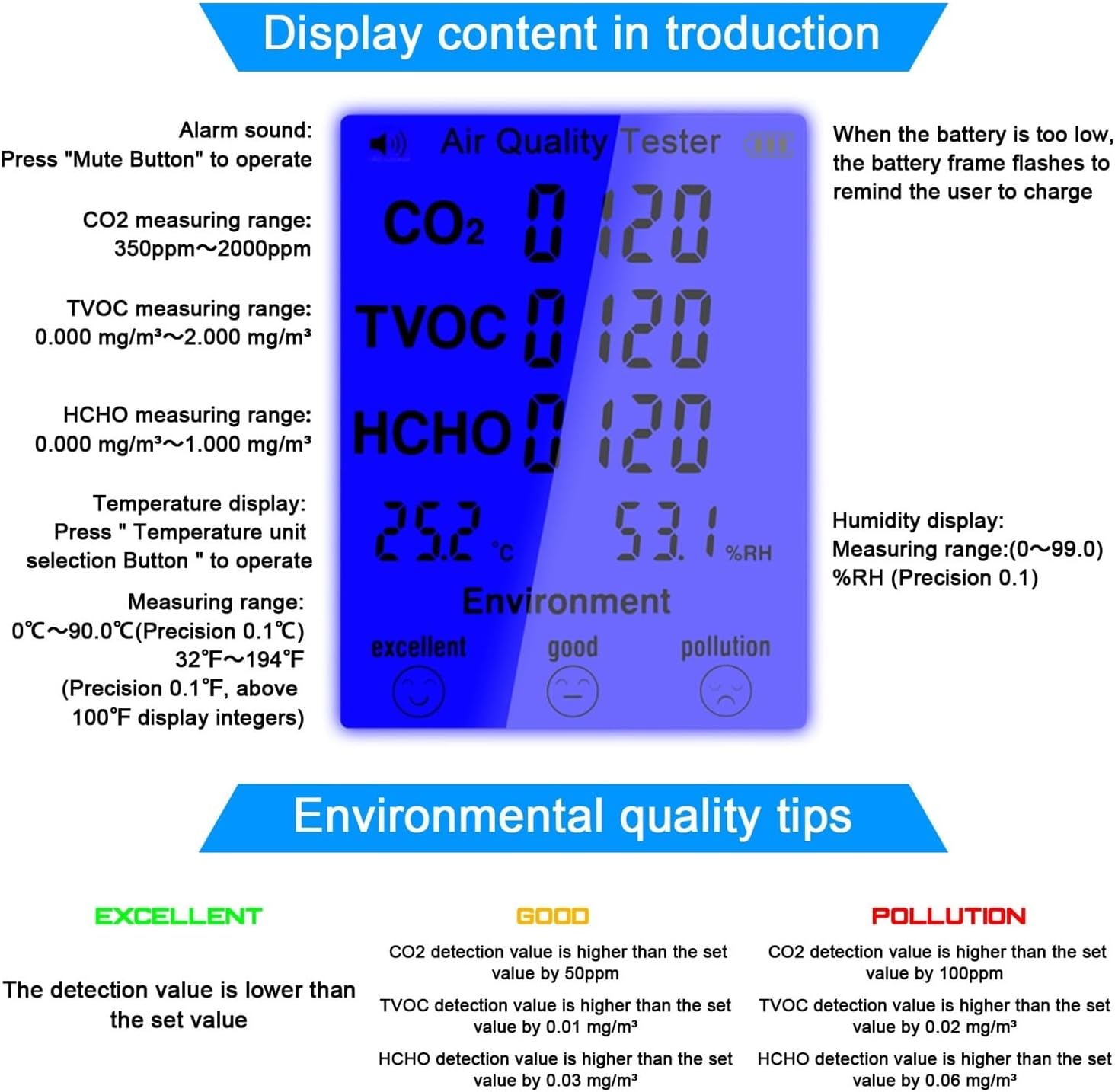
Figure 4.1: Detailed explanation of the information displayed on the LCD screen.
- CO2: Carbon Dioxide concentration (350ppm-2000ppm).
- TVOC: Total Volatile Organic Compounds concentration (0.000 mg/m³~2.000 mg/m³).
- HCHO: Formaldehyde concentration (0.000 mg/m³~1.000 mg/m³).
- Temperature: Current ambient temperature (0-90.0°C / 32-194°F).
- Humidity: Current relative humidity (0-99.0%RH).
- Battery Indicator: Shows remaining battery life.
- Environmental Quality: Visual indicator (Excellent, Good, Pollution).
4.2 Button Functions
- Mute Button: Press to toggle the alarm sound on or off. An icon on the display will indicate the alarm status.
- °C/°F Button: Press to switch the temperature display between Celsius and Fahrenheit.
- SET Button: Used to enter or confirm settings. Refer to specific settings instructions if available in future updates.
- '+' and '-' Buttons: Used for navigation or adjusting values within settings menus.
4.3 Environmental Quality Judgment
The device provides a quick assessment of air quality based on the measured values. The display will show one of three levels:
- Excellent: All detection values are lower than the set thresholds.
- Good: CO2 detection value is higher than 50ppm, TVOC higher than 0.01 mg/m³, or HCHO higher than 0.03 mg/m³.
- Pollution: CO2 detection value is higher than 100ppm, TVOC higher than 0.02 mg/m³, or HCHO higher than 0.06 mg/m³.
These thresholds are indicative and provide a general guide to air quality.
5. Specifications
| Parameter | Value |
|---|---|
| Model | JD-3002 |
| Material | Plastics |
| Display | LCD Display |
| Battery | Built-in 3.7V, 1800mAh Lithium Battery |
| CO2 Measuring Range | 350ppm - 2000ppm |
| TVOC Measuring Range | 0.000 mg/m³ - 2.000 mg/m³ |
| HCHO Measuring Range | 0.000 mg/m³ - 1.000 mg/m³ |
| Temperature Measuring Range | 0-90.0°C (32-194°F), ±1°C/±1°F |
| Humidity Measuring Range | 0-99.0%RH (Precision 0.1%) |
| Item Size | 176 x 73 x 29 mm (6.93 x 2.87 x 1.14 inches) |
| Item Weight | 222g (7.83 ounces) |
| Manufacturer | KYKYK |
6. Maintenance
6.1 Cleaning
To clean the device, gently wipe the exterior with a soft, dry cloth. Do not use abrasive cleaners, solvents, or immerse the device in water. Ensure the sensor area at the top remains clear of dust and debris for accurate readings.
6.2 Storage
When not in use for extended periods, store the device in a cool, dry place away from direct sunlight and extreme temperatures. It is recommended to charge the battery periodically to maintain its health.
7. Troubleshooting
- Device does not power on: Ensure the battery is charged. Connect the device to a USB power source and try again.
- Inaccurate readings: Ensure the sensor area is not obstructed. Allow the device to stabilize in the environment for a few minutes after powering on. Avoid placing the device near strong air currents, heat sources, or direct sunlight.
- Display is dim or flickering: The battery may be low. Recharge the device.
- Alarm not sounding: Check if the alarm sound is muted by pressing the Mute Button.
8. Warranty and Support
Information regarding product warranty and customer support was not provided in the available product details. Please refer to the product packaging or contact the retailer for specific warranty terms and support options.