
1. Introduction
The Cautoni Swastik STW-721N is a versatile 3-digit digital thumbwheel timer designed for precise time control in various industrial and commercial applications. It offers timing ranges from 0 to 999 seconds, minutes, or hours. This manual provides essential instructions for the safe installation, operation, and maintenance of the device, ensuring optimal performance and longevity.
2. Safety Information
- Read all instructions thoroughly before attempting to operate or install the device.
- Always ensure that the main power supply is disconnected before performing any installation, wiring, or maintenance procedures.
- Installation and electrical connections should only be performed by qualified and authorized personnel in accordance with local electrical codes and regulations.
- Do not expose the device to moisture, direct water spray, or extreme temperatures outside its specified operating range.
- Do not attempt to open, modify, or repair the device yourself. Refer all servicing to qualified service technicians.
3. Product Overview
The Swastik STW-721N digital timer features a clear LED display, intuitive thumbwheel controls, and selector switches for time units and range. Familiarize yourself with the components shown below.
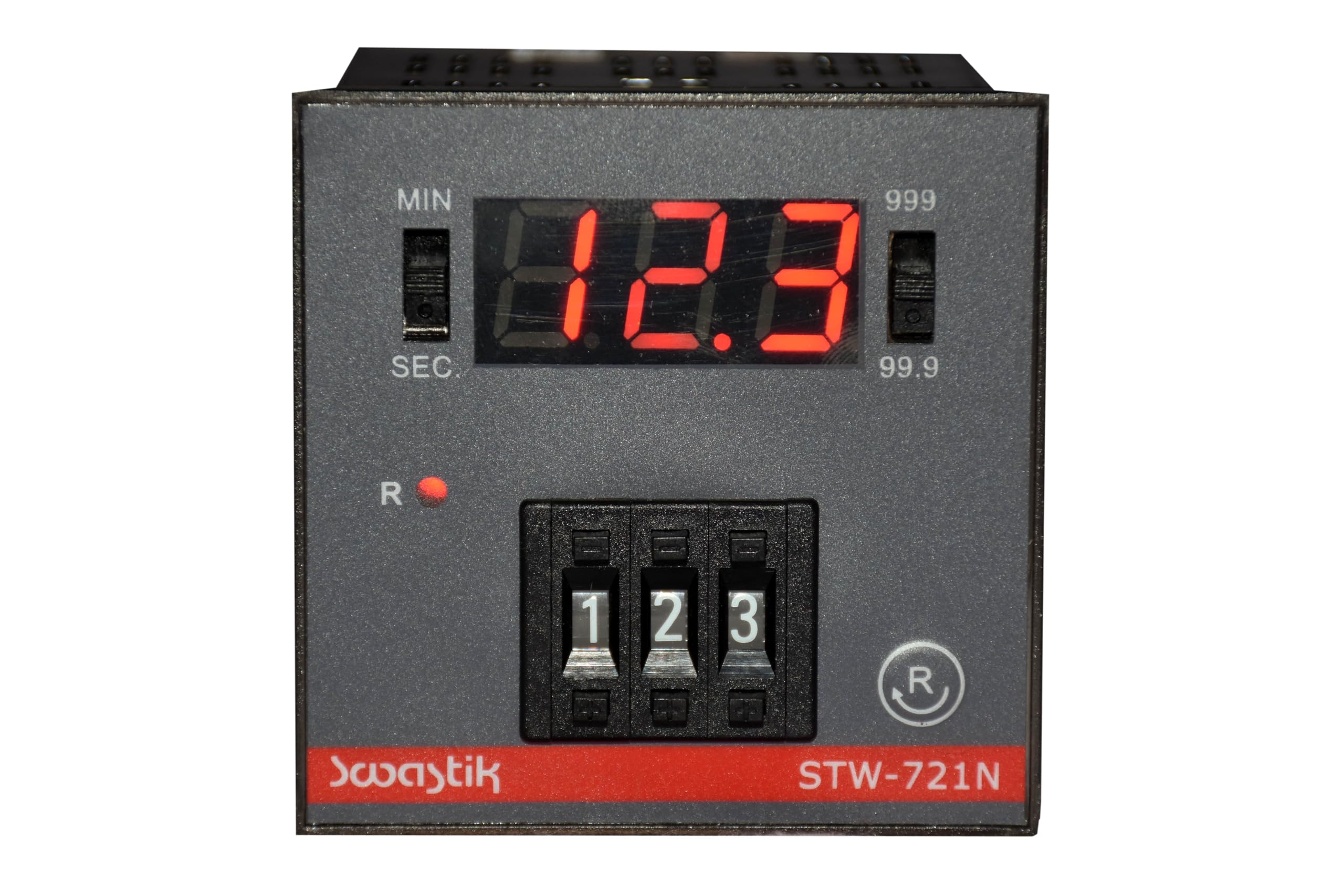
Image Description: A front view of the Swastik STW-721N Digital Thumbwheel Timer. The timer has a dark grey faceplate with a red LED display showing '12.3'. To the left of the display is a vertical toggle switch labeled 'MIN' and 'SEC'. To the right of the display is another vertical toggle switch labeled '999' and '99.9'. Below the display are three black thumbwheel switches, individually numbered '1', '2', '3' from left to right. A small red indicator light labeled 'R' is positioned below the 'MIN/SEC' switch. A circular button with an 'R' symbol is located to the right of the thumbwheels. The brand 'Swastik' and model 'STW-721N' are printed on a red strip at the bottom of the faceplate.
Front Panel Components
- LED Display: A 3-digit red LED display that shows the current time value or set point.
- Time Unit Selector Switch (MIN/SEC): A toggle switch to select between minutes and seconds as the primary timing unit.
- Range Selector Switch (999/99.9): A toggle switch to select the display and timing range, either 0-999 or 0-99.9 (e.g., for decimal seconds).
- Thumbwheel Switches (1, 2, 3): Three rotary switches used to precisely set the desired time value.
- Reset Indicator (R LED): A small red LED that illuminates to indicate a reset condition or operation.
- Reset Button (R with circle): A push-button used to clear the current time and reset the timer.
4. Setup and Installation
4.1 Mounting
The STW-721N is designed for standard panel mounting. Ensure that the mounting location provides adequate space for ventilation around the unit and allows easy access to the front panel controls and rear electrical connections. Secure the timer firmly in the panel cutout using the provided mounting hardware.
4.2 Electrical Connections
Connect the timer to the appropriate power supply and load according to the detailed wiring diagram provided with the product packaging. It is crucial to ensure all connections are secure, correctly polarized, and comply with all applicable local and national electrical safety codes. Incorrect wiring can damage the device or pose a safety hazard.
5. Operating Instructions
5.1 Setting the Time Unit
Use the MIN/SEC toggle switch on the front panel to select the desired timing unit. Move the switch to 'MIN' for minutes or 'SEC' for seconds. The product supports hours as well, which may be an internal configuration or implied by the 0-999 range when set to minutes.
5.2 Setting the Time Value
- Adjust the three thumbwheel switches (labeled 1, 2, 3) to set the desired time value. The left-most thumbwheel controls the hundreds digit, the middle thumbwheel controls the tens digit, and the right-most thumbwheel controls the units digit.
- For example, to set a value of 123, adjust the thumbwheels to '1', '2', and '3' respectively.
5.3 Selecting the Range
Use the 999/99.9 toggle switch to select the desired display and timing range. The '999' setting allows for integer values up to 999 (e.g., 999 seconds/minutes), while the '99.9' setting allows for values with one decimal place (e.g., 99.9 seconds).
5.4 Starting the Timer
The timer typically initiates its countdown or count-up sequence upon power application or receiving a specific trigger signal, depending on the configured operating mode. Refer to the complete wiring diagram and operational modes section (if available in the full product documentation) for specific trigger inputs and start conditions.
5.5 Resetting the Timer
Press the Reset button (R with circle) on the front panel to clear the current time value and reset the timer to its initial, pre-set state. The red 'R' indicator light may illuminate briefly during the reset operation.
6. Maintenance
- Cleaning: Use a soft, dry, and lint-free cloth to gently clean the timer's surface. Avoid using abrasive cleaners, solvents, or chemical sprays, as these can damage the display or casing.
- Inspection: Periodically inspect the device for any signs of physical damage, loose connections, or unusual operation. Address any issues promptly.
The Swastik STW-721N contains no user-serviceable parts. Any internal inspection or repair must be performed by qualified service personnel to prevent damage and ensure safety.
7. Troubleshooting
7.1 Timer Does Not Power On
- Verify that the power supply connections are secure and correctly wired.
- Ensure that the power source is active and providing the correct voltage.
- Check for any tripped circuit breakers or blown fuses in the power circuit.
7.2 Timer Does Not Start
- Confirm that the time value is set correctly using the thumbwheel switches.
- If using an external trigger, verify the trigger input signal is present and correctly connected.
- Ensure the timer is not in a paused or hold state (if applicable to its operating mode).
7.3 Incorrect Timing or Display
- Ensure the correct time unit (MIN/SEC) is selected via the front panel switch.
- Verify that the range (999/99.9) is appropriate for the set time value.
- Check for any external interference or unstable power supply that might affect accuracy.
8. Specifications
| Feature | Detail |
|---|---|
| Model | STW-721N |
| Brand | Cautoni Swastik |
| Display | 3-Digit Red LED |
| Timing Range | 0-999 Seconds / Minutes / Hours (configurable) |
| Material | Plastic |
| Color | Black |
| Product Dimensions (D x W x H) | 7.2D x 7.2W x 7.2H Centimeters |
| Item Weight | 200 Grams |
| Manufacturer | Swastik automation& controls pvt ltd |
9. Warranty and Support
For detailed warranty information, technical assistance, or support, please contact your authorized vendor or the manufacturer, Swastik automation& controls pvt ltd. It is recommended to retain your purchase receipt or proof of purchase for any warranty claims or service requests.