
JAXTIN G66
JAXTIN G66 Pro Hidden Camera Detector User Manual
Model: G66 Pro
1. Introduction
The JAXTIN G66 Pro is a high-performance hidden camera and bug detector designed to comprehensively protect your privacy and enhance security in various environments. Utilizing advanced AI auto-scan, magnetic GPS tracker detection, and infrared camera finding technologies, this device helps you identify and locate hidden surveillance equipment.
Key Features:
- Professional privacy protection: Detects hidden cameras, GPS trackers, and listening devices.
- Advanced Technology: Features an updated detection chip and enhanced infrared scanning for accurate and wide-range detection.
- User-friendly: Button control, visual LED screen for clear access to detection modes and status.
- Multi-Scenario Usage: Ideal for homes, hotels, fitting rooms, bedrooms, bathrooms, offices, conference rooms, and cars.
- Type-C fast charging for convenience.
2. What's in the Box
- JAXTIN G66 Pro hidden camera detector
- User manual in English
- Type-C charging cable
- Magnetic probe
- Antenna
3. Product Overview

Figure 3.1: JAXTIN G66 Pro Hidden Camera Detector with its magnetic probe and antenna attached.

Figure 3.2: Advanced features and components of the G66 Pro.

Figure 3.3: High-tech sensitivity chip.

Figure 3.4: Full-Band Gain Antenna.

Figure 3.5: Strong Magnetic Probe.

Figure 3.6: Clear LED Display and Easy Button Operation.
Video 3.1: This video demonstrates the JAXTIN G66 Pro's capabilities in detecting hidden cameras and protecting privacy, showcasing its use in various scenarios.
4. Setup
- Charging the Device: Connect the provided Type-C cable to the device and a suitable power source (e.g., USB wall adapter, computer USB port). The LED display will indicate charging status. Ensure the device is fully charged before first use for optimal performance.
- Attaching the Antenna: Screw the antenna firmly into the designated port on the top of the device. This antenna is crucial for RF signal detection.
- Attaching the Magnetic Probe (Optional): For magnetic field detection, connect the flexible magnetic probe to its dedicated port. This probe is particularly useful for locating magnetic GPS trackers.
- Power On: Press and hold the power button until the LED display illuminates. The device will perform a brief self-check.
5. Operating Instructions
The JAXTIN G66 Pro offers multiple detection modes to address various surveillance threats. Familiarize yourself with each mode for effective use.
5.1. AI Auto Scan Mode
This mode intelligently scans for a wide range of hidden devices, including wireless cameras, listening devices, and GPS trackers. It provides a comprehensive sweep of the environment.
- Activation: Press the 'AI' button on the device. The LED display will show the AI scan interface.
- Scanning: Slowly move the device around the area you wish to scan. The signal strength indicator on the display will increase as you approach a hidden device.
- Alerts: The device will emit an audible alarm or vibrate (depending on settings) when a signal is detected. The intensity of the alarm/vibration corresponds to the signal strength.
5.2. Magnetic GPS Tracker Detection
Specifically designed to find magnetic GPS trackers often hidden on vehicles or metallic surfaces.
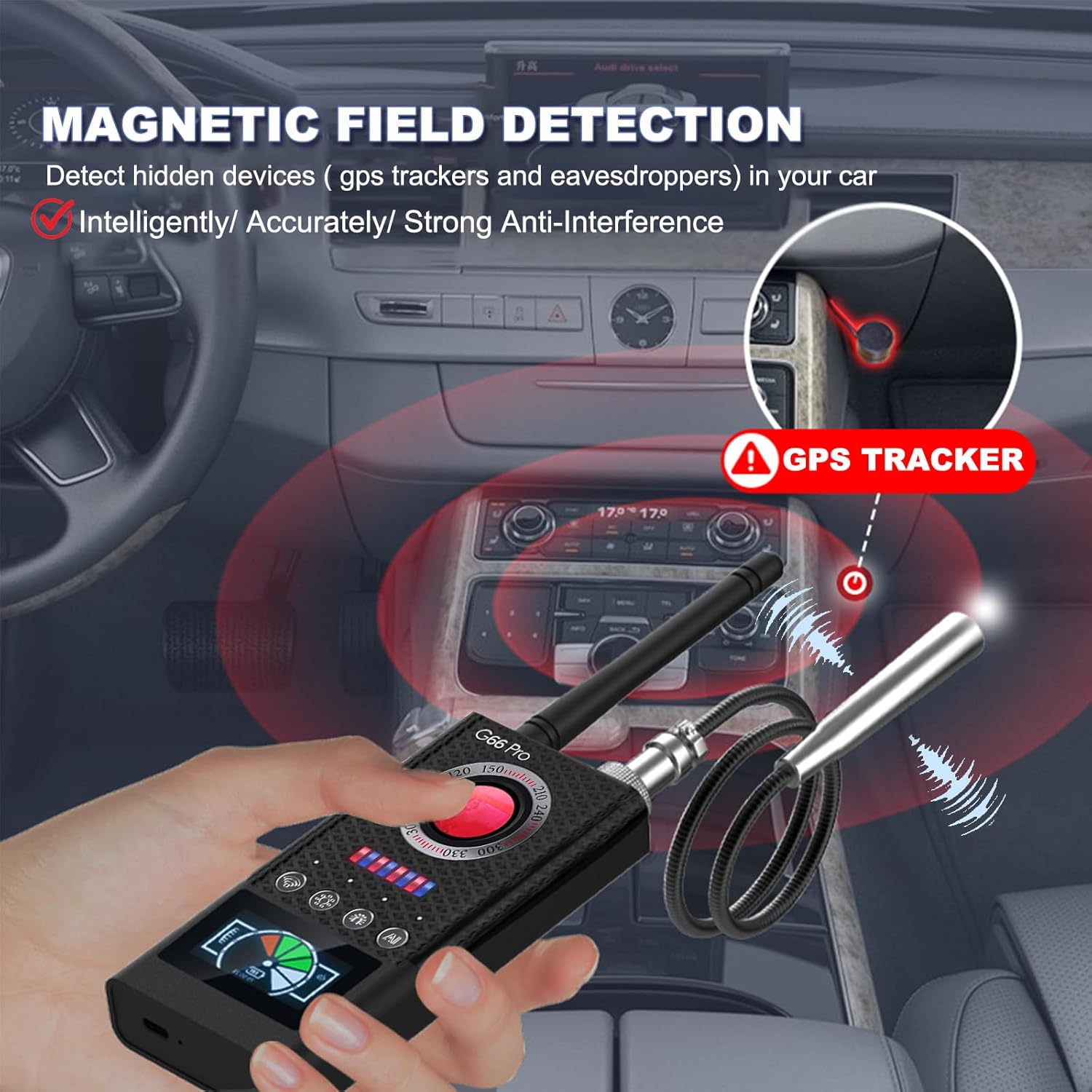
Figure 5.1: Magnetic Field Detection in a vehicle.

Figure 5.2: Omnidirectional Magnetic Detection.
- Activation: Ensure the magnetic probe is attached. Select the magnetic detection mode (refer to the device's specific button layout for this mode).
- Scanning: Use the magnetic probe to sweep along surfaces where trackers might be hidden, such as under car chassis, inside dashboards, or behind furniture.
- Detection: The device will alert you to the presence of magnetic fields, indicating a potential tracker.
5.3. Infrared Camera Finder
This mode helps locate hidden cameras by identifying their lenses, even if they are not actively transmitting signals.

Figure 5.3: Hidden Camera Detection in a bathroom.

Figure 5.4: Hidden Camera Detection principle.
- Activation: Activate the infrared scanning function (refer to the user manual for specific button). Look through the optical lens on the device.
- Scanning: Slowly sweep the device across the area, paying close attention to objects, walls, and ceilings. Hidden camera lenses will appear as bright red dots when viewed through the lens.
- Visual Confirmation: The enhanced infrared lights on the device will illuminate hidden lenses, making them visible through the optical viewfinder.
5.4. RF Signal Detection
Detects radio frequency signals emitted by wireless cameras, listening devices, and other transmitting bugs.

Figure 5.5: RF Signal Detection.
- Activation: Ensure the antenna is attached. Select the RF detection mode.
- Scanning: Move the device slowly around the suspected area. The signal strength indicator will rise as you get closer to a transmitting device.
- Sensitivity Adjustment: Use the sensitivity adjustment dial to fine-tune the detection range and minimize false positives from common household electronics.

Figure 5.6: Multi-scenario usage of the G66 Pro.

Figure 5.7: Bug Sweeper Detector in a conference setting.

Figure 5.8: Privacy Protection Expert.
6. Maintenance
- Cleaning: Use a soft, dry cloth to clean the device. Do not use abrasive cleaners or solvents.
- Storage: Store the device in a cool, dry place away from direct sunlight and extreme temperatures.
- Battery Care: To prolong battery life, avoid fully discharging the device frequently. Recharge it regularly, even if not in use for extended periods.
7. Troubleshooting
- Device not powering on: Ensure the device is fully charged. If the issue persists, try using a different Type-C charging cable and power adapter.
- No detection or weak signal: Check if the antenna is securely attached. Adjust the sensitivity dial to a higher setting. Ensure there are no strong interfering signals nearby (e.g., Wi-Fi routers, microwaves).
- False alarms: Lower the sensitivity setting. Move away from common electronic devices that emit RF signals.
- Infrared camera not visible: Ensure you are looking directly through the optical lens and slowly sweeping the area. Check for sufficient darkness in the room for better visibility of infrared reflections.
8. Specifications
| Feature | Detail |
|---|---|
| Model Name | G66 |
| Brand | JAXTIN |
| Item Model Number | G66 |
| Item Weight | 12 ounces |
| Product Dimensions | 1 x 1 x 1 inches |
| Power Source | Battery Powered (1 Lithium Ion battery included) |
| Connectivity Protocol | Type-C |
| Controller Type | Push Button |
| Material | Acrylonitrile Butadiene Styrene (ABS) |
| Indoor/Outdoor Usage | Outdoor, Indoor |
| Special Feature | Portable |
9. Warranty & Support
JAXTIN strives to provide a good product and service to our customers. For any questions, technical support, or warranty inquiries, please refer to the contact information provided with your purchase or visit the official JAXTIN website. Customer support is typically available to assist with product-related concerns.
Ask a question about this manual
Ask about setup, troubleshooting, compatibility, parts, safety, or missing instructions. Manuals+ will review the question and use this page’s manual context to help answer it.