
Introduction
Thank you for choosing the Generic Y12 TWS Wireless Earbuds. These earbuds are designed to provide a seamless audio experience with advanced features such as Bluetooth 5.4 connectivity, Active Noise Cancelling (ANC), and intuitive touch controls. With an IPX7 waterproof rating and a fast-charging case featuring an LED power display, these earbuds are built for convenience and durability in various environments. This manual will guide you through the setup, operation, and maintenance of your new earbuds.
What's in the Box
- Wireless Earbuds (Left & Right) x 2
- Portable Charging Box x 1
- USB-C Charging Cable x 1
- User Manual x 1
- Ear Tips (3 pairs in different sizes)
Product Overview

Figure 1: Generic Y12 TWS Wireless Earbuds and Charging Case. The earbuds are shown resting in their open charging case, which features a digital display on the front.

Figure 2: Earbuds with LCD Full-Color Touch Screen. This image highlights the smart touch screen on the charging case, which allows for noise reduction control, music playback, and equalizer switching.
Video 1: Wireless Bluetooth Earbuds with Touch Control. This video provides a visual demonstration of the earbuds' features and touch control functionalities.
Setup
Initial Charging
Before first use, fully charge the earbuds and the charging case. Connect the provided USB-C charging cable to the charging case and a power source. The LED power display on the case will indicate the charging status. The earbuds require approximately 1.5 hours for a full charge, and the charging case requires about 1 hour.
Pairing with Your Device
- Ensure your device's Bluetooth is turned on.
- Open the charging case. The earbuds will automatically enter pairing mode (indicated by flashing lights on the earbuds).
- On your device, search for "Y12" in the Bluetooth settings and select it to connect.
- Once connected, the earbud lights will stop flashing, and a voice prompt will confirm successful pairing.
- The earbuds feature hall switch technology, allowing them to automatically pair with your device as soon as you open the charging case after the initial pairing.
You can use the earbuds individually in mono mode or together in dual mode for maximum flexibility.
Operating Instructions
Touch Controls

Figure 3: Earbuds Easy Touch Control Guide. This diagram illustrates the various touch gestures for controlling music, calls, and voice assistants.
- Play/Pause: Single tap on either earbud (R).
- Next Song: Double tap on the Right earbud (R).
- Previous Song: Triple tap on the Right earbud (R).
- Answer/Hang Up Call: Double tap on either earbud.
- Activate Voice Assistant (Siri/Google Assistant): Long press for 2 seconds on either earbud.
- ANC/Ambient Mode Switching: Long press for 5 seconds on the Left earbud (L).
- Volume Adjustment: Use the touch screen on the charging case or your connected device.
Noise Control Modes

Figure 4: ANC+ENC Dual Noise Reduction. This image illustrates the effectiveness of the noise reduction technology in blocking external noise.
The earbuds feature Active Noise Cancelling (ANC) and Environmental Noise Cancelling (ENC) for clear audio and calls. You can switch between ANC, Ambient, and Normal modes by long-pressing the left earbud or using the touch screen on the charging case.
Earbud Case Tracking
If you misplace an earbud, the charging case supports a one-touch function to activate a beeping sound from the lost earbud. Long-press the side button on the charging case, and the earbud will emit a sound, making it easier to locate.
Charging
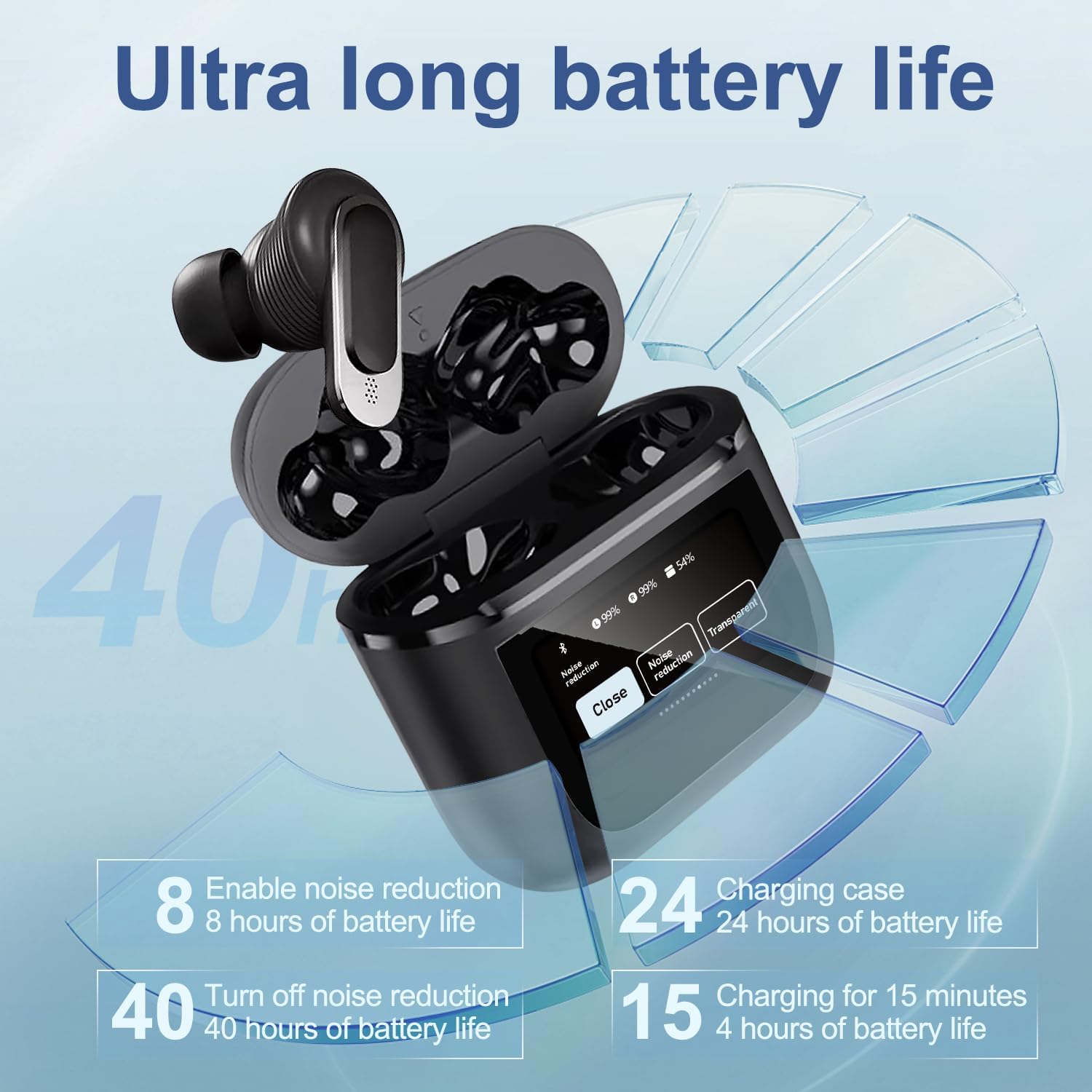
Figure 5: Earbuds Ultra Long Battery Life. This image details the battery performance, including total playtime with the charging case and single charge duration.
- Earbud Playtime: 6-8 hours on a single charge.
- Total Playtime (with Charging Case): Up to 40 hours.
- Earbud Charging Time: Approximately 1.5 hours.
- Charging Case Charging Time: Approximately 1 hour.
- LED Power Display: The charging case and earbuds feature an LED display to show remaining battery life.
Maintenance
The Y12 TWS earbuds are designed with an IPX7 waterproof and sweat-proof rating, featuring nano-coating technology to protect internal components from water damage. This makes them suitable for workouts, running, and use in light rain.
- Cleaning: Regularly wipe the earbuds and charging case with a soft, dry cloth. Avoid using abrasive materials or harsh chemicals.
- Water Exposure: While IPX7 rated, avoid prolonged submersion in water. Ensure earbuds are dry before placing them back in the charging case to prevent damage.
- Storage: Store the earbuds and case in a cool, dry place away from extreme temperatures.
Troubleshooting
- Earbuds not pairing:
- Ensure both earbuds are charged.
- Turn off Bluetooth on your device, then turn it back on.
- Forget "Y12" from your device's Bluetooth list and attempt to re-pair.
- Place both earbuds back into the charging case, close the lid, wait a few seconds, then open the lid to re-initiate pairing mode.
- Only one earbud working:
- Ensure both earbuds are charged.
- Try placing both earbuds back into the charging case and then taking them out simultaneously.
- Perform a factory reset if the issue persists (refer to the full user manual for specific reset instructions).
- Charging case display in incorrect language (e.g., Chinese):
- While the provided information does not detail language change for the digital case, typically, this is done via a setting within the case's touch screen interface or a companion app if available. Consult the full user manual or manufacturer's website for specific instructions on changing the display language.
- Poor sound quality or connection drops:
- Ensure the earbuds are within the 15-meter Bluetooth range of your device.
- Check for interference from other wireless devices.
- Clean the earbud grilles to ensure no debris is blocking the sound.
Specifications
| Model Name | Wireless Bluetooth Earbuds with Touch Control Screen |
| Model Number | Y12 TWS |
| Brand | Generic |
| Connectivity Technology | Wireless (Bluetooth 5.4) |
| Bluetooth Range | 15 Meters |
| Noise Control | Active Noise Cancellation (ANC) |
| Water Resistance Level | IPX7 Waterproof |
| Control Method | Touch |
| Battery Life (Earbuds) | 7 Hours (single charge) |
| Total Playtime | 40 Hours (with charging case) |
| Charging Time (Earbuds) | 1.5 Hours |
| Charging Time (Case) | 1 Hour |
| Material | Plastic |
| Item Weight | 4.2 ounces |
| Package Dimensions | 5.47 x 3.9 x 1.42 inches |
Warranty and Support
For warranty information and technical support, please refer to the documentation included with your product or visit the manufacturer's official website. If you encounter any issues not covered in this manual, please contact customer service for assistance.