
GOYOJO GSR710
GOYOJO Surface Roughness Tester User Manual
Model: GSR710
Introduction
This manual provides detailed instructions for the operation, maintenance, and troubleshooting of the GOYOJO Surface Roughness Tester. This portable profilometer is designed for precise measurement of surface roughness parameters including Ra, Rz, Rq, and Rt, suitable for a wide range of applications on both metal and non-metallic surfaces. Please read this manual thoroughly to ensure proper and safe use of the device.
Safety Information
Please read all safety warnings and instructions carefully before using the device to prevent injury or damage.
- Do not expose the device to extreme temperatures, high humidity, or corrosive environments.
- Avoid dropping or subjecting the device to strong impacts.
- Use only the provided power charger and charging cable. Using unauthorized accessories may damage the device and void the warranty.
- Do not attempt to disassemble or repair the device yourself. Refer to qualified personnel for service.
- Keep the stylus clean and free from debris to ensure accurate measurements. Handle the stylus with care as it is a delicate component.
Package Contents
Verify that all items listed below are present in your package:
- Surface Roughness Tester Host (1)
- Standard Calibration Block (1)
- Bracket for Calibration Block (1)
- Power Charger (1)
- USB Charging Cable (1)
- User Manual (1)
- Instrument Case (1)

This image displays the complete set of items included with the GOYOJO Surface Roughness Tester, neatly arranged. It features the main blue and black tester unit, a small silver calibration block with its clear plastic bracket, a black USB charging cable, a black power adapter, and a black hard-shell carrying case. A user manual is also visible.
Product Overview
Device Components
Familiarize yourself with the various parts of your GOYOJO Surface Roughness Tester:
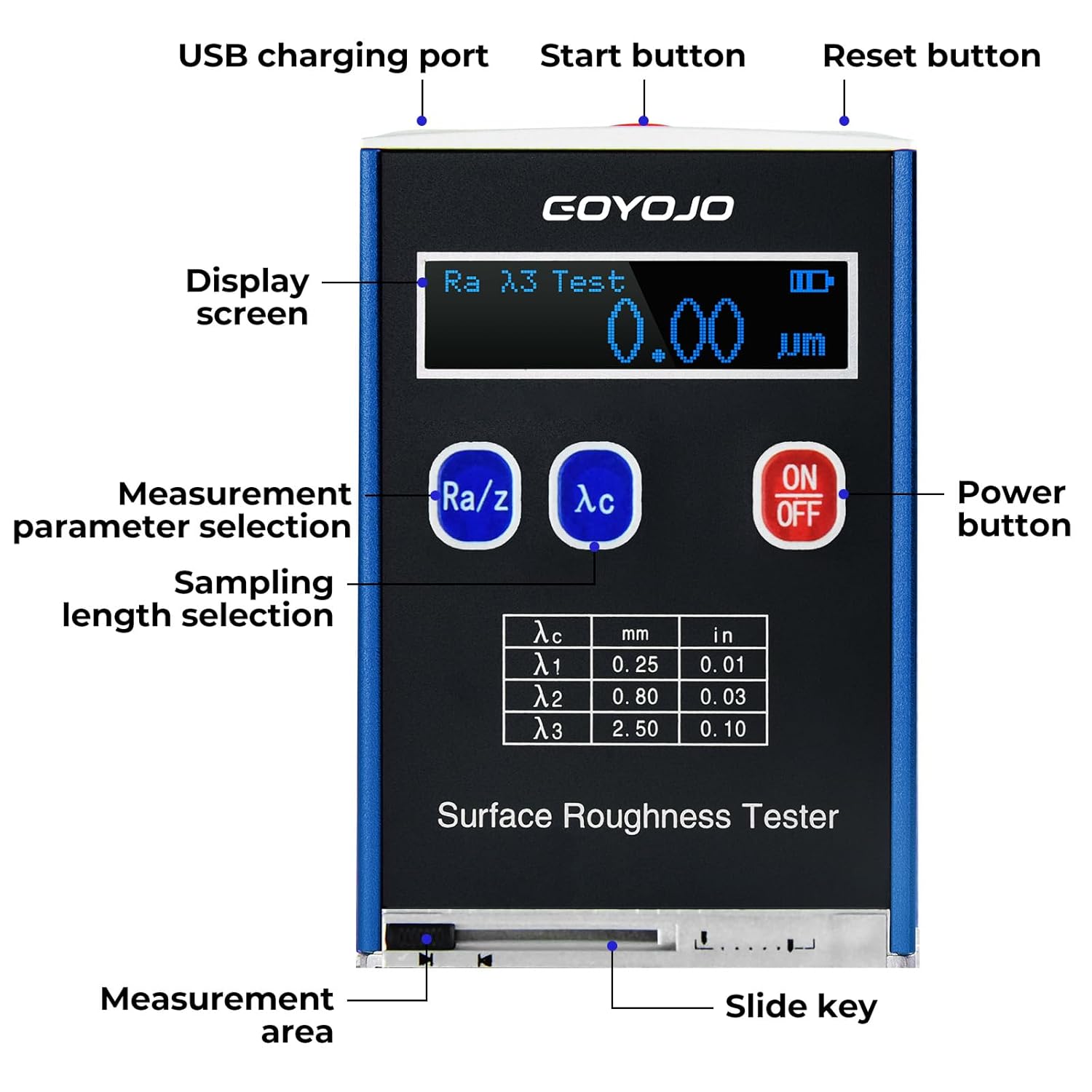
This diagram highlights the key components of the GOYOJO Surface Roughness Tester. Labels point to the USB charging port, Start button, Reset button, Display screen, Measurement parameter selection button (Ra/z), Sampling length selection button (λc), Power button (ON/OFF), Measurement area, and Slide key. A table showing sampling lengths (λc) in mm and inches is also visible on the device's face.
Key Features
- Measures Ra, Rz, Rq, and Rt with 4 testing parameters, catering to a wide range of applications.
- Versatile testing capability: can measure ex-circle, flat surfaces, conical surfaces, and grooves larger than 80 x 30mm.
- Wide measuring range suitable for a variety of materials, including both metal and non-metallic surfaces.
- Utilizes a high-speed DSP processor for quick data processing and calculations.
- Durable design with an aluminum mold shell, providing resistance to electromagnetic interference.
- Features a wide temperature OLED display for high brightness, suitable for various working conditions.
- Powered by a long-lasting lithium-ion rechargeable battery and includes a USB port for convenient charging.
Setup
Charging the Device
Before first use, it is recommended to fully charge the device to ensure optimal performance.
- Connect the provided USB charging cable to the USB charging port located on the top of the tester.
- Connect the other end of the USB cable to the power charger.
- Plug the power charger into a suitable electrical outlet.
- The battery indicator on the display will show the charging status.

This image shows the back panel of the GOYOJO Surface Roughness Tester. The top features a 'Start' button and 'Charge' indicator. Below, a table lists Ra and Rz measurement ranges for different sampling lengths (λc). The model number GSR710 and S/N are also visible. A USB charging cable and power adapter are shown next to the device, indicating the charging setup.
Initial Power On
Press and hold the ON/OFF button located on the front panel to power on the device. The OLED display will illuminate, indicating the device is ready for use.
Operating Instructions
Basic Measurement Procedure
- Power on the device by pressing the ON/OFF button.
- Select the desired measurement parameter (Ra, Rz, Rq, or Rt) by pressing the Ra/z button. The selected parameter will be displayed on the screen.
- Select the appropriate sampling length (λc) by pressing the λc button. Refer to the device's display for available options (0.25mm, 0.80mm, 2.50mm).
- Place the measurement area of the tester firmly and stably on the surface to be measured. Ensure the stylus is in proper contact with the surface.
- Press the Start button (located on the top of the device). The stylus will traverse the surface, and the measurement will be performed automatically.
- The measurement result will be displayed on the OLED screen.
Understanding Measurement Parameters
- Ra (Arithmetic Average Roughness): The arithmetic average of the absolute values of the profile deviations from the mean line within the sampling length. It is the most commonly used roughness parameter.
- Rz (Maximum Height of the Profile): The sum of the height of the largest profile peak and the depth of the largest profile valley within a sampling length.
- Rq (Root Mean Square Roughness): The root mean square average of the profile deviations from the mean line. It is sensitive to large deviations from the mean line.
- Rt (Total Height of the Profile): The total height of the roughness profile, which is the vertical distance between the highest peak and the lowest valley within the evaluation length.
Calibration
Regular calibration ensures the accuracy and reliability of your measurements.
- Ensure the device and the standard calibration block are clean and free of any dust or debris.
- Place the standard calibration block on a stable, flat surface.
- Position the tester on the calibration block using the provided bracket, ensuring the stylus is correctly aligned with the calibration surface.
- Follow the specific calibration procedure detailed in the full user manual or on-screen prompts if available.
- After calibration, verify that the reading matches the known value of the calibration block.
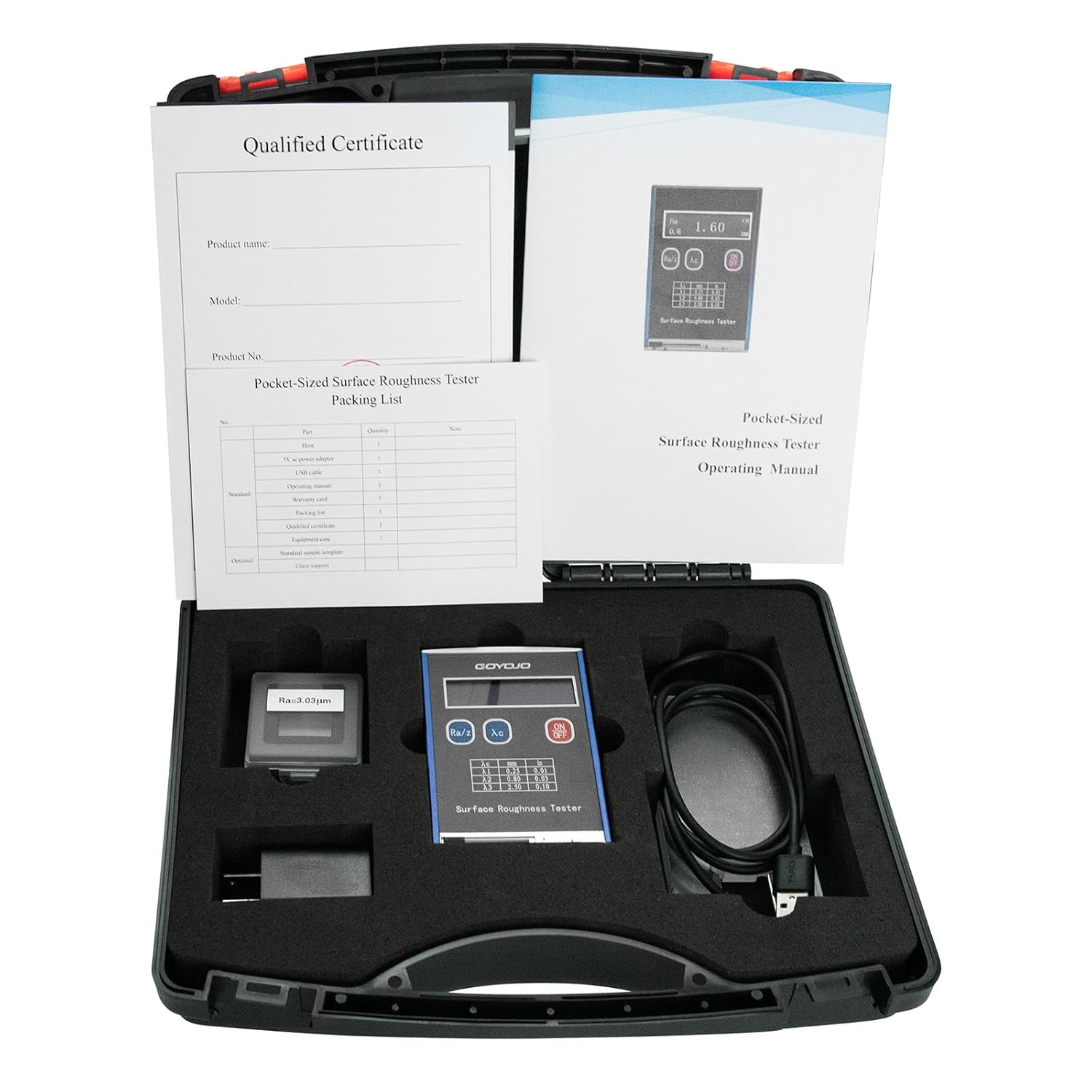
This image shows the GOYOJO Surface Roughness Tester, its accessories, and the packaging. Prominently featured is the small, silver standard calibration block with its clear plastic bracket, essential for maintaining measurement accuracy. The main tester unit, power charger, USB cable, user manual, and instrument case are also visible within the foam-lined carrying case.
Maintenance
Cleaning
- Use a soft, dry cloth to clean the exterior of the device.
- For the stylus, use a soft brush or lint-free cloth to gently remove any dust or particles. Avoid using harsh chemicals, solvents, or abrasive materials, as these can damage the device or stylus.
Storage
- Store the device in its original instrument case when not in use to protect it from dust, moisture, and physical damage.
- Store in a cool, dry place, away from direct sunlight and extreme temperatures.
- If storing for an extended period, ensure the battery is partially charged (around 50%) to prolong its lifespan.
Troubleshooting
If you encounter any issues with your GOYOJO Surface Roughness Tester, please refer to the table below for common problems and their solutions.
| Problem | Possible Cause | Solution |
|---|---|---|
| Device does not power on | Low battery; Device malfunction | Charge the device fully; If the issue persists after charging, contact customer support. |
| Inaccurate readings | Stylus dirty or damaged; Device needs calibration; Incorrect measurement parameter/sampling length selected | Clean the stylus gently; Perform calibration using the standard block; Verify that the correct measurement parameter and sampling length are selected for your application. |
| Display is dim or unreadable | Extreme temperature; Device malfunction | Ensure the device is used within the specified working temperature range (-20°C~40°C); If the issue persists, contact customer support. |
Specifications
Detailed technical specifications for the GOYOJO Surface Roughness Tester:
| Parameter | Value |
|---|---|
| Model | GSR710 |
| Testing Parameters | Ra, Rz, Rq, Rt |
| Indication Accuracy | 0.01µm |
| Measuring Range (Ra, Rq) | 0.05~15.0µm |
| Measuring Range (Rz, Rt) | 0.1~50.0µm |
| Sample Length | 0.25, 0.80, 2.50mm |
| Evaluation Length | 1.25, 4.0, 5.0mm |
| Stroke Length | 6mm |
| Variability | <12% |
| Stylus Static Force | ≤ 0.016N |
| Force Measuring Rate of Change | ≤ 800N/m |
| Power | Rechargeable Li-battery |
| Relative Humidity | <90% |
| Working Temperature | -20°C~40°C (-4°F ~ 104°F) |
| Dimensions (L x W x H) | 106 x 70 x 24mm (4.17 x 2.76 x 0.94 inches) |
| Weight | 0.2kg (7.05 Ounces) |

This image illustrates the physical dimensions of the GOYOJO Surface Roughness Tester. It shows the device from a slightly angled front view with measurements indicating its height as 4.06 inches, width as 2.76 inches, and depth as 0.94 inches.
Warranty and Support
For warranty information, technical support, or service inquiries, please refer to the contact details provided on the GOYOJO official website or the documentation included with your purchase. Keep your purchase receipt as proof of purchase for any warranty claims.
Manufacturer: GOYOJO
Model Number: GSR710
ASIN: B0DHTRTJ35
Ask a question about this manual
Ask about setup, troubleshooting, compatibility, parts, safety, or missing instructions. Manuals+ will review the question and use this page’s manual context to help answer it.