
Introduction
Thank you for choosing the Bestier Mid-Century Modern Accent Chair. This manual provides essential information for the safe assembly, operation, and maintenance of your new chair. Please read these instructions carefully before beginning assembly and retain them for future reference.

Image: The Bestier Mid-Century Modern Accent Chair, featuring a brown PU leather upholstery and a wooden frame, positioned in a contemporary living space.
Important Safety Information
WARNING:
- Exercise caution when using a power drill or power screwdriver during assembly. Reduce speed and stop when the screw is nearly tight to prevent overtightening or damage.
- Always push, pull, or drag this item carefully to avoid damage to the product or flooring.
- Do not exceed the maximum weight recommendation of 300 pounds.
Package Contents
Before assembly, ensure all components listed below are present and undamaged. If any parts are missing or damaged, please contact Bestier customer support.
- Chair Cushion
- Wooden Frame Components
- 2 Armrest Pillows
- Assembly Guide
- Installation Tool (Allen Key)
- Hardware (M8 Screws, etc.)
Assembly Instructions
Assembly of the Bestier Accent Chair is designed to be straightforward. Follow the clear instructions and use the labeled parts provided in your package. Typically, assembly can be completed within 5-10 minutes.
- Unpack Components: Carefully remove all parts from the packaging and lay them out on a clean, soft surface to prevent scratches.
- Assemble the Frame: Connect the wooden frame components using the provided M8 screws. Do not fully tighten all screws until the chair is mostly assembled to allow for minor adjustments and alignment.
- Attach Upholstered Sections: Secure the seat and backrest cushions to the wooden frame using the remaining M8 screws. Ensure proper alignment before tightening.
- Final Tightening: Once all parts are in place and aligned, securely tighten all screws.
- Attach Armrest Pillows: The two adaptable pillows attach to the armrests using hook-and-loop fasteners. Position them for optimal comfort.
Tip: If you encounter difficulty aligning screws, try loosening adjacent screws slightly to provide more flexibility. A longer Allen key (not included) can sometimes provide better leverage for hard-to-reach screws.

Image: A close-up view highlighting the sturdy wooden frame and the connection points for the upholstered sections, demonstrating the chair's construction.
Operating Instructions
Comfort and Support Features
- Optimal Recline Angle: The chair is designed with a fixed 105° recline angle, providing an ergonomic position ideal for relaxation, reading, or watching television. This angle helps reduce spinal pressure and supports the natural curve of your spine.
- Enhanced Head Support: The heightened headrest offers full support, particularly beneficial for taller individuals, preventing neck strain.
- Versatile Armrest Pillows: The two included pillows can be attached to the armrests for additional comfort. They can also be removed and used as lumbar support or decorative throw pillows, offering flexibility to suit your preference.
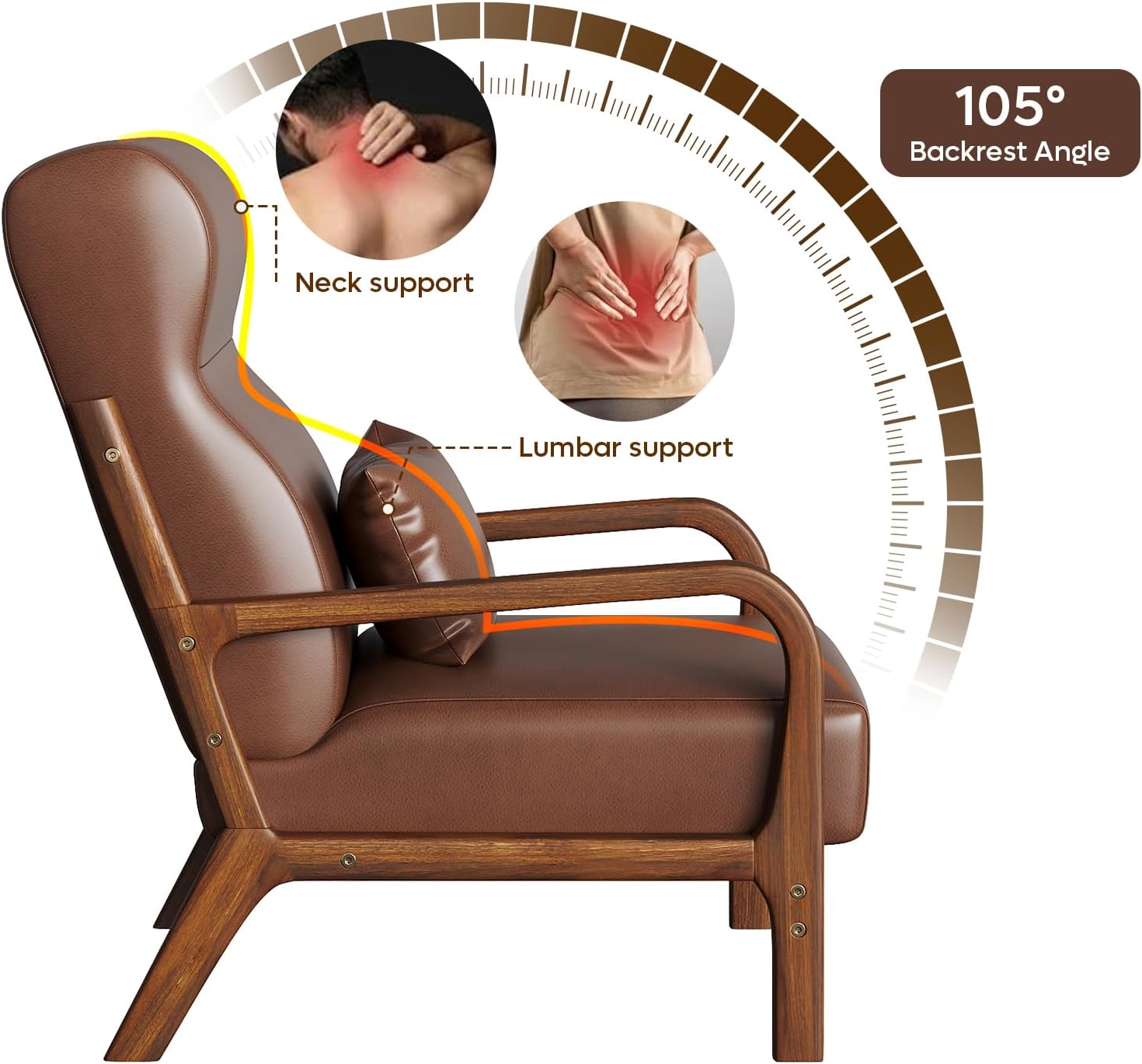
Image: An illustration demonstrating the 105-degree backrest angle of the chair, highlighting how it provides optimal neck and lumbar support for the user.
Maintenance and Care
To ensure the longevity and appearance of your Bestier Accent Chair, follow these care guidelines:
- Cleaning: The durable PU leather upholstery is water-resistant and stain-resistant. For general cleaning, simply wipe clean with a soft, damp cloth. Avoid harsh chemicals or abrasive cleaners.
- Pillow Care: The fabric covers of the armrest pillows can be removed for washing. Refer to the care label on the pillows for specific washing instructions.
- Frame Care: Dust the wooden frame regularly with a soft, dry cloth. Avoid prolonged exposure to direct sunlight or extreme temperatures, which can affect the wood finish.
- Inspection: Periodically check all screws and connections to ensure they remain tight. Retighten if necessary.
Troubleshooting
| Problem | Possible Cause | Solution |
|---|---|---|
| Difficulty aligning screw holes during assembly. | Screws were tightened too early; parts are not perfectly aligned. | Loosen all screws slightly before attempting to connect the problematic part. Once all parts are loosely connected, then tighten all screws securely. |
| Armrest pillows slide off or shift easily. | Pillows are not securely fastened or user movement dislodges them. | Ensure hook-and-loop fasteners are firmly attached. If preferred, pillows can be removed and used as lumbar support or decorative items elsewhere. |
| Chair feels unstable or wobbly. | Screws are not fully tightened. | Check and tighten all M8 screws on the frame and upholstered sections. Ensure the chair is on a level surface. |
| Missing or damaged parts upon arrival. | Shipping error or manufacturing defect. | Do not proceed with assembly. Contact Bestier customer support immediately for replacement parts. |
Specifications
| Feature | Detail |
|---|---|
| Brand | Bestier |
| Model Name | Wooden Armchair |
| Item Model Number | L501466Y-DBPU |
| Color | Brown |
| Product Dimensions (D x W x H) | 33.07"D x 25.98"W x 37.01"H |
| Seat Height | 34.7 Inches |
| Seat Depth | 20.1 Inches |
| Seat Back Interior Height | 24 Inches |
| Chair Backrest Width | 22.8 Inches |
| Arm Height | 6 Inches |
| Maximum Weight Recommendation | 300 Pounds |
| Item Weight | 36.2 Pounds |
| Material | PU Leather, Solid Wood Frame, High-Density Foam |
| Special Features | Removable Armrest Pillows, Heightened Headrest, 105° Recline Angle |
| UPC | 810153056232 |

Image: A technical diagram illustrating the various dimensions of the accent chair, including width, depth, and height measurements, along with the 300 lbs weight capacity.
Contact and Support
For any questions, assistance with assembly, missing parts, or warranty inquiries, please contact Bestier customer support.
- Manufacturer: Bestier
- Seller: Bestier USA
- Online Support: Visit the Bestier Store on Amazon for product information and contact options.
Bestier is committed to providing quality products and customer satisfaction. Please reach out if you require further assistance.