
FLATPACK2 2000W 48V
FLATPACK2 2000W 48V Power Supply Rectifier Module User Manual
Model: FLATPACK2 2000W 48V | Brand: Generic
1. Introduction
This user manual provides essential information for the safe and efficient operation of the FLATPACK2 2000W 48V High Efficiency Power Supply Rectifier Module. This module is designed to convert AC input power into stable DC output, suitable for various industrial and scientific applications requiring a reliable 48V power source. Please read this manual thoroughly before installation and operation to ensure proper usage and to prevent damage to the unit or injury.
2. Safety Information
WARNING: This device operates with high voltages and currents. Improper installation or handling can result in serious injury or death. Only qualified personnel should perform installation, maintenance, and troubleshooting.
- Always disconnect power before making any connections or performing maintenance.
- Ensure proper grounding of the unit.
- Do not operate the module in wet or damp conditions.
- Verify input voltage and current ratings match your power source.
- Use appropriate personal protective equipment (PPE) when working with electrical systems.
- Ensure adequate ventilation around the module to prevent overheating.
3. Product Overview and Features
The FLATPACK2 2000W 48V Rectifier Module is a high-efficiency power supply unit. Key features include:
- High Efficiency: Designed for optimal power conversion.
- Wide Input Voltage Range: Accepts 100-250Vac.
- Standard Output: Provides stable 53.5V DC at up to 37.4A.
- Compact Design: Suitable for integration into various systems.
- Integrated Cooling: Features internal fans for thermal management.

Figure 3.1: Front view of the FLATPACK2 2000W 48V Rectifier Module. This image shows the overall compact design of the power supply unit.
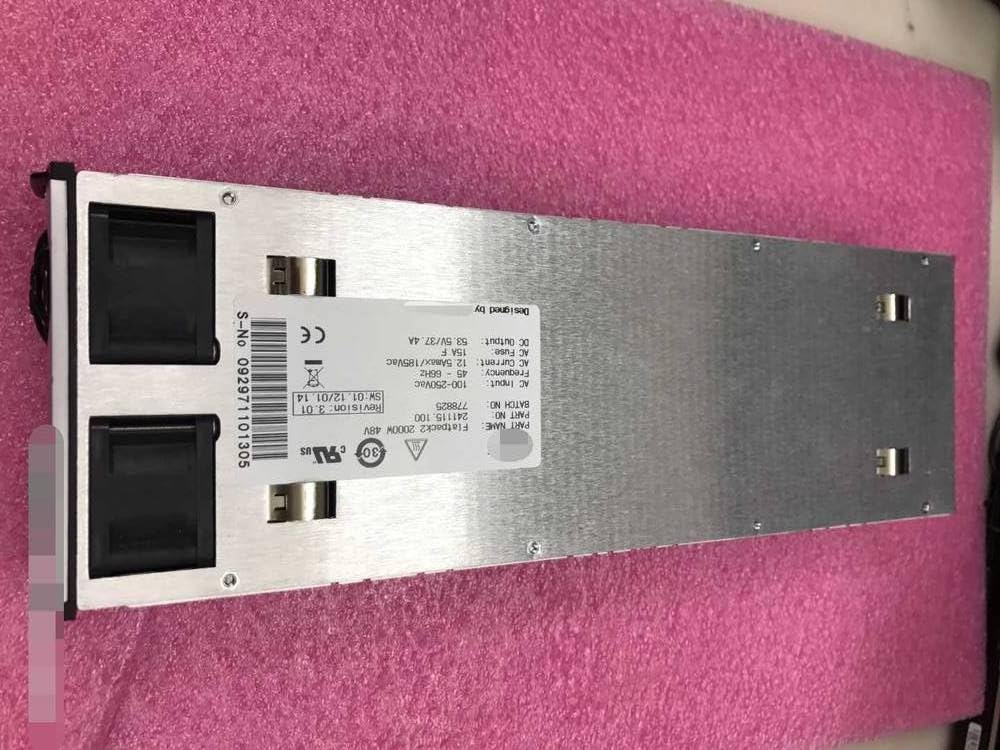
Figure 3.2: Top view of the FLATPACK2 2000W 48V Rectifier Module, highlighting the integrated cooling fans and the product label.
4. Setup and Installation
Proper installation is crucial for the performance and longevity of the rectifier module.
4.1. Environmental Considerations
- Install the module in a clean, dry, and well-ventilated area.
- Avoid locations with excessive dust, moisture, or corrosive gases.
- Ensure ambient temperature is within the specified operating range (refer to specifications).
- Maintain adequate clearance around the unit for airflow.
4.2. Physical Installation
The module is designed for rack mounting or integration into a system enclosure. Secure the unit using appropriate fasteners through the designated mounting points.

Figure 4.1: Side view of the FLATPACK2 2000W 48V Rectifier Module, showing the ventilation grilles and structural design for integration.
4.3. Electrical Connections
Before making any electrical connections, ensure that the power source is disconnected and locked out.
- AC Input Connection: Connect the AC input power cable to the designated AC input terminals on the module. Ensure the input voltage is within the 100-250Vac range and the frequency is 45-66Hz. The maximum input current is 12.5A at 185Vac. A 15A fuse is recommended for protection.
- DC Output Connection: Connect the DC load to the DC output terminals. The module provides 53.5V DC at up to 37.4A. Ensure correct polarity.
- Grounding: Connect the protective earth ground terminal of the module to a reliable earth ground point in your system.

Figure 4.2: Detailed view of the product label, showing electrical specifications including AC input (100-250Vac, 45-66Hz, 12.5Amax/185Vac, 15A Fuse) and DC output (53.5V/37.4A). Serial Number: 091171100070.

Figure 4.3: Another detailed view of a product label, confirming electrical specifications and showing Serial Number: 092971101305.
5. Operating Instructions
Once the module is securely installed and all electrical connections are verified, you can proceed with powering on the unit.
- Power On: Apply AC power to the input terminals. The module should initiate its startup sequence.
- Status Indicators: Observe any status indicators (LEDs) on the module. Refer to the specific system documentation for interpretation of these indicators. Typically, a green LED indicates normal operation.
- Verify Output: Use a multimeter to verify the DC output voltage at the terminals. It should be approximately 53.5V.
- Power Off: To power off the module, disconnect the AC input power.
6. Maintenance
Regular maintenance helps ensure the longevity and reliable operation of the rectifier module.
- Cleaning: Periodically inspect the module for dust accumulation, especially on ventilation grilles and fan inlets. Use compressed air or a soft brush to gently remove dust. Ensure power is disconnected before cleaning.
- Connections Check: Annually, or as needed, inspect all electrical connections for tightness and signs of corrosion. Re-tighten if necessary.
- Environmental Monitoring: Ensure the operating environment remains within specified temperature and humidity limits.
7. Troubleshooting
This section provides basic troubleshooting steps for common issues. For complex problems, contact qualified service personnel.
| Problem | Possible Cause | Solution |
|---|---|---|
| No DC Output | No AC input power; Blown fuse; Internal fault. | Check AC power source and connections. Inspect and replace fuse if necessary (ensure power is off). If problem persists, contact support. |
| Incorrect DC Output Voltage | Overload; Faulty connections; Internal fault. | Verify load does not exceed module capacity. Check DC output wiring. If problem persists, contact support. |
| Overheating | Insufficient ventilation; Blocked fans; Excessive ambient temperature. | Ensure adequate airflow around the unit. Clean fan inlets and grilles. Reduce ambient temperature if possible. |
8. Specifications
| Parameter | Value |
|---|---|
| Model Name | FLATPACK2 2000W 48V |
| Brand | Generic |
| AC Input Voltage Range | 100-250Vac |
| AC Input Frequency | 45-66Hz |
| Max AC Input Current | 12.5A (at 185Vac) |
| Recommended AC Fuse | 15A F |
| DC Output Voltage | 53.5V |
| DC Output Current | 37.4A |
| Power Output | 2000W |
| ASIN | B0DHSWZ8JH |
| Date First Available | Sept. 23 2024 |
9. Warranty and Support
For information regarding warranty coverage, terms, and conditions, please refer to the documentation provided at the time of purchase or contact the seller directly.
If you require technical assistance or have questions not covered in this manual, please contact the manufacturer or your authorized distributor. Provide the product model number (FLATPACK2 2000W 48V) and serial number (found on the product label) when seeking support.
Related Documents - FLATPACK2 2000W 48V
 |
Sine Wave Dual Drive Controller Instruction Manual User manual for 36V/48V/60V/64V sine wave dual drive controller (2000W). Includes technical specifications, wiring instructions, and regulatory compliance information. |
 |
MZMW User Manual - Product Specifications and Operating Instructions User manual for MZMW power supplies, detailing product specifications, installation, operating instructions, and important warnings. Covers environmental conditions and data variability. |
 |
Electric Bicycle Instruction Manual - ZEFIORA V10 Comprehensive instruction manual for the ZEFIORA V10 electric bicycle, covering safety, parts identification, operation, assembly, maintenance, and troubleshooting. |
 |
DMYOND 2000W 40A DC Motor Speed Controller PWM Voltage Regulator Technical specifications and overview of the DMYOND 2000W DC Motor Speed Controller, a PWM voltage regulator suitable for industrial and general-purpose DC motor applications. |
 |
Ijoy EDB001 Electric Motorcycle User Manual Comprehensive user manual for the Ijoy EDB001 electric motorcycle, covering assembly, battery charging, safety guidelines, and operational instructions. |
 |
INBIKEOU Raptor 48V 2000W Electric Bike User Manual Comprehensive user manual for the INBIKEOU Raptor 48V 2000W electric bike, covering assembly, operation, safety, and maintenance instructions. |
Ask a question about this manual
Ask about setup, troubleshooting, compatibility, parts, safety, or missing instructions. Manuals+ will review the question and use this page’s manual context to help answer it.