
Z9
SANAG Z9 Wireless Waterproof On-Ear Sports Headphones User Manual
Model: Z9
1. Product Overview
The SANAG Z9 Wireless Waterproof On-Ear Sports Headphones are designed for active lifestyles, offering wireless connectivity, a waterproof design, and comfortable wear. This manual provides instructions for setup, operation, maintenance, and troubleshooting.
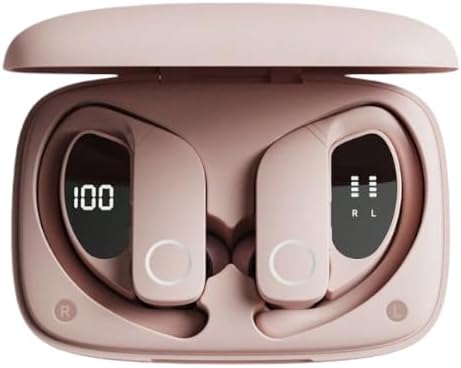
Image: SANAG Z9 headphones resting in their open charging case. The earbuds display digital battery indicators, with one showing "100" and the other showing battery bars, indicating charge status. The case and headphones are a light pink color.

Image: A single SANAG Z9 headphone, dark in color, covered in water droplets. This image highlights the product's waterproof and sweat-resistant capabilities, making it suitable for sports and outdoor activities.
2. Package Contents
Ensure all items are present in the package:
- SANAG Z9 Headset
- Charging Case
- Multi-Size Eartips
- Type-C Charging Cable
- User Manual (this document)
- Packing Box

Image: An illustration detailing the contents of the SANAG Z9 headphone package. It shows the Z9 headset, charging case, a Type-C charging cable, and indicates the inclusion of multi-size earplugs, a manual, and the packing box.
3. Setup Guide
3.1 Initial Charging
Before first use, fully charge the headphones and the charging case.
- Connect the provided Type-C charging cable to the charging port on the case.
- Connect the other end of the cable to a USB power adapter (not included) or a computer's USB port.
- The indicator lights on the case and headphones will show charging status. Once fully charged, the indicators will change or turn off.
3.2 Pairing with a Device
The SANAG Z9 headphones use Bluetooth technology for wireless connection.
- Ensure the headphones are charged and within range of your device (e.g., smartphone, tablet).
- Open the charging case. The headphones will automatically enter pairing mode, indicated by a flashing light (refer to specific light patterns in the operating section).
- On your device, go to Bluetooth settings and turn Bluetooth on.
- Search for available devices. Select "SANAG Z9" from the list.
- Once connected, a voice prompt will confirm successful pairing, and the indicator light will stop flashing.

Image: A pair of SANAG Z9 headphones resting on a smartphone, emphasizing their wireless Bluetooth 5.0 connectivity. This image highlights the low latency and stable transmission features of the headphones.
4. Operating Instructions
4.1 Wearing the Headphones
The SANAG Z9 features an on-ear design with a sports non-slip earhook for secure fit.
- Identify the left (L) and right (R) headphones.
- Gently place the earbud into your ear canal and position the earhook over your ear for a snug and comfortable fit.
- Adjust the earhook as needed to ensure stability during physical activity.

Image: A woman wearing a pink SANAG Z9 headphone, demonstrating its ergonomic and touchable design. This image emphasizes the ease of controlling music and calls during exercise.

Image: A man wearing a dark SANAG Z9 headphone, showcasing the medical-grade silicone earhooks. This image illustrates how the earhooks self-adapt to ear contours and, combined with different earplug sizes, provide a comfortable and secure fit for sports.
4.2 Touch Controls
The SANAG Z9 headphones feature intuitive touch controls on the earcup:
| Function | Action |
|---|---|
| Play/Pause Music | Single tap on either earbud |
| Next Track | Double tap on the right earbud |
| Previous Track | Double tap on the left earbud |
| Answer/End Call | Single tap on either earbud during an incoming call |
| Reject Call | Press and hold either earbud for 2 seconds during an incoming call |
| Activate Voice Assistant | Triple tap on either earbud |
| Volume Up | Press and hold the right earbud |
| Volume Down | Press and hold the left earbud |
5. Maintenance and Care
Proper maintenance ensures the longevity and performance of your SANAG Z9 headphones.
- Cleaning: Wipe the headphones and charging case with a soft, dry, lint-free cloth. For stubborn dirt, slightly dampen the cloth with water. Do not use harsh chemicals or abrasive materials.
- Water Exposure: While IPX7 waterproof, avoid prolonged submersion in water. Dry the headphones thoroughly after exposure to sweat or splashes before placing them back in the charging case to prevent damage to charging contacts.
- Storage: Store the headphones in their charging case when not in use to protect them from dust and physical damage. Store in a cool, dry place away from direct sunlight and extreme temperatures.
- Battery Care: To preserve battery life, avoid fully discharging the headphones frequently. Charge them regularly, even if not used for extended periods.
6. Troubleshooting
If you encounter issues with your SANAG Z9 headphones, refer to the following common solutions:
| Problem | Possible Cause / Solution |
|---|---|
| Headphones not turning on | Battery is low. Place headphones in the charging case and charge fully. |
| Cannot pair with device |
|
| No sound or low volume |
|
| Intermittent connection / audio drops |
|
If the problem persists, please contact customer support.
7. Specifications
| Feature | Detail |
|---|---|
| Model Name | Z9 |
| Connectivity Technology | Wireless (Bluetooth 5.0) |
| Form Factor | On Ear |
| Waterproof Rating | IPX7 |
| Noise Control | Active Noise Cancellation |
| Special Features | Ergonomic, Low Latency, Noise Isolation, Surround Sound, Voice Control |
| Material | Acrylonitrile Butadiene Styrene (ABS) |
| Color | Pink |
| Included Components | Charging Cable, Charging Case, User Manual |
8. Warranty and Support
The SANAG Z9 headphones come with a manufacturer's warranty.
- Manufacturer's Warranty: 6 Months
- Customer Support: For technical assistance, warranty claims, or further inquiries, please contact the seller or refer to the contact information provided with your purchase.
Ask a question about this manual
Ask about setup, troubleshooting, compatibility, parts, safety, or missing instructions. Manuals+ will review the question and use this page’s manual context to help answer it.