
1. Introduction
This manual provides detailed instructions for the installation, operation, and maintenance of your Trux TLED-H110 LED Projector Headlight Assembly. Please read this manual thoroughly before installation and use to ensure proper function and longevity of the product. Retain this manual for future reference.
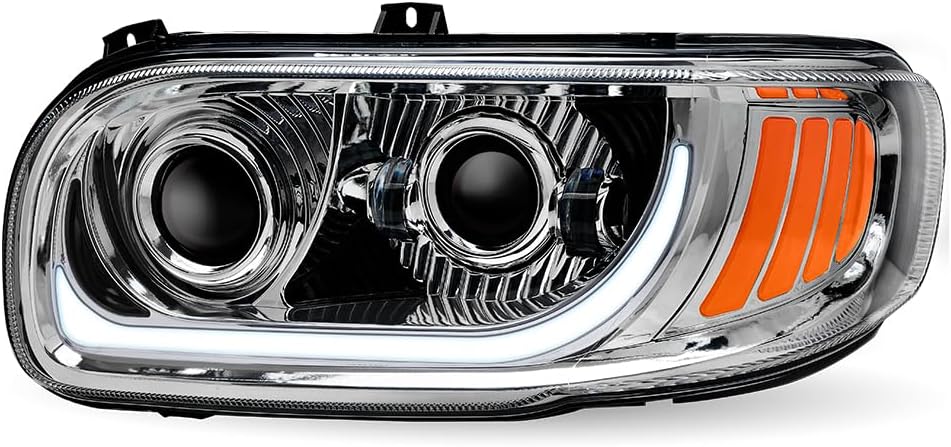
The Trux TLED-H110 is designed to enhance vehicle visibility and safety with its advanced LED projector technology and dual-function accent lighting. This assembly is specifically for the driver side of compatible Peterbilt models.
2. Product Overview
2.1. Key Features
- "Plug & Play" design for simplified installation.
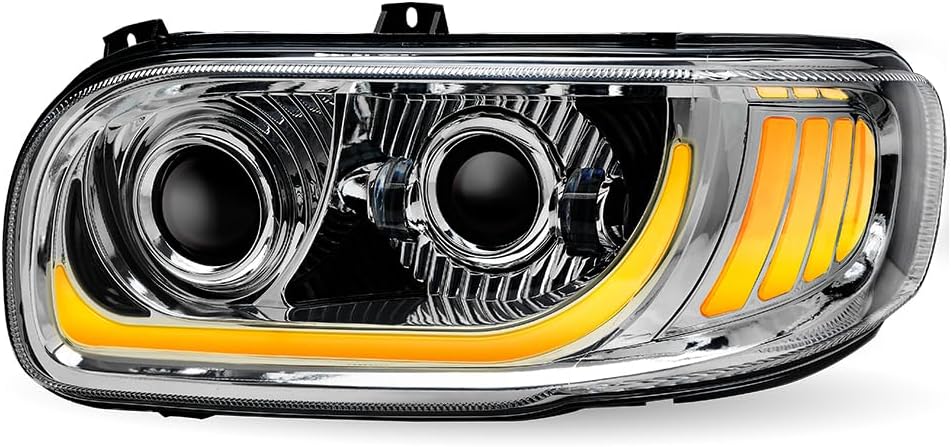
- Dual Function White Glow Position (DRL Auxiliary) and Amber Marker LED Accents.
- OE Replacement for part number P54-6112-110.
- Integrated LED Side Marker.
- Projector Technology for a wider and more focused beam pattern.
- Durable, waterproof construction.
2.2. What's in the Box
- 1 x Trux TLED-H110 LED Projector Headlight Assembly (Driver Side)
3. Vehicle Compatibility
This headlight assembly is compatible with the following Peterbilt truck models:
- Peterbilt 367: 2014 - 2018
- Peterbilt 388: 2006 - 2015
- Peterbilt 389: 2006 - Current Year
- Peterbilt 567: 2014 - 2018
Ensure your vehicle's make, model, and year match the compatibility list before proceeding with installation.
4. Installation Instructions
The Trux TLED-H110 headlight assembly features a "Plug & Play" design for straightforward installation. However, professional installation is recommended to ensure correct wiring and alignment, especially for those unfamiliar with vehicle electrical systems.
4.1. Pre-Installation Checklist
- Verify the headlight assembly matches the vehicle's driver side.
- Ensure the vehicle's ignition is off and the battery is disconnected to prevent electrical shorts.
- Gather necessary tools (e.g., screwdrivers, wrenches, wire cutters/strippers if custom wiring is needed).
4.2. Installation Steps
- Remove Existing Headlight: Carefully remove the old headlight assembly from your Peterbilt truck. This typically involves unscrewing mounting bolts and disconnecting the electrical harness. Refer to your vehicle's service manual for specific removal procedures.
- Inspect Wiring: Examine the vehicle's existing wiring harness for any signs of damage or corrosion. Clean any dirty connections.
- Connect New Headlight: Connect the Trux TLED-H110 headlight assembly's electrical connectors to the vehicle's wiring harness. The "Plug & Play" design means these should match directly. Ensure all connections are secure.
- Mount New Headlight: Position the new headlight assembly into the vehicle's headlight opening. Secure it using the original mounting bolts. Do not overtighten.
- Reconnect Battery: Reconnect the vehicle's battery.
- Test Functionality: Turn on the vehicle's lights to test all functions: low beam, high beam, DRL (white glow position), and amber marker lights.
- Adjust Aim: If necessary, adjust the headlight aim according to local regulations and for optimal road illumination. This usually involves adjustment screws on the headlight housing.

5. Operating Instructions
The Trux TLED-H110 LED Projector Headlight Assembly operates in conjunction with your vehicle's existing lighting controls.
- Low Beam/High Beam: Activate these functions using your vehicle's standard headlight switch. The projector technology provides a clear and wide beam pattern for improved visibility.
- White Glow Position (DRL Auxiliary): This feature provides a white LED accent light, typically functioning as a Daytime Running Light (DRL) or auxiliary position light, enhancing vehicle visibility during daylight hours.
- Amber Marker LED Accents: These amber LEDs function as marker lights, increasing the vehicle's visibility to other drivers, especially in low-light conditions or when signaling turns.
6. Maintenance
Regular maintenance ensures optimal performance and extends the lifespan of your headlight assembly.
- Cleaning: Clean the lens regularly with a soft cloth and mild soap and water. Avoid abrasive cleaners or harsh chemicals that could damage the polycarbonate lens material.
- Inspection: Periodically inspect the headlight assembly for any signs of damage, loose connections, or moisture ingress. Although the unit is waterproof, extreme conditions or physical damage can compromise its integrity.
- Bulb Replacement: The LED components are designed for long life and are generally not user-replaceable. If an LED fails, the entire assembly may need servicing or replacement.
7. Troubleshooting
If you encounter issues with your headlight assembly, refer to the following common troubleshooting steps:
- Headlight Not Illuminating:
- Check vehicle fuses related to headlights.
- Ensure all electrical connections are secure and free of corrosion.
- Verify the vehicle's headlight switch is functioning correctly.
- Dim or Flickering Lights:
- Inspect wiring for loose connections or damaged insulation.
- Check for adequate voltage supply to the headlight.
- Moisture Inside Lens:
- Small amounts of condensation can occur due to temperature changes and usually dissipate.
- If significant water ingress is observed, inspect the housing for cracks or seal damage. This may require professional inspection.
For persistent issues, contact customer support or a qualified automotive technician.
8. Technical Specifications
| Brand | Trux (Manufacturer) |
| Model | TLED-H110 |
| OEM Part Number | P54-6112-110 |
| Lens Material | Polycarbonate |
| Special Features | Waterproof, Projector Technology, Dual Function LED Accents |
| Vehicle Service Type | Semi Trucks |
| Auto Part Position | Front (Driver Side) |
| Color/Exterior | Chrome / Clear Lens |
| Assembly Required | Yes (Installation) |
9. Warranty and Support
9.1. Warranty Information
This Trux TLED-H110 LED Projector Headlight Assembly is covered by a 3-year warranty from the date of purchase. This warranty covers defects in materials and workmanship under normal use. It does not cover damage resulting from improper installation, accident, abuse, modification, or normal wear and tear.
Please retain your proof of purchase for warranty claims.
9.2. Customer Support
For technical assistance, warranty claims, or further inquiries, please contact your authorized Trux dealer or the point of purchase. When contacting support, please have your product model number (TLED-H110) and proof of purchase readily available.
