
1. Introduction
Thank you for choosing the Robustrue Digital Torque Wrench 1/2" (Model TH340). This precision instrument is designed for accurate torque measurement and application, ensuring fasteners are tightened to their specified values. Please read this manual thoroughly before operation to ensure safe and effective use.
2. Safety Information
Always observe basic safety precautions when using power tools and hand tools to reduce the risk of personal injury or damage to the tool or workpiece.
- Read and Understand: Read all instructions and safety warnings before using this tool.
- Eye Protection: Always wear appropriate eye protection when operating tools.
- Proper Use: Use the torque wrench only for its intended purpose. Do not use it as a breaker bar or for loosening fasteners.
- Maintain Grip: Ensure a firm grip on the handle during operation.
- Cleanliness: Keep the tool clean and free from oil, grease, and debris.
- Storage: Store the torque wrench in its protective case in a dry, secure location away from children.
- Battery Safety: Follow all battery safety guidelines when installing or replacing batteries. Do not mix old and new batteries or different types of batteries.
3. Product Overview
The Robustrue Digital Torque Wrench features a clear digital display and intuitive controls for precise torque application.
Key Features:
- Wide torque range for various applications.
- High precision with an accuracy of ±2%.
- Multiple operating modes: Preset, Real-time, and Peak.
- Target torque alert system with visual (green, yellow, red lights), audible (beeps), and tactile (vibration) feedback.
- Data storage for up to 500 records.
- Switchable units: Nm, ft-lb, in-lb, Kgf-m, Kgf-cm.
Display and Controls:
The wrench features an enhanced color display for clear data visibility and a user-friendly button interface.

Image: Enhanced color display of the Robustrue Digital Torque Wrench.
The display shows current torque, selected mode (Preset, Peak, Track), battery level, and unit of measurement. Control buttons include directional arrows for adjustment, an 'OK' button for confirmation, an 'M' button for mode selection, and a 'U' button for unit selection.
4. Setup
Battery Installation:
The Robustrue Digital Torque Wrench requires 3 AA batteries (included). Ensure correct polarity during installation.
- Unscrew the cap at the end of the handle.
- Insert 3 AA batteries, observing the polarity markings inside the battery compartment.
- Securely screw the cap back onto the handle.
For a visual guide on battery replacement, refer to the video below:
Video: Demonstrates how to replace the batteries in the digital torque wrench.
5. Operating Instructions
This section details how to operate your digital torque wrench for various tasks.
Power On/Off:
- Press the 'OK' key to power on the device.
- The device will automatically power off after a period of inactivity to conserve battery.
Switching Units:
The wrench supports multiple units of measurement.
- From the standby interface, press the 'U' key to cycle through available units: Nm, ft-lb, in-lb, Kgf-m, Kgf-cm.
Operating Modes:
The wrench offers three distinct operating modes:
- Preset Mode: Allows you to set a target torque value. The wrench will provide alerts as you approach and reach the target.
- Real-time Mode (Track Mode): Displays the current torque being applied in real-time.
- Peak Mode: Records and displays the maximum torque value achieved during an operation.
Press the 'M' key to switch between these three modes.

Image: Displaying the three operating modes: Preset, Real-time, and Peak.
Setting Preset Torque:
- In Preset Mode, use the up/down arrow keys to adjust the target torque value.
- Press the 'OK' key to save the set preset torque.
Target Torque Alert System:
The wrench provides progressive alerts as you approach your preset torque value:
- 80% of Target: Beep sound and green light.
- 90% of Target: Beep sound and yellow light.
- 100% of Target: Continuous beeping, red light, and vibration.

Image: Visual representation of the target torque alert system.
For a demonstration of setting units, modes, and data management, please watch the video below:
Video: Demonstrates how to switch units, select modes, set presets, and manage stored data.
For a general overview of the wrench's features and usage, refer to this video:
Video: Provides a quick overview of the digital torque wrench's features and application.
6. Data Management
The Robustrue Digital Torque Wrench can store up to 500 data records.
Querying Stored Data:
- From the standby interface, press and hold the down arrow key to enter data query mode.
- Use the up/down arrow keys to switch between stored data sets.
Deleting Stored Data:
You can delete individual data sets or all stored data.
- To delete all data: In data query mode, press 'M' (ALL) then 'U' (ONE) then 'M' (SUCC). The display will show "SUCC" indicating successful deletion.
- To delete one data set: In data query mode, navigate to the desired data set using the arrow keys. Then press 'M' (ALL) then 'U' (ONE) then 'M' (SUCC).
7. Specifications
| Feature | Detail |
|---|---|
| Model Number | TH340 |
| Manufacturer | Robustrue |
| Drive Size | 1/2 inch |
| Torque Range | 17-340 Nm (12.5-250.8 ft-lb) |
| Accuracy | ±2% |
| Material | Chrome Vanadium Steel |
| Finish | Powder Coated |
| Head Style | Hex |
| Power Source | 3 AA Lithium Ion batteries (included) |
| Data Storage | Up to 500 records |
| Item Length | 25.59 Inches |
| Item Weight | 2.36 kg |
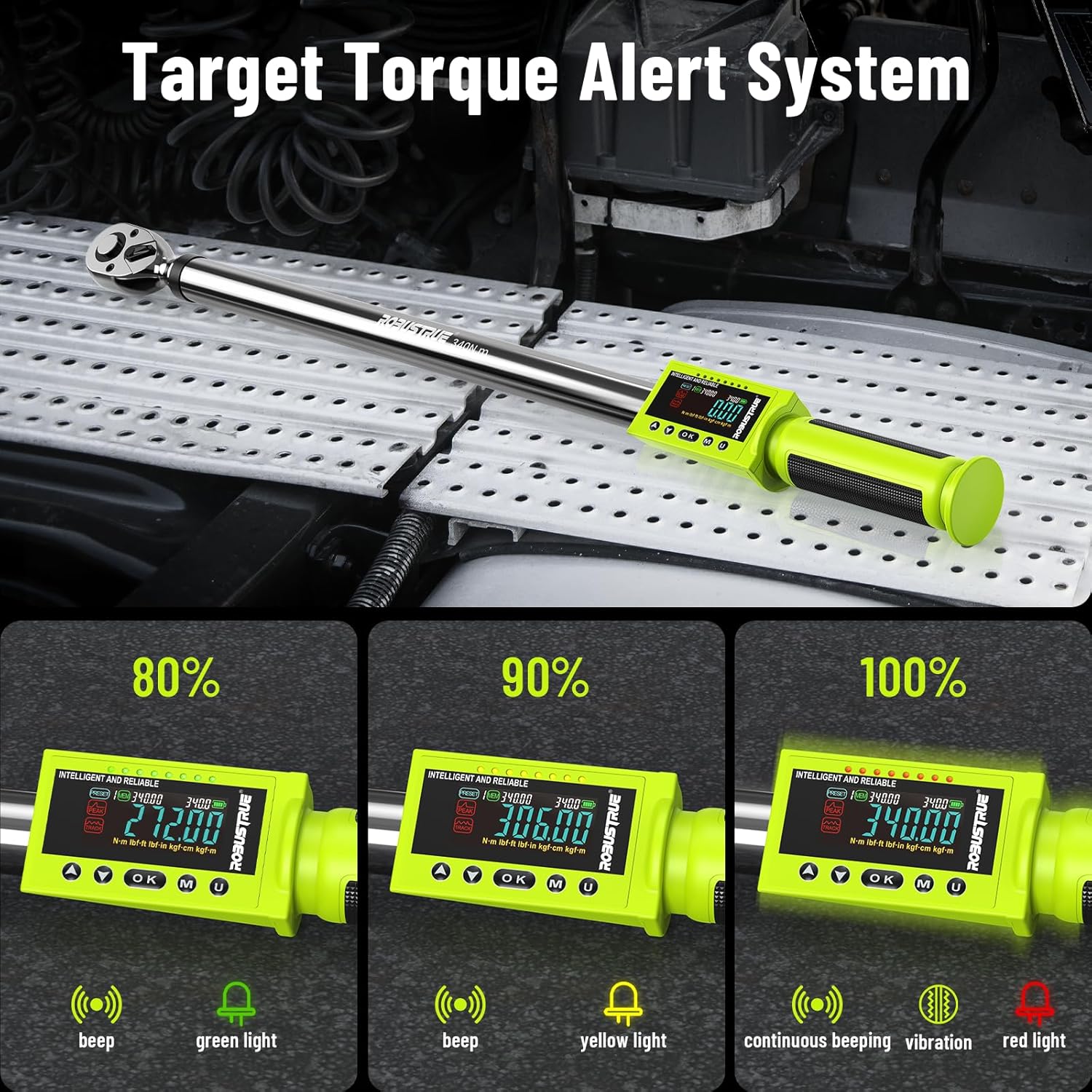
Image: Torque range specifications for the digital torque wrench.
8. Maintenance
Proper maintenance ensures the longevity and accuracy of your torque wrench.
- Cleaning: Wipe the tool with a clean, dry cloth after each use. Do not use harsh chemicals or abrasive cleaners.
- Storage: Store the torque wrench in its original protective case to prevent damage from impacts or environmental factors. Keep it in a dry place.
- Battery Care: Remove batteries if the tool will not be used for an extended period to prevent leakage and corrosion.
- Calibration: Digital torque wrenches require periodic calibration to maintain accuracy. Refer to the manufacturer's recommendations for calibration intervals, typically every 12 months or 5000 cycles.

Image: High-precision torque control and calibration certificate.
9. Troubleshooting
If you encounter issues with your Robustrue Digital Torque Wrench, refer to the following common problems and solutions:
| Problem | Possible Cause | Solution |
|---|---|---|
| Wrench does not power on | Dead or incorrectly installed batteries | Check battery polarity. Replace with fresh AA batteries. |
| Inaccurate torque readings | Needs calibration; improper technique | Ensure proper technique. Send for professional calibration if necessary. |
| Display is dim or flickering | Low battery power | Replace batteries. |
| Buttons are unresponsive | Software glitch; extreme temperature | Remove and reinsert batteries to reset. Allow tool to reach room temperature. |
10. Warranty and Support
Robustrue stands behind the quality of its products. For warranty information, technical support, or service inquiries, please contact Robustrue customer service through the retailer where the product was purchased or visit the official Robustrue website.
Please retain your proof of purchase for warranty claims.