
Introduction
The Borofone BE68 Cloud Bluetooth Neck-Mounted Earphones are designed to provide a hands-free audio experience with wireless connectivity. These earphones offer a stable connection to your smartphone, tablet, or other Bluetooth-enabled devices, ensuring good range and clear, balanced sound quality for both music playback and phone calls. Their lightweight construction makes them suitable for prolonged use, and they provide extended playback and talk time on a single charge.
Product Overview and Contents

Figure 1: Front view of the Borofone BE68 Cloud Bluetooth Neck-Mounted Earphones, showcasing the neckband design and in-ear buds.

Figure 2: Top-down view of the earphones, highlighting the flexible neckband and earbud placement.
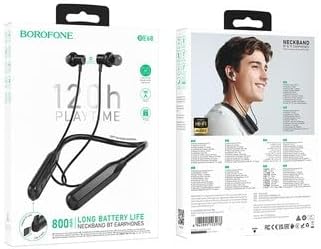
Figure 3: Retail packaging for the Borofone BE68 earphones, showing product features and specifications.
Package Contents:
- 1 x Borofone BE68 Cloud Bluetooth Neck-Mounted Earphones, Black
- Charging Cable (not explicitly listed but implied for rechargeable device)
- User Manual (this document)
Setup
1. Charging the Earphones
Before first use, fully charge the earphones. Connect the charging cable to the charging port on the neckband and the other end to a USB power source. The LED indicator will show charging status. A full charge takes approximately 2 hours. The earphones have an 800mAh battery capacity.
2. Powering On/Off
- To Power On: Press and hold the Power button (location not specified, typically on the control module) for a few seconds until the LED indicator lights up and you hear a power-on prompt.
- To Power Off: Press and hold the Power button again for a few seconds until the LED indicator turns off and you hear a power-off prompt.
3. Bluetooth Pairing
- Ensure the earphones are powered off.
- Press and hold the Power button until the LED indicator flashes rapidly (usually blue and red), indicating pairing mode.
- On your device (smartphone, tablet, etc.), enable Bluetooth and search for available devices.
- Select "Borofone BE68" from the list of found devices.
- Once connected, the LED indicator will typically stop flashing and remain solid blue, and you will hear a connection prompt.
The earphones support Bluetooth 5.3 for a stable connection and good range. They also support a 2-in-1 connection, allowing simultaneous connection to two devices.
Operating Instructions
Basic Controls (Typical)
While specific button functions are not detailed, most neck-mounted Bluetooth earphones feature common controls:
- Power Button: Power on/off, Play/Pause music, Answer/End calls.
- Volume Up (+): Increase volume, Next track (long press).
- Volume Down (-): Decrease volume, Previous track (long press).
Music Playback
Once paired, you can play music from your connected device. Use the earphone controls to play, pause, skip tracks, and adjust volume.
Call Functionality
When a call comes in, the earphones will ring. Press the Power button (or designated call button) to answer or end a call. Long press to reject a call.
TF Card Playback
The earphones support TF (microSD) cards up to 32GB. Insert a TF card with audio files into the designated slot. The earphones will automatically switch to TF card playback mode. Use the earphone controls to manage playback.
Language Prompts
The earphones support Chinese and English sound prompts. In non-pairing mode, double-click the main button to switch between languages. You will hear a beep confirming the change.
Maintenance
- Cleaning: Use a soft, dry cloth to clean the earphones. Do not use abrasive cleaners or solvents.
- Storage: Store the earphones in a cool, dry place away from direct sunlight and extreme temperatures.
- Battery Care: To prolong battery life, avoid fully discharging the battery frequently. Charge the earphones regularly, even if not in use for extended periods.
- Water Resistance: These earphones are not specified as water-resistant. Avoid exposure to water or excessive moisture.
Troubleshooting
| Problem | Possible Cause | Solution |
|---|---|---|
| Earphones do not power on. | Low battery. | Charge the earphones fully. |
| Cannot pair with device. | Earphones not in pairing mode; Bluetooth off on device; device too far. | Ensure earphones are in pairing mode. Turn on Bluetooth on your device. Move device closer to earphones. |
| No sound or low volume. | Volume too low; earphones not connected; incorrect audio output selected. | Increase volume on earphones and device. Re-pair earphones. Check audio output settings on your device. |
| Intermittent connection. | Interference; device too far; low battery. | Move away from sources of interference. Move device closer. Charge earphones. |
Specifications
| Feature | Detail |
|---|---|
| Model Name | BE68 |
| Model Number | 20000012 |
| Bluetooth Version | 5.3 (JL AC7006 chip) |
| Battery Capacity | 800mAh |
| Charging Time | Approximately 2 hours |
| Working Time | Up to 120 hours |
| Standby Time | Up to 800 hours |
| Material | ABS (Acrylonitrile Butadiene Styrene) |
| Total Length | 75cm |
| Item Weight | 50g |
| TF Card Support | Yes, up to 32GB |
| Multi-device Connection | 2-in-1 connection supported |
| Voice Prompts | Chinese and English |
| Manufacturer | Shenzhen Hoco Technology Development Co., Ltd. |
Warranty and Support
Specific warranty details are not provided in the product information. Please refer to your point of purchase or the manufacturer's official website for warranty information and customer support. For technical assistance or inquiries, contact Borofone customer service.
Keep your purchase receipt as proof of purchase for any warranty claims.