
1. Introduction and Overview
Thank you for choosing the fohoa 4K 33FT Digital Camera D50. This rugged, dustproof, and shockproof camera is designed to capture your adventures both on land and underwater. With its advanced features and user-friendly design, you can preserve vivid memories in stunning 4K video and 48MP photos.
Key Features:
- Waterproof up to 33FT (10 meters): Ideal for snorkeling, diving, and beach activities.
- 4K Video Recording & 48MP Photos: Capture high-resolution content with an 18x digital zoom.
- Dual Screens: Features a 2.8" rear screen and a 1.44" front screen for easy framing and selfies.
- SOS Flashlight: One-touch activation for emergencies or low-light conditions.
- 2500mAh Battery: Ensures extended power for prolonged use.
- Creative Modes: Includes continuous shooting, timed captures, time-lapse photography, and dynamic filters.

Image: The fohoa D50 camera is shown in action during surfing, swimming, and diving, highlighting its versatility for water activities.
2. What's in the Box
Your fohoa 4K 33FT Digital Camera D50 package includes:
- fohoa D50 Camera Body
- Rechargeable Lithium Ion Battery (1 included, 2 total if purchased with extra)
- USB Charging Cable
- Wrist Strap
- 32GB Micro SD Card (pre-installed or included separately)
- User Manual
- Carrying Pouch (may vary by package)
3. Setup
- Install Battery: Open the waterproof compartment cover located at the bottom of the camera. Insert the provided Lithium Ion battery into the battery slot. Ensure it is correctly oriented.
- Insert Micro SD Card: Locate the Micro SD card slot within the same waterproof compartment. Insert the 32GB Micro SD card until it clicks into place. The camera supports up to 128GB cards.
- Charge Battery: Connect the camera to a USB power source using the provided USB charging cable. The charging port is located inside the waterproof compartment. A full charge ensures maximum operating time.
- Secure Compartment: Crucially, ensure the waterproof compartment cover is securely closed and locked before any water exposure. Improper sealing can lead to water damage.
- Power On: Press and hold the power button (usually located on the top or side) until the screen illuminates.
- Initial Settings: Upon first use, you may be prompted to set the date and time. Navigate using the directional buttons and confirm with the OK/SET button.

Image: The fohoa D50 camera is displayed alongside an illustration of its 2500mAh long-lasting battery, emphasizing its power capacity.
4. Operating Instructions
4.1 Power On/Off & Shutter
- Power On: Press and hold the power button (top-left) for a few seconds.
- Power Off: Press and hold the power button again until the screen turns off.
- Shutter Button: Press the shutter button (top-right) to take a photo or start/stop video recording.
4.2 Mode Selection
Use the 'MODE' button to switch between different camera modes, such as Photo, Video, Playback, and Settings.
4.3 Zoom Function
Use the 'W' (Wide) and 'T' (Telephoto) buttons to adjust the 18x digital zoom. Press 'W' to zoom out and 'T' to zoom in.

Image: The fohoa D50 camera is shown with an overlay indicating its 18x digital zoom feature, demonstrating its ability to magnify subjects.
4.4 Dual Screen Operation
The camera features a 2.8" rear screen and a 1.44" front screen. Use the dedicated screen switch button (often near the power button) to toggle between the front and rear displays, especially useful for selfies.
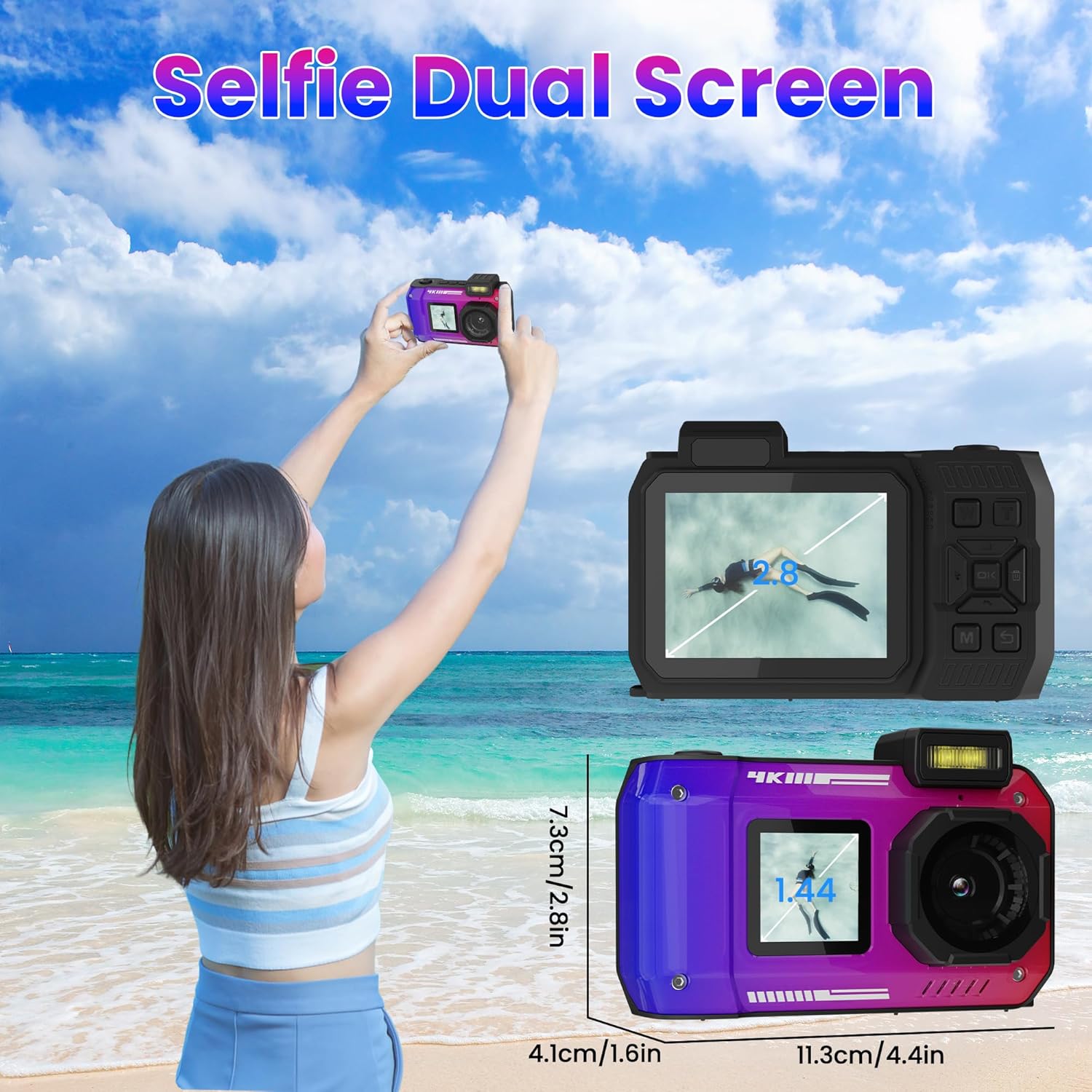
Image: The fohoa D50 camera is depicted with its dual screens, illustrating how the front screen facilitates taking selfies.
4.5 Capturing Photos & Videos
- 48MP Photos: Select Photo mode. Frame your shot using either screen. Half-press the shutter button to activate autofocus, then fully press to capture.
- 4K Video: Select Video mode. Press the shutter button to start recording. Press again to stop.

Image: The fohoa D50 camera is shown capturing a high-definition 48MP image of a family enjoying themselves on a beach.

Image: The fohoa D50 camera is shown actively recording a surfer, emphasizing its 4K video recording capability.
4.6 Autofocus & Image Stabilization
The camera features intelligent autofocus and built-in stabilization to ensure crisp and clear shots. Half-press the shutter button to allow the camera to focus before fully pressing to capture.

Image: The fohoa D50 camera illustrates its advanced image stabilization and autofocus features by showing a clear shot of a diver mid-air versus a blurry one without these features.
4.7 SOS Flashlight
Activate the one-touch SOS flashlight for emergencies or to illuminate subjects in dark environments. The button is typically located on the top of the camera.

Image: The fohoa D50 camera is shown underwater with its one-touch SOS flashlight activated, demonstrating its utility in dark aquatic environments.
4.8 Creative Features
Explore various creative modes through the camera's menu:
- Continuous Shooting: Capture a rapid sequence of photos.
- Timed Captures: Set a delay before taking a photo.
- Time-Lapse Photography: Capture a series of images over time to create a time-lapse video.
- Dynamic Filters: Apply various filters to enhance your photos.
- Fill Light: Use the built-in fill light for improved visibility in low light or murky waters.
- Smile Capture: Automatically takes a photo when a smile is detected.

Image: The fohoa D50 camera highlights its creative features, including time-lapse, continuous shooting, dynamic filters, and timed captures, through a collage of example photos.
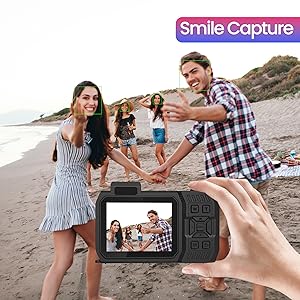
Image: The fohoa D50 camera shows its smile capture feature in action, with green boxes indicating detected faces and smiles.

Image: The fohoa D50 camera demonstrates the effect of its fill light feature, showing a clearer underwater image with the light on compared to off.
4.9 Official Product Video
Video: This official seller video demonstrates the fohoa D50 underwater digital camera's features and usage for snorkeling, surfing, and swimming, showcasing its capabilities in various water environments.
5. Maintenance
- Waterproof Seal: Always inspect the waterproof seals and compartment cover for any debris or damage before each use, especially before submerging the camera. Ensure it is clean and properly sealed.
- Cleaning: After use in saltwater, rinse the camera thoroughly with fresh water and dry it completely with a soft cloth. Clean the lens and screens with a microfiber cloth to avoid scratches.
- Battery Care: Store the battery in a cool, dry place. Avoid extreme temperatures. Charge the battery fully before extended periods of non-use.
- Storage: Store the camera in its carrying pouch or a protective case when not in use to prevent scratches and impacts.
6. Troubleshooting
- Water Leakage: If water enters the camera, immediately power it off, remove the battery and SD card, and allow it to dry completely. This often indicates improper sealing of the battery/card compartment. Always double-check the seal before water activities.
- Memory Card Error: Ensure the Micro SD card is inserted correctly. Try re-inserting or formatting the card (this will erase all data). If the issue persists, try a different compatible Micro SD card.
- Camera Not Charging/Powering On: Verify the USB cable is securely connected to both the camera and a working power source. Ensure the battery is properly installed. If the battery is old, it may need replacement.
- Blurry Images/Videos: Ensure the lens is clean and free of smudges. Activate autofocus by half-pressing the shutter button before fully pressing. Check lighting conditions; low light can affect clarity.
- Physical Damage: While rugged, the camera is not indestructible. Avoid dropping it from excessive heights or subjecting it to extreme impacts.
7. Specifications
| Feature | Detail |
|---|---|
| Model Name | D50 |
| Brand | fohoa |
| Maximum Webcam Image Resolution | 48 MP |
| Image Stabilization | Digital |
| Maximum Focal Length | 18 Millimeters |
| Maximum Aperture | 10 Millimeters |
| Supported File Format | AVI |
| Photo Sensor Technology | CMOS |
| Aspect Ratio | 1:1 |
| Batteries | 1 Lithium Ion batteries required. (included) |
| Item Weight | 14.4 ounces |
| Package Dimensions | 5.55 x 4.13 x 2.64 inches |
| Manufacturer | FOHOA |
8. Warranty and Support
For warranty information and customer support, please refer to the documentation included with your product or contact FOHOA customer service directly. Keep your proof of purchase for any warranty claims.


