
Introduction
Thank you for choosing the Sarsumir U80Y002 Digital LED Alarm Clock. This silent, non-ticking bedside alarm clock is designed to bring convenience to your daily life with its clear LED display and multiple functions. This manual provides comprehensive instructions to help you set up and operate your new alarm clock effectively.
Package Contents
- 1 x Digital LED Alarm Clock
- 1 x USB Data Cable
- 1 x Instruction Manual
Product Features
- Multifunctional Digital Clock: Features a large 6.7-inch LED display for clear viewing.
- Multiple Display Modes: Includes Time, Date, Temperature, Night Mode, and Alarm Mode.
- Adjustable Brightness: Three levels (bright, medium, low) and an automatic night mode (18:00-06:00).
- Dual Power Options: Can be powered by 3 AAA batteries (not included) or via USB cable.
- Silent Operation: Non-ticking design ensures a quiet environment.
- Snooze Function: Provides 1 to 60 minutes of extra sleep (default 5 minutes).
- Time Formats: Supports both 12-hour and 24-hour display.
- Three Alarm Modes: Monday-Friday, Monday-Saturday, and Monday-Sunday.
- Versatile Placement: Suitable for various environments such as bedrooms, offices, studies, and kitchens.

Image: The alarm clock shown in different environments, including a kitchen, study, office, and bedroom, demonstrating its versatile design.
Setup
1. Powering the Device
The alarm clock can be powered in two ways:
- USB Power: Connect the provided USB data cable to the DC Power Jack on the back of the clock and plug the other end into a USB power source (e.g., power bank, laptop, or USB charger). This provides continuous power.
- Battery Power: Insert three AAA batteries (not included) into the battery slot on the back of the clock. When powered by batteries, the display will automatically turn off after 16 seconds to conserve energy. You can activate the display by sound or by pressing any button.

Image: The alarm clock can be powered by 3 AAA batteries (not included) or via a USB cable connected to a power bank, laptop, or charger.
2. Initial Setup and Button Overview
Familiarize yourself with the buttons located on the back of the alarm clock:
- DOWN Button: Used to decrease values or navigate settings.
- UP Button: Used to increase values or navigate settings.
- LIGHT/SNOOZE Button: Activates snooze during an alarm, adjusts brightness, or turns off the display in battery mode.
- MODE Button: Cycles through different display modes (Time, Date, Temperature) and enters setting modes.
- ALARM Button: Enters alarm setting mode.
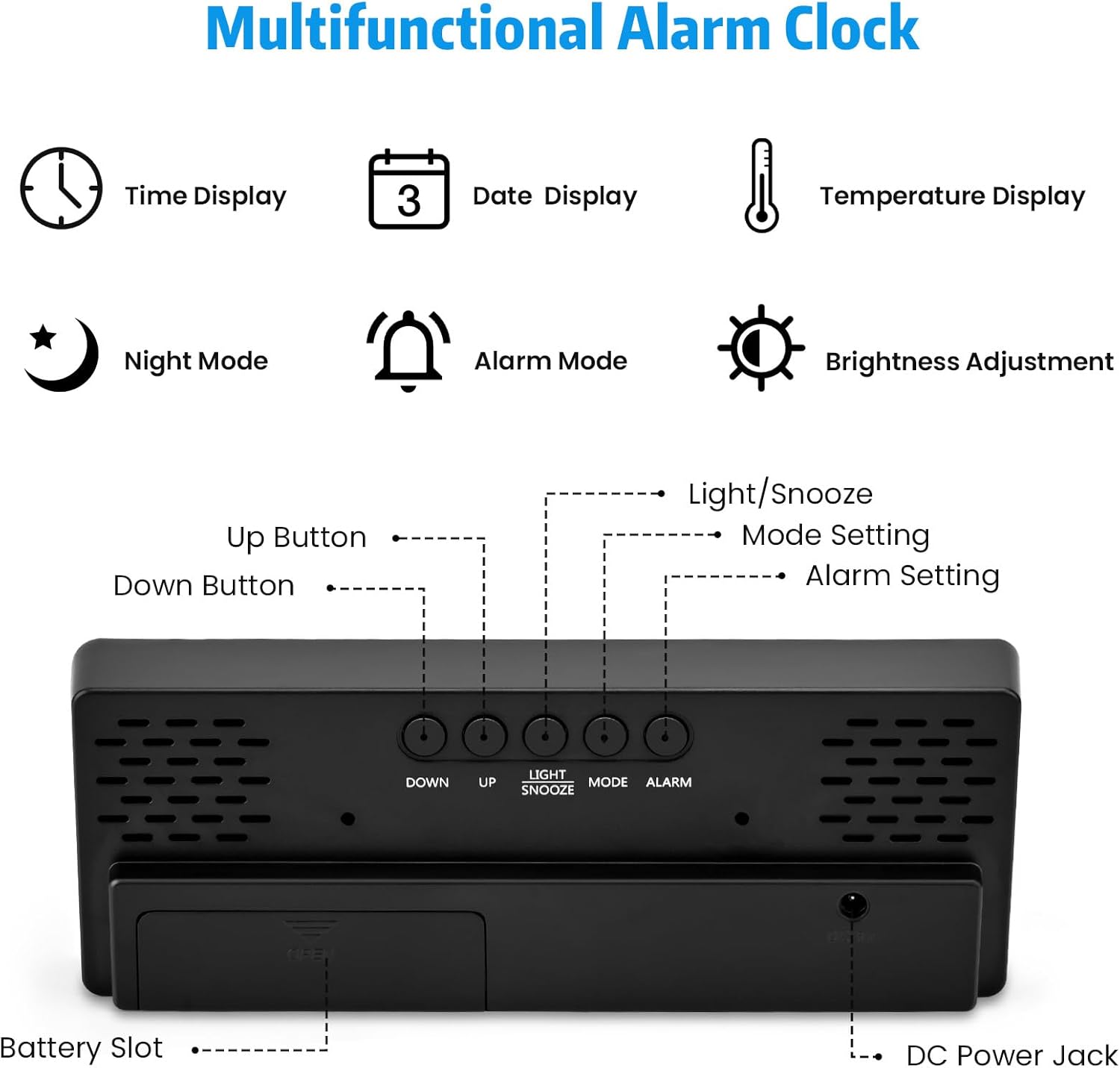
Image: Rear view of the alarm clock, highlighting the Up, Down, Light/Snooze, Mode, and Alarm buttons, along with the battery slot and DC power jack.
Operating Instructions
1. Setting Time and Date
- Press the MODE button to cycle through Time, Date, and Temperature display modes.
- To set the time, press and hold the MODE button for 3 seconds. The hour digits will flash. Use the UP and DOWN buttons to adjust the hour.
- Press MODE again to move to minutes, then use UP and DOWN to adjust.
- Continue pressing MODE to set the year, month, and day in the same manner.
- After setting the date, press MODE to exit the setting mode.
- To switch between 12-hour and 24-hour format, press the UP button while in time display mode (not in setting mode).
2. Adjusting Brightness and Night Mode
The clock offers three levels of brightness and a customizable night mode:
- Manual Brightness: In normal time display mode, press the UP or DOWN button to cycle through three brightness levels: Bright, Medium, and Low.
- Night Mode: The clock automatically dims between 18:00 (6 PM) and 06:00 (6 AM) by default. To customize the night mode period, press and hold the LIGHT/SNOOZE button for 3 seconds. Use UP and DOWN to set the start and end times for the night mode. Press LIGHT/SNOOZE to confirm each setting.
- Display Off (Battery Mode): When powered by batteries, the display turns off after 16 seconds. To turn off the display completely for a quiet night, press and hold the LIGHT/SNOOZE button for more than 3 seconds. Press any button to reactivate the display.
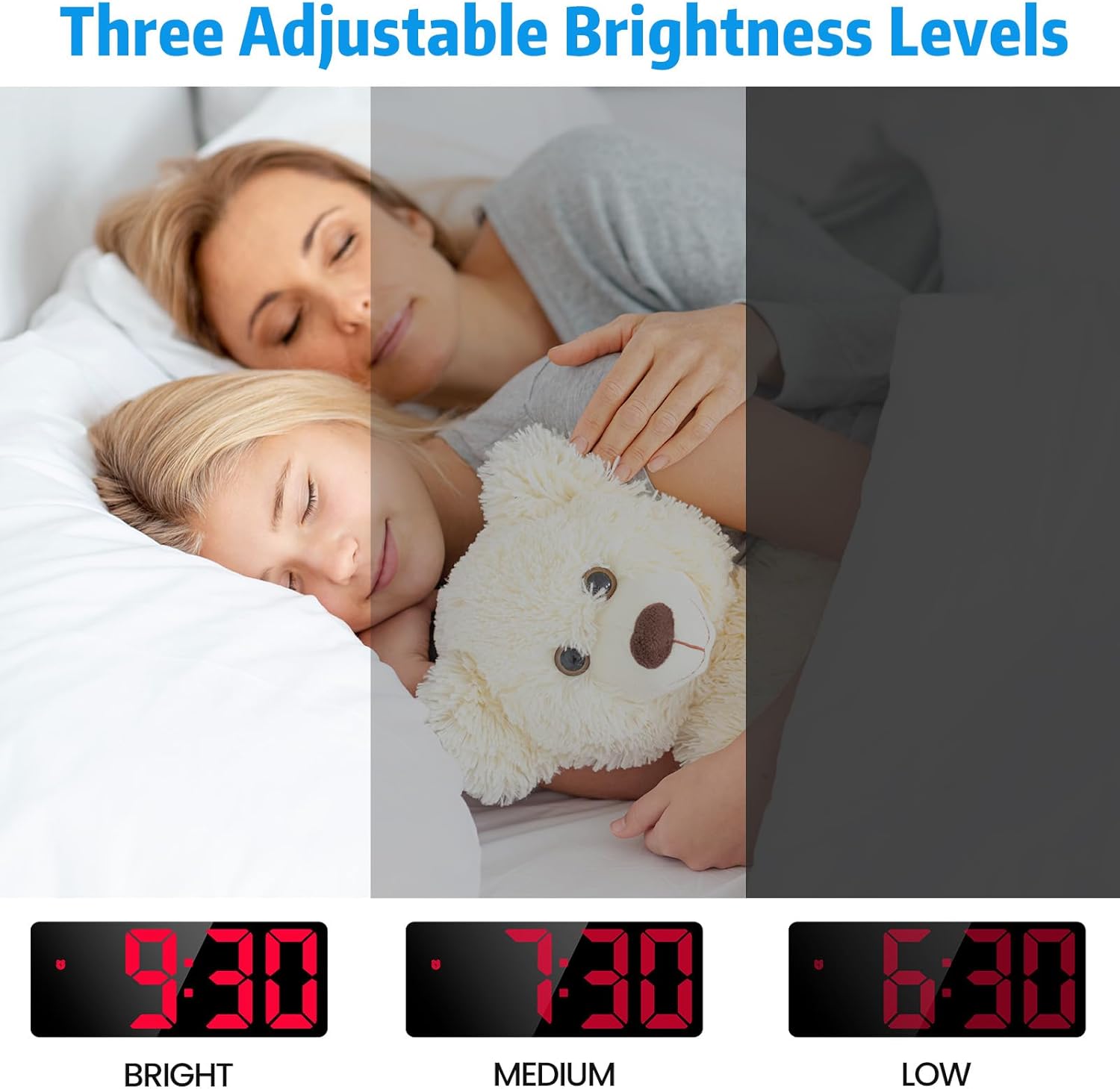
Image: The alarm clock display demonstrating three adjustable brightness levels: Bright, Medium, and Low, for optimal visibility in different lighting conditions.
3. Setting Alarms and Snooze Function
The clock supports three alarm modes and a snooze function:
- Press the ALARM button to enter alarm setting mode. The alarm time will flash.
- Use the UP and DOWN buttons to set the desired alarm hour. Press ALARM to confirm.
- Use the UP and DOWN buttons to set the desired alarm minute. Press ALARM to confirm.
- Next, select the alarm mode:
- 1-5: Monday to Friday
- 1-6: Monday to Saturday
- 1-7: Everyday
- Snooze Function: When the alarm sounds, press the LIGHT/SNOOZE button to activate snooze. The default snooze time is 5 minutes. You can adjust the snooze duration from 1 to 60 minutes by pressing and holding the LIGHT/SNOOZE button during snooze mode and using UP/DOWN.
- To cancel the alarm completely when it sounds, press any other button (e.g., UP, DOWN, MODE, ALARM).

Image: The alarm clock displaying the three alarm modes (1-5 for weekdays, 1-6 for Mon-Sat, 1-7 for everyday) and the Light/Snooze button for activating snooze.
4. Display Modes (Time, Date, Temperature)
The clock can display time, date, and temperature. Press the MODE button repeatedly to cycle through these displays.
- Time Display: Shows the current time in 12-hour or 24-hour format.
- Date Display: Shows the current date (Year/Month/Day).
- Temperature Display: Shows the ambient temperature.

Image: The alarm clock with its large digital display, showing the time and indicating its dimensions (16cm/6.3in length, 6cm/10.2in width, 1.8-2.5cm/0.7-1.0in height).
Maintenance
- Clean the clock with a soft, dry cloth. Do not use abrasive cleaners or solvents.
- Avoid exposing the clock to extreme temperatures, direct sunlight, or high humidity.
- If using batteries, remove them if the clock will not be used for an extended period to prevent leakage.
Troubleshooting
| Problem | Possible Cause | Solution |
|---|---|---|
| Display is blank or flickering. | Low batteries or power connection issue. | Replace AAA batteries or ensure USB cable is securely connected to a working power source. |
| Alarm does not sound. | Alarm not set correctly or alarm volume is too low (if adjustable, though not specified for this model). | Verify alarm time and mode settings. Ensure the alarm is enabled. |
| Display turns off frequently when on battery power. | This is normal behavior to conserve battery life. | Tap any button or make a sound to reactivate the display. For continuous display, use USB power. |
| Incorrect time/date. | Time/date not set or reset after power interruption. | Follow the "Setting Time and Date" instructions to reset. |
Specifications
| Brand | Sarsumir |
| Model Number | U80Y002 |
| Color | Red |
| Product Dimensions (L x W x H) | 17 x 3.81 x 7.3 cm (6.7 x 1.5 x 2.9 inches) |
| Item Weight | 150 grams (0.33 lbs) |
| Display Type | Digital LED |
| Power Source | USB cable or 3 x AAA batteries (not included) |
| Snooze Duration | Adjustable 1-60 minutes (default 5 minutes) |
| Brightness Levels | 3 (Bright, Medium, Low) + Night Mode |
Warranty and Support
Specific warranty information and customer support contact details are not provided in the product description. Please refer to the packaging or contact your retailer for warranty terms and support options.