1. Product Overview
The YougetTech Evaporative Humidifier (Model EH18E) is designed to provide natural and pure humidification for large rooms, up to 725 sq.ft. Utilizing a no-mist evaporation principle, it prevents the spread of impurities and white dust, making it safe for all family members, including children and the elderly. Its quiet operation and large 1.6-gallon water tank ensure continuous, comfortable humidity without frequent refills.

Figure 1: Front view of the YougetTech Evaporative Humidifier.
2. Key Features
- Natural Pure Evaporation: Prevents the spread of water impurities and white dust, ensuring cleaner air. Safe for use with tap water.
- High Humidifying Capacity: Delivers up to 1000 mL/h (or 0.32 Gal/H) of moisture, effectively humidifying areas up to 725 sq.ft.
- Large Water Tank: Features a 1.6-gallon (6L) capacity water tank for over 24 hours of continuous operation, reducing the need for frequent refills.
- 10 Speed Modes: Customize your desired humidity level with 10 adjustable fan speeds.
- Ultra-Quiet Operation: Operates at an ultra-low noise level of 30dB (or less than 22dB in lowest mode), ideal for bedrooms and sensitive sleepers.
- Timer Function: Includes a 1-12 hour timer for convenient preset operation.
- Easy to Clean Design: Separate casing design allows for easy disassembly and cleaning, with electronic components safely located at the top. The washable filter screen can be used for 1-2 years with repeated cleaning.
- Visual Water Level Window: Easily monitor the water level without lifting the tank.
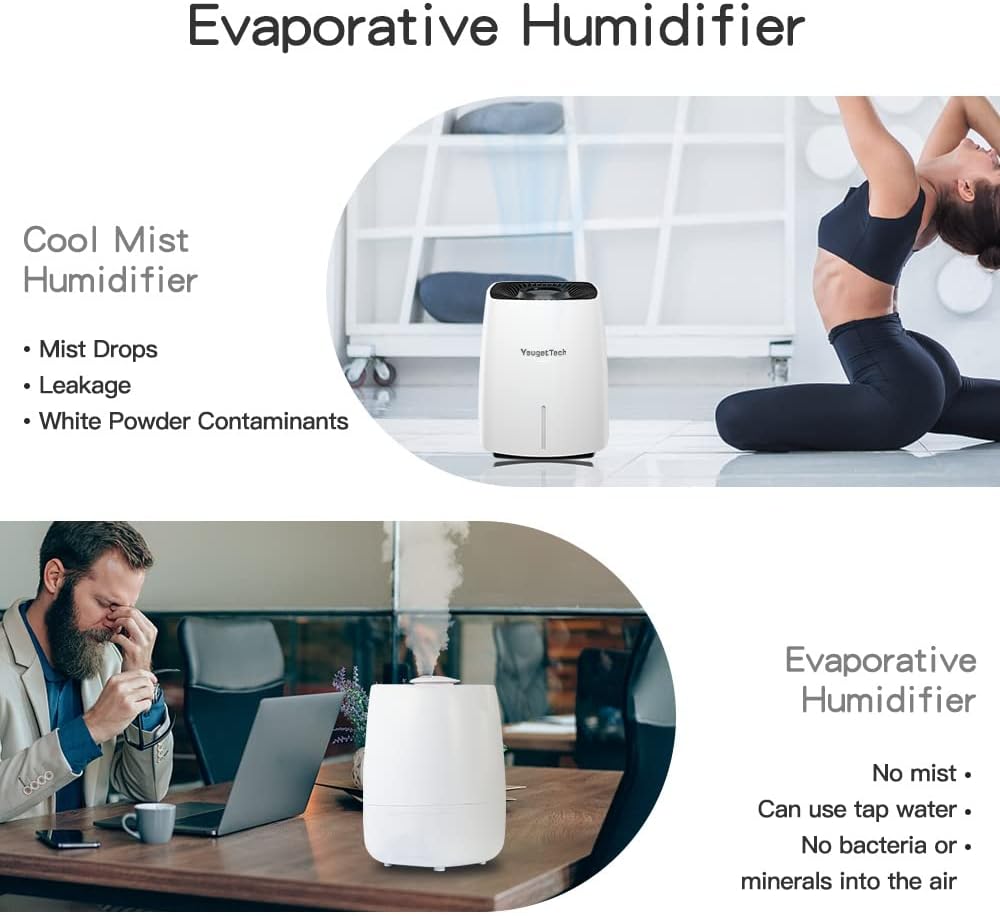
Figure 2: Illustrates the benefits of evaporative humidification over cool mist, highlighting no mist, no drops, no leakage, and no white powder contaminants.

Figure 3: Overview of key features including 10 adjustable speeds, no water mist, low noise, and energy saving.
3. Setup Guide
3.1 Unboxing and Placement
- Carefully remove the humidifier and all packaging materials from the box.
- Place the humidifier on a flat, stable, and water-resistant surface. Ensure it is away from direct sunlight, heat sources, and electronic devices.
- Allow at least 6 inches of space from walls or furniture for optimal airflow.
3.2 Filling the Water Tank
- Gently lift the top section of the humidifier to access the water tank. The design allows for easy separation of the electronic components from the water tank.
- Remove the water tank from the base.
- Fill the water tank with clean tap water. The humidifier is designed to purify tap water through natural evaporation. Do not exceed the maximum fill line.
- Carefully place the water tank back onto the base, ensuring it is properly seated.
- Replace the top section of the humidifier, aligning it correctly.

Figure 4: Demonstrates the process of filling the large 6-liter water tank.

Figure 5: Shows the convenience of refilling the humidifier directly with tap water.
4. Operating Instructions
4.1 Power On/Off
- Plug the power cord into a standard electrical outlet.
- Press the Power Button on the control panel to turn the humidifier ON or OFF.
4.2 Adjusting Fan Speed (10 Levels)
- After turning on the unit, press the Speed Button repeatedly to cycle through the 10 available fan speed levels.
- Lower speeds (1-3) are ideal for quiet operation, especially during sleep. Higher speeds provide faster humidification for larger areas.
4.3 Setting the Timer
- Press the Timer Button to set the desired operating duration. You can set the timer from 1 to 12 hours.
- The humidifier will automatically turn off once the set time has elapsed.
4.4 Sleep Mode
- The humidifier operates at ultra-low noise levels (30dB) in its lowest speed settings (1-3), making it suitable for sleep mode. The faint lighting design also contributes to a comfortable dark environment.

Figure 6: Illustrates the 10 speed levels and the ultra-quiet sleep mode, suitable for sensitive sleepers including babies and seniors.
Video 1: Official product video demonstrating the YougetTech EH18 Evaporative Humidifier's features, including its no-mist operation, quiet performance, and large capacity.
5. Maintenance
Regular maintenance ensures optimal performance and longevity of your humidifier. It is recommended to clean the unit weekly, especially the filter screen and water tank.
5.1 Cleaning the Humidifier Wick/Filter Screen
- Turn off and unplug the humidifier before cleaning.
- Remove the top section and the water tank.
- Carefully remove the humidifier wick/filter screen from its frame.
- The filter screen is washable by hand or machine. Rinse it thoroughly under running water or wash it with mild soap and water. For machine washing, place it in a laundry bag on a gentle cycle.
- Allow the filter to air dry completely before reinserting it. The filter can be used for 1-2 years with repeated cleaning.
5.2 Cleaning the Water Tank and Base
- Empty any remaining water from the tank and base.
- Wipe down the interior of the water tank and the base with a soft cloth and mild detergent.
- Rinse thoroughly to remove any soap residue.
- Ensure all parts are dry before reassembling the humidifier.

Figure 7: Demonstrates how to wash the humidifier wick by hand, highlighting its reusability for many years.
6. Troubleshooting
| Problem | Possible Cause | Solution |
|---|---|---|
| Humidifier does not turn on. | No power, unit not plugged in, or power button not pressed. | Ensure the power cord is securely plugged into a working outlet. Press the power button firmly. |
| No humidity output or low output. | Water tank empty, filter is dry or dirty, or fan speed is too low. | Refill the water tank. Ensure the filter is properly saturated with water. Clean or replace the filter if it's dirty. Increase the fan speed setting. |
| Unit is noisy. | Fan operating at high speed, unit not on a stable surface, or internal component issue. | Reduce the fan speed, especially for quiet environments. Ensure the humidifier is placed on a flat, stable surface. If noise persists, contact customer support. |
| Humidity level not increasing sufficiently. | Room size too large for unit, doors/windows open, or low fan speed. | Ensure the humidifier is appropriate for your room size (up to 725 sq.ft). Close doors and windows to contain humidity. Increase fan speed. |
| Water leakage. | Water tank not properly seated, or damage to the tank/base. | Ensure the water tank is correctly positioned and sealed on the base. Inspect for cracks or damage. If damaged, discontinue use and contact support. |
7. Product Specifications
| Attribute | Detail |
|---|---|
| Brand | YougetTech |
| Model Name | EH18E |
| Operation Mode | Evaporative |
| Water Tank Capacity | 1.6 Gallon (approx. 6 Liters) |
| Humidifying Capacity | 1000 mL/h (Max) |
| Applicable Area | Up to 725 sq.ft |
| Noise Level | 30dB (Ultra-low in sleep mode, less than 22dB in lowest mode) |
| Speed Settings | 10 Speed Levels |
| Timer | 1-12 Hours |
| Filter Type | Wicking Filters (Washable) |
| Product Dimensions | 15"D x 13"W x 13"H |
| Item Weight | 8.48 pounds |
| Voltage | 120 Volts |
| Wattage | 22 watts |
8. Warranty and Support
YougetTech is committed to providing high-quality products and excellent customer service. Your YougetTech humidifier comes with a standard warranty. For specific warranty details, please refer to the warranty card included in your product packaging or visit the official YougetTech website.
If you encounter any issues or have questions regarding your product, please do not hesitate to contact our customer support team. YougetTech offers 24-hour online service for any assistance.
- Contact Method: Please contact us through the order details page on the platform where you purchased the product.
- Online Support: Available 24/7 for your convenience.

