
Introduction
This manual provides essential information for the safe and effective use of your TWFRIC 37-Key Kids Toddler Toy Piano Keyboard, Model 0045. Please read these instructions carefully before operating the product and retain them for future reference.
Safety Information
- Not suitable for children under 3 years due to small parts.
- Adult supervision is recommended during use.
- Do not expose the product to water or excessive moisture.
- Use only the specified power sources (USB cable or 3 AA batteries).
- Do not mix old and new batteries, or different types of batteries.
- Remove batteries if the product is not used for an extended period.
- Keep the product away from heat sources.
Package Contents
Verify that all items are present in the package:
- 1 x TWFRIC 37-Key Kids Toddler Toy Piano Keyboard
- 1 x Microphone
- 1 x USB Power Cable
Product Features
The TWFRIC 37-Key Kids Toddler Toy Piano Keyboard is designed to introduce children to music with various interactive features:
- 37 Keys: Provides a suitable range for beginners to explore melodies.
- Wood-Grain Keys: Designed for a tactile experience, mimicking a traditional piano.
- Dual Speakers: Enhanced sound output for a clearer audio experience.
- 8 Tones: Offers a variety of instrument sounds.
- 8 Rhythms: Includes different musical styles for accompaniment.
- 19 Demos: Pre-recorded songs for listening and learning.
- 4 Percussion Sounds: Additional rhythmic elements.
- 4 Animal Sounds: Engaging sound effects for younger users.
- Record & Playback Function: Allows users to record and listen to their compositions.
- Volume/Tempo Control: Adjustable settings for personalized play.
- Microphone Input: For singing along while playing.
- Power Options: Can be powered via USB cable or 3 AA batteries.

Figure 1: Overview of keyboard features and dimensions (43cm/16.9in length, 16cm/6.3in width).

Figure 2: Detailed view of key design, speaker placement, and control panel.
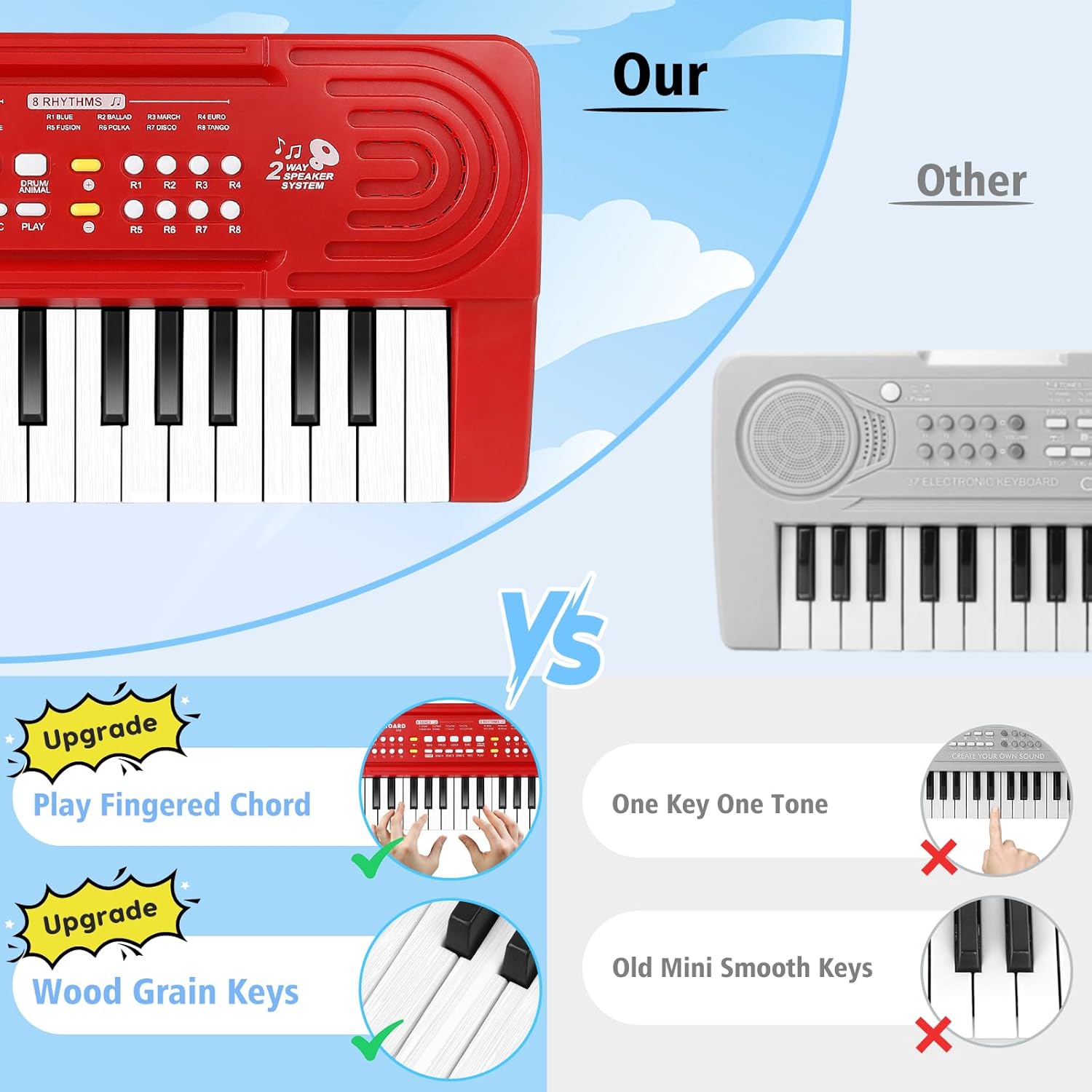
Figure 3: Comparison highlighting the wood-grain key design and fingered chord functionality.
Setup
Power Supply
The keyboard can be powered by either a USB cable or 3 AA batteries (not included).
- Battery Installation: Locate the battery compartment on the underside of the keyboard. Open the cover, insert 3 new AA batteries, ensuring correct polarity (+/-). Close the cover securely.
- USB Power: Connect the small end of the provided USB cable to the keyboard's power port. Connect the larger end to a standard USB power adapter (e.g., phone charger) or a computer USB port.
Microphone Connection
Plug the microphone cable into the designated microphone jack on the keyboard. Ensure it is fully inserted for proper function.
Operating Instructions
- Power On/Off: Press the 'Power' button to turn the keyboard on or off.
- Volume Control: Use the 'Volume Up' and 'Volume Down' buttons to adjust the overall sound level.
- Tempo Control: Use the 'Tempo Up' and 'Tempo Down' buttons to adjust the speed of rhythms and demos.
- Selecting Tones: Press the 'Tone' button repeatedly or use the numbered buttons (T1-T8) to cycle through different instrument sounds.
- Selecting Rhythms: Press the 'Rhythm' button repeatedly or use the numbered buttons (R1-R8) to select a background rhythm. Press 'Stop' to end the rhythm.
- Playing Demos: Press the 'Demo' button repeatedly or use the numbered buttons (D1-D19) to play pre-recorded songs. Press 'Stop' to end the demo.
- Percussion/Animal Sounds: Press the dedicated 'Percussion' or 'Animal Sound' buttons to activate these effects.
- Record & Playback:
- Press the 'REC' button to start recording your playing.
- Play your desired melody.
- Press the 'PLAY' button to listen to your recorded performance.
- Microphone Use: Once connected, speak or sing into the microphone. The sound will be amplified through the keyboard's speakers.
Maintenance
- Cleaning: Wipe the keyboard with a soft, dry cloth. Do not use abrasive cleaners or solvents.
- Storage: Store the keyboard in a cool, dry place away from direct sunlight and extreme temperatures.
- Battery Care: Remove batteries if the keyboard will not be used for an extended period to prevent leakage.
Troubleshooting
| Problem | Possible Cause | Solution |
|---|---|---|
| No sound from keyboard. | Low or dead batteries; USB cable not connected; Volume too low. | Replace batteries or connect USB power; Ensure USB cable is securely connected; Increase volume. |
| Microphone not working. | Microphone not fully plugged in; Microphone malfunction. | Ensure microphone is securely plugged into the jack. If issue persists, the microphone may be faulty. |
| Keyboard sounds out of tune. | Inherent characteristic of some toy instruments. | This is a toy instrument and may not have perfect pitch calibration. It is intended for recreational play. |
| Keyboard turns off unexpectedly. | Low batteries; Loose power connection. | Replace batteries; Check USB cable connection. |
Specifications
- Model Number: 0045
- Brand: TWFRIC
- Keys: 37
- Product Dimensions: 12 x 5 x 2 inches (approximately 30.5 x 12.7 x 5.1 cm)
- Item Weight: 1.46 pounds (approximately 0.66 kg)
- Recommended Age: 3 years and up
- Power Supply: USB Cable (included) or 3 x AA Batteries (not included)
- Material: ABS (BPA-free)

Figure 4: Product constructed from child-safe, BPA-free materials.
Warranty and Support
For any questions, concerns, or support regarding your TWFRIC 37-Key Kids Toddler Toy Piano Keyboard, please contact the manufacturer directly through their official channels or the retailer where the product was purchased. Specific warranty details may vary by region and retailer.