
Introduction
Thank you for purchasing the Apkezel HK-588 Rechargeable Kids Walkie Talkie 3-Pack. This manual provides detailed instructions for the safe and effective use of your new walkie talkies. Please read this manual thoroughly before operation and retain it for future reference.
Product Overview
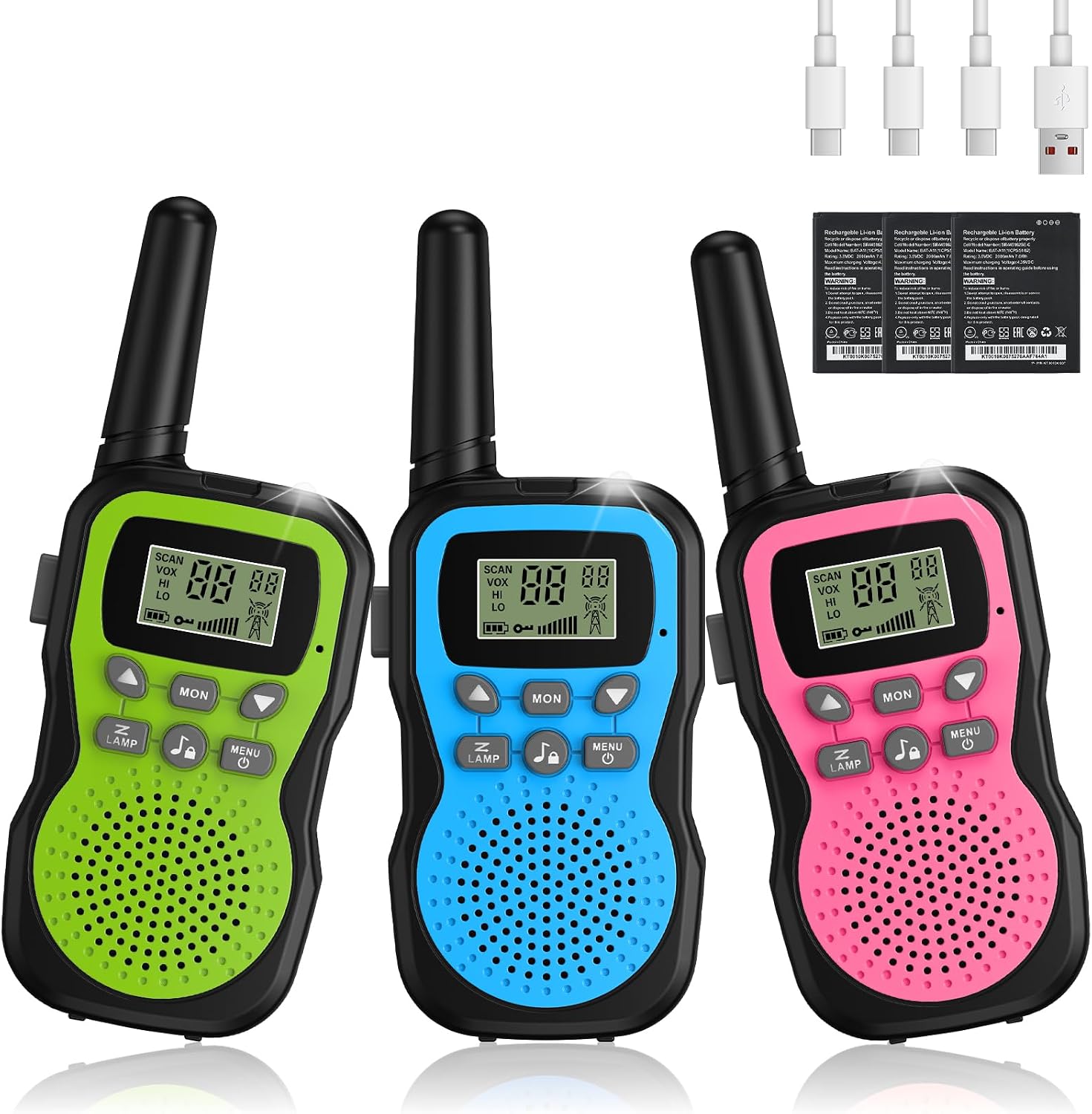
Included Components:
- 3 x Apkezel HK-588 Walkie Talkies
- 3 x 1000mAh Rechargeable Lithium-ion Batteries (pre-installed)
- 1 x USB Type-C Charging Cable (3-in-1)
- User Manual (this document)
Key Features:
- Long Range Communication: Up to 3 km in open areas, 1.5 km in urban environments.
- Rechargeable Battery: Built-in 1000mAh Lithium-ion battery for extended use.
- VOX Function: Voice-activated transmission for hands-free operation.
- Built-in Flashlight: For use in low-light conditions.
- LCD Display: Clear display of channel, battery status, and other settings.
- 8 Channels & 99 Sub-tones: Ensures clear communication and reduces interference.
- Keypad Lock: Prevents accidental setting changes.
- Auto Power Saving: Extends battery life.
- 10 Call Ringtones: Customizable alert tones.
Setup
1. Initial Charging:
- The walkie talkies come with pre-installed rechargeable lithium-ion batteries.
- Before first use, fully charge all walkie talkies using the provided 3-in-1 USB Type-C charging cable. Connect the cable to a standard USB power adapter (not included) and then to the Type-C port on each walkie talkie.
- The charging indicator on the LCD screen will show charging status. A full charge typically takes several hours.

2. Powering On/Off:
- To power on, press and hold the Power/Menu button (usually labeled 'MENU' or with a power icon) until the LCD screen illuminates.
- To power off, press and hold the Power/Menu button again until the screen turns off.
Operating Instructions
1. Channel Selection:
- With the walkie talkie powered on, press the Menu button once. The channel number on the LCD screen will flash.
- Use the Up (▲) or Down (▼) buttons to select your desired channel (1-8).
- Press the Menu button again to confirm the channel, or wait a few seconds for it to auto-confirm.
2. Sub-tone (CTCSS/DCS) Setting:
- After selecting the channel, press the Menu button twice. The sub-tone number will flash.
- Use the Up (▲) or Down (▼) buttons to select your desired sub-tone (0-99). Setting to 0 disables the sub-tone.
- Press the Menu button again to confirm, or wait for auto-confirmation.
- Note: For communication, all walkie talkies must be set to the same channel and sub-tone.
3. Transmitting and Receiving (PTT):
- To transmit, press and hold the PTT (Push-to-Talk) button located on the side of the walkie talkie. Speak clearly into the microphone.
- Release the PTT button to stop transmitting and listen for a response.
- When receiving a signal, the signal indicator on the LCD screen will activate.

4. VOX Function (Voice Operated Exchange):
- The VOX function allows for hands-free transmission. When activated, the walkie talkie will automatically transmit when it detects your voice.
- To activate/deactivate VOX, press the Menu button until 'VOX' appears on the screen. Use the Up (▲) or Down (▼) buttons to select the VOX sensitivity level (e.g., 1-3, with 3 being most sensitive). Set to 'OFF' to disable.
- Press PTT or Menu to confirm.
5. Flashlight Operation:
- To turn on the built-in LED flashlight, press the LAMP button (usually labeled with a flashlight icon).
- Press the LAMP button again to turn it off.

6. Keypad Lock:
- To prevent accidental button presses, press and hold the Menu button until a key icon appears on the LCD screen.
- To unlock, press and hold the Menu button again until the key icon disappears.
7. Call Tones:
- To send a call tone to other walkie talkies on the same channel/sub-tone, press the Call button (usually labeled with a music note icon).
- To change the call tone, press the Menu button until the call tone setting appears. Use the Up (▲) or Down (▼) buttons to cycle through the available 10 call tones.
- Press PTT or Menu to confirm.
Charging and Battery
- The walkie talkies are equipped with a 1000mAh rechargeable Lithium-ion battery.
- Use only the provided USB Type-C charging cable. Connect it to a compatible USB power source (e.g., computer USB port, USB wall adapter).
- A full charge provides approximately 48 hours of working time and up to 7 days in standby mode.
- The battery icon on the LCD screen indicates the current battery level. Recharge when the battery icon is low or flashing.
- Do not attempt to replace the internal battery yourself. Contact support if battery issues arise.

Maintenance
- Cleaning: Wipe the walkie talkies with a soft, damp cloth. Do not use harsh chemicals or abrasive cleaners.
- Storage: Store the walkie talkies in a cool, dry place away from direct sunlight and extreme temperatures when not in use.
- Water Resistance: These walkie talkies are not waterproof. Avoid exposure to water or high humidity.
- Battery Care: For long-term storage, charge the batteries to about 50% every 3-6 months to maintain battery health.
Troubleshooting
| Problem | Possible Cause | Solution |
|---|---|---|
| No power | Battery is depleted. | Charge the walkie talkie fully. |
| Cannot communicate with other units | Different channels or sub-tones. | Ensure all units are on the same channel and sub-tone. |
| Poor sound quality or static | Out of range; interference; low battery. | Move closer to the other unit; avoid obstacles; recharge battery. |
| VOX not working | VOX sensitivity too low; VOX disabled. | Increase VOX sensitivity or ensure VOX is enabled. |
| Keypad locked | Keypad lock activated. | Press and hold the Menu button to unlock. |
Specifications
- Brand: Apkezel
- Model: HK-588
- Channels: 8
- Sub-tones: 99
- Maximum Talk Range: Up to 3 kilometers (open areas)
- Battery: 1000mAh Lithium-ion (rechargeable, included)
- Voltage: 3.7 Volts
- Charging: USB Type-C
- Included Items: 3 walkie talkies, 1 USB Type-C charging cable
- Water Resistance Level: Not water resistant
- Dimensions (Package): 14.9 x 10.9 x 6.4 cm
- Weight (Package): 300 g
Warranty and Support
The Apkezel HK-588 Walkie Talkie 3-Pack comes with a 1-year warranty from the date of purchase. This warranty covers manufacturing defects and ensures the product meets quality standards.
For technical support, warranty claims, or any questions regarding your product, please contact our customer service team via the retailer's platform or through the contact information provided with your purchase. Please have your purchase receipt and model number (HK-588) ready when contacting support.
Our walkie talkies are tested to meet CE certification standards.


