
Paukila P114-S
Paukila P114-S Smart Watch User Manual
Model: P114-S
Introduction
This manual provides detailed instructions for the setup, operation, and maintenance of your Paukila P114-S Smart Watch. Please read this manual thoroughly before using your device to ensure proper function and to maximize your user experience.

Image: Paukila P114-S Smart Watch, silver case with light-colored band, displaying time, heart rate, calories, and steps. A smaller inset shows an incoming call notification.
What's in the Box
The Paukila P114-S Smart Watch package includes the following items:
- Smart Watch
- Watch Band
- Charging Cable
- User Manual (this document)
Setup Guide
1. Charging the Device
Before initial use, fully charge your Paukila P114-S Smart Watch. Connect the magnetic charging cable to the charging points on the back of the watch and plug the USB end into a compatible power adapter (not included) or a computer's USB port.
- Charging Time: Approximately 2 hours for a full charge.
- Battery Life: Up to 5-7 days of typical use, and approximately 20 days in standby mode.

Image: The Paukila P114-S Smart Watch displaying "Charging..." on its screen, alongside text indicating 15 days standby time, 7 days battery life, and 2 hours charging time.
2. App Installation and Pairing
To unlock the full functionality of your smart watch, download and install the companion application on your smartphone.
- Download the App: Search for "Hero Band III" in your smartphone's app store (Google Play Store for Android, Apple App Store for iOS) and install it.
- Enable Bluetooth: Ensure Bluetooth is enabled on your smartphone.
- Open the App: Launch the "Hero Band III" application.
- Pair Device: Follow the in-app instructions to search for and connect to your Paukila P114-S Smart Watch. The watch is compatible with Android 9.0 or iOS 9.0 and higher, and Bluetooth 5.2.
Once paired, the watch will synchronize data with your phone, and you can customize settings, watch faces, and view health data within the app.
Operating Instructions
1. Screen and Customization
The Paukila P114-S features a 1.85-inch HD touch screen. You can customize the watch face through the "Hero Band III" app, choosing from diversified themes or using your own photos.

Image: A close-up of the Paukila P114-S Smart Watch screen highlighting its 1.85-inch HD display, 240x284 resolution, 95% viewing area, and IPS wide vision. An illustration shows how to customize watch faces via the app.
2. Bluetooth Calls and Notifications
With its built-in microphone and Hi-Fi speakers, the watch allows you to make and receive calls directly from your wrist when connected to your smartphone.
- Making Calls: Access the dial pad or contact list on the watch.
- Receiving Calls: Answer or reject incoming calls directly from the watch screen.
- Message Notifications: Receive vibration alerts for messages and social media notifications (e.g., Facebook, WhatsApp, Instagram, X) directly on your wrist.

Image: A visual representation of the Paukila P114-S Smart Watch's connectivity features, including Bluetooth call functionality with built-in mic, call history, and voice assistant. It also shows message reminders and smart alarm features.
3. Health Monitoring
The watch continuously monitors various health metrics using advanced optical sensors.
- Heart Rate: Real-time heart rate monitoring.
- Blood Oxygen (SpO2): Measures blood oxygen levels.
- Stress Levels: Tracks and provides insights into your stress.
- Sleep Tracking: Analyzes sleep quality (deep sleep, light sleep, REM) to help improve sleep patterns.
View detailed health data and trends within the "Hero Band III" app.
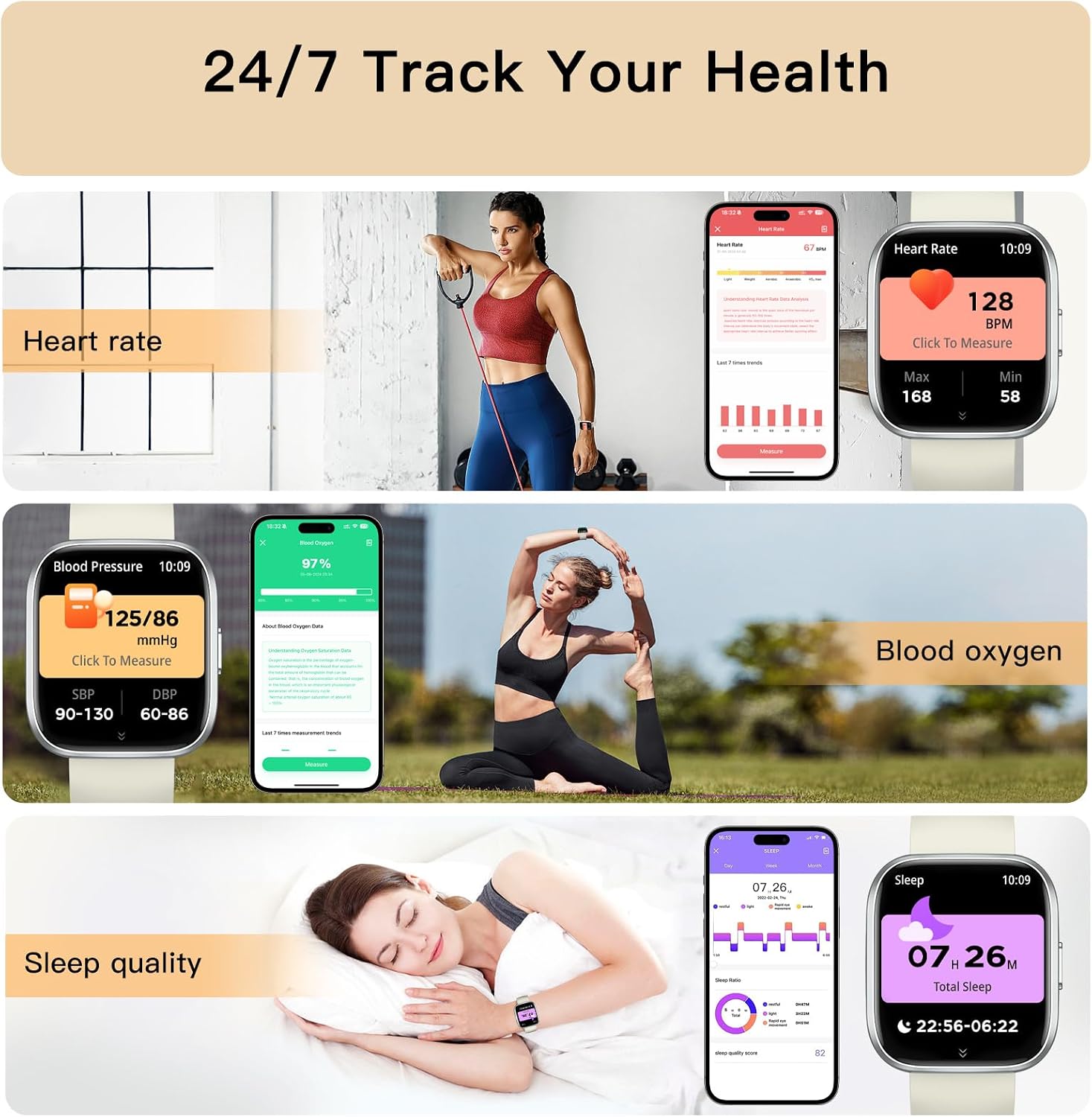
Image: A collage showing the Paukila P114-S Smart Watch tracking heart rate, blood pressure, blood oxygen, and sleep quality, with corresponding app interfaces and lifestyle images.
4. Activity Tracking and Sports Modes
The watch supports over 120 sports modes, including running, basketball, swimming, and yoga. It records exercise data such as time, pace, distance, and calories burned.
- GPS Tracking: Connects to your smartphone's GPS to track your workout routes.
- Daily Activity: Monitors steps, distance, and calories throughout the day.

Image: The Paukila P114-S Smart Watch displaying real-time activity data, with an accompanying smartphone app interface showing activity history. Icons for over 120 sports modes are displayed, along with information on connecting to health apps and GPS tracking via smartphone.
5. Additional Smart Features
The Paukila P114-S Smart Watch offers several other convenient features:
- Smart Reminders: Sedentary reminders, intake reminders, weather updates, and alarm clocks.
- Music Player Control: Control music playback on your smartphone.
- Camera Control: Remotely trigger your smartphone's camera.
- Games: Includes simple games for entertainment.
- Women's Health Management: Tracks menstrual cycles, fertile periods, and safe periods.

Image: Three women in workout attire, with one wearing the Paukila P114-S Smart Watch. An inset shows the watch screen displaying a menstrual cycle tracking interface, with options for Menstrual Period, Fertile Period, and Safe Period.
Care and Maintenance
Water Resistance (IP68)
The Paukila P114-S Smart Watch is IP68 waterproof, meaning it is resistant to dust and can withstand immersion in water up to 1.5 meters for 30 minutes. It is suitable for daily water exposure such as hand washing, rain, and shallow swimming.
- Do Not Use In: Hot water, saunas, or seawater, as these conditions may compromise the waterproof seals.
- After Water Exposure: Wipe the watch dry with a soft cloth to prevent water spots and ensure proper sensor function.
General Care
- Cleaning: Regularly clean the watch screen and band with a soft, dry cloth. For stubborn dirt, a slightly damp cloth can be used, followed by drying.
- Avoid Chemicals: Do not use harsh chemicals, cleaning solvents, or strong detergents, as they may damage the watch's finish or internal components.
- Storage: Store the watch in a cool, dry place when not in use.
Troubleshooting
If you encounter issues with your Paukila P114-S Smart Watch, please refer to the following common solutions:
1. Watch Not Turning On or Charging
- Check Charging Cable: Ensure the magnetic charging cable is securely connected to both the watch and the power source.
- Verify Power Source: Try a different USB port or power adapter.
- Clean Contacts: Ensure the charging contacts on the watch and cable are clean and free of debris.
2. Unable to Pair with Smartphone
- Bluetooth On: Confirm Bluetooth is enabled on your smartphone.
- App Running: Ensure the "Hero Band III" app is open and actively searching for devices.
- Watch Power: Make sure the watch is powered on and sufficiently charged.
- Restart Devices: Try restarting both your smartphone and the smart watch.
- Forget Device: If previously paired, remove the watch from your phone's Bluetooth device list and attempt to pair again.
- App Reinstallation: If issues persist, uninstall and reinstall the "Hero Band III" app.
3. Inaccurate Health Data
- Proper Fit: Ensure the watch is worn snugly on your wrist, about one finger's width above the wrist bone. It should not be too loose or too tight.
- Clean Sensors: Keep the optical sensors on the back of the watch clean and free from sweat or dirt.
- Movement: For best results, remain still during measurements like heart rate or SpO2.
4. Notifications Not Received
- App Permissions: Check that the "Hero Band III" app has all necessary notification permissions enabled in your phone's settings.
- App Settings: Verify that notification alerts are enabled within the "Hero Band III" app for the specific applications you wish to receive alerts from.
- Bluetooth Connection: Ensure the watch is actively connected to your phone via Bluetooth.
Specifications
| Model Number | P114-S |
| Screen Size | 1.85 Inches |
| Display Type | HD Touch Screen |
| Connectivity | Bluetooth 5.2 |
| Operating System Compatibility | Android 9.0+ / iOS 9.0+ |
| Battery Capacity | 260 Milliamp Hours |
| Typical Usage Battery Life | 5-7 Days |
| Standby Time | Approx. 20 Days |
| Charging Time | Approx. 2 Hours |
| Water Resistance | IP68 |
| Health Monitoring | Heart Rate, SpO2, Sleep Tracking, Stress Level |
| Activity Tracking | 120+ Sports Modes, Steps, Calories, Distance |
| Item Weight | 38.5 Grams (1.36 ounces) |
| Dimensions (Watch Face) | Approx. 46mm (H) x 39.5mm (W) x 11.7mm (D) |

Image: Detailed diagram showing the dimensions of the Paukila P114-S Smart Watch, including watch face height (1.81 inches / 46.00mm), width (1.56 inches / 39.5mm), thickness (0.46 inches / 11.7mm), and band length (9.68 inches / 246mm).
Warranty and Support
Paukila is committed to providing high-quality products and professional after-sales service.
- Customer Service: If you have any questions, concerns, or require assistance with your Paukila P114-S Smart Watch, please contact our customer support team. Refer to the contact information provided with your purchase or on the official Paukila website.
- Warranty Information: Specific warranty details are typically included with your purchase documentation. Please retain your proof of purchase for warranty claims.
Ask a question about this manual
Ask about setup, troubleshooting, compatibility, parts, safety, or missing instructions. Manuals+ will review the question and use this page’s manual context to help answer it.