
1. Introduction
The NALACAL Motorcycle Tire Pressure Monitoring System (TPMS) is designed to enhance riding safety by providing real-time monitoring of your motorcycle's tire pressure and temperature. This system features wireless external sensors, a digital LCD display, and various alarm functions to alert you to potential tire issues.
Key Features:
- Dual Tire Compatibility: Suitable for motorcycles with two tires, supporting a maximum tire pressure below 8 bar.
- Comprehensive Alerts: Provides seven types of alarms: leakage, high/low pressure, high temperature, low power, no signal, and low receiver power.
- Customizable Settings: Allows adjustment of units (PSI/Bar, °C/°F), pressure thresholds, sensor matching, and time settings.
- Magnetic Charging: Features a waterproof magnetic charging port for the display unit.
- Wireless Transmission: Ensures easy installation and reliable performance with a bracket mount.

Image 1.1: The NALACAL Motorcycle TPMS display unit, showing real-time pressure, temperature, and time.
2. Package Contents
Verify that all items are present in the package before proceeding with installation.
- TPMS Display Unit (1)
- External Sensors (2)
- Mounting Bracket (1)
- Hex Nuts (2)
- TPMS Wrench (1)
- Magnetic Charging Cable (1)
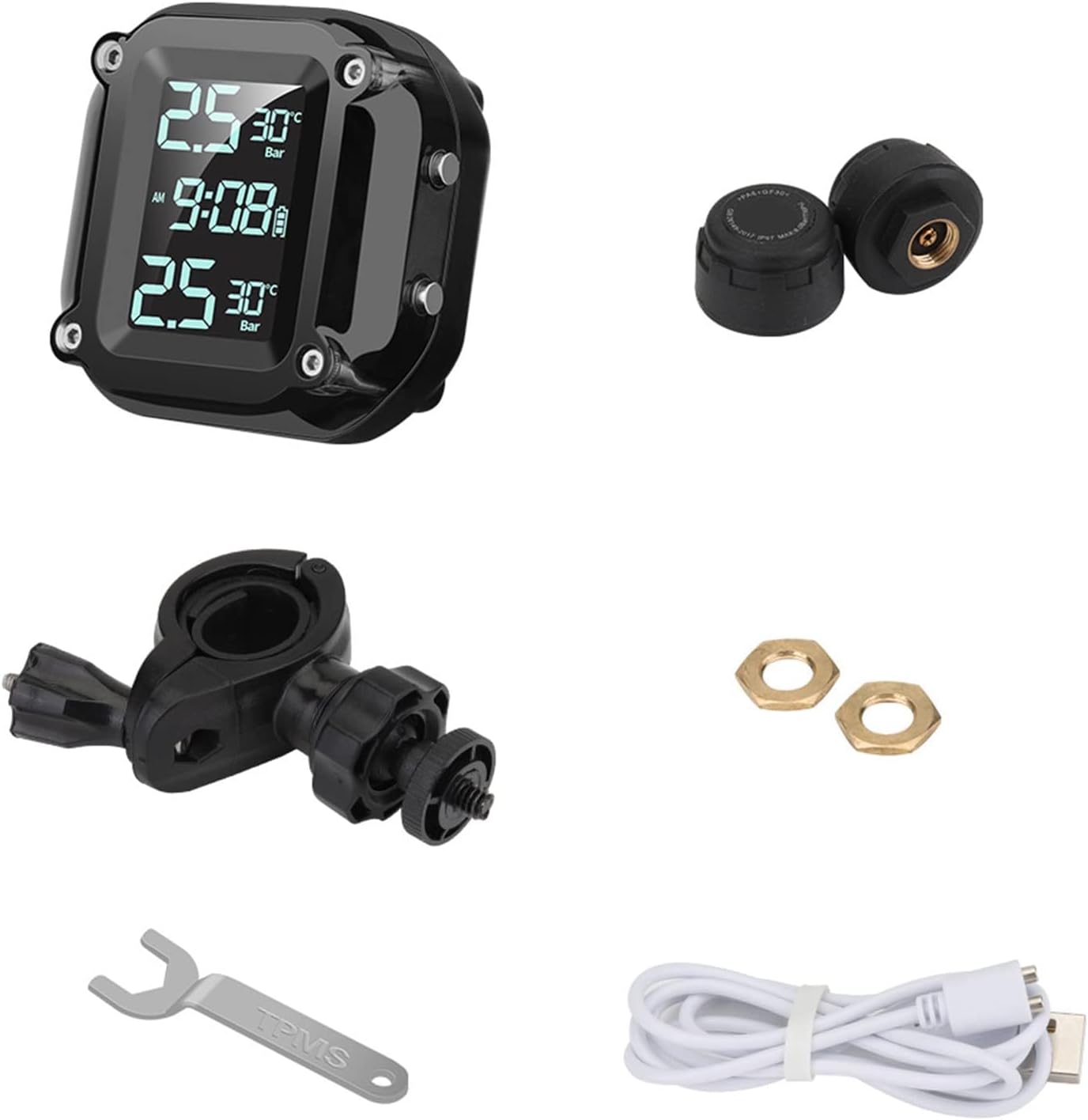
Image 2.1: All components included in the NALACAL Motorcycle TPMS package: display, two sensors, mounting bracket, two hex nuts, TPMS wrench, and magnetic charging cable.
3. Setup and Installation
3.1 Display Unit Installation
The display unit can be easily mounted on your motorcycle's handlebars using the provided bracket. No wiring is required for operation.
- Attach the mounting bracket to a suitable location on your motorcycle's handlebars.
- Secure the TPMS display unit to the bracket.
- Adjust the viewing angle for optimal visibility.

Image 3.1: The TPMS display unit mounted on motorcycle handlebars, showing its compact and wireless design.

Image 3.2: View of the TPMS display unit installed on motorcycle handlebars from the rider's perspective, showing clear visibility.
3.2 External Sensor Installation
Install the external sensors on your motorcycle's tire valves. Ensure correct sensor placement (front/rear) as indicated on the sensors.
- Screw out the original valve bonnet from the tire valve.
- Apply the hex nut onto the tire valve stem.
- Identify the correct sensor (front or rear) and rotate it onto the relative tire valve.
- Counter-rotate the hex nut against the sensor and tighten it using the provided TPMS wrench.
- Check for air leaks by applying soapy water around the sensor and valve stem. No bubbles should appear.

Image 3.3: Visual guide for installing the external tire pressure sensors (top section of image), including securing with a hex nut and checking for leaks.
3.3 Initial Charging
Before first use, fully charge the display unit using the magnetic charging cable.
- Connect the magnetic charging cable to the charging port on the display unit.
- Connect the other end of the cable to a USB power source (e.g., USB charger, computer USB port).
- The display will indicate charging status. Charge until the battery icon shows full.

Image 3.4: The TPMS display unit being charged via its magnetic charging port, highlighting the waterproof design.
4. Operation
4.1 Power On/Off
- To power on, press and hold the power button until the display illuminates.
- To power off, press and hold the power button until the display turns off.
- The system can be started and stopped anytime to conserve power.
4.2 Display Information
The LCD display shows real-time tire pressure and temperature for both tires, along with the current time and battery status.
- Pressure: Displays tire pressure in PSI or Bar.
- Temperature: Displays tire temperature in °C or °F.
- Time: Shows the current time (AM/PM).
- Battery Indicator: Shows the remaining battery level of the display unit.

Image 4.1: The TPMS display unit showing real-time tire pressure and temperature data, with a motorcycle in the background.
4.3 Customizable Settings
Access the settings menu to adjust various parameters:
- Unit Selection: Switch between PSI and Bar for pressure, and °C and °F for temperature.
- Pressure Thresholds: Set custom high and low-pressure alarm limits.
- Temperature Thresholds: Set custom high-temperature alarm limits.
- Sensor Matching: Re-pair or match sensors if needed.
- Time Setting: Adjust the current time and AM/PM format.
4.4 Alarm Functions
The system provides visual and audible alerts for critical tire conditions:
- Leakage Warning: Alerts to rapid air loss.
- High/Low Pressure Warning: Activates if tire pressure exceeds or falls below set thresholds.
- High Temperature Warning: Activates if tire temperature exceeds the set threshold.
- Low Power Warning: Indicates low battery for the display unit or sensors.
- No Signal Warning: Alerts if communication with a sensor is lost.
- Low Receiver Power: Indicates low battery for the display unit.

Image 4.2: The TPMS display unit highlighting various warning indicators for leakage, pressure, temperature, and signal status.
5. Maintenance
5.1 External Sensor Battery Replacement
The external sensors use replaceable button cell batteries with an estimated life of 2 years. Replace batteries when a low power warning is triggered for a specific sensor.
- Loosen the hex nut on the sensor.
- Unscrew the sensor from the tire valve.
- Carefully open the sensor casing and remove the old button battery.
- Insert a new button battery (CR1632 or equivalent) with the correct polarity.
- Close the sensor casing and re-install the sensor onto the tire valve, following the installation steps in Section 3.2.
Image 5.1: Visual guide for replacing the battery in an external tire pressure sensor (bottom section of image).
5.2 Display Unit Charging
Recharge the display unit when the low receiver power warning appears or the battery indicator is low. Use the provided magnetic charging cable.
- Connect the magnetic charging cable to the display unit and a USB power source.
- Charging time may vary. Ensure the unit is fully charged for optimal performance.
5.3 Cleaning
Wipe the display unit and sensors with a soft, damp cloth. Avoid using abrasive cleaners or solvents.
6. Troubleshooting
| Problem | Possible Cause | Solution |
|---|---|---|
| Display not turning on | Low battery; Unit not powered on | Charge the display unit; Press and hold the power button to turn on. |
| "No Signal" alarm | Sensor battery low; Sensor not paired; Sensor too far from display; Interference | Replace sensor battery; Re-pair sensor (refer to settings); Ensure proper installation; Avoid strong electromagnetic interference. |
| "Low Pressure" or "High Pressure" alarm | Actual tire pressure outside set thresholds | Check tire pressure with a reliable gauge and adjust to recommended levels; Verify alarm thresholds in settings. |
| "High Temperature" alarm | Actual tire temperature too high | Stop riding and allow tires to cool; Check for mechanical issues causing excessive heat; Verify alarm threshold in settings. |
| "Leakage Warning" | Rapid air loss from tire | Immediately and safely stop the motorcycle; Inspect the tire and sensor for damage or improper installation; Seek professional assistance if necessary. |
| Inaccurate readings | Sensor malfunction; Incorrect calibration (unlikely for external sensors) | Compare readings with a known accurate gauge; Replace faulty sensor if necessary. |
7. Specifications
| Feature | Detail |
|---|---|
| Brand | NALACAL |
| Model Number | 987461 |
| Display | LCD Color Screen |
| Operating Voltage (Display) | 3.7 - 5 V |
| Bright Operating Current (Display) | < 7 mA |
| RF Transmission Frequency (Display) | 433.92 MHz ± 50 KHz |
| Operating Temperature (Display) | -2 °C to 75 °C |
| Storage Temperature (Display) | -30 °C to 80 °C |
| RF Signal Reception Sensitivity (Display) | -90 dbm |
| Transmission Power (Sensor) | < 10 dBm |
| Transmission Frequency (Sensor) | 433.92 MHz ± 15 KHz |
| Pressure Range | 0 - 6 Bar |
| Sensor Battery Life | 2 years (approx.) |
| Sensor Weight | 10 grams |
| Installation Method (Sensor) | Independent installation (external) |
| Item Weight (Total) | 220 g |
| Package Dimensions | 25 x 16.6 x 5.3 cm |

Image 7.1: Detailed product parameters for the TPMS display unit and external sensors.
8. Warranty and Support
Specific warranty information is not provided in this manual. For warranty details, technical support, or service inquiries, please refer to the product packaging or contact NALACAL customer service through your purchase platform.