
1. Introduction
Thank you for choosing the Ulumac Aroma AT-10A Rechargeable Clip-On Tuner. This device is designed to provide quick and accurate tuning for a variety of string instruments, including guitar, violin, ukulele, bass, and mandolin. Its compact size, vibrant full-color display, and rechargeable battery make it an ideal companion for musicians on the go.
2. Safety Information
- Keep the device away from water or any liquids to prevent electric shock or damage.
- Do not disassemble, repair, or modify the device. Contact customer support if service is required.
- Avoid exposing the device to extreme temperatures, direct sunlight, or high humidity.
- Use only the provided Type-C charging cable for recharging to prevent battery damage.
- Keep out of reach of small children to prevent choking hazards from small parts.
3. Package Contents
- Ulumac Aroma AT-10A Rechargeable Clip-On Tuner
- Type-C Charging Cable
4. Setup
4.1 Attaching the Tuner
Gently open the clip and attach the tuner securely to the headstock of your instrument. The clip features soft pads to protect your instrument's finish. Ensure the display is facing you for easy viewing.
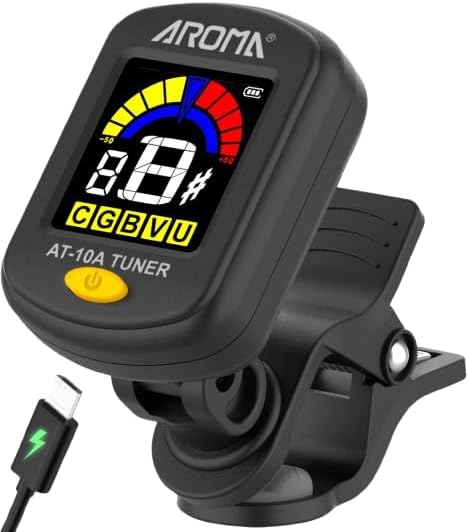
Image: Ulumac Aroma AT-10A Tuner attached to a guitar headstock.
4.2 Adjusting the Display Angle
The tuner's display supports 360° rotation, allowing you to adjust it for optimal viewing from any angle. Carefully swivel the display to your preferred position.

Image: The tuner's display can be rotated 360 degrees for optimal viewing.
4.3 Powering On/Off
To power on the tuner, press and hold the power button located on the front of the device. To power off, press and hold the button again. The tuner will automatically power off after a period of inactivity to conserve battery life.
5. Operating Instructions
5.1 General Tuning Process
Once the tuner is attached and powered on, pluck a single string on your instrument. The tuner will detect the vibration and display the note name and pitch accuracy on the screen. Adjust your instrument's tuning peg until the display indicates the correct pitch.

Image: Visual guide for interpreting the tuner display (flat, in tune, sharp).
5.2 Interpreting the Display
- Flat (Left Side/Yellow): If the needle points to the left and the display is yellow, your string is flat. Tighten the string until the needle moves to the center.
- In Tune (Center/Green): When the needle is in the center and the display turns green, your string is in tune.
- Sharp (Right Side/Red): If the needle points to the right and the display is red, your string is sharp. Loosen the string until the needle moves to the center.
Video: Demonstration of the Ulumac Aroma AT-10A Tuner in use, showing quick and accurate tuning.
6. Tuning Modes
The AT-10A tuner offers five distinct tuning modes for various instruments. To switch between modes, short press the power button after the tuner is powered on.

Image: The tuner supports five different instrument modes.
- C (Chromatic): For tuning any instrument to any note.
- G (Guitar): Standard tuning for guitar.
- B (Bass): Standard tuning for bass guitar.
- V (Violin): Standard tuning for violin.
- U (Ukulele): Standard tuning for ukulele.

Image: Easy tuning with one-button operation to select modes.
7. Charging the Tuner
The Ulumac Aroma AT-10A features a built-in lithium-ion battery. When the battery indicator on the display shows low power, connect the included Type-C charging cable to the tuner's charging port and to a standard USB power source (e.g., computer, USB wall adapter).

Image: The tuner's built-in lithium battery charges via Type-C cable.
- Charging Time: Approximately 1 hour.
- Usage Time: Up to 3 hours on a full charge.
8. Maintenance
- Clean the tuner with a soft, dry cloth. Do not use abrasive cleaners or solvents.
- Store the tuner in a cool, dry place when not in use.
- Avoid dropping the tuner or subjecting it to strong impacts.
9. Troubleshooting
| Problem | Possible Cause | Solution |
|---|---|---|
| Tuner does not power on. | Battery is depleted. | Charge the tuner using the provided Type-C cable. |
| Inaccurate tuning readings. | Tuner not securely attached or external noise interference. | Ensure the tuner is firmly clipped to the headstock. Tune in a quiet environment. |
| Display is dim or flickering. | Low battery. | Recharge the tuner. |
10. Specifications
| Feature | Detail |
|---|---|
| Model Number | AT-10A |
| Tuning Modes | Chromatic (C), Guitar (G), Bass (B), Violin (V), Ukulele (U) |
| A4 Frequency Range | A27.5-4186Hz |
| Power Supply | 3.7V/110mAh Lithium Ion Battery |
| Charging Port | Type-C |
| Item Weight | 0.96 ounces |
| Package Dimensions | 3.62 x 1.85 x 1.77 inches |
11. Warranty and Support
Ulumac offers hassle-free returns and exchanges within 365 days of purchase. For any product inquiries, technical assistance, or warranty claims, please contact Ulumac customer support. Our team is available 24/7 to provide quick responses and ensure your satisfaction.
For further assistance, please visit the Ulumac Store on Amazon.