
1. Safety Information
Please read all safety instructions carefully before assembly and use. Failure to follow these instructions may result in injury or damage to the product.
- Always ensure the TV stand is securely attached to the wall to prevent tip-over.
- Do not place heavy objects on the top shelf that exceed the specified weight capacity.
- Keep flammable materials at least 3 feet (0.9 meters) away from the electric fireplace.
- Always supervise children and pets when the electric fireplace is in use.
- Allow the electric fireplace to cool down completely before touching or cleaning any internal components.
- Ensure the power cord is not pinched or routed under the unit or any other furniture.
- Only use the product on wood walls, concrete walls, or brick walls. It is not suitable for hollow walls or gypsum board (drywall) walls without proper reinforcement.
2. Product Overview
The LEMBERI DL70TV is a 70-inch floating TV stand designed to enhance your living space with both functionality and modern aesthetics. It integrates a wall-mounted media console with a 36-inch electric fireplace, offering a comprehensive entertainment solution.
Key Features:
- Integrated Design: Combines a 70-inch floating TV cabinet with a 36-inch electric fireplace.
- Durable Construction: Made from engineered wood with a waterproof paint finish for easy cleaning and longevity.
- Adjustable Height: The cabinet's mounting height on the wall can be customized.
- Electric Fireplace: Features 12 flame colors, 5 brightness options, adjustable temperature (62°F to 82°F), and two heat settings (750W or 1200W) capable of heating up to 400 square feet. Flame effects and heating function independently.
- LED Lighting: Includes 20 color LED lights to create ambient lighting.
- Efficient Storage: Equipped with open shelves for media devices and display items, and cabinets with doors for concealed storage.
- Cable Management: Two cable holes are provided on the top and bottom to organize wires.

Figure 2.1: The LEMBERI DL70TV Floating Fireplace TV Stand installed in a modern living room, highlighting its integrated design and ambient lighting.

Figure 2.2: Detailed view of the product's construction, including cable management features and material finish.
3. Setup and Installation
The LEMBERI DL70TV Floating Fireplace TV Stand requires wall mounting. It is crucial to follow the provided instructions carefully to ensure secure installation. This product is delivered in two separate packages.
3.1 Package Contents
Your order will arrive in two distinct packages, potentially on different days. Please ensure both packages have arrived before beginning assembly.
- Box 1: TV Stand components and hardware.
- Box 2: Electric Fireplace unit.

Figure 3.1: Product dimensions and illustration of the two-parcel delivery system.
3.2 Tools Required (Not Included)
- Drill
- Stud Finder (recommended for wood walls)
- Level
- Measuring Tape
- Pencil
- Screwdriver (Phillips head)
3.3 Wall Mounting Guidelines
- Identify Wall Type: This TV stand is designed for installation on solid wood walls, concrete walls, or brick walls. Do NOT install on hollow walls or gypsum board (drywall) walls without proper reinforcement.
- Locate Studs (for wood walls): Use a stud finder to locate and mark the center of wall studs. Anchoring into studs is crucial for stability and weight support.
- Determine Mounting Height: Decide the desired height for your TV stand. Consider the viewing angle from your seating area. The height of the cabinet can be adjusted to your preference.
- Mark Pilot Holes: Using the provided mounting template (if applicable) or by measuring, mark the precise locations for drilling pilot holes on the wall. Ensure marks are level.
- Drill Pilot Holes: Drill pilot holes according to the size specified in the assembly instructions for your wall type.
- Attach Mounting Brackets: Securely fasten the wall mounting brackets to the wall using the appropriate hardware (wall anchors for concrete/brick, screws for studs).
- Assemble TV Stand Components: Follow the step-by-step assembly instructions provided in Box 1 to construct the TV stand frame and shelves. It is often easier to install the fireplace unit into the TV stand before mounting the entire unit to the wall.
- Mount TV Stand: Carefully lift and attach the assembled TV stand to the wall mounting brackets. Ensure it is securely seated and level.
- Install Electric Fireplace: If not already installed, slide the electric fireplace unit into its designated compartment within the TV stand.
- Final Checks: Double-check all connections and mounting points for stability.
Important Note: If you are unsure about the installation process or your wall type, it is highly recommended to seek professional assistance to prevent potential damage or injury.
4. Operating Instructions
This section details how to operate the electric fireplace and LED lighting features of your LEMBERI DL70TV TV stand.
4.1 Electric Fireplace Operation
The electric fireplace can be controlled via the unit's control panel or the included remote control.
- Power On/Off: Press the power button to turn the fireplace on or off.
- Flame Colors: Cycle through 12 different flame colors to match your ambiance. You can select a single color or a sequence of colors.
- Flame Brightness: Adjust the flame intensity with 5 brightness options.
- Heat Settings: Choose between 750W or 1200W heat output. The fireplace can heat rooms up to 400 square feet.
- Temperature Control: Set the desired room temperature between 62°F and 82°F. The unit will automatically adjust heating to maintain this temperature.
- Timer Function: Utilize the timer for automatic shut-off, typically ranging from 0 to 8 hours.
- Independent Functions: The flame effect and heating function can be operated independently. You can enjoy the visual flame without heat, or use heat without the flame effect.

Figure 4.1: Overview of the electric fireplace features and controls.

Figure 4.2: Fireplace control panel icons.

Figure 4.3: Flame brightness settings.

Figure 4.4: Available flame colors.
4.2 LED Light Operation
The integrated LED lights offer 20 different color options to customize the ambiance of your room. These lights are typically controlled via a separate remote control or a switch on the unit.
- Power On/Off: Use the dedicated button on the remote or unit to turn the LED lights on or off.
- Color Selection: Cycle through the 20 available colors to find your preferred setting.
- Brightness Adjustment: Adjust the brightness level of the LED lights.
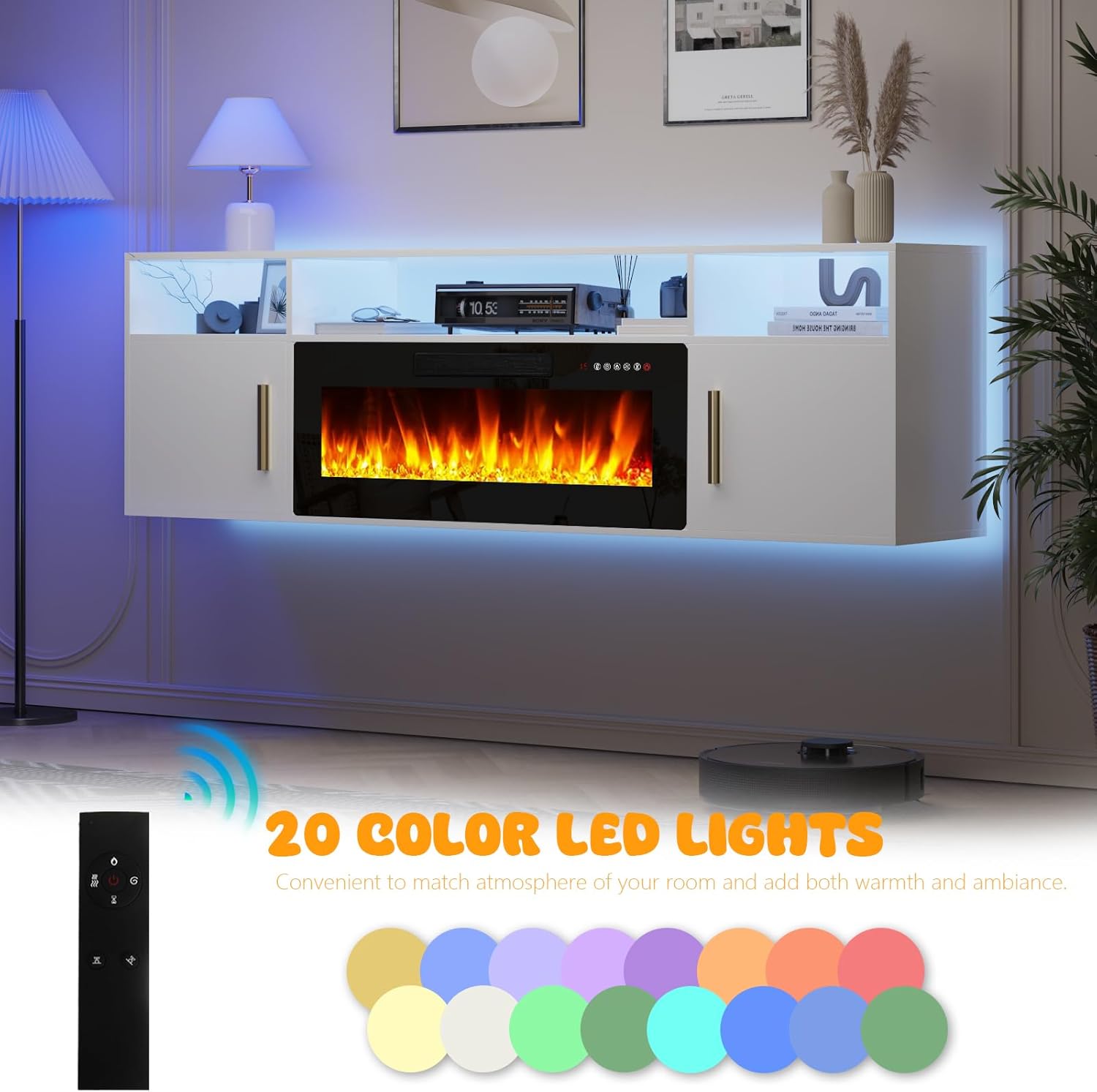
Figure 4.5: The 20-color LED lighting feature and its remote control.
5. Maintenance
Regular maintenance ensures the longevity and optimal performance of your LEMBERI DL70TV Floating Fireplace TV Stand.
5.1 Cleaning Instructions
- Exterior Surfaces: Wipe the exterior surfaces of the TV stand with a soft, damp cloth. Avoid using abrasive cleaners or harsh chemicals, as these can damage the finish.
- Electric Fireplace: Ensure the fireplace is turned off and unplugged before cleaning. Allow it to cool completely. Use a soft, dry cloth to wipe the glass and exterior. Do not spray water directly onto the unit.
- Dusting: Regularly dust all surfaces, including shelves and the top of the unit, to prevent dust buildup.
5.2 General Care
- Periodically check all mounting hardware to ensure the TV stand remains securely attached to the wall.
- Inspect the power cord of the electric fireplace for any signs of damage. If damaged, discontinue use and contact customer support.
- Avoid exposing the unit to excessive moisture or direct sunlight for prolonged periods.
6. Troubleshooting
This section provides solutions to common issues you might encounter with your LEMBERI DL70TV Floating Fireplace TV Stand.
| Problem | Possible Cause | Solution |
|---|---|---|
| Electric fireplace does not turn on. |
|
|
| No heat output from fireplace. |
|
|
| LED lights are not working. |
|
|
| TV stand feels unstable after mounting. |
|
|
7. Specifications
| Feature | Detail |
|---|---|
| Brand | LEMBERI |
| Model Number | DL70TV |
| Material | Engineered Wood |
| Color | White |
| Product Dimensions (L x W x H) | 70 x 13.8 x 21.1 inches |
| Item Weight | 87 pounds |
| Fireplace Size | 36 inches |
| Heat Output | 750W / 1200W |
| Heating Area | Up to 400 square feet |
| Temperature Range | 62°F to 82°F |
| Flame Colors | 12 options |
| Flame Brightness | 5 options |
| LED Light Colors | 20 options |
| Maximum TV Size Supported | Up to 80 inches |
| Product Care | Wipe with Damp Cloth |

Figure 7.1: TV size compatibility for the LEMBERI DL70TV.
8. Warranty and Customer Support
For any questions, concerns, or suggestions regarding your LEMBERI DL70TV Floating Fireplace TV Stand, please contact LEMBERI customer support. Specific warranty details may be included with your product packaging or available on the LEMBERI official website.
When contacting support, please have your model number (DL70TV) and purchase information readily available.