
Ibergrif MA001
Ibergrif MA001 Monitor Mount User Manual
Model: MA001
1. Introduction
Thank you for choosing the Ibergrif MA001 Monitor Mount. This manual provides detailed instructions for the safe and efficient installation, operation, and maintenance of your monitor mount. Please read this manual thoroughly before installation and keep it for future reference.
1.1 Safety Information
Please observe the following safety precautions:
- Ensure all components are present and undamaged before installation. Do not use if any parts are missing or faulty.
- Do not exceed the maximum weight capacity of 9 kg (19.8 lbs).
- Ensure your desk surface is stable and strong enough to support the combined weight of the mount and monitor.
- Follow all installation steps carefully. Incorrect installation may result in damage or injury.
- Keep children and pets away during installation.
1.2 Product Overview
The Ibergrif MA001 is an ergonomic, height-adjustable gas spring monitor mount designed for single screens. It features full articulation for optimal viewing angles and integrated cable management to maintain a tidy workspace.

Image 1.1: The Ibergrif MA001 Monitor Mount, showing the arm, VESA plate, and C-clamp base.
2. Package Contents
Verify that all components listed below are included in your package:

Image 2.1: Visual representation of all included accessories.
- Monitor Arm Assembly
- VESA Plate
- C-Clamp Base and Components
- Grommet Base and Components
- M4x12mm Screws (4 pcs)
- M5x12mm Screws (4 pcs)
- Washers (4 pcs)
- Allen Wrenches (various sizes)
- Cable Management Clips
- Instruction Manual
3. Specifications
The following table outlines the technical specifications of the Ibergrif MA001 Monitor Mount:
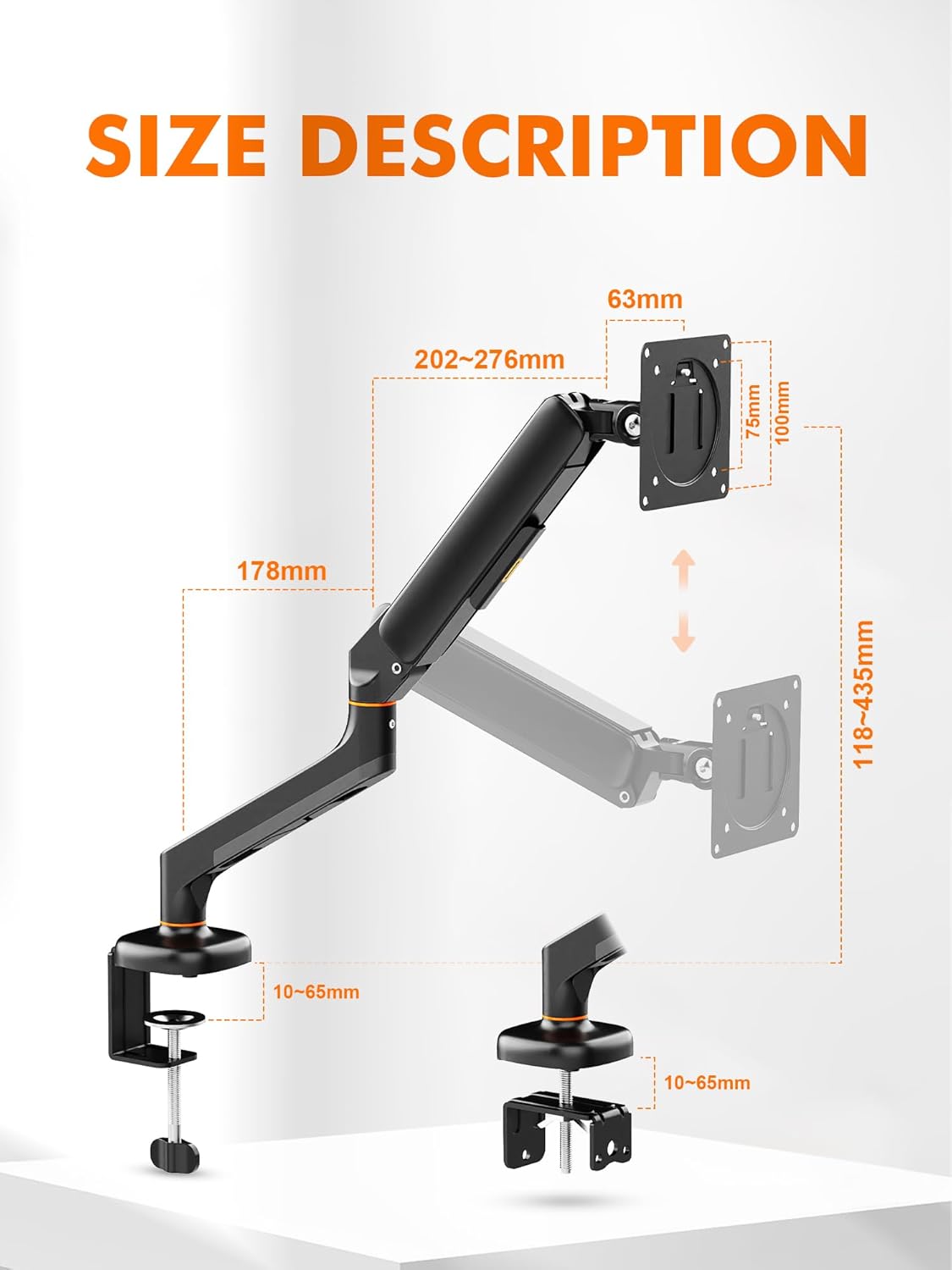
Image 3.1: Detailed dimensions and movement ranges of the monitor mount.
| Feature | Detail |
|---|---|
| Model | MA001 |
| Brand | Ibergrif |
| Compatible Screen Sizes | 13 - 32 inches |
| Weight Capacity | 2 - 9 kg (4.4 - 19.8 lbs) |
| VESA Compatibility | 75x75mm, 100x100mm |
| Material | Alloy Steel |
| Movement Type | Articulating Gas Spring |
| Tilt Range | ±65° |
| Swivel Range | ±70° |
| Rotation | 360° (Portrait to Landscape) |
| Maximum Arm Height | 435mm |
| Maximum Arm Extension | 600mm |
| Desk Thickness (C-clamp/Grommet) | 10 - 65mm |
| Item Weight | 4.53 pounds |

Image 3.2: Illustration of monitor size, weight, and VESA compatibility.
4. Setup and Installation
Before you begin, ensure your desk and monitor meet the specifications outlined in Section 3.

Image 4.1: Visual guide for C-clamp and grommet installation methods.
4.1 Choose Your Mounting Method
The Ibergrif MA001 supports two installation methods: C-clamp and Grommet. Select the method suitable for your desk.
- C-Clamp Installation: For desks with an edge, without needing to drill a hole.
- Grommet Installation: For desks with an existing hole (10-60mm diameter) or if you prefer to drill one.
4.2 C-Clamp Installation Steps
- Attach the C-clamp base to the main pole using the provided screws and Allen wrench.
- Position the C-clamp on the edge of your desk. Ensure the desk thickness is between 10-65mm.
- Tighten the C-clamp screw until the base is securely fastened to the desk. Do not overtighten.
4.3 Grommet Installation Steps
- If your desk does not have a suitable hole, drill one with a diameter between 10-60mm.
- Assemble the grommet base components, passing the bolt through the desk hole.
- Secure the grommet base from underneath the desk using the washer and nut. Tighten firmly.
- Attach the monitor arm to the grommet base.
4.4 Attaching the Monitor
- Carefully place your monitor face down on a soft, clean surface.
- Align the VESA plate with the mounting holes on the back of your monitor (75x75mm or 100x100mm).
- Secure the VESA plate to the monitor using the appropriate M4 or M5 screws and washers. Ensure they are tightened securely but do not overtighten.
- Slide the monitor (with VESA plate attached) onto the monitor arm's VESA head. Ensure it clicks into place or is secured with the provided locking mechanism.
5. Operating and Adjustments
The Ibergrif MA001 monitor mount offers various adjustments to achieve your optimal viewing position.
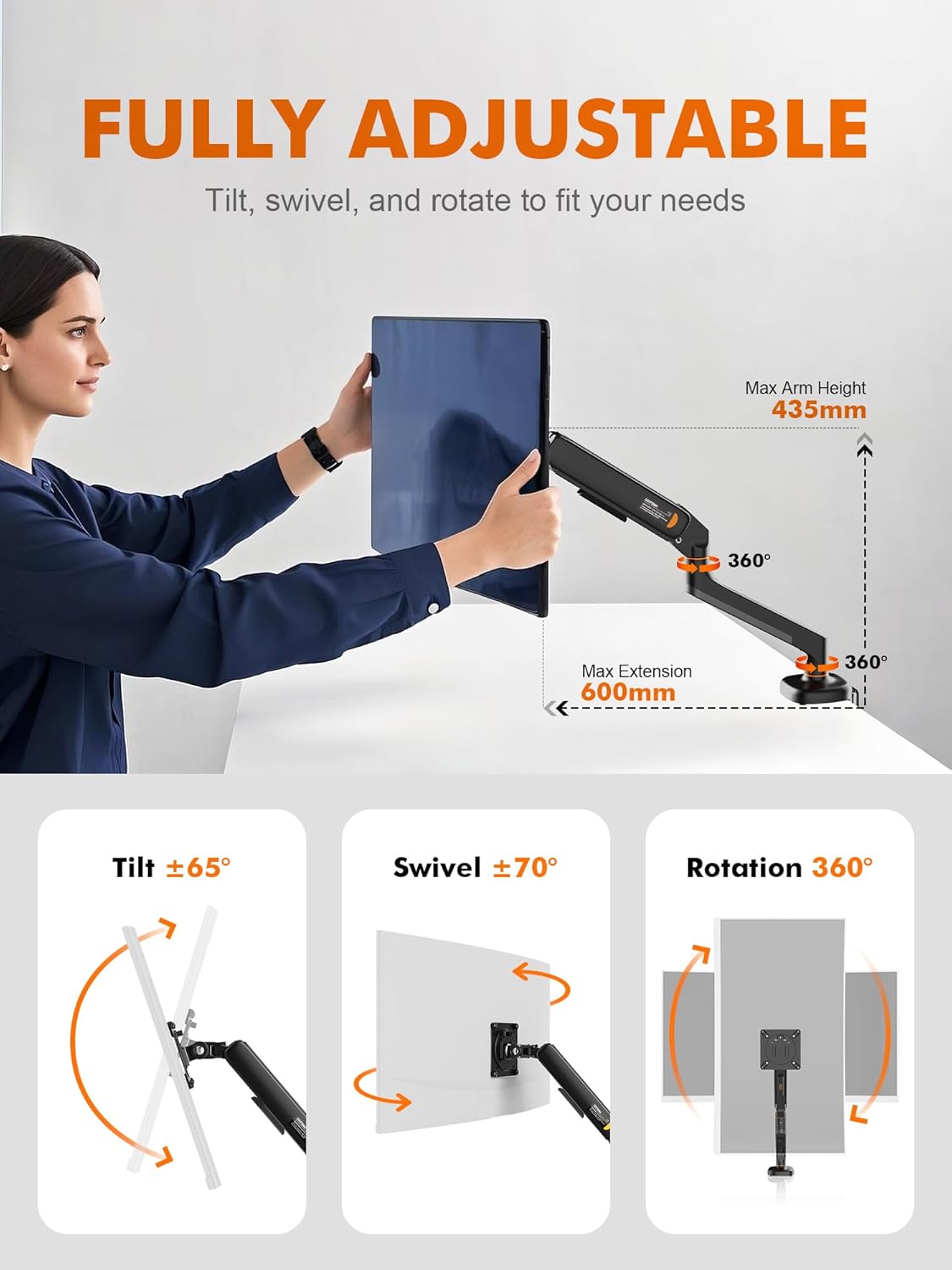
Image 5.1: Illustration of the monitor mount's full range of motion, including tilt, swivel, rotation, and height adjustment.
5.1 Gas Spring Tension Adjustment
The gas spring tension is factory-set to a medium strength. After mounting your monitor, you may need to adjust the tension to match your monitor's weight for smooth movement and stable positioning.
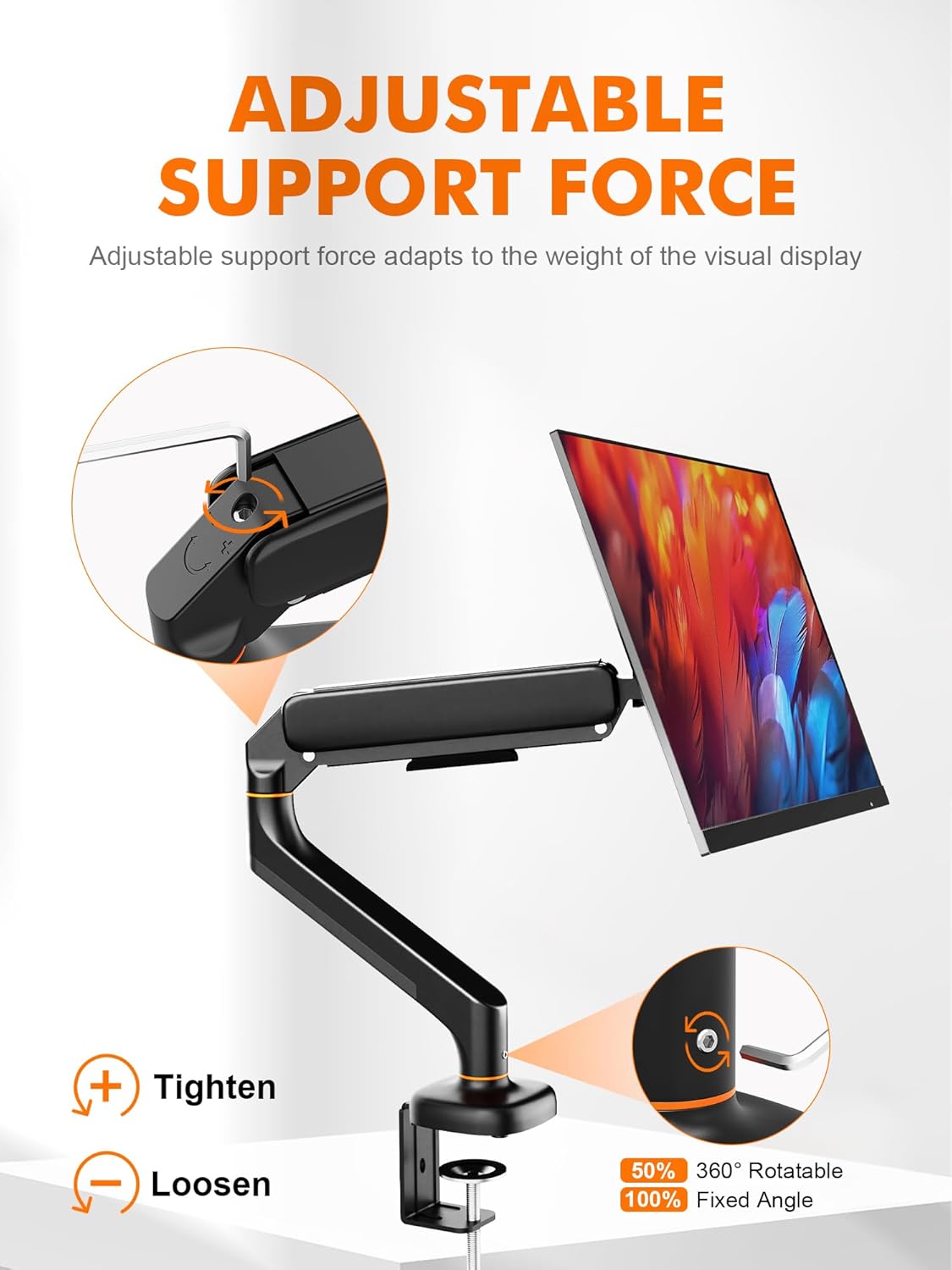
Image 5.2: Diagram showing how to tighten or loosen the gas spring tension.
- Use the provided Allen wrench to turn the adjustment screw located on the arm.
- Turn clockwise (+) to increase tension (for heavier monitors) if the monitor sags.
- Turn counter-clockwise (-) to decrease tension (for lighter monitors) if the monitor is too stiff to move down.
- Adjust gradually and test the movement until the monitor holds its position freely.
5.2 Height Adjustment
Gently push or pull the monitor up or down to adjust its height. The gas spring mechanism will assist in holding the monitor at your desired level.
5.3 Tilt Adjustment
Grasp the top and bottom edges of your monitor and tilt it forward or backward to achieve a comfortable viewing angle (±65° range).
5.4 Swivel Adjustment
Rotate the monitor left or right from its central axis to share your screen or adjust your viewing position (±70° range).
5.5 Rotation Adjustment
The VESA plate allows for 360° rotation, enabling you to switch between landscape and portrait orientations. Simply rotate the monitor to your preferred orientation.
5.6 Cable Management
The monitor arm features integrated cable management channels to keep your workspace organized.

Image 5.3: Example of a tidy workspace achieved with the monitor mount's cable management.
- Route your monitor cables (power, video, etc.) through the designated clips or channels along the underside of the arm.
- Ensure cables have enough slack to accommodate the full range of motion of the arm without being pulled or pinched.
6. Maintenance
Regular maintenance helps ensure the longevity and proper function of your monitor mount.
- Cleaning: Wipe the mount with a soft, damp cloth. Avoid using abrasive cleaners or harsh chemicals, as these can damage the finish.
- Periodic Checks: Periodically check all screws and connections to ensure they remain tight and secure. Retighten if necessary.
- Gas Spring: The gas spring is designed for long-term use and generally requires no maintenance. If you notice a change in performance, refer to the gas spring adjustment section.
7. Troubleshooting
If you encounter issues with your Ibergrif MA001 Monitor Mount, refer to the solutions below:
| Problem | Possible Cause | Solution |
|---|---|---|
| Monitor sags or does not stay at desired height. | Gas spring tension is too low for the monitor's weight. | Increase gas spring tension by turning the adjustment screw clockwise (+). Refer to Section 5.1. |
| Monitor is too stiff to move or difficult to push down. | Gas spring tension is too high for the monitor's weight. | Decrease gas spring tension by turning the adjustment screw counter-clockwise (-). Refer to Section 5.1. |
| Monitor wobbles or feels unstable. | Loose connections or unstable desk surface. | Check all mounting screws (C-clamp/grommet, VESA plate, arm connections) and tighten if necessary. Ensure your desk is stable. |
| Cables are messy or getting caught. | Cables not properly routed. | Re-route cables through the integrated cable management channels. Ensure sufficient slack for movement. Refer to Section 5.6. |
8. Warranty and Customer Support
For warranty information or if you require further assistance, please contact Ibergrif customer support. Details can typically be found on the product packaging or the official Ibergrif website.
You can visit the Ibergrif Store on Amazon for more product information.
Ask a question about this manual
Ask about setup, troubleshooting, compatibility, parts, safety, or missing instructions. Manuals+ will review the question and use this page’s manual context to help answer it.