
Introduction
The EMSON POCKET AIR Portable Tire Inflator is a compact and powerful air compressor designed for convenient inflation of various items, including car tires, bicycle tires, sports balls, and inflatables. Its portable design and advanced features make it an essential tool for on-the-go inflation needs.
This manual provides detailed instructions on how to set up, operate, and maintain your POCKET AIR inflator to ensure optimal performance and longevity.
What's in the Box
Upon unboxing your POCKET AIR Portable Tire Inflator, please verify that all the following components are included:
- 1x Pocket Air Portable Tire Inflator Unit
- 1x Air Hose
- 1x Sports Needle
- 2x Nozzle Adapters
- 1x Spare Fuse
- 1x Bullseye Pro Travel Bag
- 1x USB-C Charging Cable (wall charger not included)
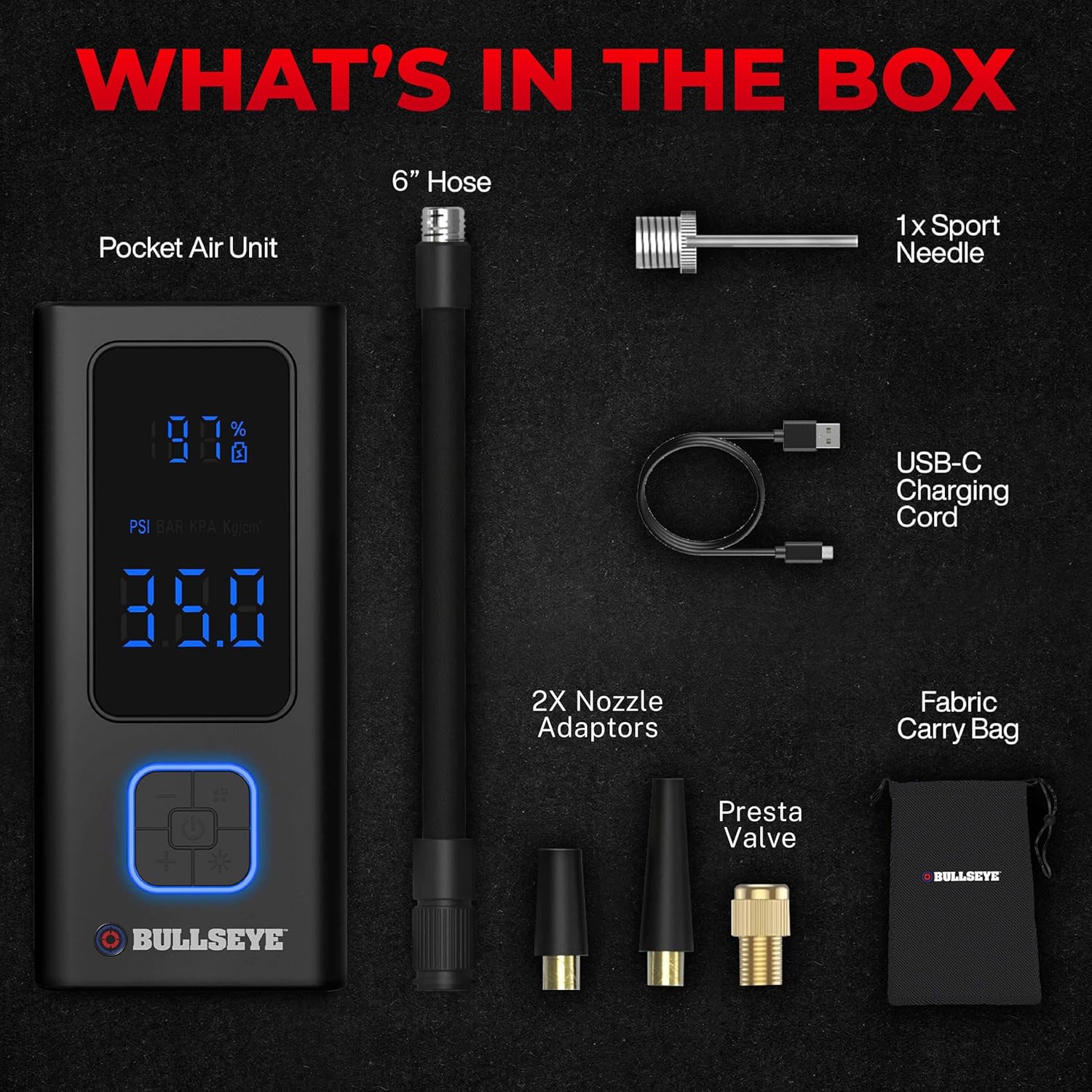
Image: All components included in the POCKET AIR Portable Tire Inflator package.
Key Features
The POCKET AIR Portable Tire Inflator is equipped with several features designed for efficiency, convenience, and safety:
- Ultra-Compact and Portable: Engineered to fit comfortably in a glove box, backpack, or pocket, weighing less than a pound.
- Quick Inflation: High-performance motor inflates standard car tires in just a few minutes, with a maximum pressure of 100 PSI.
- Smart Auto-Shutoff: Features a built-in digital pressure gauge allowing you to set the desired pressure. The inflator automatically stops once the preset pressure is reached, preventing over-inflation.
- 4000mAh Rechargeable Battery: Provides ample power for multiple inflations on a single charge.
- USB-C Charging: Conveniently recharges using the included USB-C cable.
- Built-in Night Light and SOS Probe: An ultra-bright LED light and SOS mode ensure safe usage even at night or during emergencies.
- Versatile Nozzle Adapters: Includes a sports needle and two nozzle adapters for inflating various items like car tires, bike tires (including Presta valve compatibility), sports balls, and inflatables.
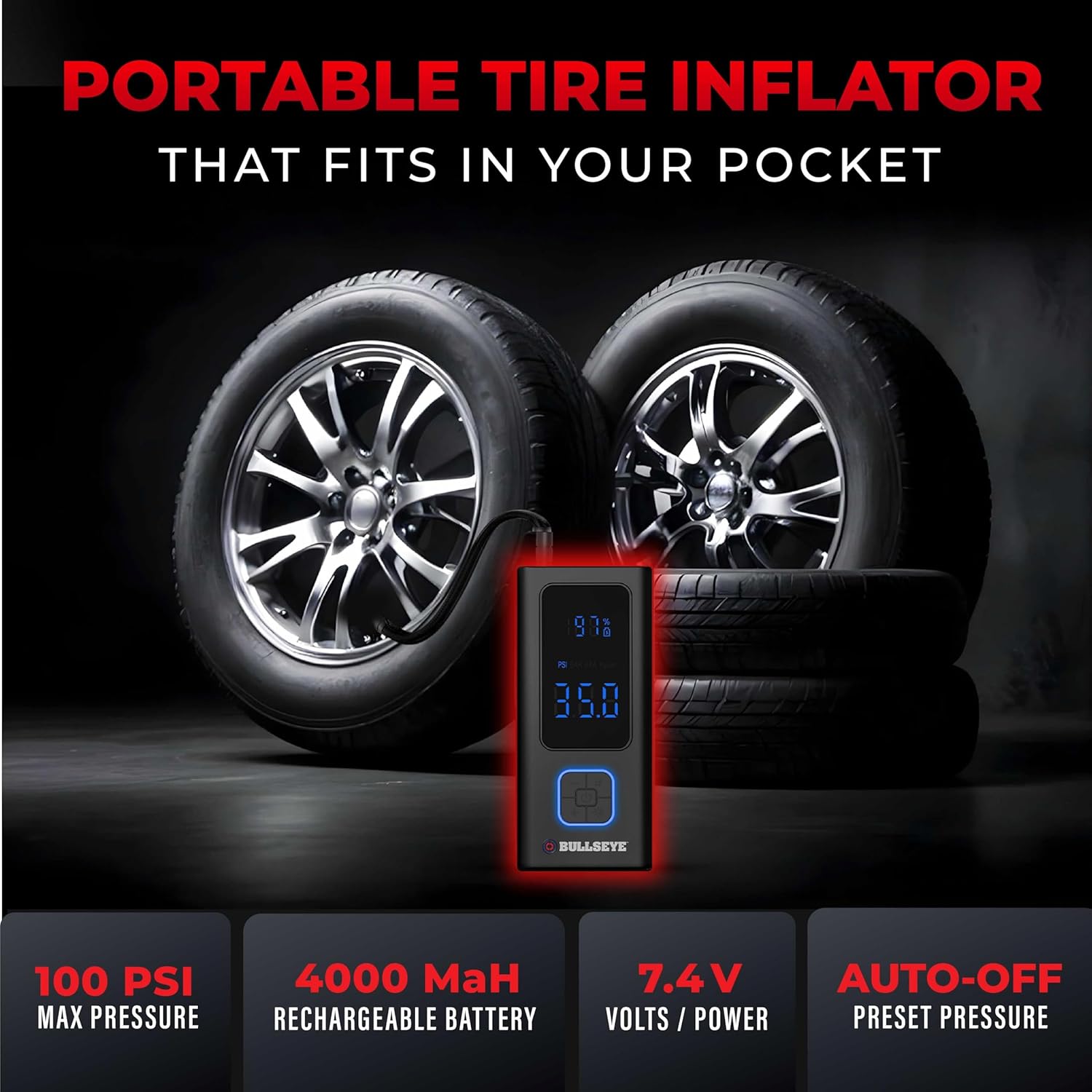
Image: Key features of the POCKET AIR Portable Tire Inflator.

Image: The POCKET AIR inflator is suitable for various items beyond car tires.
Setup
- Charge the Device: Before first use, fully charge the POCKET AIR inflator using the provided USB-C charging cable. Connect the cable to the inflator's USB-C port and plug the other end into a compatible USB power adapter (not included). The battery indicator on the display will show charging progress.
- Select Appropriate Nozzle: Identify the correct nozzle adapter for the item you wish to inflate. The standard air hose is suitable for car and motorcycle tires. Use the sports needle for balls or the cone-shaped adapters for various inflatables.
- Attach Air Hose/Nozzle: Securely screw the air hose onto the inflator's air outlet. If using an adapter, attach it to the end of the air hose.

Image: The POCKET AIR inflator and its accessories, including the USB-C charging cable.
Operating Instructions
- Power On: Press the power button to turn on the inflator. The digital display will illuminate, showing the current battery level and pressure unit.
- Set Desired Pressure: Use the '+' and '-' buttons to adjust the target pressure (PSI, BAR, KPA, or Kg/cm²). Refer to your vehicle's manual or the item's recommended pressure.
- Connect to Item: Securely attach the air hose (with the appropriate nozzle) to the valve stem of the tire or inflatable. Ensure a tight seal to prevent air leakage.
- Start Inflation: Press the inflation button to begin inflating. The display will show the real-time pressure increase.
- Auto-Stop Function: The inflator will automatically stop once the preset pressure is reached. This feature ensures precise inflation and prevents over-inflation.
- Disconnect: Once inflation is complete, quickly disconnect the air hose from the valve stem. A small amount of air may escape, which is normal.
- Using the LED Light: Press the light button to activate the ultra-bright LED light for illumination in low-light conditions. Press again to cycle through modes, including SOS mode for emergencies.

Image: The easy-to-read digital display allows for precise pressure monitoring even in challenging conditions.

Image: The AI Smart Stop feature ensures accurate and safe inflation by automatically stopping at the preset pressure.

Image: The built-in LED light and SOS mode provide safety and visibility during nighttime use or emergencies.
Official Product Video: Pocket Air Pro
Video: This official product video demonstrates the key features and operation of the Pocket Air Pro, including its portability, quick inflation capabilities, and auto-stop function for various items like car tires, bikes, and sports balls.
Maintenance
- Cleaning: Wipe the exterior of the inflator with a soft, dry cloth. Do not use harsh chemicals or abrasive cleaners.
- Storage: Store the inflator in a cool, dry place, away from direct sunlight and extreme temperatures. Ensure the air hose and nozzles are properly stored in the travel bag to prevent damage or loss.
- Battery Care: For optimal battery life, charge the device regularly, even if not in frequent use. Avoid completely draining the battery before recharging.
- Fuse Replacement: If the inflator stops working, check the spare fuse. Refer to the "What's in the Box" section for fuse location and replacement instructions if necessary.
Troubleshooting
| Problem | Possible Cause | Solution |
|---|---|---|
| Inflator does not turn on. | Low battery; Power button not pressed correctly. | Charge the inflator fully. Ensure the power button is pressed firmly. |
| Inflator runs but does not inflate. | Air hose not securely attached; Nozzle not properly sealed; Item already at desired pressure. | Check all connections for tightness. Ensure the nozzle is fully inserted into the valve. Verify the current pressure on the display. |
| Inflation is slow. | Low battery; Large item being inflated; Extreme temperature. | Ensure the inflator is fully charged. Inflation time varies based on item size and existing pressure. Performance may vary in very cold conditions. |
| Display is not working correctly. | Device malfunction. | Try restarting the device. If the issue persists, contact customer support. |
Specifications
- Brand: EMSON
- Model Name: 6146
- Voltage: 7.4 Volts
- Power Source: Rechargeable (4000mAh Lithium Ion Battery)
- Maximum Operating Pressure: 100 PSI (Pound per Square Inch)
- Hose Length: 6 Inches
- Item Weight: 1.85 pounds
- Color: Black
- Material: Plastic or Lightweight Alloy
- Special Features: Built-in Night Light and SOS Probe, Easy-to-read Digital Pressure Gauge, Cordless, Lightweight, Portable, Compact.
Warranty and Support
For any questions, technical assistance, or warranty claims regarding your POCKET AIR Portable Tire Inflator, please contact EMSON customer support. Refer to the product packaging or the official EMSON website for the most current contact information.
While specific warranty details are not provided in this manual, protection plans may be available for purchase separately. Please check with your retailer or the manufacturer for details on available protection plans.


