Introduction
This manual provides comprehensive instructions for the Generic RGB Wired Mechanical Keyboard. Please read this guide thoroughly before using the product to ensure proper setup, operation, and maintenance. This keyboard is designed for use with computers and gaming laptops, offering a responsive mechanical typing experience and customizable RGB backlighting.
Package Contents
- Generic RGB Wired Mechanical Keyboard
- USB Type-C Cable
Setup
- Connect the Keyboard: Locate the USB Type-C port on the back or side of the keyboard. Insert one end of the provided USB Type-C cable into this port.
- Connect to Computer: Insert the other end of the USB Type-A connector into an available USB port on your computer or gaming laptop.
- Driver Installation: The keyboard is plug-and-play. Your operating system should automatically detect and install the necessary drivers. No additional software installation is typically required for basic functionality.
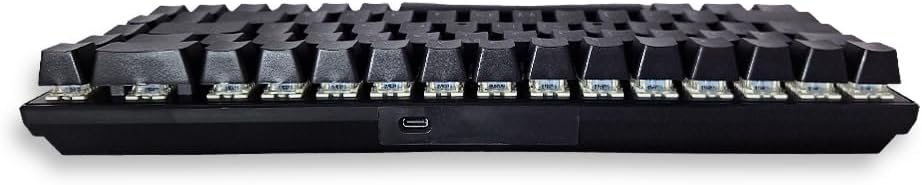
Image: Side view of the keyboard, highlighting the USB Type-C connection port.
Operating Instructions
Basic Usage
Once connected, the keyboard is ready for immediate use. The mechanical switches provide tactile feedback and a responsive typing experience suitable for both general use and gaming.

Image: Top-down view of the keyboard layout.
RGB Backlighting and Mood Keys
This keyboard features customizable RGB backlighting. The three dedicated 'Mood Keys' allow for quick cycling through preset lighting effects or user-defined lighting profiles. Refer to the keyboard's specific key combinations (often involving the 'Fn' key) for detailed control over brightness, speed, and lighting patterns.

Image: Angled view of the keyboard and its cable.
Maintenance
To ensure the longevity and optimal performance of your keyboard, follow these maintenance guidelines:
- Cleaning: Use a soft, dry cloth to wipe the surface of the keyboard. For deeper cleaning, use compressed air to remove dust and debris from between the keycaps. Avoid using liquid cleaners directly on the keyboard.
- Spills: In case of a liquid spill, immediately disconnect the keyboard from your computer. Turn it upside down to drain any liquid and allow it to dry completely for at least 24-48 hours before reconnecting.
- Storage: Store the keyboard in a cool, dry place away from direct sunlight and extreme temperatures.
Troubleshooting
If you encounter issues with your keyboard, please refer to the following common solutions:
- Keyboard Not Responding:
- Ensure the USB Type-C cable is securely connected to both the keyboard and the computer.
- Try connecting the keyboard to a different USB port on your computer.
- Test the keyboard on another computer to determine if the issue is with the keyboard or the computer's port.
- Keys Not Registering:
- Check for any physical obstructions under the keycaps.
- Ensure no software conflicts are present (e.g., other keyboard utilities).
- RGB Lighting Not Working:
- Verify that the keyboard is properly connected and receiving power.
- Use the dedicated 'Mood Keys' or 'Fn' key combinations to cycle through lighting modes and brightness levels.
Specifications
| Feature | Detail |
|---|---|
| Brand Name | Generic |
| Compatible Devices | Computers, Gaming Laptops |
| Connectivity Technology | USB-C (Wired) |
| Keyboard Description | Gaming |
| Recommended Uses | Gaming |
| Special Features | Backlit, 3 Mood Keys |
| Color | Black |
| Backlight Color Support | RGB (Red, Green, Blue) |
| Style | Gaming |
| Material | Plastic |
| Power Source | Wired |
| Switch Type | Mechanical |
| Keyboard Layout | QWERTY |
| Hand Orientation | Ambidextrous |
| Included Components | USB Cable |
| Manufacturer | Foreve |
| Country of Origin | China |
| Item Weight | 50 grams |
Warranty and Support
Warranty Information
This product is provided without an explicit warranty. Please refer to the retailer's return policy for any issues encountered shortly after purchase.
Customer Support
For further assistance or inquiries regarding the Generic RGB Wired Mechanical Keyboard, please contact your point of purchase or refer to the manufacturer's official website for support resources.


