
1. Product Overview
The XWXLIJV Remote Key Frequency Tester CNBJ-501 is a portable digital frequency meter designed for accurately testing the frequency and infrared signals of various remote control devices. It provides a clear digital display of the measured frequency and indicates infrared signal functionality, aiding in the diagnosis and adjustment of remote controls.

Figure 1: Front view of the XWXLIJV Remote Key Frequency Tester CNBJ-501.
This device is suitable for a wide range of applications, including electric door controllers, car burglar alarms, electric locks, garage door remote controls, and access control systems.
2. Components and Controls

Figure 2: Labeled diagram of the tester's components.
The tester features a 4-bit digital display, an infrared input LED, a lighting button, a power switch button (ON/OFF), a testing region (TX Zone), a battery replacement area, and a fall-proof rope attachment point.
3. Setup
3.1 Battery Installation
- Locate the battery compartment on the back of the device.
- Slide open the battery compartment cover.
- Connect a 9V 6F22 battery (not included) to the battery connector inside the compartment, ensuring correct polarity.
- Place the battery into the compartment and close the cover securely.
Video 1: Demonstrates battery installation and initial power-on of the frequency tester.
3.2 Powering On
Press the ON/OFF button located on the front panel to power on the device. The digital display will illuminate.
4. Operating Instructions
4.1 Frequency Testing
- Ensure the tester is powered on.
- Place the remote control device within 5cm of the 'TX Zone' on the tester. For optimal accuracy, position the remote as close as possible to this zone.
- Press any button on the remote control. The tester's digital display will show the frequency value in MHz.

Figure 3: Testing a car key remote's frequency. The display shows the measured frequency.
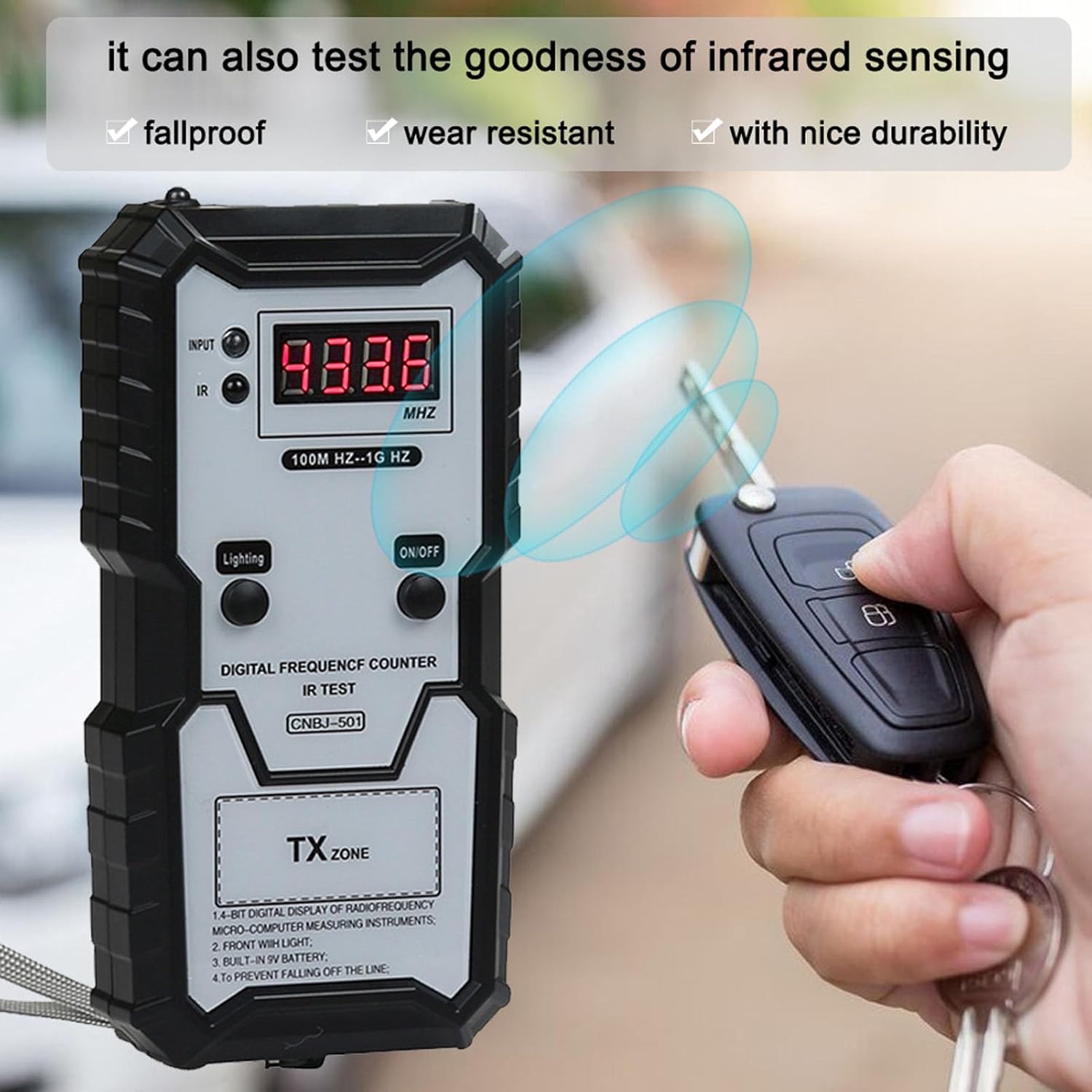
Figure 4: The tester can also detect infrared signals, indicated by the IR LED.
4.2 Infrared Signal Detection
- While testing the frequency, observe the 'IR' indicator light.
- If the remote control emits an infrared signal, the 'IR' indicator light will flash red, confirming proper infrared output.
Video 2: A short demonstration of the frequency tester in action, showing how to test a remote key fob.
Video 3: Demonstrates testing various remote keys for frequency and infrared signals.
Video 4: Shows the frequency tester being used to check a remote control's signal.
Video 5: A brief preview demonstrating the portable frequency counter's function.
4.3 Using the Built-in Light
Press the 'Lighting' button to activate the built-in LED light. This feature is useful for operating the tester in low-light conditions.

Figure 5: The tester's built-in LED light provides illumination in dark environments.
5. Maintenance
- Keep the device clean and dry. Avoid exposure to moisture or extreme temperatures.
- When the display becomes dim or the device does not power on, replace the 9V battery.
- Store the device in a safe place to prevent physical damage. The included fall-proof rope can be used to secure the device during use.
6. Troubleshooting
6.1 No Frequency Display
- Ensure the remote control is within the effective testing range (within 5cm) of the 'TX Zone'.
- Verify that the remote control's battery is not depleted.
- Check if the tester's battery is sufficiently charged.
6.2 IR Indicator Light Does Not Flash
- If the IR indicator light does not illuminate when a remote button is pressed, it suggests a potential malfunction or damage to the remote control's infrared transmitter.
- Confirm the remote control uses infrared technology; some remotes use radio frequency only.
7. Specifications
| Feature | Detail |
|---|---|
| Test Frequency Range | 100 MHz - 1 GHz |
| Effective Testing Range (IR) | Within 5 cm |
| Power Source | 9V 6F22 Battery (Not included) |
| Working Conditions | -10 ℃ - 40 ℃ |
| Working Relative Humidity | ≤ 80% |
| Storage Conditions | -20 ℃ - 50 ℃ |
| Storage Relative Humidity | ≤ 85% |
| Item Weight | 1.76 ounces (50 Grams) |
| Package Dimensions | 1.18 x 0.79 x 0.39 inches |
8. Warranty and Support
This XWXLIJV product comes with a 12-month warranty. For any questions or support regarding your purchase, please contact the seller. They are committed to resolving any issues within 24 hours.