
1. Introduction and Overview
This manual provides detailed instructions for the Heemol SK120X DC6-36V 120W 6A Digital Control Buck-Boost Converter. This device is a versatile voltage regulator designed for various applications, including charging rechargeable batteries and solar charging with MPPT functionality. It features digital control for precise voltage and current adjustment, a clear LCD display, and robust construction.

Image 1: Heemol SK120X Digital Control Buck-Boost Converter with its display showing voltage, current, and power readings.
2. Product Features
- Digital Control: Precise adjustment of output voltage and current.
- Clear LCD Display: Large, readable fonts for voltage, current, and power readings.
- Silicone Buttons: Tactile and responsive buttons with integrated indicator lights.
- Robust Construction: Flame-retardant, injection-molded shell with a gold immersion display board for durability and conductivity.
- Firmware Upgrade Support: Compatible with standard Modbus communication protocol and future firmware updates via WiFi module.
- MPPT Solar Charging: Integrated Maximum Power Point Tracking for efficient solar panel charging.
- High Accuracy: Utilizes a high-precision external clock crystal and a powerful 48-pin MCU controller for accurate measurements.
- Anti-Reverse Protection: Features anti-reverse connection functionality for battery charging.
- External Temperature Sensor Support: Allows connection of an NTC temperature probe for over-temperature protection.
3. Safety Information
Please read and understand the following safety precautions before operating the device:
- Reverse Polarity: This product does not have output reverse connection protection. Reversing the positive and negative terminals of the battery will damage the device. Ensure correct polarity during connection.
- Professional Knowledge: Battery charging requires specific professional knowledge. Non-professionals should not attempt to charge batteries directly to prevent fire and explosion hazards.
- Ventilation: Ensure adequate ventilation around the device during operation to prevent overheating.
- Power Off During Upgrades: Do not power off the device during a firmware upgrade process. If an upgrade fails, press and hold the power button to force it into upgrade mode.
4. Product Overview and Components
The Heemol SK120X features a compact design with an intuitive interface.

Image 2: Close-up of the SK120X display panel, showing the V-SET, SW, I-SET buttons, ON/OFF button, and rotary encoder.
4.1. Front Panel Controls
- V-SET Button: Used to set the output voltage.
- SW Button: Used for switching display modes or navigating menus.
- I-SET Button: Used to set the output current limit.
- ON/OFF Button: Toggles the output power. Features a red indicator for power off and a green indicator for power output on.
- Rotary Encoder: Used for fine adjustment of values when setting voltage or current.
- LCD Display: Shows real-time voltage, current, and power readings.
4.2. Internal Components and Connections

Image 3: Internal view of the SK120X, highlighting key components like inductors, capacitors, fan, and connection terminals.
- IN+/IN- Terminals: Input power connection points.
- OUT+/OUT- Terminals: Output power connection points.
- NTC Temperature Probe Interface: Connector for an external temperature sensor (10k NTC 3905B).
- Serial Communication Interface: For Modbus protocol and connection to external modules (e.g., XY-K485X for 485 bus control, WiFi module for APP/web control, infrared receiver for remote control).
- Dual Inductance Design: High-power, high-temperature resistant FeSiAl magnetic ring inductors.
- Solid-State Capacitor: High-quality capacitor for stable performance.
- Intelligent Temperature-Controlled Fan: Ensures optimal operating temperature with large-area ventilation heat sinks.
5. Setup
5.1. Physical Dimensions

Image 4: Dimensions of the SK120X module and its mounting cutout.
The module dimensions are approximately 10.4 cm (L) x 7 cm (W) x 5.2 cm (H). Refer to Image 4 for detailed measurements for integration into an enclosure.
5.2. Wiring Connections
- Input Power: Connect your DC power source (6-36V) to the IN+ (positive) and IN- (negative) terminals. Ensure correct polarity.
- Output Load: Connect your load or battery to be charged to the OUT+ (positive) and OUT- (negative) terminals. Double-check polarity, especially when charging batteries, as the device lacks output reverse connection protection.
- External Temperature Probe (Optional): If using, connect the NTC temperature probe to the designated interface. This enables over-temperature protection for battery charging.

Image 5: Diagram illustrating connections for MPPT solar charging, including solar panel, battery, and external temperature probe.
6. Operating Instructions
6.1. Power On/Off
- Press the ON/OFF button to toggle the output power. The button's indicator light will change from red (off) to green (on).
6.2. Setting Output Voltage (V-SET)
- Press the V-SET button. The voltage value on the display will start blinking.
- Rotate the Rotary Encoder to adjust the desired output voltage.
- Press V-SET again to confirm the setting, or wait a few seconds for it to auto-save.
6.3. Setting Output Current Limit (I-SET)
- Press the I-SET button. The current value on the display will start blinking.
- Rotate the Rotary Encoder to adjust the desired maximum output current.
- Press I-SET again to confirm the setting, or wait a few seconds for it to auto-save.
6.4. Display Modes (SW Button)
Press the SW button to cycle through different display modes, which may include input voltage, output voltage, output current, output power, capacity, and energy statistics.
6.5. Firmware Upgrade
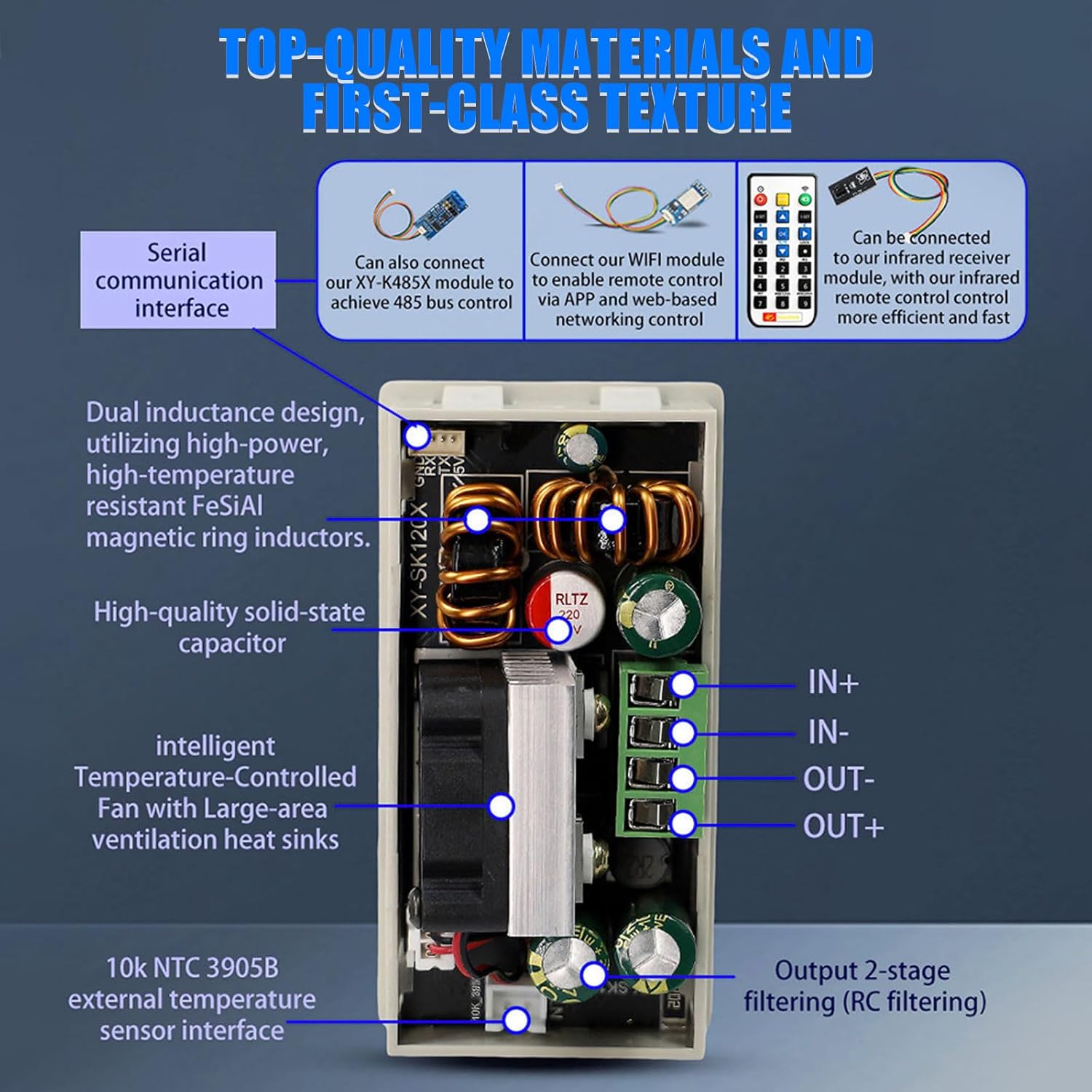
Image 6: Display showing firmware upgrade progress, version number, and status.
The device supports firmware upgrades. Currently, this is primarily done via a connected WiFi module. Future updates may allow upgrades via multi-serial port host computer software.
- Important: Do not power off the device during the firmware upgrade process.
- If an upgrade fails, press and hold the power button to power on the product and force it into the upgrade mode.
6.6. Network Control (Optional)

Image 7: Diagram illustrating network control options via PC host computer, mobile APP (Sinilink), and cloud services.
With an optional WiFi module, the SK120X can be controlled remotely via a PC host computer or a mobile application (Sinilink APP for Android/iOS). This allows for real-time communication, monitoring, and control over an external network, supporting email notifications and cloud record keeping.
7. Maintenance
To ensure the longevity and optimal performance of your Heemol SK120X, follow these maintenance guidelines:
- Cleaning: Regularly clean the exterior of the device with a soft, dry cloth. Avoid using abrasive cleaners or solvents.
- Ventilation: Ensure that the ventilation openings are not obstructed to allow proper airflow for the internal cooling fan.
- Storage: When not in use for extended periods, store the device in a cool, dry place away from direct sunlight and extreme temperatures.
- Connections: Periodically check all wiring connections to ensure they are secure and free from corrosion.
8. Troubleshooting
If you encounter issues with your Heemol SK120X, refer to the following common troubleshooting steps:
- No Power/Display:
- Check the input power supply connection and ensure it is within the 6-36V range.
- Verify that the input power source is functioning correctly.
- No Output:
- Ensure the output is turned ON by pressing the ON/OFF button (green indicator should be lit).
- Check output wiring for correct polarity and secure connections.
- Verify that the set output voltage and current limits are appropriate for your load.
- Incorrect Readings:
- Ensure all connections are secure.
- Compare readings with a calibrated multimeter if possible.
- If readings are consistently off, contact support.
- Overheating:
- Ensure adequate ventilation around the device.
- Check if the cooling fan is operating.
- Reduce the load if operating near maximum power for extended periods.
- If an external temperature probe is connected, ensure it is properly installed and functioning.
- Firmware Upgrade Failure:
- Do not power off during the upgrade. If it fails, press and hold the power button to force the device into upgrade mode and retry.
- Ensure a stable network connection if upgrading via WiFi.
9. Specifications
| Parameter | Value |
|---|---|
| Brand | Heemol |
| Model Number | SK120X |
| Input Voltage | DC 6.0-36.00V |
| Output Voltage | DC 0-36.00V |
| Output Current | 0-6.000A |
| Power Output | 120W (Max) |
| Dimensions (L x W x H) | 10.4 x 7 x 5.2 cm |
| Weight | 140 grams |
| Compliance | CE |
| Power Source | Cable Electric |
| Mounting Type | Rack Mount |

Image 8: Summary of key specifications including input/output voltage, current, power, and storage capacity.
10. Warranty and Support
For warranty information and technical support, please refer to the documentation provided with your purchase or contact the seller/manufacturer directly. Keep your purchase receipt as proof of purchase.