
1. Introduction and Overview
The Neewer TLP-E6P is a high-capacity 2400mAh lithium-ion replacement battery designed as a fully decoded alternative to original Canon LP-E6P, LP-E6NH, LP-E6N, and LP-E6 models. It provides reliable power for extended shooting sessions and is compatible with a wide range of Canon EOS cameras.
This battery features an integrated USB Type-C charging port, allowing for convenient recharging without the need for a dedicated external charger. It also includes multiple built-in safety protections to ensure secure operation.

Figure 1: Neewer LP-E6P Replacement Battery and USB-C Charging Cable.
2. Product Features
- Fully Decoded Compatibility: The TLP-E6P battery is fully decoded to function seamlessly with Canon EOS R series cameras (including EOS R5 Mark II, R5, R6, R7, R) and various Canon DSLRs (including 5D Mark II/III/IV, 6D, 6D Mark II, 7D, 7D Mark II, 60D, 70D, 80D, 90D). It supports real-time battery level display on your camera.
- Integrated Type-C Charging: An innovative built-in Type-C port allows for direct charging using a standard USB Type-A to Type-C cable (included). This enables charging via portable chargers, laptops, adapters, or car chargers, offering flexibility in various environments. A full charge takes approximately 3.3 hours.
- High Capacity: With a 2400mAh capacity, this battery provides sufficient power for extended shooting sessions, supporting prolonged use for both photos and videos.
- Original Standard Design: Designed to match the original LP-E6P battery specifications in size and form factor, ensuring a perfect fit within the camera's battery compartment without issues like jamming or bulging. It can also be recharged using the original LP-E6P charger.
- Intelligent Protection: Equipped with multiple circuit protections against overheating, overcharging, over-discharge, short circuits, and overvoltage, ensuring safe and reliable operation.

Figure 2: Compatible Canon EOS Camera Models.

Figure 3: Overview of Built-in Intelligent Protection.
3. Setup
Before first use, it is recommended to fully charge the battery. The battery comes with a protective dust cover for its contacts. Remove this cover before inserting the battery into your camera or connecting it to a charger.
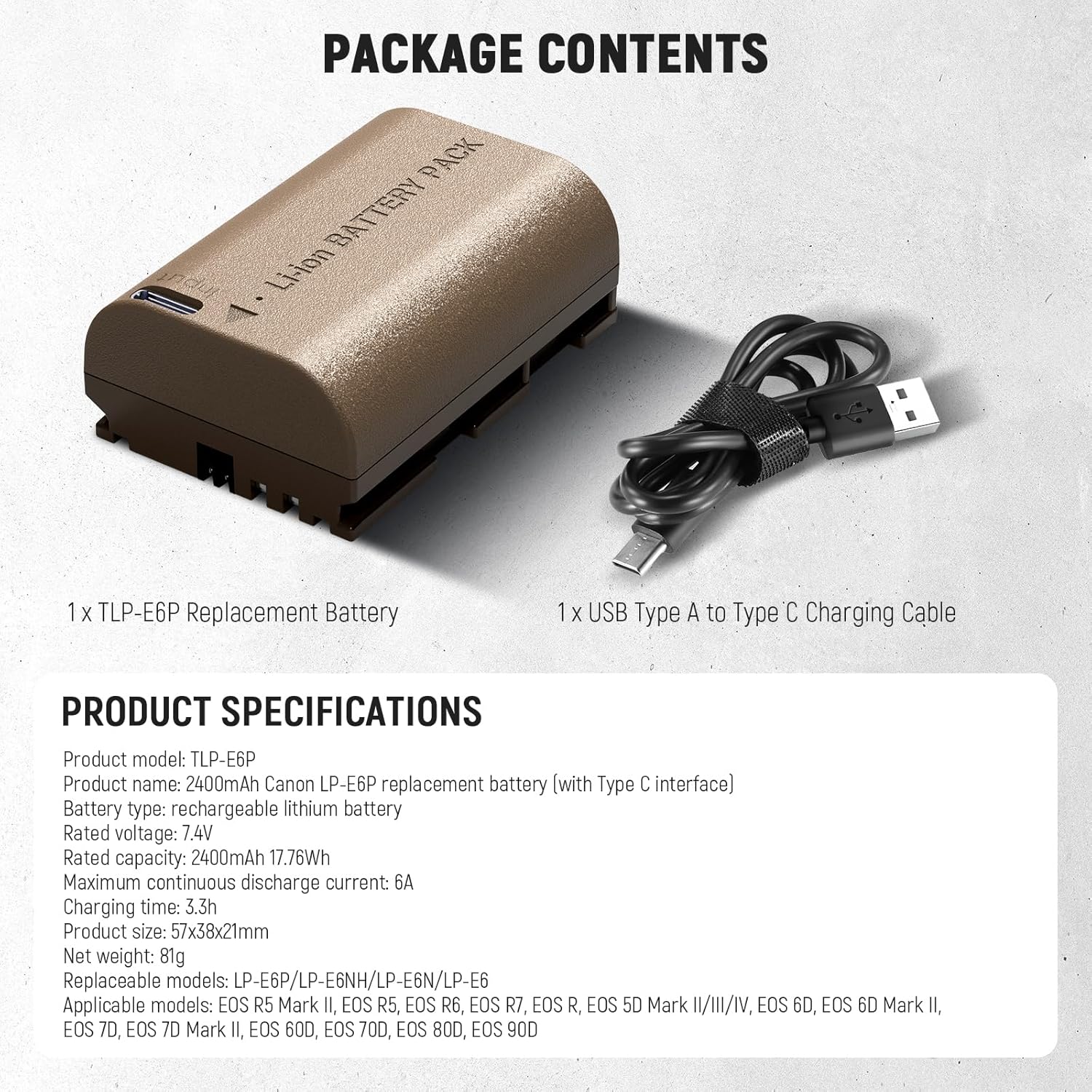
Figure 4: Package Contents and Product Specifications.
4. Operating Instructions
4.1 Charging the Battery
The TLP-E6P battery offers two primary charging methods:
- Via USB Type-C Port: Connect the included USB Type-A to Type-C charging cable to the battery's Type-C port. Plug the USB Type-A end into any compatible USB power source, such as a USB power adapter, laptop, car charger, or portable power bank. The charging indicator light on the battery will illuminate red during charging and turn green when fully charged. A full charge typically takes 3.3 hours.
- Using an LP-E6P Charger: The battery is compatible with original Canon LP-E6P chargers (sold separately). Insert the battery into the charger as per the charger's instructions.

Figure 5: Direct Charging via USB Type-C Port.

Figure 6: Battery Charging Status Indicator (Red for Charging, Green for Full).
4.2 Using the Battery with Your Camera
Insert the fully charged TLP-E6P battery into your compatible Canon EOS camera's battery compartment. Ensure it is inserted correctly and securely. The battery's fully decoded chip allows your camera to display the real-time battery level, just like an original battery.

Figure 7: Real-time Battery Level Display on Camera.
5. Maintenance
- Storage: When not in use, store the battery in a cool, dry place. Use the provided dust cover to protect the battery contacts from dust and debris, which can prevent proper connection and potentially damage the battery or camera.
- Cleaning: If contacts become dirty, gently wipe them with a clean, dry cloth. Avoid using liquids or abrasive materials.
- Temperature: Avoid exposing the battery to extreme temperatures (hot or cold) as this can affect its performance and lifespan.
- Disposal: Dispose of lithium-ion batteries responsibly according to local regulations. Do not dispose of them in household waste.

Figure 8: The compact design makes the battery easy to carry and store.
6. Troubleshooting
- Battery Not Charging: Ensure the USB Type-C cable is securely connected to both the battery and the power source. Verify that the power source is active and providing sufficient power. If using an original charger, ensure it is functioning correctly.
- Battery Not Reaching 100% Charge via USB: In some instances, especially during initial uses, charging via USB Type-C may only reach a partial charge (e.g., 60%). If this occurs, try fully discharging the battery and then recharging it multiple times. Using an original Canon LP-E6P charger typically ensures a 100% charge consistently.
- Battery Not Recognized by Camera: Ensure the battery is inserted correctly into the camera's battery compartment. Check that the battery contacts are clean and free of debris. If the issue persists, try restarting the camera.
- Short Battery Life: Ensure the battery is fully charged before use. Battery performance can be affected by extreme temperatures or continuous high-power usage (e.g., prolonged video recording).
7. Specifications and Package Contents
7.1 Product Specifications
| Attribute | Value |
|---|---|
| Product Model | TLP-E6P |
| Product Name | 2400mAh Canon LP-E6P replacement battery (with Type C interface) |
| Battery Type | Rechargeable Lithium Battery |
| Rated Voltage | 7.4V |
| Rated Capacity | 2400mAh (17.76Wh) |
| Maximum Continuous Discharge Current | 6A |
| Charging Time (via Type-C) | 3.3 hours |
| Product Size | 57x38x21mm |
| Net Weight | 81g |
| Replaceable Models | LP-E6P/LP-E6NH/LP-E6N/LP-E6 |
| Applicable Models | Canon EOS R5 Mark II, EOS R5, EOS R6, EOS R7, EOS R, EOS 5D Mark II/III/IV, EOS 6D, EOS 6D Mark II, EOS 7D, EOS 7D Mark II, EOS 60D, EOS 70D, EOS 80D, EOS 90D |
7.2 Package Contents
- 1 x LP-E6P Replacement Battery
- 1 x USB Type A to Type C Charging Cable
8. Warranty and Support
NEEWER products are designed for reliability and performance. For warranty information, technical support, or any inquiries regarding your Neewer TLP-E6P battery, please refer to the official NEEWER website or contact their customer service directly. Keep your purchase receipt for warranty claims.
For further assistance, visit the NEEWER Store on Amazon.