
LASELION LT70
LASELION LT70 Laser Distance Meter User Manual
Model: LT70 | Brand: LASELION
1. Introduction
Thank you for choosing the LASELION LT70 Laser Distance Meter. This device is designed for precise and efficient distance measurements, offering a range of functions including area, volume, and Pythagorean calculations. Its compact design and user-friendly interface make it an ideal tool for professionals and DIY enthusiasts alike. This manual provides detailed instructions for the proper use, maintenance, and troubleshooting of your LT70 laser distance meter.

Image: Front view of the LASELION LT70 Laser Distance Meter, showcasing its display and control buttons.
2. Product Features
- 70m Maximum Range (229ft): Measures distances up to 70 meters (229 feet) with high precision. Laser class: Class II, power: <1mW.
- Multiple Measurement Functions: Includes single distance, continuous measurement, area, volume, and Pythagorean theorem modes for comprehensive measuring needs.
- Built-in Level Bubble: Ensures real-time horizontal alignment for more accurate results.
- Mute Function: Operates in silence with the mute feature, ideal for quiet environments.
- Durable & Reliable Design: Built with quality Acrylonitrile Butadiene Styrene material to withstand daily use in demanding environments.
- Unit Conversion: Easily switch between metric (m) and imperial (ft/in) units.
- Compact & Portable: Lightweight (100g) and easy to carry for convenient use on the go.
- Automatic Storage: Stores up to 100 data sets.

Image: Visual representation of the LASELION LT70's multiple measurement functions, including single, continuous, distance, area, volume, and Pythagorean modes.

Image: The LASELION LT70 displaying its dual bubble levels for enhanced accuracy and illustrating the front and back reference points for measurements.

Image: The LASELION LT70 demonstrating its dustproof capability in sand and its IP54 waterproof rating under water droplets, highlighting its robust design.
3. Setup
3.1 Package Contents
Before first use, please verify that all items are present in the package:
- LASELION LT70 Laser Distance Meter
- AAA Batteries (1 included)
- User Manual
- Carrying Pouch
- Wrist Strap

Image: The LASELION LT70 Laser Distance Meter, its packaging, included AAA batteries, carrying pouch, wrist strap, and user manual.
3.2 Battery Installation
- Locate the battery compartment cover on the back of the device.
- Slide the cover open in the direction indicated by the arrow.
- Insert 1 AAA battery, ensuring correct polarity (+/-) as marked inside the compartment.
- Close the battery compartment cover securely until it clicks into place.
4. Operating Instructions
4.1 Device Overview and Buttons

Image: Detailed diagram of the LASELION LT70's display icons and button functions, including Measure, Menu, Addition/Subtraction, Continuous Measurement, Memory, Clear/Mute, and Power ON/OFF.
- Measure Button (Red Triangle): Activates the laser, initiates single measurements, or confirms selections.
- Menu Button (Top Left): Enters measurement mode selection.
- Addition / Subtraction Button (+/-): Adds or subtracts measurements.
- Continuous Measurement Button (Horizontal Arrows): Activates continuous measurement mode.
- Memory Button (Stack of Papers): Accesses stored measurements.
- Clear / Mute Button (C/Speaker): Clears current measurement, returns to previous screen, or toggles mute function.
- Unit / Reference Point Button (Unit/Arrow): Short press to change reference point, long press to change units.
- Power ON / OFF Button (Red Circle): Turns the device on or off.
4.2 Power On/Off
- To Power On: Press the Power ON / OFF button. The display will light up.
- To Power Off: Press and hold the Power ON / OFF button for 2 seconds. The device will also automatically power off after 180 seconds of inactivity to save battery.
4.3 Basic Measurement (Single Distance)
- Ensure the device is powered on.
- Point the laser at the target surface.
- Press the Measure button once. The laser will activate.
- Press the Measure button again. The distance will be displayed on the screen.
4.4 Measurement Modes
Press the Menu button to cycle through different measurement modes.
- Continuous Measurement (Min/Max):
This mode allows for dynamic measurement as you move the device. The display will show the current distance, as well as the minimum and maximum distances recorded during the continuous scan.
To activate: Press the Continuous Measurement button.
To stop: Press the Measure button.
Image: The LASELION LT70 display showing continuous measurement with minimum and maximum values.
- Area Measurement:
Measures the area of a rectangular space by taking two distance measurements (length and width).
To activate: Select Area mode from the Menu.
Steps: Take the first measurement (length), then the second measurement (width). The device will automatically calculate and display the area. - Volume Measurement:
Measures the volume of a cubic space by taking three distance measurements (length, width, and height).
To activate: Select Volume mode from the Menu.
Steps: Take the first measurement (length), then the second (width), and finally the third (height). The device will automatically calculate and display the volume. - Pythagorean Measurement:
Calculates indirect distances using the Pythagorean theorem (e.g., height of a building).
To activate: Select Pythagorean mode from the Menu.
Steps: Follow the on-screen prompts to take the required measurements (e.g., hypotenuse and one leg). The device will calculate the unknown side. - Addition and Subtraction:
Allows you to add or subtract multiple measurements.
To use: After a measurement, press the +/- button. The display will show a plus or minus sign. Take the next measurement, and the device will perform the calculation.
Image: The LASELION LT70 display illustrating an addition operation between two measurements.
4.5 Reference Point Selection
The LT70 can measure from either its front or back edge. This is crucial for accurate measurements depending on your starting point.
- To change reference point: Short press the Unit / Reference Point button. An icon on the display will indicate whether the measurement is taken from the front or back of the device.

Image: The LASELION LT70 showing how to switch between front and back reference points, and demonstrating the various unit conversion options (m, ft, in, ft+in).
4.6 Unit Conversion
The device supports multiple units of measurement.
- To change units: Long press the Unit / Reference Point button to cycle through meters (m), feet (ft), inches (in), and feet+inches (ft+in).
4.7 Mute Function
To operate the device silently, you can enable the mute function.
- To toggle mute: Long press the Clear / Mute button. A speaker icon on the display will indicate the mute status.

Image: The LASELION LT70 being used in a quiet environment, with a close-up of the 'C/Speaker' button indicating the mute function.
4.8 Automatic Storage
The LT70 automatically stores measured and calculated values, with a total capacity of 100 memory locations. When the memory is full, the latest measurement will overwrite the oldest record.
- To view stored data: Press the Memory button. Use the arrow buttons (if available, or cycle through with Memory button) to navigate through the stored records.
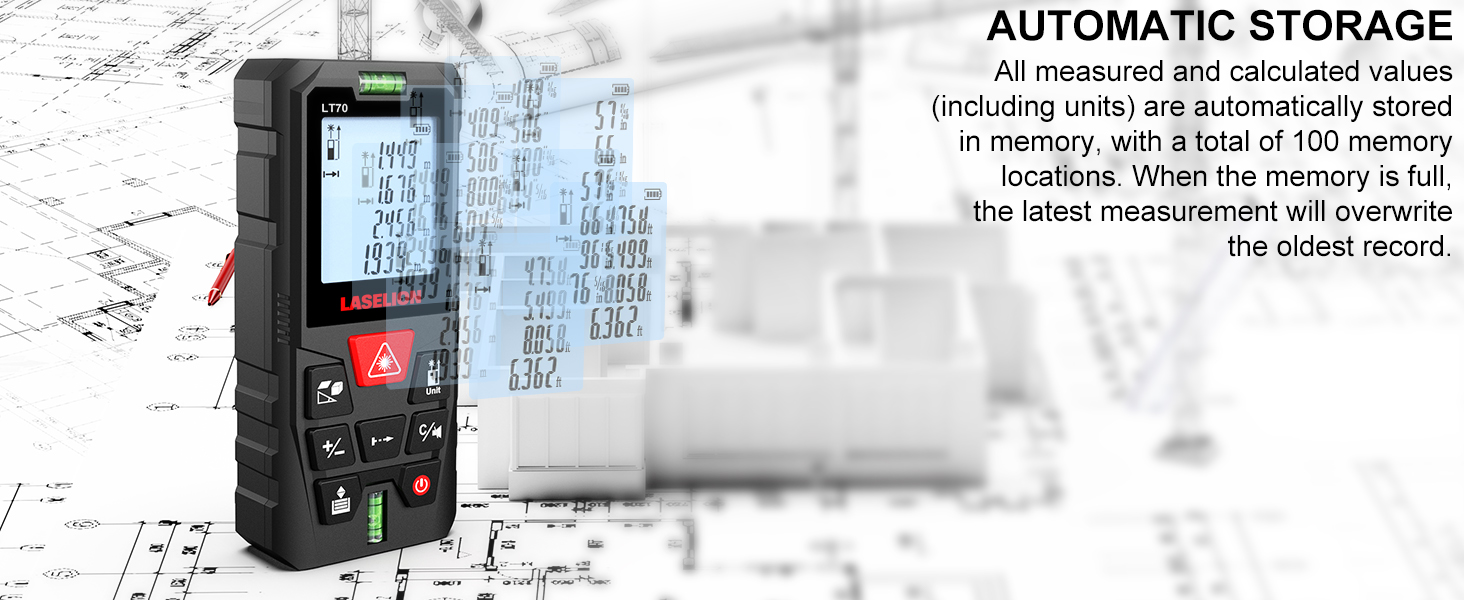
Image: The LASELION LT70 demonstrating its automatic storage capability, showing multiple measurement values being saved and accessible in memory.
5. Maintenance
- Cleaning: Use a soft, damp cloth to clean the device. Do not use abrasive cleaners or solvents. Ensure the laser lens is clean for accurate measurements.
- Battery Replacement: Replace batteries when the low battery indicator appears on the display. Always use new AAA alkaline batteries. Remove batteries if the device will not be used for an extended period to prevent leakage.
- Storage: Store the device in a cool, dry place, away from direct sunlight and extreme temperatures. Use the provided carrying pouch for protection.
- Avoid Impact: While durable, avoid dropping the device or subjecting it to strong impacts, as this can affect its accuracy and functionality.
6. Troubleshooting
- Device does not turn on:
- Check if batteries are installed correctly with correct polarity.
- Replace with new batteries. - Inaccurate readings:
- Ensure the laser lens is clean and free from dust or smudges.
- Verify the reference point setting (front or back of the device).
- Ensure the target surface is flat and reflective enough for the laser.
- Avoid measuring through transparent surfaces like glass. - Laser not visible:
- The laser may be difficult to see in bright sunlight or strong ambient light. Try to shade the target area or use the device in lower light conditions. - Display shows 'Error':
- This may indicate a measurement outside the device's range or an obstruction. Try measuring a closer target or clear any obstructions. If the error persists, power cycle the device. - Buttons are unresponsive:
- Power off the device and restart it. If the issue continues, ensure no debris is lodged around the buttons.
7. Specifications
| Specification | Detail |
|---|---|
| Model | LT70 |
| Measuring Range | 0.05m - 70m (0.16ft - 229ft) |
| Accuracy | ±2mm (±1/16 inch) |
| Measurement Speed | 0.5s |
| Laser Class | Class II |
| Laser Power | <1mW |
| Units of Measurement | m, ft, in, ft+in |
| Automatic Storage | 100 data sets |
| Batteries | 1 x AAA Alkaline (included) |
| Automatic Laser Off | 30 seconds |
| Automatic Device Off | 180 seconds |
| Operating Temperature | 0°C to 40°C (32°F to 104°F) |
| Storage Temperature | -20°C to 60°C (-4°F to 140°F) |
| IP Rating | IP54 (Dustproof & Splashproof) |
| Dimensions | 14.8 x 9.5 x 4.7 cm |
| Weight | 100 g |
| Material | Acrylonitrile Butadiene Styrene |
| Manufacturer | Shenzhen Baisitu Technology Co., Ltd. |
8. Warranty and Support
8.1 Warranty Information
The LASELION LT70 Laser Distance Meter comes with a 1-year warranty from the date of purchase. This warranty covers defects in materials and workmanship under normal use. It does not cover damage caused by misuse, accidents, unauthorized modifications, or improper maintenance.
8.2 Customer Support
For technical support, warranty claims, or any questions regarding your LASELION LT70 Laser Distance Meter, please contact our customer service. Refer to the contact information provided on the product packaging or the official LASELION website.
Ask a question about this manual
Ask about setup, troubleshooting, compatibility, parts, safety, or missing instructions. Manuals+ will review the question and use this page’s manual context to help answer it.