1. Introduction
Thank you for choosing the OYAJIA BD068C Dehumidifier. This manual provides essential information for the safe and efficient operation, maintenance, and troubleshooting of your new appliance. Please read it thoroughly before use and retain it for future reference.
Important Note:
Before using a newly purchased dehumidifier for the first time, it is recommended to let it stand upright for 4 to 6 hours, or sometimes longer. This allows the refrigerant to settle properly. During transportation, the dehumidifier may tilt, causing the refrigerant to shift. Operating it immediately might result in poor dehumidification, improper function, or excessive noise. Allowing it to stand ensures the compressor functions correctly, optimizing performance and durability.

Image 1.1: OYAJIA BD068C Dehumidifier with Wi-Fi App Control
2. Safety Instructions
To prevent injury to the user or others and property damage, the following instructions must be followed. Incorrect operation due to ignoring instructions may cause harm or damage.
- Always ensure the dehumidifier is placed on a stable, level surface.
- Do not operate the unit if the power cord or plug is damaged.
- Keep the unit away from heat sources, flammable materials, and direct sunlight.
- Do not block the air inlet or outlet. Maintain at least 20 cm clearance around the unit.
- Do not insert fingers or foreign objects into the air vents.
- Unplug the unit before cleaning, maintenance, or when not in use for extended periods.
- Do not use the dehumidifier in areas where water may splash onto it.
- This appliance is not intended for use by persons (including children) with reduced physical, sensory or mental capabilities, or lack of experience and knowledge, unless they have been given supervision or instruction concerning use of the appliance by a person responsible for their safety.
- Children should be supervised to ensure that they do not play with the appliance.
- Only use accessories recommended by the manufacturer.
3. Product Overview
3.1 Components
- Dehumidifier Unit (with integrated dust filter and water tank)
- Drainage Hose
- User Manual
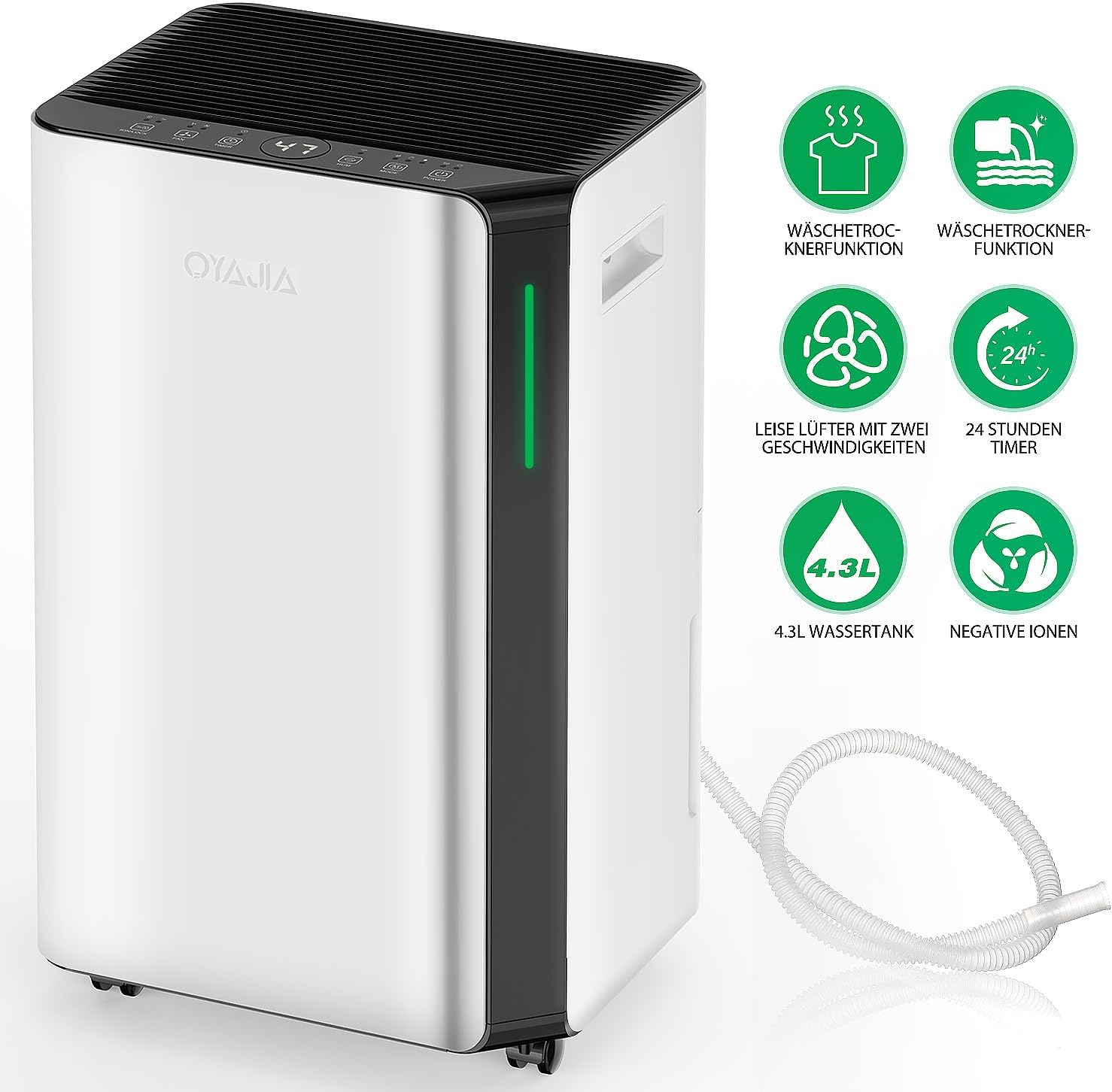
Image 3.1: Key Features of the OYAJIA BD068C Dehumidifier
3.2 Control Panel
The dehumidifier features an intuitive touch control panel for easy operation.

Image 3.2: Dehumidifier Control Panel
- Power Button: Touch to turn the unit on or off.
- Mode Button: Touch to select Automatic, Sleep, or Continuous Drying mode.
- Humidity Button: Touch to adjust the desired air humidity level.
- Timer / Wi-Fi Button: Touch to set the timer for automatic start or stop. Press and hold to initiate network configuration or disconnect from 2.4G Wi-Fi.
- Fan Speed Button: Touch to select the desired fan speed (2 options).
- Lock / Negative Ion Button: Press to activate/deactivate the negative ion function. Press and hold to activate/deactivate the child safety lock.
- Digital Display: Shows the current humidity value, timer setting, or test value.
- Indicator Light: Displays humidity level: Blue (<45% humidity), Green (≤65% humidity), Red (>65% humidity).
4. Setup
4.1 Unpacking
- Carefully remove the dehumidifier and all packaging materials from the box.
- Ensure all components listed in Section 3.1 are present.
- Place the unit upright on a flat, stable surface and allow it to stand for 4-6 hours before plugging it in.
4.2 Placement
- Position the dehumidifier in a location where the humidity is highest or where dehumidification is most needed.
- Ensure there is at least 20 cm (8 inches) of space around the unit for proper airflow.
- Avoid placing the unit near obstacles that could block the air intake or exhaust.
- The unit is equipped with universal wheels for easy movement.
4.3 Power Connection
Plug the power cord into a grounded electrical outlet (220-240V/50Hz). The unit will enter standby mode.
5. Operating Instructions
5.1 Power On/Off
Touch the Power Button to turn the dehumidifier on or off.
5.2 Mode Selection
Touch the Mode Button to cycle through the available operating modes:
- Automatic Mode: The unit automatically adjusts its operation based on the ambient humidity to maintain a comfortable level.
- Sleep Mode: Reduces fan speed and light intensity for quiet operation during nighttime, ensuring an undisturbed sleeping environment.
- Continuous Drying Mode: Operates continuously at a high fan speed for maximum dehumidification, ideal for drying laundry or very damp areas.
5.3 Humidity Setting
In Automatic Mode, touch the Humidity Button to set your desired humidity level (e.g., 40%, 50%, 60%). The unit will operate to maintain this level.
5.4 Timer Function
Touch the Timer / Wi-Fi Button to set a timer for automatic power on or off, up to 12 hours. Each touch increases the timer by one hour.
5.5 Fan Speed Adjustment
Touch the Fan Speed Button to switch between two fan speed options (High/Low) to suit your preference and dehumidification needs.
5.6 Negative Ion Function and Child Lock
Press the Lock / Negative Ion Button to activate or deactivate the negative ion function, which helps purify the air by removing particles, bacteria, and odors.
Press and hold the Lock / Negative Ion Button to activate or deactivate the child safety lock. When activated, the control panel buttons will be locked to prevent accidental changes.
5.7 Humidity Indicator Light
The LED indicator light on the unit changes color to visually represent the current humidity level:
- Blue: Humidity < 45%
- Green: Humidity ≤ 65% (optimal range 50-70%)
- Red: Humidity > 65%

Image 5.1: Humidity Level Smart Light System
5.8 Wi-Fi Connectivity
The dehumidifier supports 2.4G Wi-Fi connectivity, allowing remote control via a smartphone app (e.g., Smart Life/Tuya app).
- Download the compatible app (e.g., Smart Life or Tuya) from your smartphone's app store.
- Register or log in to your account.
- Press and hold the Timer / Wi-Fi Button on the dehumidifier to enter network configuration mode. The Wi-Fi indicator light will flash.
- Follow the in-app instructions to add the device and connect it to your 2.4G Wi-Fi network.
- Once connected, you can remotely control modes, humidity settings, fan speed, and other parameters from your smartphone.

Image 5.2: Manual Operation or Smart Life App Control
6. Drainage Options
The OYAJIA BD068C dehumidifier offers two drainage methods:

Image 6.1: Two Drainage Methods
6.1 Manual Drainage (Water Tank)
The unit collects condensed water in its removable 4.3-liter water tank. When the tank is full, the dehumidifier will automatically stop operating and emit a reminder. The digital display will indicate that the tank is full.
- Carefully pull out the water tank from the front of the unit.
- Empty the collected water into a sink or drain.
- Slide the empty water tank back into the unit until it clicks into place. The dehumidifier will resume operation.
6.2 Continuous Drainage
For continuous operation without needing to empty the water tank, you can use the included drainage hose.
- Locate the continuous drainage outlet on the back or side of the dehumidifier.
- Remove the rubber stopper (if present).
- Connect one end of the drainage hose to the outlet. Ensure a secure connection to prevent leaks.
- Direct the other end of the hose to a suitable drain, ensuring it is lower than the dehumidifier's drainage outlet for gravity flow.
- Once connected, water will continuously drain, allowing for uninterrupted operation.
7. Maintenance
Regular maintenance ensures optimal performance and extends the lifespan of your dehumidifier.
7.1 Cleaning the Air Filter
The dehumidifier is equipped with a washable filter to capture dust and particles. Clean the filter regularly (e.g., every two weeks or as needed).
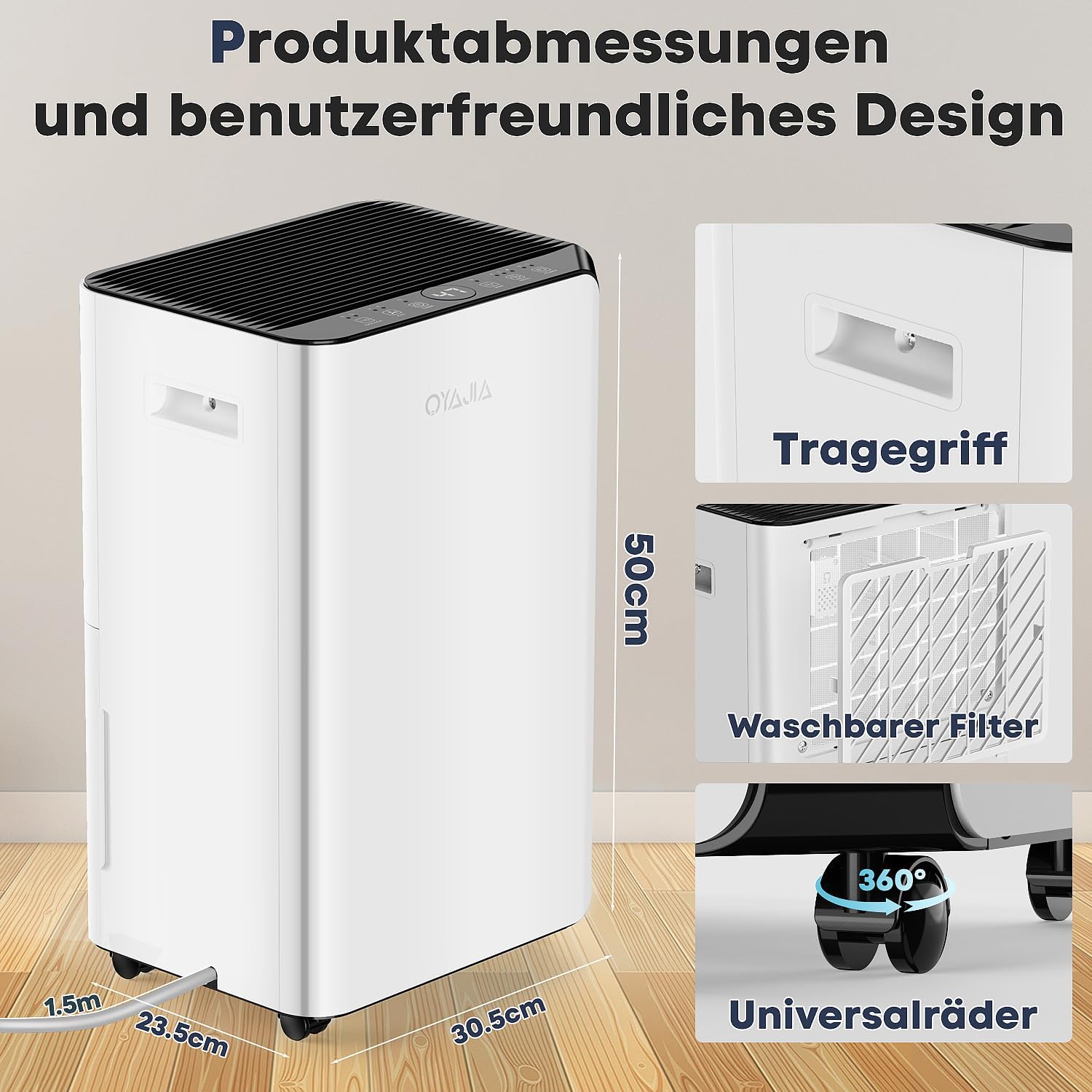
Image 7.1: Washable Filter
- Turn off the dehumidifier and unplug it from the power outlet.
- Locate the air filter cover (usually on the back or side of the unit) and remove it.
- Gently pull out the air filter.
- Wash the filter with clean water (not hot water) and a mild detergent.
- Rinse thoroughly and allow the filter to air dry completely before reinserting it.
- Place the dry filter back into its slot and reattach the cover.
7.2 Cleaning the Unit Exterior
Wipe the exterior of the dehumidifier with a soft, damp cloth. Do not use harsh chemicals, abrasive cleaners, or solvents, as these can damage the surface.
7.3 Water Tank Cleaning
Clean the water tank periodically to prevent mold or mildew growth. Use a mild detergent and warm water, then rinse thoroughly and dry before reinserting.
8. Troubleshooting
Before contacting customer service, please refer to the following table for common issues and solutions.
| Problem | Possible Cause | Solution |
|---|---|---|
| Dehumidifier does not turn on. | No power supply. Power cord not properly plugged in. | Ensure the unit is plugged into a working outlet. Check the circuit breaker. |
| No dehumidification or poor performance. | Air filter is dirty. Air inlet/outlet blocked. Room temperature too low. Humidity setting is too high. Unit recently moved (refrigerant needs to settle). | Clean the air filter. Ensure proper clearance around the unit. Operating temperature range is 5°C to 35°C. Lower the desired humidity setting. Allow the unit to stand upright for 4-6 hours before operation. |
| Water tank is full, but unit is not operating. | Water tank is full. Water tank not properly inserted. | Empty the water tank. Ensure the water tank is correctly and securely reinserted. |
| Unit is noisy. | Unit not on a level surface. Air filter is dirty. Foreign object in fan. | Place the unit on a flat, stable surface. Clean the air filter. Turn off and unplug the unit, then check for obstructions. |
| Wi-Fi connection fails. | Incorrect Wi-Fi password. Not connected to 2.4G Wi-Fi. Router too far or signal weak. | Verify Wi-Fi password. Ensure your phone and dehumidifier are on a 2.4G network. Move the unit closer to the router or improve signal strength. |
9. Specifications
| Feature | Specification |
|---|---|
| Brand | OYAJIA |
| Model | BD068C |
| Dehumidification Capacity | 16 Liters/24 Hours |
| Water Tank Capacity | 4.3 Liters |
| Dehumidification Method | R290 Compressor |
| Recommended Dehumidification Area | Up to 60 m² (approx. 645 sq ft) |
| Power Supply | 220-240 V / 50 Hz |
| Noise Level | ≤ 45 dB |
| Dimensions (L x W x H) | 50 x 23.5 x 30.5 cm (19.7 x 9.3 x 12 inches) |
| Weight | 13.4 kg (29.5 lbs) |
| Fan Speeds | 2 |
| Special Features | Digital Display, 3-Color Humidity Indicator, Child Lock, Sleep Mode, Timer, Wi-Fi Control, Negative Ion Function, Auto-Defrost, Continuous Drainage, Removable/Washable Filter, Full Water Reminder, Overheat Protection, Portable with Universal Wheels. |
Image 9.1: Product Dimensions and Design Features
10. Warranty and Support
For warranty information, technical support, or any questions regarding your OYAJIA BD068C Dehumidifier, please contact our customer service team. Refer to your purchase documentation or the manufacturer's website for contact details.