
Introduction
This manual provides detailed instructions for the operation, maintenance, and troubleshooting of your Yewhick YY-9909B-A 5-in-1 Water Quality Tester. This device is designed to accurately measure pH, Electrical Conductivity (EC), Total Dissolved Solids (TDS), Temperature, and Salinity in various water environments, including pools, hot tubs, spas, aquariums, and hydroponic systems. Please read this manual thoroughly before use to ensure proper function and longevity of the product.
Product Overview
The Yewhick YY-9909B-A is a versatile digital water quality tester featuring a backlit LCD display for easy reading, an IP67 waterproof rating, and a highly sensitive, detachable probe. It operates on 3 LR44 button batteries and includes an automatic shut-down feature after 5 minutes of inactivity to conserve power.
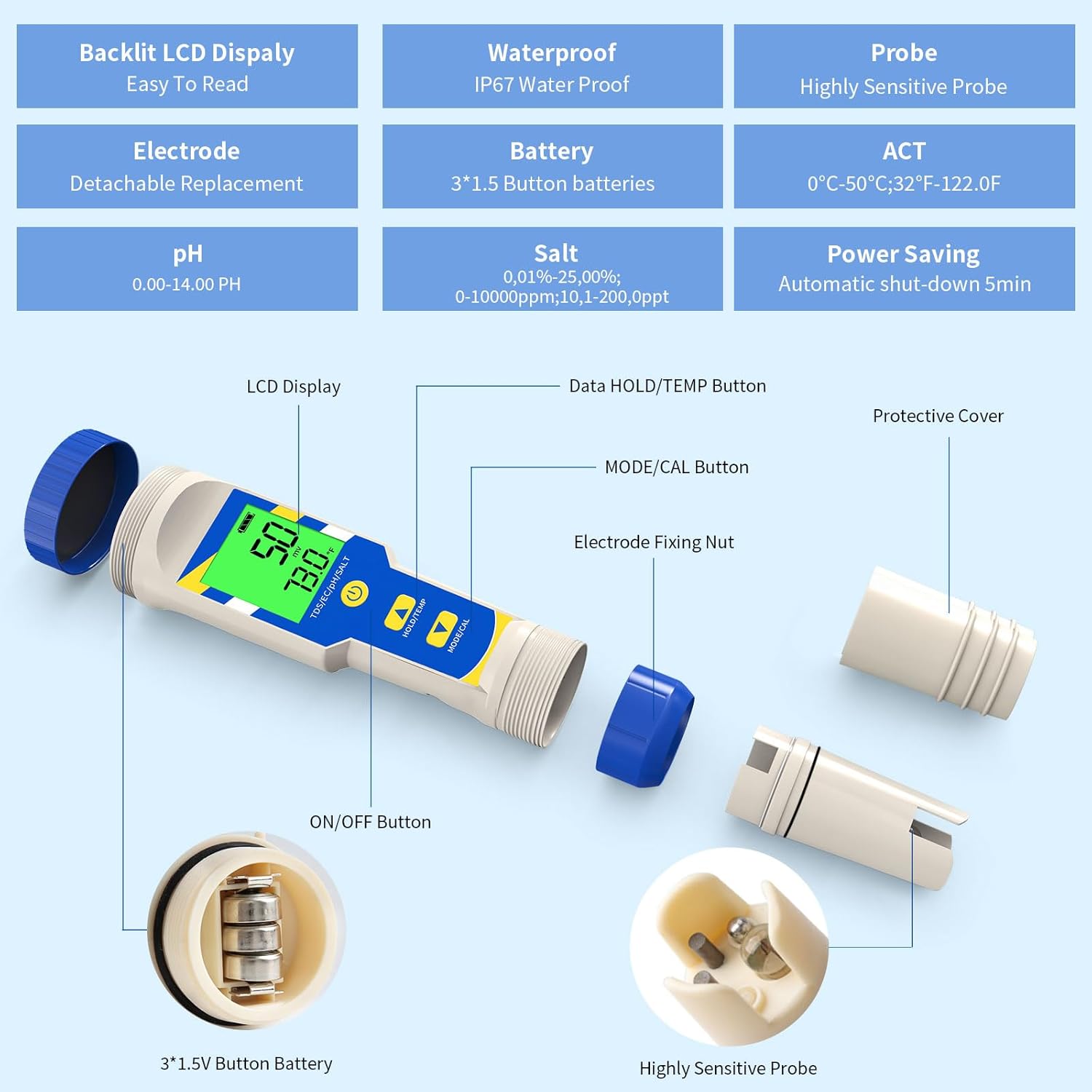
Figure 1: Exploded view of the Yewhick 5-in-1 water quality tester, highlighting its components including the LCD display, ON/OFF button, HOLD/TEMP button, MODE/CAL button, electrode fixing nut, highly sensitive probe, and 3*1.5V button battery compartment.
Key Features:
- Backlit LCD Display: Easy to read measurements.
- Waterproof: IP67 rated for durability.
- Highly Sensitive Probe: Ensures accurate readings.
- Detachable Electrode: For easy replacement and maintenance.
- Battery: Uses 3 x 1.5V LR44 button batteries (included).
- Measurement Ranges: pH (0.00-14.00 pH), Salt (0.01%-25.00%; 0-10000ppm; 10.1-200.0ppt), Temperature (0°C-50°C / 32°F-122°F).
- Power Saving: Automatic shut-down after 5 minutes of inactivity.
Specifications
| Specification | Value |
|---|---|
| Package Dimensions | 8.78 x 8.35 x 1.93 inches |
| Item Weight | 9.6 ounces |
| Manufacturer | Yewhick |
| ASIN | B0DHGDWQB7 |
| Item Model Number | YY-9909B-A |
| Batteries | 3 LR44 batteries required (included) |
Setup
1. Battery Installation
- Unscrew the battery cap at the top of the tester.
- Insert three LR44 button batteries, ensuring correct polarity (+/-).
- Securely screw the battery cap back on.
2. Initial Preparation
- Remove the protective cap from the electrode.
- Rinse the electrode with distilled water and gently wipe dry with a clean tissue.
- It is recommended to perform a calibration before first use or after prolonged storage.
Operating Instructions
1. General Measurement Procedure
- Press the ON/OFF button to turn on the tester.
- Immerse the electrode into the solution to be tested. Ensure the liquid level is below the electrode fixing nut.
- Gently stir the solution and wait for the reading to stabilize on the LCD display.
- Press the HOLD/TEMP button to freeze the reading. Press again to release.
- Press the MODE/CAL button to switch between pH, EC, TDS, and Salinity modes.
- To switch between Celsius and Fahrenheit, long press the HOLD/TEMP button for 5 seconds.
- After use, rinse the electrode with distilled water and replace the protective cap.
2. Specific Applications

Figure 2: Testing salt levels in a pool with the Yewhick 5-in-1 water quality tester.
- Pools and Hot Tubs: Use to monitor pH, salinity, and TDS levels to maintain optimal water chemistry for safety and equipment longevity.
- Aquariums: Essential for maintaining stable pH and salinity levels in both freshwater and saltwater aquariums to support aquatic life.
- Hydroponics: Measure EC and TDS to ensure nutrient solutions are at appropriate concentrations for plant growth.

Figure 3: Measuring salinity in a saltwater aquarium using the Yewhick 5-in-1 water quality tester.

Figure 4: The Yewhick 5-in-1 water quality tester in use for multi-parameter testing in a hot tub.
3. Video Demonstration
Video 1: A demonstration of the Yewhick 5-in-1 water quality tester in use for measuring parameters in an aquarium and a pool. This video shows the device being submerged and displaying readings for various water conditions.
Calibration
Regular calibration ensures the accuracy of your tester. It is recommended to calibrate the pH and EC/TDS/Salinity functions periodically, especially after prolonged storage or if readings appear inconsistent.
1. pH Calibration
- Prepare standard pH buffer solutions (e.g., pH 6.86, pH 4.00, pH 9.18).
- Turn on the tester and immerse the electrode into the pH 6.86 buffer solution.
- Press and hold the MODE/CAL button for 5 seconds until "CAL" appears on the display.
- The tester will automatically recognize the buffer solution and calibrate. Wait for the reading to stabilize and confirm.
- Rinse the electrode with distilled water.
- Repeat the process for pH 4.00 and pH 9.18 buffer solutions if a multi-point calibration is desired.
2. EC/TDS/Salinity Calibration
- Prepare a standard EC calibration solution (e.g., 1413 µS/cm or 12.88 mS/cm).
- Turn on the tester and switch to EC mode using the MODE/CAL button.
- Immerse the electrode into the EC standard solution.
- Press and hold the MODE/CAL button for 5 seconds until "CAL" appears.
- The tester will automatically calibrate. Wait for the reading to stabilize and confirm.
- Rinse the electrode with distilled water.
Maintenance
1. Electrode Cleaning
- Always rinse the electrode with distilled water after each use to prevent contamination.
- If the electrode becomes dirty or readings are unstable, soak the electrode in a mild cleaning solution (e.g., pH electrode cleaning solution) for 10-20 minutes, then rinse thoroughly with distilled water.
- Avoid touching the electrode's sensitive glass bulb or metal pins with your fingers.
2. Storage
- Store the electrode with its protective cap on, ensuring the sponge inside the cap is kept moist with a few drops of pH storage solution or KCL solution. Never store dry.
- Store the tester in a cool, dry place away from direct sunlight.
3. Battery Replacement
- When the battery indicator on the LCD shows low power, replace all three LR44 batteries simultaneously.
- Follow the battery installation steps in the Setup section.
Troubleshooting
- Inaccurate Readings:
- Ensure the electrode is clean.
- Perform calibration with fresh standard solutions.
- Check battery level.
- Display Not Turning On:
- Check battery installation and ensure batteries are new or fully charged.
- Ensure the battery cap is securely tightened.
- Slow Response Time:
- Clean the electrode.
- Ensure the electrode is properly hydrated (not stored dry).
Safety Information
- Keep the device out of reach of children.
- Do not disassemble or modify the tester.
- Avoid dropping or subjecting the device to severe impact.
- Dispose of batteries and the device according to local regulations.
Warranty and Support
Yewhick products are manufactured to high-quality standards. For warranty information, technical support, or service inquiries, please refer to the contact information provided with your purchase or visit the official Yewhick website. Please have your model number (YY-9909B-A) and purchase date available when contacting support.