
1. Introduction
This document provides essential instructions for the XHGTJK Replacement Remote Control. This remote is designed as a functional replacement for specific Pioneer AV Receiver models. It operates using infrared (IR) technology.
Important Compatibility Note: This is not a universal remote control. Ensure that your AV receiver model is listed in the compatible models section of this manual or on the product packaging. Compatibility is crucial for proper functionality. While this replacement remote aims to replicate main functions, it may not operate all features available on your original remote control.
2. Setup
The XHGTJK Replacement Remote Control is designed for immediate use with compatible Pioneer AV receivers. No complex programming or pairing procedures are required.
2.1 Battery Installation
- Locate the battery compartment on the back of the remote control.
- Slide open the battery compartment cover.
- Insert two (2) AAA batteries, ensuring the positive (+) and negative (-) terminals align correctly with the markings inside the compartment.
- Close the battery compartment cover securely.
Once batteries are installed, the remote control is ready for operation.
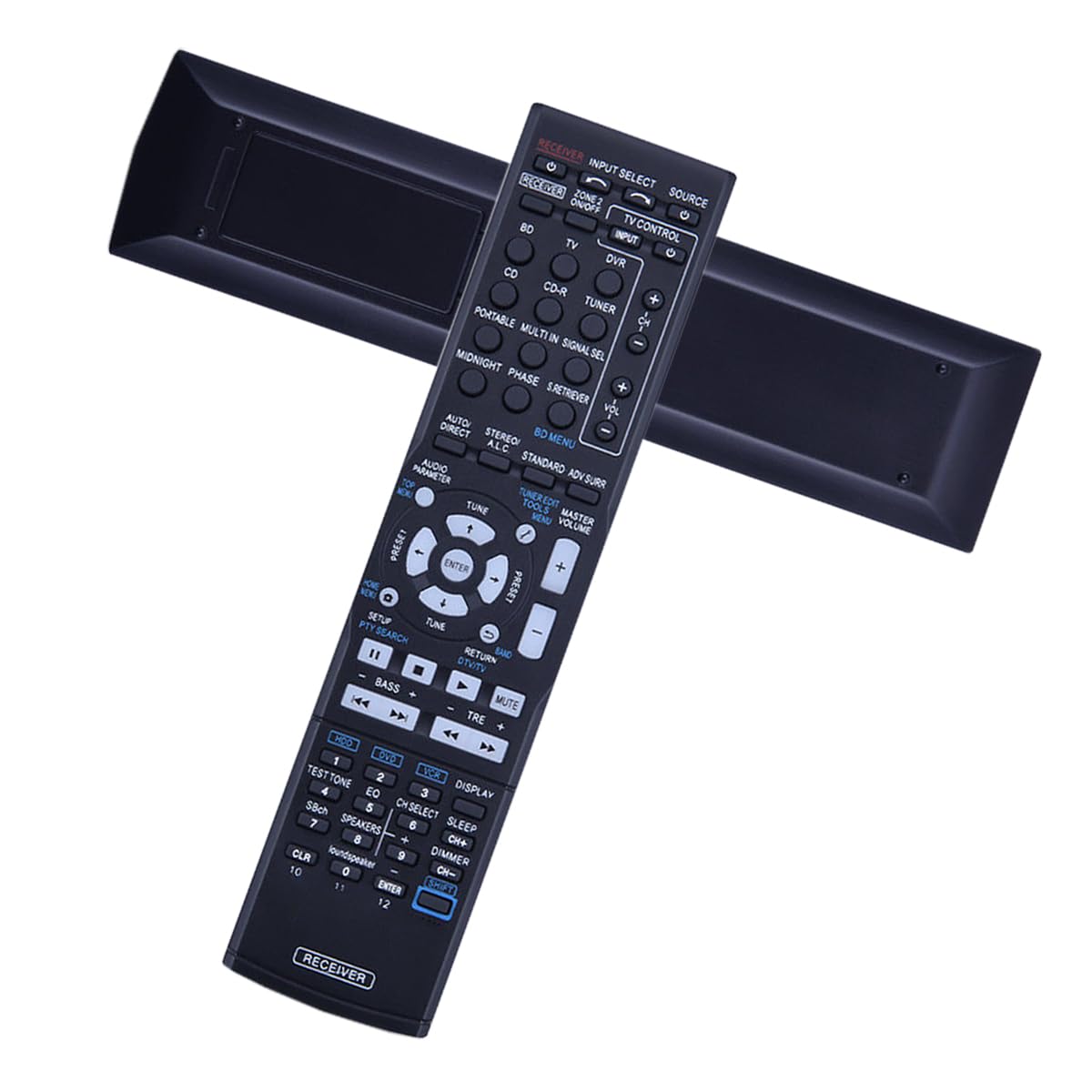
Figure 1: Front view of the XHGTJK Replacement Remote Control. This image displays the layout of the buttons, including power, volume, channel, and input selection, designed for intuitive operation of compatible Pioneer AV receivers.
3. Operating Instructions
This remote control operates via infrared (IR) signals. Ensure a clear line of sight between the remote control and the IR receiver on your Pioneer AV receiver for optimal performance.
3.1 Basic Functions
- Power On/Off: Press the POWER button to turn your AV receiver on or off.
- Volume Control: Use the VOL + and VOL - buttons to adjust the audio volume.
- Input Selection: Use the INPUT or dedicated input buttons (e.g., HDMI 1, DVD) to switch between different audio/video sources.
- Mute: Press the MUTE button to temporarily silence the audio. Press again to unmute.
- Navigation: Use the directional arrow buttons (UP, DOWN, LEFT, RIGHT) and the ENTER button for menu navigation on your AV receiver, if supported.
Refer to your Pioneer AV receiver's original manual for detailed information on specific functions and menu operations.
4. Maintenance
Proper care will extend the life of your remote control.
- Cleaning: Wipe the remote control with a soft, dry cloth. Do not use abrasive cleaners or solvents.
- Battery Replacement: Replace batteries when the remote's response becomes sluggish or stops working. Always replace both batteries at the same time with new ones.
- Storage: Store the remote control in a cool, dry place away from direct sunlight and extreme temperatures.
- Avoid Drops: Protect the remote from physical impact, as drops can damage internal components.
5. Troubleshooting
If you experience issues with your remote control, please follow these troubleshooting steps:
- Check Batteries: Ensure batteries are inserted correctly with the correct polarity (+/-). Replace old batteries with new AAA batteries.
- Line of Sight: Verify there is a clear path between the remote control and the IR sensor on your AV receiver. Obstructions can block the signal.
- Remote Range: The maximum effective range for this remote is approximately 8 feet (2.4 meters). Ensure you are within this range.
- Compatibility: Double-check that your Pioneer AV receiver model is listed as compatible with this replacement remote.
- Interference: Strong light sources or other infrared devices can sometimes interfere with the remote's signal. Try operating the remote in a different environment if possible.
If the remote control still does not function after following these steps, please refer to the Warranty and Support section for further assistance.
6. Specifications
| Feature | Specification |
|---|---|
| Brand | XHGTJK |
| Connectivity Technology | Infrared (IR) |
| Compatible Devices | Pioneer AV A/V Receivers (Specific models listed in Introduction) |
| Max Number of Supported Devices | 1 (One AV Receiver) |
| Power Source | 2 x AAA Batteries (not included) |
| Maximum Range | 8 Feet (approx. 2.4 meters) |
| Color | Black |
| Special Feature | Ergonomic Design |
| Item Dimensions (L x W x H) | 4.12" x 1.16" x 9.57" (approx. 10.46 cm x 2.95 cm x 24.31 cm) |
7. Warranty and Support
Your XHGTJK Replacement Remote Control comes with a commitment to quality and customer satisfaction.
7.1 Warranty Information
This product includes a 30-day quality warranty from the date of purchase. This warranty covers manufacturing defects and ensures the remote control functions as described. It does not cover damage caused by misuse, accidents, or unauthorized modifications.
7.2 Customer Support
If you have any questions, encounter issues, or require assistance with your remote control, please do not hesitate to contact our customer support team. We are dedicated to providing a satisfactory solution to any concerns you may have.
Please have your product model (B0DHFXDV69) and purchase details ready when contacting support to facilitate a quicker resolution.