Introduction
This manual provides essential information for the proper use and maintenance of your new compatible remote control for Aiwa Smart TVs. This remote is designed to offer seamless control without the need for complex setup procedures.
Compatibility
This remote control is compatible with various Aiwa Smart TV models. Please verify your TV model for full compatibility. Known compatible models include:
- Aiwa Smart TV AWS-TV-43-BL-02-A
- Aiwa Smart TV AWS-TV-50-BL-02-A
If your model is not listed, please refer to your TV's original manual or the product listing for further compatibility details.
Setup
The remote control is designed for immediate use with compatible Aiwa Smart TVs. No programming or complex configuration is required.
Battery Installation
- Locate the battery compartment on the back of the remote control.
- Slide the battery cover downwards or in the direction indicated by the arrow to open it.
- Insert two AAA batteries (not included), ensuring the positive (+) and negative (-) terminals align correctly with the markings inside the compartment.
- Close the battery cover by sliding it back into place until it clicks securely.

Image: Front and back view of the remote control. The back view clearly shows the battery compartment cover.
Operating Instructions
Point the remote control directly at your Aiwa Smart TV. Ensure there are no obstructions between the remote and the TV's infrared receiver.
Key Functions

Image: Overview of the remote control, highlighting various buttons and their layout.
- Power Button (Red Circle with Line): Turns the TV on or off.
- Input/Source Button (Rectangle with Arrow): Switches between different input sources (HDMI, AV, etc.).
- Navigation Pad (Circular with OK in center): Use the directional arrows (Up, Down, Left, Right) to navigate menus and select options. The OK Button confirms selections.
- Back Button (Left Arrow): Returns to the previous screen or menu.
- Home Button (House Icon): Accesses the TV's main smart hub or home screen.
- TV Button (TV Icon): Switches to live TV or the last viewed TV channel.
- Volume Up/Down (+VOL-): Adjusts the volume level.
- Mute Button (Speaker with X): Mutes or unmutes the TV sound.
- Channel Up/Down (P^ P<): Changes TV channels.
- Dedicated App Buttons (Netflix, YouTube, Prime Video, Google Play): Direct access to these streaming applications.
- Colored Buttons (Red, Green, Yellow, Blue): These buttons typically perform specific functions within certain applications or menus, as indicated on the TV screen.
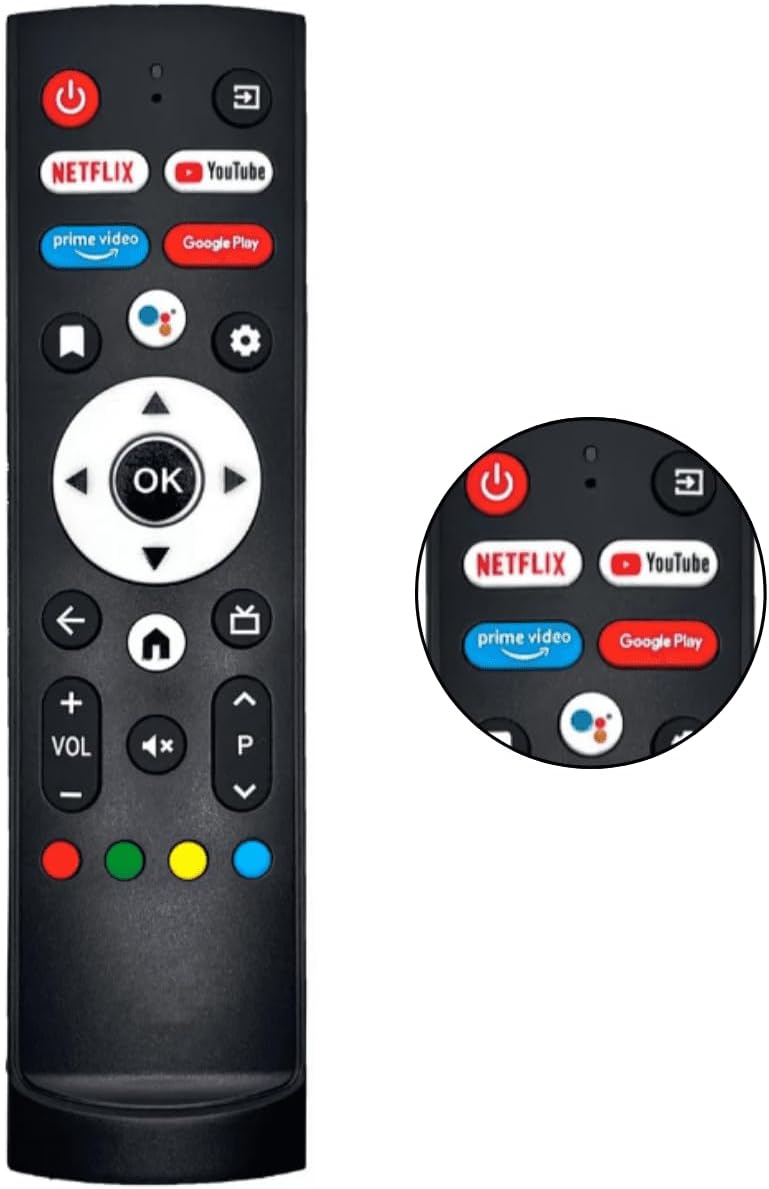
Image: Detailed view of the upper part of the remote control, showing the dedicated app buttons and power button.
Maintenance
Cleaning
To clean the remote control, use a soft, dry cloth. For stubborn dirt, slightly dampen the cloth with water or a mild, non-abrasive cleaner. Do not use harsh chemicals or immerse the remote in water.
Battery Replacement
Replace batteries when the remote control's response becomes sluggish or stops working. Always replace both batteries at the same time with new ones of the same type (AAA). Dispose of used batteries responsibly according to local regulations.
Troubleshooting
| Problem | Possible Cause | Solution |
|---|---|---|
| Remote not responding. | Dead or incorrectly inserted batteries. Obstruction between remote and TV. Remote out of range. | Check battery polarity and replace batteries if necessary. Remove any obstructions. Move closer to the TV. |
| Certain buttons not working. | Dirt under buttons. Remote not compatible with specific TV function. | Clean the remote. Verify compatibility for specific functions (e.g., some smart features might require the original remote). |
| TV not turning on/off. | TV power issue. Remote not sending signal. | Ensure TV is plugged in and has power. Try replacing remote batteries. |
Specifications
| Feature | Detail |
|---|---|
| Brand | Generic |
| Product Type | Electronics |
| Compatible Devices | Television (Aiwa Smart TV AWS-TV-43, AWS-TV-50 series) |
| Special Features | No programming required |
| Number of Units | 10 (for the kit) |
| Power Source Type | Battery Powered (AAA) |
| Connectivity Technology | Infrared |
| Maximum Supported Devices | 18 |
Warranty Information
This product comes with a manufacturer's warranty of 7 days from the date of purchase. This warranty covers manufacturing defects. Please retain your proof of purchase for any warranty claims.
Customer Support
For further assistance or inquiries regarding your remote control, please refer to the seller's contact information on the product's purchase page. Ensure you have your product model and purchase details ready when contacting support.
For general information about your Aiwa Smart TV, please consult your TV's original user manual or the manufacturer's website.


