
MSEU-VC01
Generic Violin Clip for SubZero Instrument Microphone Instruction Manual
Model: MSEU-VC01 | Brand: Generic
Introduction
This instruction manual provides detailed information on the Generic Violin Clip for SubZero Instrument Microphones. This accessory is designed to securely attach an instrument microphone to various string instruments, including violins, violas, banjos, and mandolins. Its robust design ensures stability while protecting your instrument from damage.
Key Features
- Designed to connect an instrument microphone to a violin, viola, banjo, or mandolin.
- Mounting mechanism allows for easy, one-handed movement of the microphone between instruments.
- Simple installation process requiring no additional tools.
- Equipped with black rubber end pieces to prevent damage to the instrument's finish.
- Features a thumbscrew for secure and adjustable attachment.
- Versatile design suitable for mandolins and similar string instruments.
Package Contents
- 1 x Violin Microphone Holder (Clip only. Microphone is not included.)
Setup Guide
Follow these steps to properly attach the Generic Violin Clip to your instrument and microphone:
- Identify Components: Familiarize yourself with the clip's parts: the main body, the adjustable arm, the thumbscrew, and the rubber-padded contact points.
- Prepare the Clip: Loosen the thumbscrew slightly to allow the adjustable arm to move freely.
- Position on Instrument: Carefully place the clip onto the edge of your instrument (e.g., violin, viola, banjo, mandolin). Ensure the rubber end pieces are in contact with the instrument's surface to prevent scratches.
- Secure the Clip: Tighten the thumbscrew until the clip is firmly secured to the instrument. Do not overtighten, as this may damage the instrument. The clip should be stable and not wobble.
- Attach Microphone: Insert your instrument microphone into the designated holder on the clip's arm. Ensure the microphone is securely seated.
- Adjust Microphone Position: Adjust the flexible arm of the microphone (if applicable) to achieve the desired proximity and angle for optimal sound capture.

Image: Side view of the clip, showing its compact design.
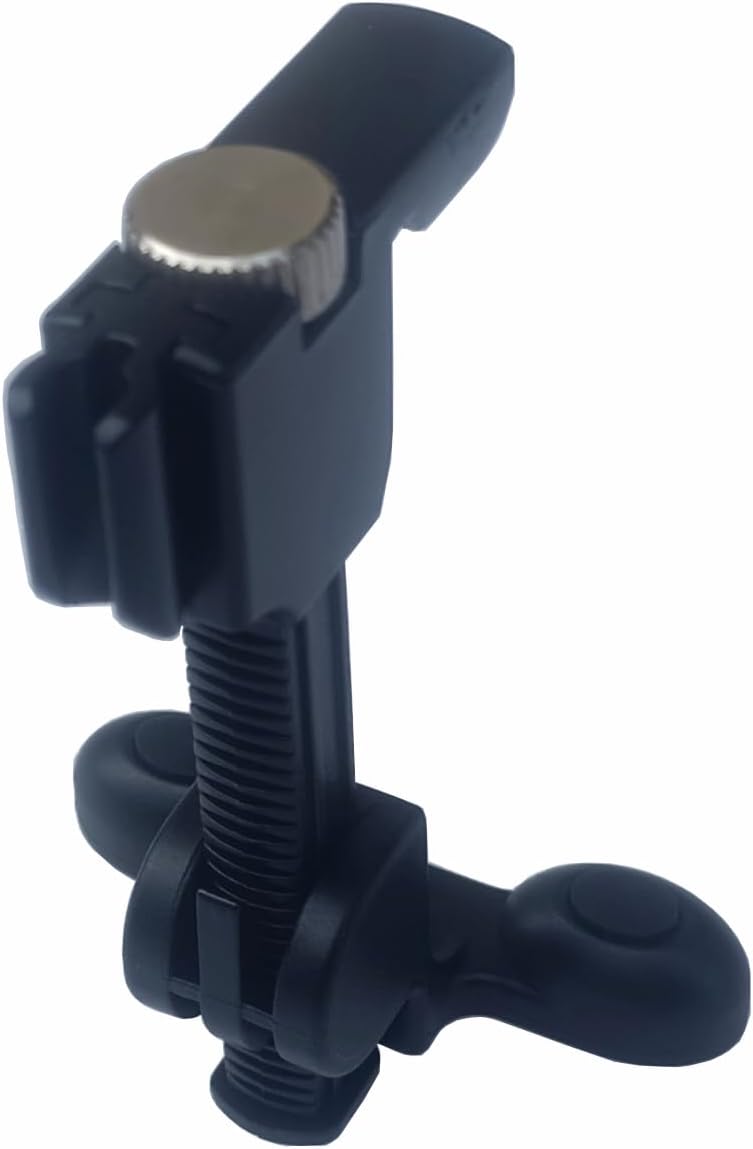
Image: Angled view highlighting the thumbscrew and the microphone attachment point.

Image: Detailed view of the thumbscrew, which allows for easy adjustment and secure fastening.

Image: The clip shown with a compatible instrument microphone attached, ready for use.

Image: Demonstrates the clip securely mounted on a violin, with the microphone positioned for performance.

Image: A composite image showing various angles and components of the clip, including its attachment points.
Operation
Once the clip is securely attached to your instrument and the microphone is in place, no further complex operation is required. The design allows for quick and easy removal or repositioning of the microphone between instruments with a single hand, making it ideal for musicians who switch instruments frequently.
Care and Maintenance
To ensure the longevity and optimal performance of your Generic Violin Clip, follow these simple maintenance guidelines:
- Cleaning: Wipe the clip with a soft, dry cloth to remove dust or smudges. For stubborn dirt, a slightly damp cloth can be used, followed by immediate drying. Avoid abrasive cleaners or solvents.
- Storage: Store the clip in a cool, dry place away from direct sunlight and extreme temperatures when not in use.
- Inspection: Periodically check the thumbscrew and rubber pads for any signs of wear or damage. Ensure the thumbscrew operates smoothly.
Troubleshooting
If you encounter any issues with your Generic Violin Clip, consider the following common solutions:
- Clip is Loose: Ensure the thumbscrew is tightened sufficiently. The clip should feel secure without excessive force.
- Microphone Not Stable: Verify that the microphone is fully inserted into the clip's holder. If the microphone's arm is flexible, ensure it is bent into a stable position.
- Instrument Scratches: Double-check that the black rubber end pieces are properly positioned and making contact with the instrument. These pads are designed to protect the surface.
Product Specifications
| Specification | Detail |
|---|---|
| Item Weight | 100 g |
| Item Model Number | MSEU-VC01 |
| Body Material | Rubber |
| Colour | Black |
| Material Type | Rubber |
| Manufacturer | Generic |
| Country of Origin | China |
Warranty and Support Information
Specific warranty details for this product are not provided in the available information. For any support inquiries, please refer to the retailer or manufacturer's contact information provided at the point of purchase.
Ask a question about this manual
Ask about setup, troubleshooting, compatibility, parts, safety, or missing instructions. Manuals+ will review the question and use this page’s manual context to help answer it.