
HP AZ5P0UT#ABA
HP Elite 805 G9 Desktop Computer User Manual
Model: AZ5P0UT#ABA
1. Introduction
This manual provides essential information for setting up, operating, and maintaining your HP Elite 805 G9 Small Form Factor (SFF) Desktop Computer. The HP Elite 805 G9 is designed for demanding applications, featuring an AMD Ryzen™ 8000 series processor, AMD RDNA™ 3 onboard graphics, and an integrated Neural Processing Unit (NPU) for enhanced AI capabilities. It operates on Windows 11 Pro and includes advanced security features like HP Wolf Security for Business.

Figure 1: Front view of the HP Elite 805 G9 Desktop Computer. This image displays the compact, horizontal chassis with the HP Elite Desk branding and front-facing USB ports, audio jack, and card reader.
2. Setup
2.1 Unpacking
Carefully remove all components from the packaging. Verify that all items listed in the "What's in the Box" section are present:
- HP Elite 805 G9 Desktop PC
- Keyboard
- Mouse
- Power Adapter
2.2 Connecting Peripherals
Before powering on, connect your essential peripherals:
- Monitor: Connect your display cable (HDMI, DisplayPort, etc.) from your monitor to the corresponding port on the back of the desktop.
- Keyboard and Mouse: Connect the USB cables from your keyboard and mouse to any available USB ports on the desktop. The HP Elite 805 G9 features 11 native USB ports for extensive connectivity.
- Power: Connect the power adapter to the desktop's power input, then plug the power cord into a grounded electrical outlet.
- Network (Optional): For wired internet access, connect an Ethernet cable from your router or modem to the Ethernet port on the back of the desktop.
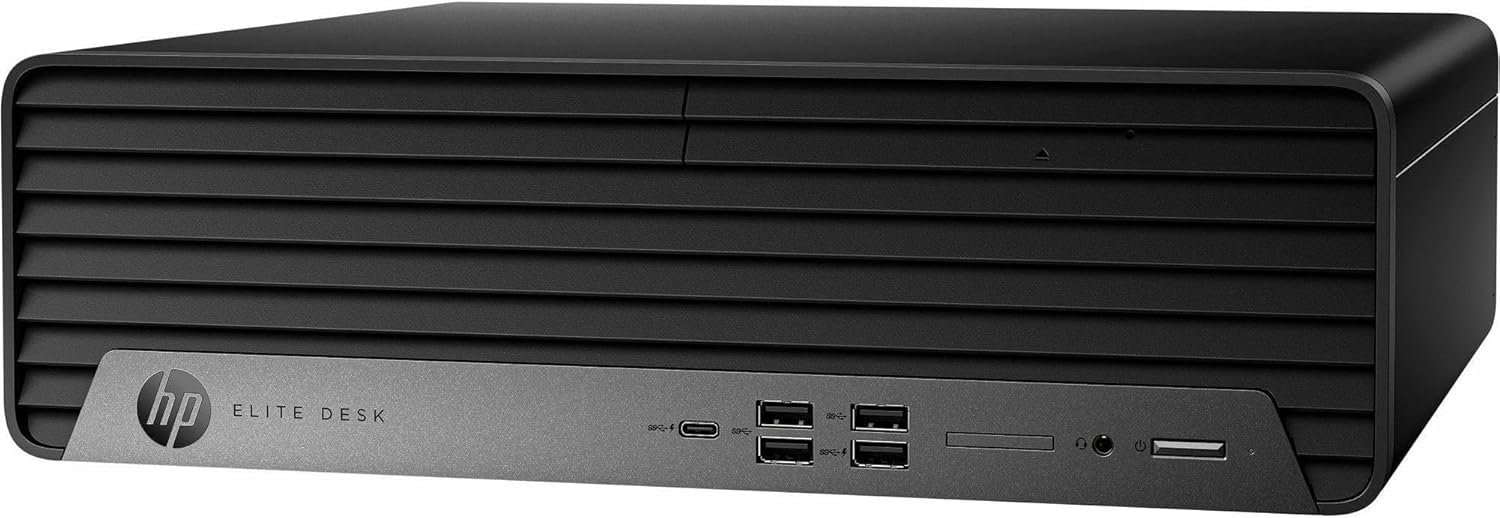
Figure 2: Angled front view of the HP Elite 805 G9 Desktop Computer. This perspective highlights the textured front panel design and the ventilation grilles on the side, indicating airflow for cooling.
2.3 Initial Boot-Up
Press the power button located on the front of the desktop. The system will begin the initial boot process. Follow the on-screen prompts to complete the Windows 11 Pro setup, including language selection, network configuration, and user account creation.
3. Operating Your HP Elite 805 G9
3.1 Windows 11 Pro Overview
Your desktop comes pre-installed with Windows 11 Pro, offering a secure and productive environment. Familiarize yourself with the Start Menu, Taskbar, and File Explorer for navigation. Windows 11 Pro includes features designed for business and enhanced security.
3.2 Key Features and Performance
- Processor: Powered by an AMD Ryzen™ 8000 series processor with an integrated NPU, the system delivers responsive performance and accelerates AI-enhanced tasks.
- Graphics: Integrated AMD RDNA™ 3 graphics provide visual capabilities for everyday tasks and multimedia.
- Security: HP Wolf Security for Business provides a hardware-enforced, always-on defense against modern threats. This includes HP Sure Click for web browsing protection and HP Sure Sense for advanced malware detection.
- Connectivity: Utilize the numerous USB ports (11 native) for connecting a wide range of peripheral devices.

Figure 3: Another angled front view of the HP Elite 805 G9 Desktop Computer. This image provides a slightly different angle, showcasing the compact Small Form Factor (SFF) design, ideal for space-constrained environments.
4. Maintenance
4.1 Cleaning
Regular cleaning helps maintain optimal performance and longevity:
- Use a soft, lint-free cloth to wipe the exterior surfaces.
- Use compressed air to clear dust from vents and ports. Ensure the system is powered off before cleaning.
- Avoid using liquid cleaners directly on components.
4.2 Software Updates
Keep your operating system and drivers updated to ensure security and performance:
- Windows Updates: Regularly check for and install Windows updates via Settings > Windows Update.
- Driver Updates: Visit the official HP support website for your model to download the latest drivers for graphics, chipset, and other components.
4.3 System Backups
Regularly back up your important data to an external drive or cloud storage to prevent data loss.
5. Troubleshooting
This section addresses common issues you might encounter.
5.1 No Power
- Ensure the power cord is securely connected to both the desktop and the electrical outlet.
- Verify the electrical outlet is functional by plugging in another device.
- Check the power adapter for any damage.
5.2 No Display
- Confirm the monitor is powered on and its input source is correctly selected.
- Check that the display cable is securely connected to both the desktop and the monitor.
- Try connecting the monitor to a different display port on the desktop, if available.
5.3 Slow Performance
- Close unnecessary applications running in the background.
- Check for and install any pending Windows or driver updates.
- Run a system scan for malware or viruses.
- Ensure sufficient free space on your primary drive.
5.4 System Recovery
If your system experiences severe issues, HP Sure Recover provides fast, secure, and automated recovery of the operating system over LAN or Wi-Fi® from advanced malware attacks.
6. Specifications
| Feature | Detail |
|---|---|
| Brand | HP |
| Model Name | AZ5P0UT#ABA |
| Operating System | Windows 11 Pro |
| Processor | AMD Ryzen 5 8600G (Hexa-core, 4.35 GHz) |
| RAM | 16 GB DDR5 RAM |
| Storage | 256 GB SSD (Serial ATA) |
| Graphics Coprocessor | AMD RDNA 3 (Integrated) |
| Color | Black |
| Item Weight | 14.7 pounds |
| Package Dimensions | 19 x 15.5 x 9 inches |
| Number of Processors | 6 |
| Memory Slots Available | 2 |
| Specific Uses For Product | AI and Machine Learning |
7. Warranty and Support
Your HP Elite 805 G9 Desktop Computer comes with a standard manufacturer's warranty. For specific warranty terms and conditions, please refer to the documentation included with your product or visit the official HP support website.
For technical assistance, driver downloads, or further support, please visit the HP support portal or contact HP customer service. Keep your product model number (AZ5P0UT#ABA) and serial number ready when seeking support.