
1. Introduction
Thank you for choosing the Bigzzia Ergonomic Gaming Chair. This manual provides essential information for the safe assembly, proper operation, and effective maintenance of your new chair. Please read these instructions carefully before use and retain them for future reference.

Image 1.1: The Bigzzia Ergonomic Gaming Chair, featuring a white and black design with a headrest and lumbar support cushion.
2. Safety Information
- Weight Capacity: This chair is designed to support a maximum weight of 300 lbs (approximately 136 kg). Do not exceed this limit to prevent damage or injury.
- Assembly: Ensure all components are securely fastened according to the assembly instructions. Loose parts can cause instability.
- Usage: Use the chair on a flat, stable surface. Avoid standing on the chair or using it as a step stool.
- Children: Keep children away from the chair during assembly. Supervise children when they are near or using the chair.
- Moving: When moving the chair, lift it rather than dragging it to prevent damage to the base or floor.
3. Package Contents
Before beginning assembly, please verify that all parts are present and undamaged. If any parts are missing or damaged, contact customer support immediately.
- Backrest
- Seat Base
- Armrests (2)
- Star Base
- Casters (5)
- Gas Lift Cylinder
- Gas Lift Cover
- Mechanism Plate
- Headrest Pillow
- Lumbar Support Pillow
- Hardware Kit (screws, washers, Allen wrench)
- Instruction Manual
4. Setup and Assembly Instructions
Assembly typically takes approximately 20-30 minutes. It is recommended to assemble the chair on a soft, clean surface to prevent scratching.
- Attach Casters to Base: Insert the five casters into the holes at the end of the star base until they click into place.
- Install Gas Lift: Place the gas lift cylinder into the center hole of the star base. Cover it with the gas lift cover.
- Attach Mechanism Plate: Secure the mechanism plate to the underside of the seat base using the provided screws. Ensure the front of the mechanism faces the front of the seat.
- Connect Armrests: Attach the armrests to the seat base using the designated screws. Do not overtighten initially.
- Attach Backrest: Align the backrest with the armrests and secure it using the remaining screws. Tighten all armrest and backrest screws once aligned.
- Assemble Seat to Base: Carefully place the assembled seat and backrest onto the gas lift cylinder. Apply downward pressure to ensure a secure fit.
- Attach Pillows: Secure the headrest and lumbar support pillows to the chair using their integrated straps.
5. Operating Instructions
Your Bigzzia Gaming Chair offers multiple adjustment features to customize your seating experience for optimal comfort and ergonomic support.
5.1. Seat Height Adjustment
To adjust the seat height, pull the lever located on the right side of the chair upwards. While holding the lever, stand up to raise the seat or remain seated and apply pressure to lower it. Release the lever to lock the height.
5.2. Backrest Recline
The backrest can be reclined from 90° (upright) to 155° (deep recline). Pull the recline lever, typically on the left side, and lean back to your desired angle. Release the lever to lock the backrest position. This allows for various postures, from working to relaxing.
5.3. 360° Swivel Function
The chair features a 360° swivel seat, allowing for easy rotation and movement without needing to reposition the entire chair base.
5.4. Armrest Adjustment
The linkage padded armrests are designed to move with the recline of the backrest, providing continuous support. While not independently adjustable for height, their design ensures ergonomic support in various reclined positions.

Image 5.1: Visual representation of the chair's adjustable features, including backrest tilt (90-135 degrees), 360-degree swivel, and seat height adjustment.
5.5. Headrest and Lumbar Support
The included headrest and lumbar support pillows are adjustable. Position them along the chair's backrest to align with your cervical and lumbar spine for personalized ergonomic support. The ergonomic design supports the spine, promoting healthy sitting posture.

Image 5.2: An X-ray style diagram highlighting the ergonomic support provided by the headrest for the cervical spine, the lumbar pillow for the lumbar spine, and the unique cushion for hip support.
6. Maintenance
Regular maintenance will extend the life and appearance of your Bigzzia Gaming Chair.
- Cleaning: Wipe the PU leather surfaces with a soft, damp cloth. For stubborn stains, use a mild soap solution and immediately wipe dry. Avoid harsh chemicals or abrasive cleaners.
- Casters: Periodically check casters for hair or debris and clean them to ensure smooth rolling.
- Hardware: Every few months, check all screws and bolts to ensure they are tight. Retighten if necessary to maintain stability.
- Avoid Direct Sunlight: Prolonged exposure to direct sunlight can cause the PU leather to fade or crack.
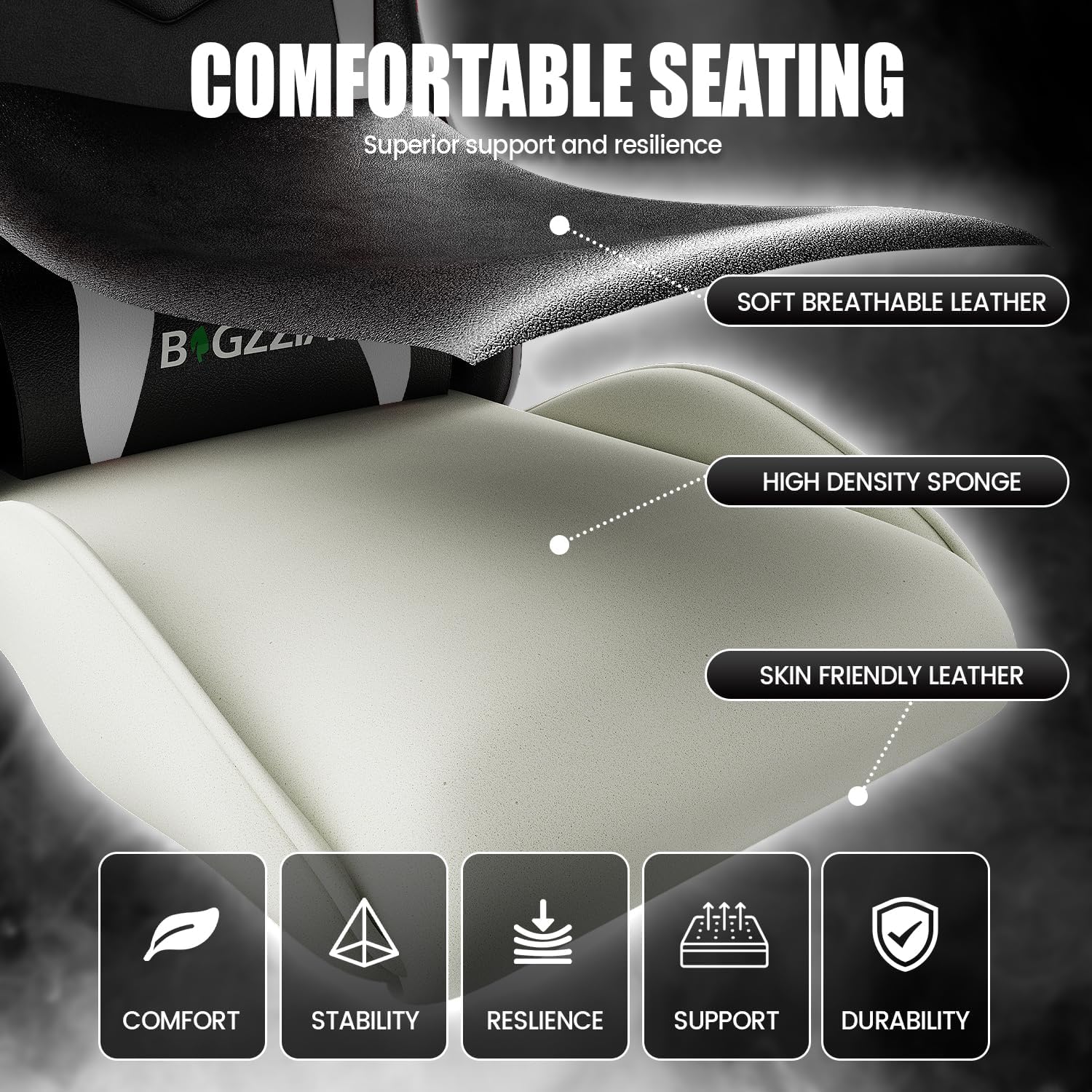
Image 6.1: A detailed view of the chair's construction materials, including soft breathable PU leather and high-density sponge, emphasizing comfort and durability.
7. Troubleshooting
If you encounter any issues with your chair, please refer to the following common solutions:
- Chair Squeaks: Check all bolts and screws and tighten any that are loose. A small amount of silicone lubricant can be applied to moving parts if necessary.
- Difficulty Adjusting Height: Ensure the gas lift lever is fully engaged. If the issue persists, the gas lift cylinder may need replacement.
- Chair Wobbles: Verify that all assembly screws are securely tightened, especially those connecting the seat to the mechanism and the base. Ensure the casters are fully inserted into the star base.
- Casters Not Rolling Smoothly: Inspect casters for trapped debris (e.g., hair, lint) and clean them thoroughly.
8. Specifications
| Feature | Specification |
|---|---|
| Brand | Bigzzia |
| Model | B0DHCS7HF7 |
| Color | White |
| Product Dimensions (D x W x H) | 23.23"D x 11.42"W x 31.1"H (packaged) |
| Back Style | Continuous |
| Special Features | 360° Swivel, Adjustable Height, Arm Rest, Ergonomic, Head/Lumbar Support |
| Backrest Recline Angle | 90° to 155° |
| Maximum Weight Capacity | 300 lbs |

Image 8.1: Detailed dimensions of the chair, including seat height, backrest height, and overall footprint, along with the 300 lbs maximum load capacity.
9. Warranty and Support
Bigzzia provides a one-month replacement service for any issues that occur during assembly or initial use. Additionally, a 1-year parts warranty is offered, covering manufacturing defects and component failures under normal use.
For any questions, concerns, or warranty claims, please feel free to contact our customer support team. Please have your purchase information and model number (B0DHCS7HF7) ready when contacting support.