
1. Introduction
This manual provides detailed instructions for the installation, operation, and maintenance of your WREO Smart Door Knob Lock Plus. Please read this manual thoroughly before installation and use to ensure proper function and safety. Keep this manual for future reference.
2. Product Overview
2.1 Key Features
- 4-in-1 Access: Unlock using fingerprint, password, mobile app (Bluetooth), or physical key.
- Fingerprint Recognition: Stores up to 20 fingerprints for quick access.
- App Control: Manage users, generate temporary codes, and set access permissions via the Smart Life App.
- Auto-Lock Feature: Automatically locks the door after 5 seconds in Normal Mode for enhanced security.
- Anti-Peep Technology: Protects your passcode by allowing random digits before and after the actual code.
- Multiple Modes: Includes Normal Mode, Passage Mode (always unlocked), and Private Mode (admin unlock only).
- Emergency Power: Rechargeable battery with Type-C charging port and physical key backup.
- Weather Resistant: IP54 rated for protection against various weather conditions.
2.2 Package Contents
- Smart Door Knob Lock (Exterior and Interior Knobs)
- Keys (2)
- User Manual
- Installation Hardware (screws, latch, strike plate)

Image: WREO Smart Door Knob Lock Plus, showing the exterior keypad with fingerprint sensor and the interior knob.
3. Installation Guide
3.1 Door Compatibility
Ensure your door meets the following specifications for proper installation:
- Door Hole Diameter: 2-1/8 inches (54 mm)
- Door Thickness: 1-3/8 inches to 2-1/8 inches (35-54 mm)
- Backset: Adjustable for 2-3/8 inches (60 mm) or 2-3/4 inches (70 mm)
- Latch Length: 15 mm
- Compatible with both left-handed and right-handed doors.
- Compatible with single cylinder doors. Not compatible with mortise locks.
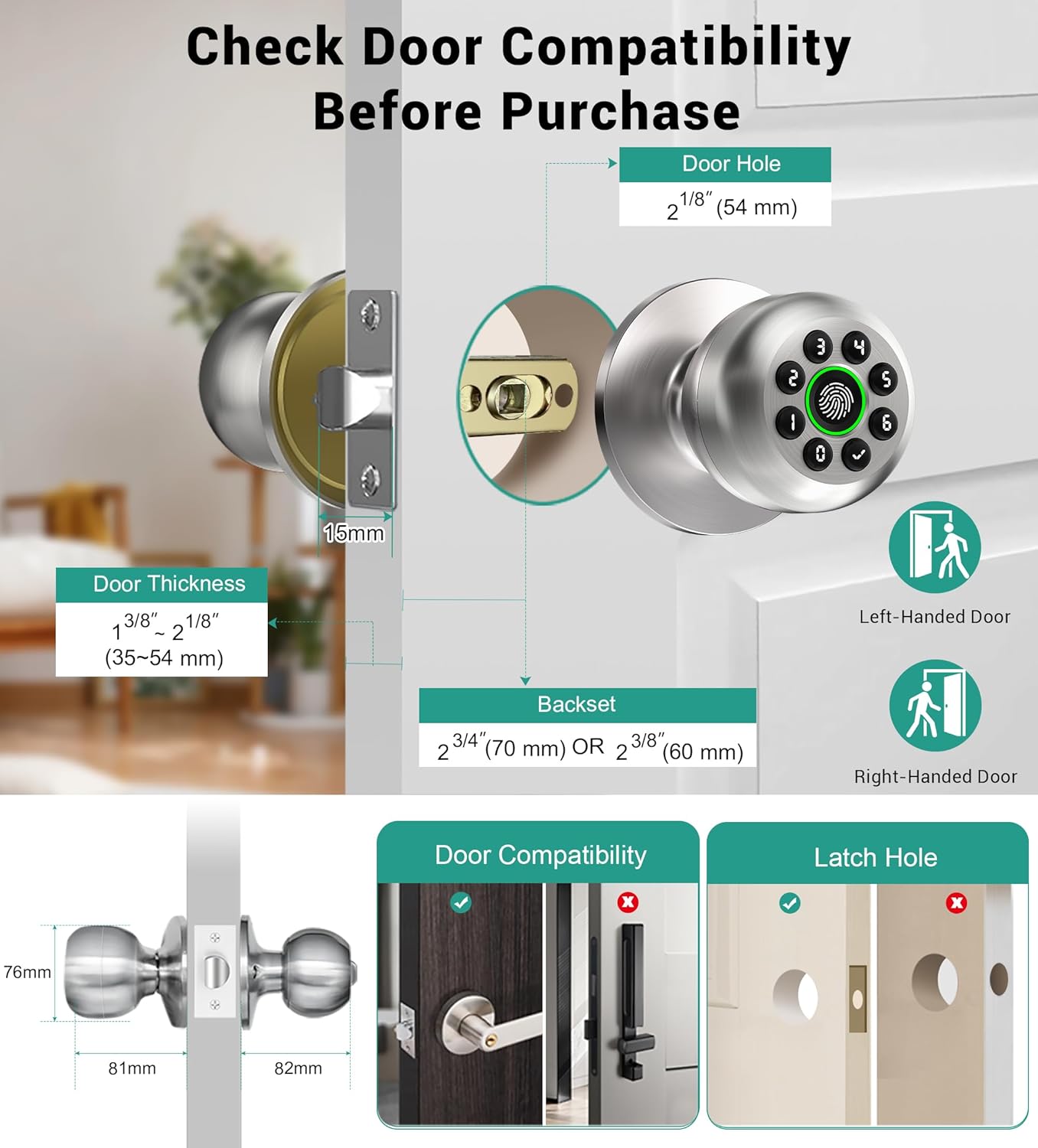
Image: Detailed diagram showing door dimensions and latch adjustments for installing the smart door knob.

Image: Visual guide for checking door size and compatibility before installation.
3.2 Installation Steps
Installation typically requires only a screwdriver. Follow the detailed instructions provided in the included user manual. Key points:
- Ensure the latch's status is horizontal.
- When installing the interior knob, adjust both Exterior and Interior Knobs with the 'UP' sign on top to secure them.
- Ensure the spindle bar is vertical.
- Fully charge the lock for 3-4 hours before installation.
4. Operation Instructions
4.1 Unlocking Methods
The WREO Smart Door Knob Lock Plus offers four ways to unlock:
- Fingerprint Recognition: Place your registered finger on the sensor.
- Passcode: Enter your numerical code on the keypad.
- App Control: Use the Smart Life App via Bluetooth.
- Backup Key: Use the physical key for manual unlocking.

Image: Visual representation of the four access methods: App Control, Passcode, Fingerprint, and Physical Key.
4.2 Fingerprint Management
The lock can store up to 20 fingerprints. To record a fingerprint:
- Ensure your finger is clean and dry.
- Place your finger at various angles and positions on the sensor to ensure a larger area is scanned for better recognition.
- Follow the prompts in the Smart Life App for adding new fingerprints.

Image: User interacting with the fingerprint sensor on the smart door knob.
4.3 Passcode Management
The lock supports up to 20 passcodes. You can set permanent or temporary codes via the Smart Life App.
- Anti-Peep Technology: When entering your passcode, you can input random digits before or after your actual code to prevent others from viewing it. For example, if your code is 123456, you can enter 987123456000.

Image: Illustration of anti-peep technology for passcode entry on the smart door knob.
4.4 App Control (Smart Life App)
The Smart Life App allows comprehensive management of your door lock:
- User Management: Add or remove fingerprints and passcodes for family members, guests, or service providers.
- Temporary Codes: Generate time-sensitive access codes for visitors.
- Access Logs: View unlock records.
- Silent Mode: Enable quiet operation for undisturbed peace.
- Remote Control: Requires a separate gateway purchase for remote unlocking and management beyond Bluetooth range.
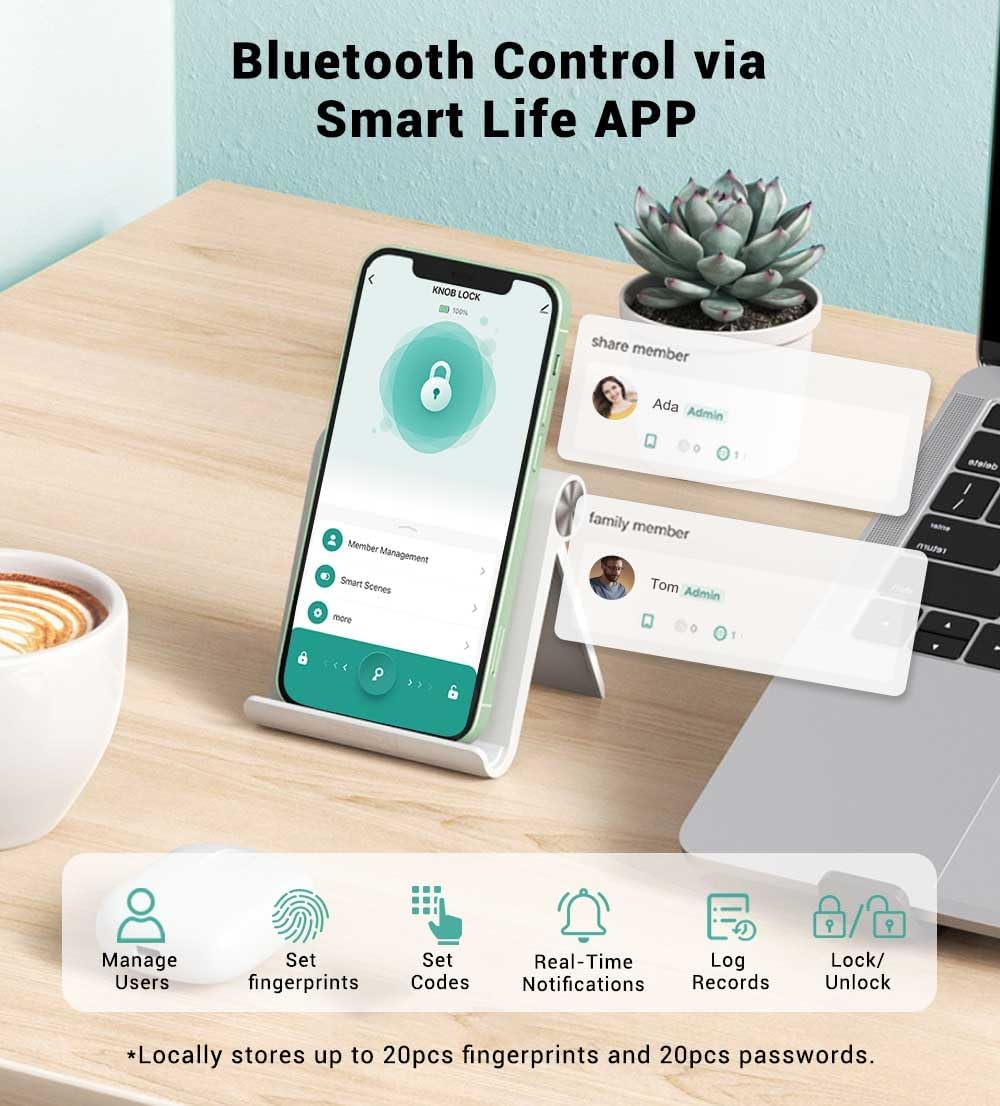
Image: Smartphone displaying the Smart Life app interface for controlling the smart door lock.

Image: Smart Life app showing member management and access control features.
4.5 Operating Modes
The interior knob allows selection of different operating modes:
- Normal Mode: The door auto-locks after 5 seconds. Unlock with fingerprint, passcode, key, or app.
- Passage Mode: The door remains continuously unlocked.
- Private Mode: Only admin fingerprints or the app can unlock the door.

Image: Visual representation of Privacy Mode, Normal Mode (5s Auto Lock), and Passage Mode.

Image: Illustration of the 5-second auto-lock feature in action.

Image: Depiction of the mute mode feature for quiet operation.
5. Maintenance
5.1 Battery Management
The lock is equipped with a 400mAh rechargeable battery, offering extended use up to a year on a single charge.
- Charging: Use the Type-C port for convenient charging.
- Low Battery Alert: The lock will indicate low battery by flashing green, then red.
- Emergency Backup: Always keep the physical keys as a reliable backup in case of power depletion.

Image: Smart door knob being charged via a Type-C cable from a portable power bank.
5.2 Weather Resistance
The lock is IP54 waterproof, designed to withstand temperatures from 23°F to 131°F (-5°C to 55°C), providing reliable protection in various weather conditions.

Image: Smart door knob installed on a door during rainy weather, demonstrating its weather resistance.
6. Troubleshooting
Here are solutions to common issues you might encounter:
- Q: Why is the fingerprint not being recognized, or why does it take multiple attempts to unlock?
A: 1. After the fingerprint unlocks successfully (green flash), wait 2 seconds before turning the door knob to improve recognition success.
2. If the light flashes red, adjust your finger position for better recognition.
3. When recording fingerprints, place your clean, dry finger at different angles to ensure a larger area is scanned. - Q: Why is this lock not compatible with my door?
A: The fingerprint door lock is designed to fit US standard doors with a backset of 2-3/8" (60 mm) and 2-3/4" (70 mm), and door thicknesses ranging from 1-3/8" to 2-1/8" (35 mm - 54 mm). It is compatible with both left-handed and right-handed doors. Additionally, the latch length is 15 mm. If your door does not meet these specifications, the lock may not be compatible. - Q: Why is the lock not engaging and staying in the unlocked state?
A: Check if the lock is in Passage Mode. In this mode, even if you press the lock button on the app, the door will remain unlocked. Passage Mode is an unlock mode. To resolve this, switch to Normal Mode, which allows you to lock the door using the app and enables the 5-second auto-lock feature.

Image: Common troubleshooting questions and answers for the smart door knob.
7. Product Specifications
| Brand | WREO |
| Model Number | Plus |
| Material | Aluminum |
| Color | Satin Nickel |
| Product Dimensions | 9"L x 3.86"W |
| Item Weight | 1.65 pounds |
| Lock Type | Biometric, Combination Lock, Keypad Lock |
| Special Features | Auto lock, Passage Mode, Private Mode, Mute Mode, Fingerprint/Password/APP/Keys Unlock, Member Management |
| Hand Orientation | Ambidextrous |
| Indoor/Outdoor Usage | Indoor, Outdoor |
| Battery | 400mAh Rechargeable (Type-C charging) |
| Weather Resistance | IP54 Waterproof |
8. Warranty and Customer Support
WREO provides a 1-year protection plan for this smart door lock. For any inquiries or assistance, professional customer service is available 24 hours a day via telephone or email.

Image: WREO 24/7 Support information, highlighting warranty and customer service availability.