
1. Important Safety Information
WARNING: Ozone is a powerful oxidant and can be harmful if inhaled.
- Use in Unoccupied Spaces ONLY: This ozone generator must only be operated in spaces that are completely free of humans, pets, and plants.
- Ventilation: After each treatment cycle, ensure the treated area is thoroughly ventilated for at least 30 minutes to several hours before re-entry. The ozone smell should dissipate before re-occupying the space.
- No Entry Sign: Always use the provided 'NO ENTRY' sign on the door of the treated area to prevent accidental entry.
- Placement: Do not place the unit near furnace intake vents or in areas where air circulation is restricted.
Failure to follow these safety instructions can result in serious health risks.

Image: The 'NO ENTRY' sign provided with the ONAMOR Digital Ozone Generator, to be used during operation for safety.
2. Product Overview
The ONAMOR Digital Ozone Generator is designed for high-capacity odor removal in various environments, including homes, cars, basements, and offices. It utilizes ozone (O3) to neutralize tough odors caused by smoke, pets, cooking, and more.
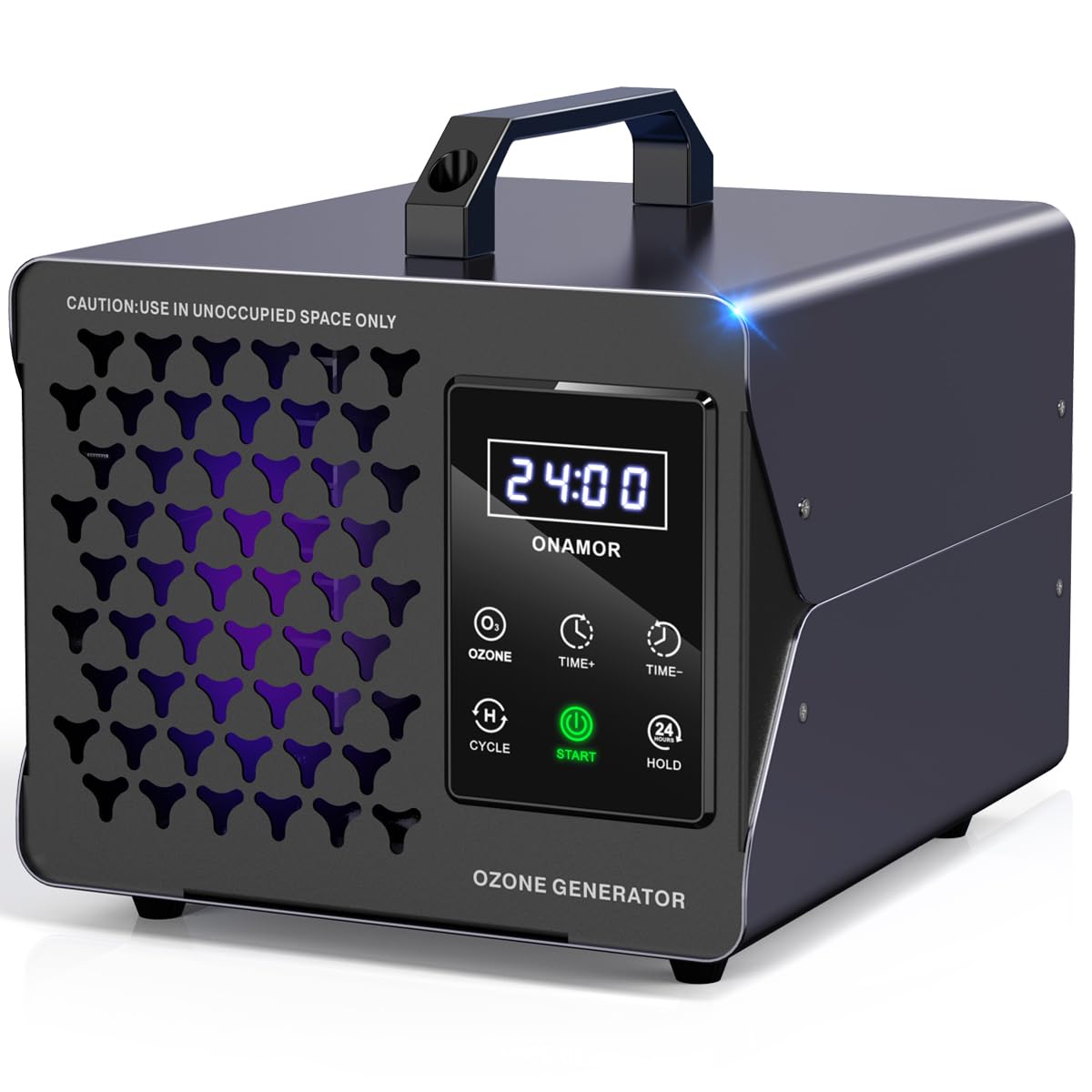
Image: The ONAMOR Digital Ozone Generator, a compact and portable device for odor elimination.
Key Features:
- Intuitive Touch Controls: Features six buttons and a user-friendly digital display for easy operation.
- Flexible Timer Settings: Adjustable timer from 0-24 hours in 5-minute increments, with a 'Cycle' function for half-hour intervals.
- Strong Ozone Output: Generates 180,000 mg/h of ozone, capable of treating spaces up to 8,000 square feet.
- Powerful Fan: Equipped with a 2600 RPM fan for rapid ozone diffusion, cleaning 100 sq. ft. in approximately 7 minutes.
- Durable Construction: Robust all-aluminum alloy shell with an independent ozone module, upgraded ceramic ozone plate, and three replaceable fuses.
- 5-Second Delay Start: Provides a brief delay after setting to allow users to leave the treatment area safely.
- Post-Treatment Fan Circulation: For cycles over 30 minutes, ozone generation stops 5 minutes before the end, while the fan continues to circulate to help dissipate residual ozone odor.
3. Package Contents
Upon unpacking your ONAMOR Digital Ozone Generator, please ensure all items listed below are present:
- 1 x ONAMOR Digital Ozone Generator (Grey)
- 1 x AC Power Cable (1.5M)
- 1 x User Manual
- 1 x Warning Card ('NO ENTRY' door hanger)
- 3 x Glass Fuses (preinstalled, plus spares)
- 1 x Ceramic Ozone Plate (preinstalled)
- 1 x Washable Stainless Filter (preinstalled)

Image: All items included in the ONAMOR Digital Ozone Generator package.
4. Setup
- Prepare the Area: Remove all humans, pets, and plants from the room or vehicle to be treated.
- Clean Odor Source: For best results, clean or remove the source of the odor as much as possible before ozone treatment.
- Placement: Place the ozone generator in a central location within the treatment area, ensuring it is on a stable, flat surface. Avoid placing it directly against walls or furniture to allow for optimal air circulation.
- Connect Power: Plug the AC power cable into the generator and then into a standard electrical outlet.
- Secure the Area: Close all windows and doors in the treatment area. Place the 'NO ENTRY' warning card on the door handle.

Image: Visual guide for the four-step process of using the ozone generator.
5. Operating Instructions
Control Panel Overview:
- Digital Display: Shows current time settings.
- OZONE Button: Short press to turn ozone generation ON/OFF.
- TIME+ / TIME- Buttons: Adjust treatment time in 5-minute increments. Long press for quick settings.
- CYCLE Button: Quickly set 30-minute interval cycles (e.g., 3H, 6H, 9H, etc.).
- START Button: Short press to pause/start operation. Long press to turn the unit ON/OFF.
- HOLD Button: Activates 24-hour continuous operation.

Image: Detailed view of the touch control panel and its functions.
Starting Operation:
- Power On: Long press the 'START' button to turn the unit on.
- Set Treatment Time: Use the 'TIME+' or 'TIME-' buttons to set the desired treatment duration. Refer to the 'Recommended Operating Times' table below. For continuous operation, press 'HOLD'. For interval cycles, press 'CYCLE'.
- Initiate Cycle: Short press the 'START' button to begin the ozone generation. The unit will emit a 5-second delay buzzer, allowing you time to safely exit the area.
- Exit the Area: Immediately leave the treated space and ensure no one enters until the cycle is complete and the area has been thoroughly ventilated.
Stopping Operation:
- The unit will automatically shut off after the set time has elapsed.
- To manually stop the unit, long press the 'START' button.
Video Guide: How to Operate
Video: A step-by-step guide on how to operate the ONAMOR Digital Ozone Generator, including setting the timer and starting the ozone treatment.
6. Recommended Operating Times
The optimal treatment time depends on the size of the area and the intensity of the odor. The following table provides general recommendations:
| Area Size | Recommended Time |
|---|---|
| 100 sq. ft. | 7 minutes |
| 200 sq. ft. | 15 minutes |
| 300 sq. ft. | 30 minutes |
| 500 sq. ft. | 60 minutes |
| 1000 sq. ft. | 90 minutes |
| 1500 sq. ft. | 120 minutes |
| 2000 sq. ft. | 150 minutes |
| 3000 sq. ft. | 180 minutes |
| 8000 sq. ft. | HOLD (Continuous) |
Note: Always ensure the space is unoccupied during treatment. Adjust times based on odor severity and ventilation capabilities.

Image: Recommended operating times for various area sizes.
7. Maintenance
Regular maintenance ensures optimal performance and longevity of your ozone generator.
Cleaning the Air Filter:
The unit is equipped with a washable stainless steel filter to block impurities. Clean it regularly, especially in dusty environments.
- Unplug the unit from the power source.
- Locate the fan cover on the back of the unit.
- Carefully remove the fan cover and the stainless steel filter.
- Wash the filter with water and mild soap. Rinse thoroughly and allow it to dry completely before reinstallation.
- Reattach the filter and fan cover.

Image: Instructions for detaching and cleaning the fan filter.
Replacing Fuses:
The unit comes with three replaceable fuses for added dependability.
- Unplug the unit from the power source.
- Locate the fuse compartment next to the power inlet on the back of the unit.
- Use a small flat-head screwdriver to gently pry open the fuse compartment.
- Remove the old fuse and replace it with a new one (ensure it's the correct rating).
- Close the fuse compartment securely.
Replacing Ozone Plate:
The ceramic ozone plate is designed for long life but may require replacement over time. Consult the full user manual for detailed instructions on replacing the ozone plate.
8. Troubleshooting
If you encounter issues with your ONAMOR Digital Ozone Generator, refer to the following common troubleshooting steps:
- Unit Not Powering On:
- Ensure the power cable is securely plugged into both the unit and a working electrical outlet.
- Check the fuses. Replace if blown (refer to Maintenance section).
- Ensure the 'START' button is long-pressed to power on the unit.
- No Ozone Output:
- Verify that the ozone generation is activated via the 'OZONE' button and the timer is set.
- Check if the ceramic ozone plate is clean and properly installed.
- Weak Odor Removal:
- Increase the treatment time or consider a 'HOLD' (continuous) cycle for severe odors.
- Ensure the room is properly sealed during treatment.
- Clean the air filter and ozone plate.
For further assistance, please contact ONAMOR customer support.
9. Specifications
| Feature | Detail |
|---|---|
| Model Number | NM-009D-Grey-01 |
| Ozone Output | 180,000 mg/h |
| Coverage Area | Up to 8,000 sq. ft. |
| Power Source | AC (110-120V) |
| Wattage | 100 watts |
| Control Method | Touch |
| Timer Range | 0-24 hours (5-minute increments) |
| Fan Speed | 2600 RPM |
| Noise Level | 45 Decibels |
| Product Dimensions | 8.3 x 6 x 7.1 inches |
| Item Weight | 3.2 Pounds |
| Color | Grey |
| Certifications | FCC Certified |

Image: Key specifications and dimensions of the ONAMOR Digital Ozone Generator.
10. Warranty and Support
ONAMOR is committed to providing reliable products and excellent customer service. We have specialized in ozone machine manufacturing for over 7 years.
If you have any questions or concerns regarding your ONAMOR Digital Ozone Generator, please do not hesitate to reach out to our customer support team. We aim to provide a satisfactory solution within 24 hours.
Note: This product is not for sale in California.