
1. Introduction
This manual provides essential information for the safe and proper assembly, operation, and maintenance of your AOKCOS Floor TV Stand. Please read all instructions carefully before beginning assembly and retain this manual for future reference.
2. Safety Information
WARNING: Failure to follow these safety instructions may result in property damage or personal injury.
- Do not exceed the maximum weight capacity of 88 lbs (40 kg).
- Ensure your TV's VESA mounting pattern is compatible (100x100mm to 400x400mm).
- Always use the provided hardware and tools.
- Assemble the stand on a soft, clean surface to prevent scratches.
- Keep children and pets away during assembly.
- Verify all connections are secure before placing the TV on the stand.
3. Package Contents
Before assembly, ensure all parts listed in the detailed installation manual are present. The package includes:
- Main support column
- Tempered glass base
- Two adjustable media shelves
- TV mounting brackets
- All necessary screws, washers, and tools for assembly

4. Assembly Instructions
The AOKCOS Floor TV Stand is designed for quick installation, typically within 15 minutes. A detailed installation manual with numbered parts and necessary tools is included in the package. For visual guidance, please refer to the official installation video below.
Video 1: This video demonstrates the proper method for attaching the hook mount and engaging the safety lock mechanism on the AOKCOS TV stand, ensuring secure TV placement.
Key Assembly Steps:
- Attach the main support column to the tempered glass base.
- Install the TV mounting brackets to the back of your television, ensuring correct VESA alignment.
- Mount the TV onto the stand's support column.
- Secure the TV with the provided safety screws.
- Attach and adjust the two media shelves to your desired height.

5. Operating Features
The AOKCOS Floor TV Stand offers several adjustable features for an optimal viewing experience.
5.1. Height Adjustment
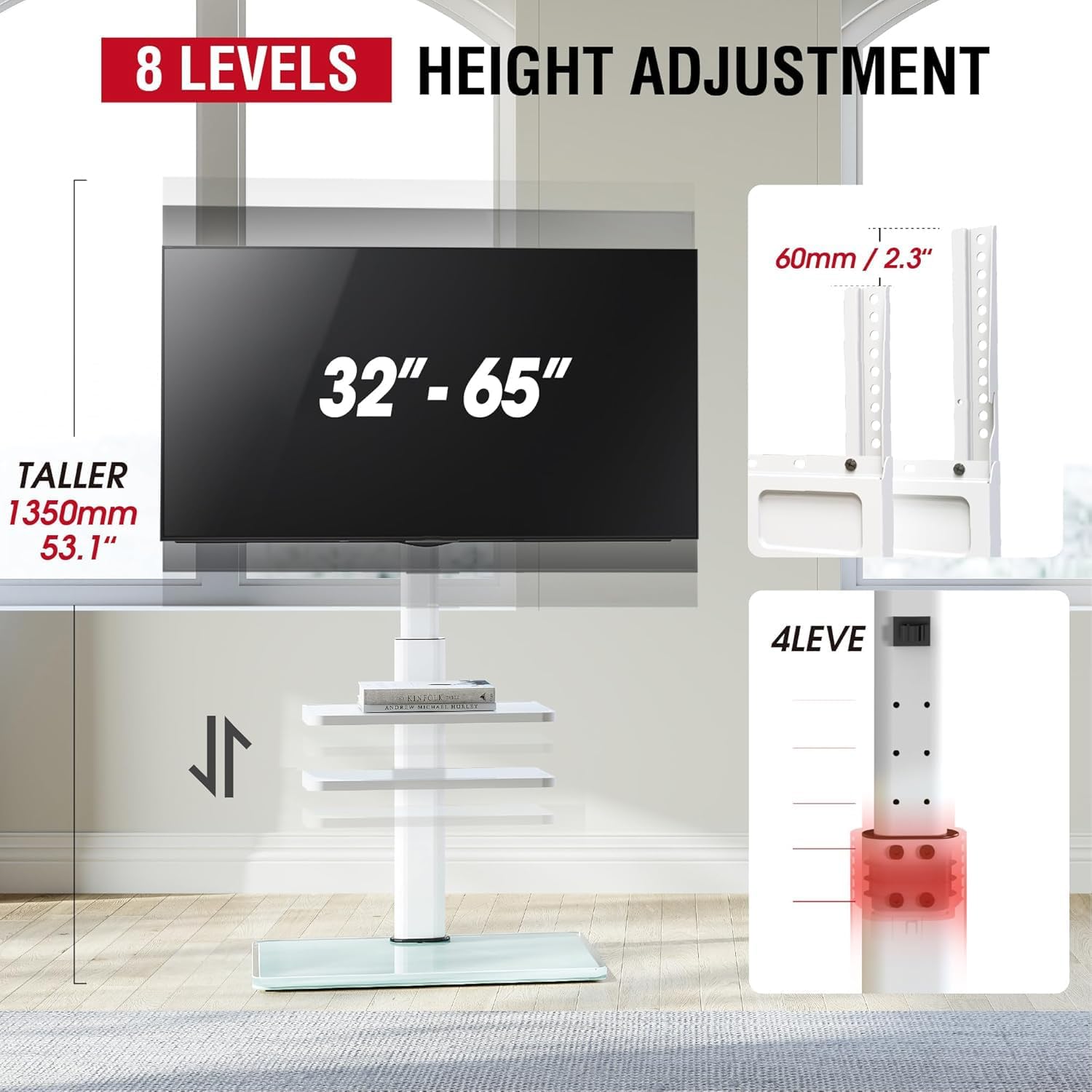
The stand features 8 different height adjustments. The main column can be adjusted in 4 positions, each increasing height by 2.6 inches (65mm). Additionally, the TV hanging bracket offers 2 positions, each adjusting height by 2.4 inches (60mm). This allows for flexible positioning to suit various viewing preferences.
5.2. Swivel and Tilt Adjustment
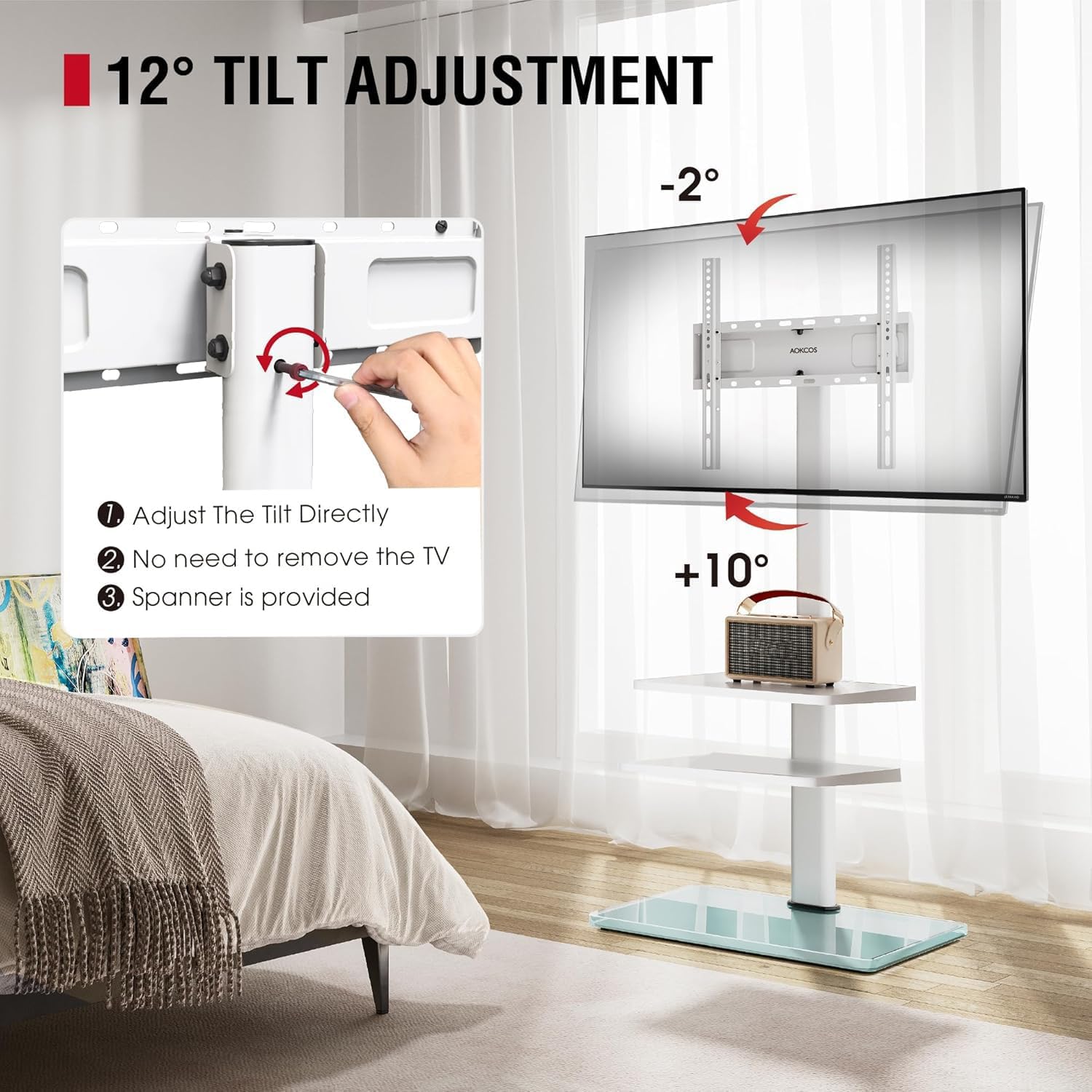
The TV mount allows for a 30° swivel to the left or right, enabling you to direct the screen towards different areas of a room. It also includes a tilt function ranging from -2° to 10° to reduce glare and optimize viewing angles. The tilt adjustment is easily performed by turning the long screws located on the back of the TV stand.

5.3. Adjustable Media Shelves
Two adjustable shelves are integrated into the stand, providing space for media devices such as DVD players, cable boxes, game consoles, and other accessories. These shelves can be positioned at various heights along the main column to suit your needs.

5.4. Cable Management
The stand incorporates a cable management system to keep wires organized and out of sight, contributing to a clean and tidy appearance.

Video 2: This video highlights the flexible shelf and overall design of the AOKCOS floor TV stand, showcasing its adaptability for various room setups.
6. Specifications
| Attribute | Value |
|---|---|
| Brand | AOKCOS |
| Model Number | FTC3402AGW-USA |
| Item Weight | 22 pounds |
| Product Dimensions | 21.6 x 15 x 53.1 inches |
| Color | White |
| Mounting Type | Floor Mount |
| Movement Type | Swivel Tilt |
| Material | Metal, Tempered Glass |
| Compatible Devices | Television |
| TV Size Compatibility | 32-65 inches |
| Weight Capacity | Up to 88 lbs (40 kg) |
| VESA Compatibility | 100x100mm to 400x400mm |
7. Maintenance
To ensure the longevity and proper function of your TV stand:
- Regularly check all screws and connections to ensure they remain tight.
- Clean the metal and tempered glass surfaces with a soft, damp cloth. Avoid abrasive cleaners.
- Do not place excessively heavy items on the shelves or base.
8. Troubleshooting
If you encounter any issues during assembly or use, please refer to the detailed installation manual for specific troubleshooting steps. Common issues and solutions include:
- TV not level: Adjust the tilt function using the screws on the back of the mounting bracket.
- Stand unstable: Ensure all screws are tightened and the stand is placed on a flat, stable surface. Verify the TV weight does not exceed the maximum capacity.
- Difficulty with height adjustment: Loosen the adjustment screws, reposition the column/bracket, and re-tighten securely.
9. Warranty and Support
For any questions regarding installation, product selection, or support, please contact AOKCOS customer service. Specific warranty details may be provided with your purchase documentation.