
1. Introduction
This manual provides essential information for the installation, operation, and maintenance of your Marsrock 1000W MPPT Hybrid Wind Solar Controller. This deluxe version controller features a vibrant color screen for comprehensive data display and supports optional WiFi and GPRS modules for advanced APP cloud monitoring. Please read this manual thoroughly before installation and use to ensure optimal performance and safety.
2. Key Features
- Wind generator MPPT boost charging function.
- PWM dump load for wind, with external dump-load resistance and intelligent disconnection of solar charging.
- Dual power supply function: Battery + solar power supply.
- LCD displays parameters such as voltage and current for wind, solar, and load.
- High performance and stable chip controller.
- Four battery types charging mode can be selected for operation: Lead-acid battery, Ternary lithium battery, Lithium iron phosphate, Custom.
3. Package Contents
Upon opening the package, please verify that all components are present and in good condition:
- Marsrock MPPT Hybrid Wind Solar Controller Body
- User Manual
- Warranty Card
- Connection Cables (Red and Black)
- Wrench Tool
- Unloading Resistance (Dump Load Resistor)
- Mounting Hardware (Nuts)

Figure 3.1: Marsrock MPPT Hybrid Wind Solar Controller and included accessories, including the controller unit, dump load resistor, connection cables, wrench, and nuts.
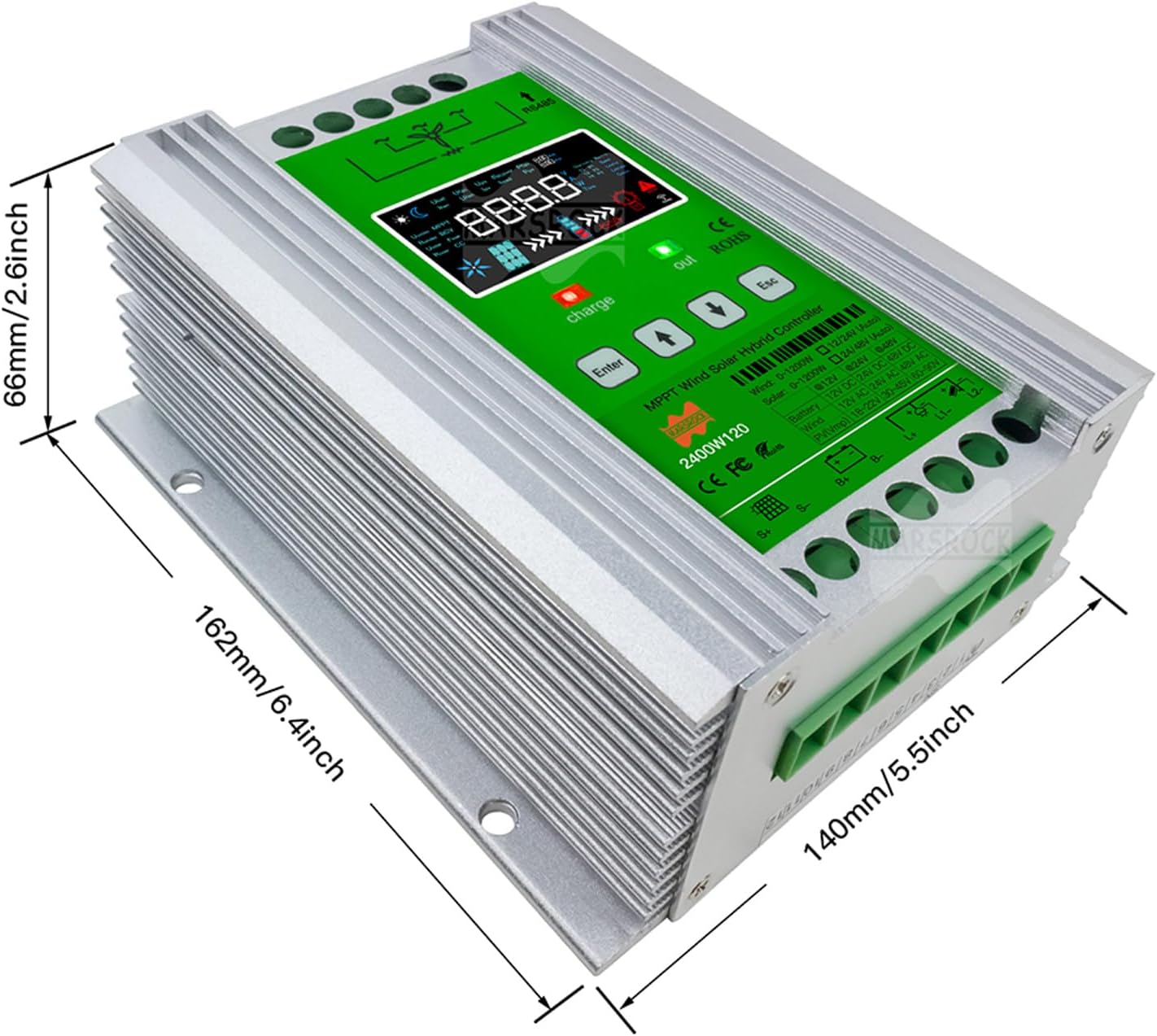
Figure 3.2: Physical dimensions of the Marsrock MPPT Hybrid Wind Solar Controller, showing measurements of 162mm (6.4 inches) in length, 140mm (5.5 inches) in width, and 66mm (2.6 inches) in height.
4. Setup and Installation
Follow these steps for proper installation of your hybrid controller. Ensure all connections are secure and correctly polarized.
- Connect Unloading Resistance: First, connect the hybrid controller body to the unloading resistance.
- Connect Battery: Connect the controller to the battery. Ensure correct polarity: positive to positive, and negative to negative. The battery terminals are located below the battery symbol on the controller screen.
- Connect Wind Generator: Connect your wind generator to the hybrid controller.
- Connect Solar Panel: Connect your solar panel to the hybrid controller's solar panel terminal. Ensure the positive and negative terminals are connected correctly.
- Connect WiFi Module (Optional): Finally, connect the WiFi module to the controller. The blue sheath head of the network cable connects to the hybrid controller, and the other side connects to the WiFi module.

Figure 4.1: Detailed view of the controller's interface, showing the wind turbine terminal, RS485 interface, dump load terminal, LCD color screen, charge indicator, out indicator, Escape key, DOWN button, UP button, Setting key, battery terminal, DC load terminal, and solar panel terminal.
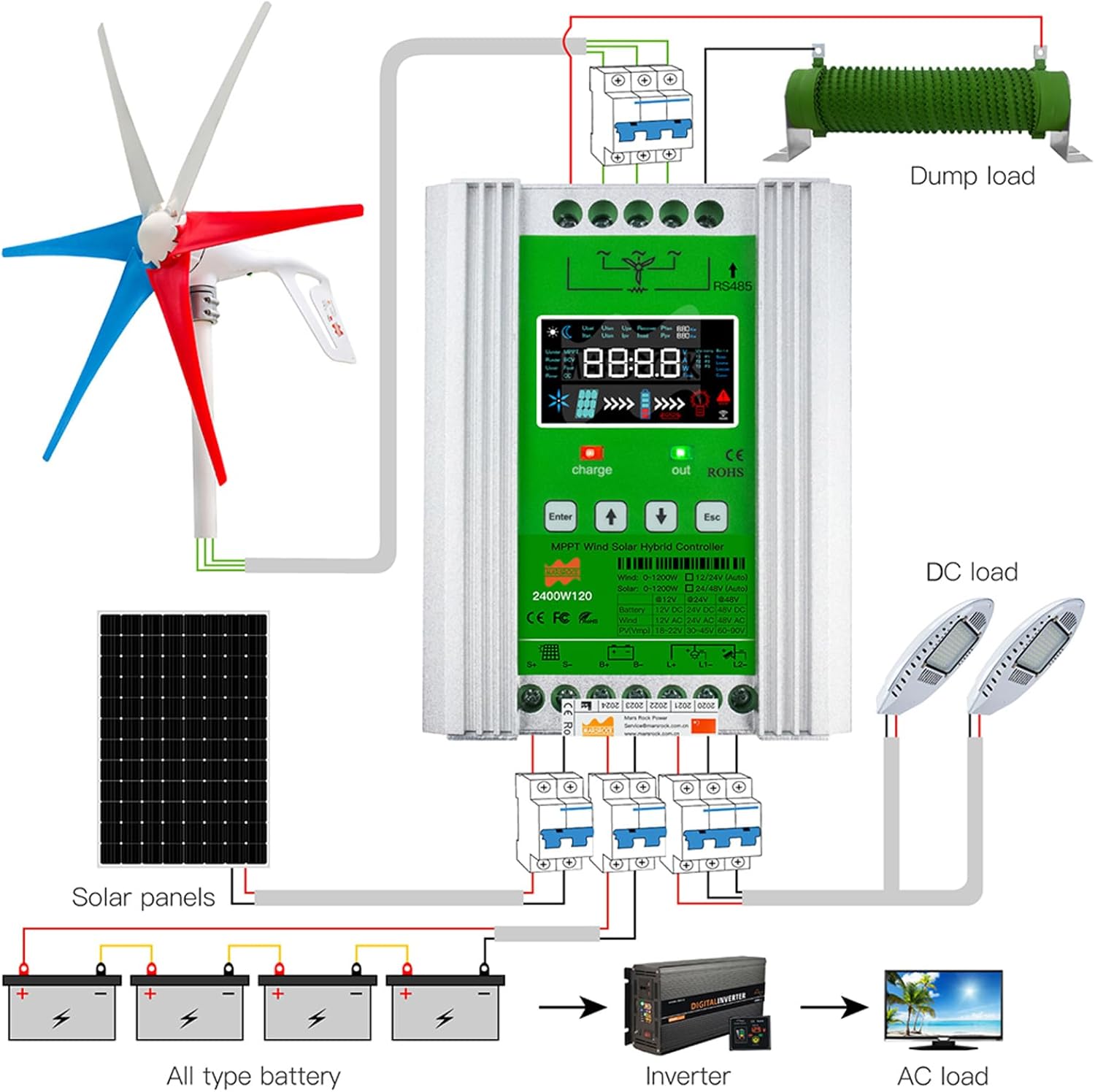
Figure 4.2: Comprehensive wiring diagram illustrating the connection of a wind turbine, solar panels, battery bank, dump load resistor, DC load, and inverter for AC load to the Marsrock MPPT Hybrid Wind Solar Controller.
Video 4.1: This video demonstrates the unboxing and connection process for the Marsrock MPPT Hybrid Wind Solar Controller, including connecting the dump load, battery, wind generator, solar panel, and WiFi module. It also shows the initial setup and button functionalities.
5. Operating Instructions
The controller features an intuitive LCD display and control buttons for easy operation.
5.1. Controller Keys
- Enter Button: Press this button to enter the setup interface or to switch between setup programs.
- Up Arrow Button: Click this button to switch up in page views. In the setup interface, this button is used to increase parameter values (step 0.1 V).
- Down Arrow Button: Click this button to switch down in page views. In the setup interface, this button is used to reduce parameter values (step 0.1 V).
- Esc Button: Click this button to exit the setup interface and save the parameters.
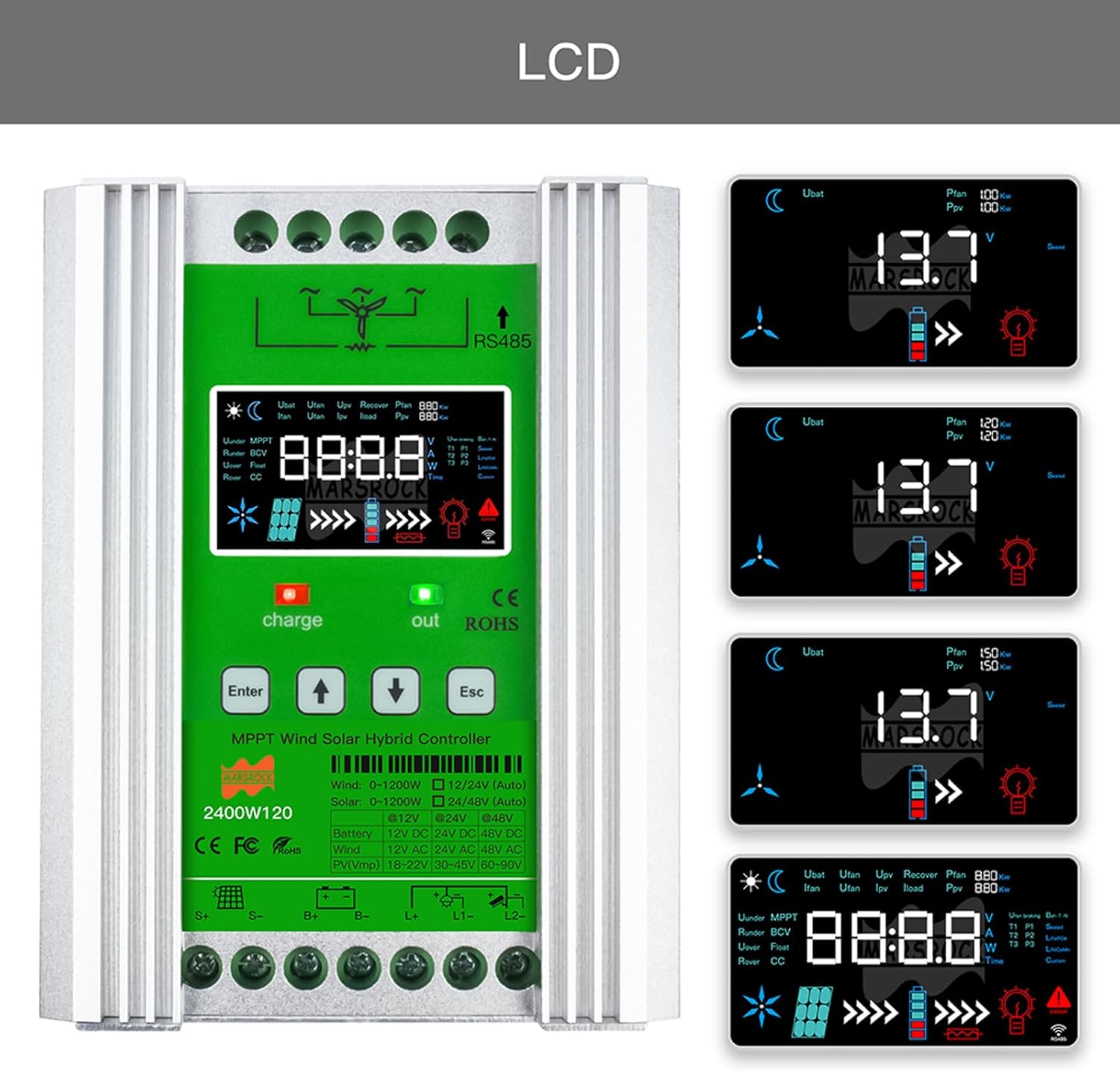
Figure 5.1: Examples of the information displayed on the controller's LCD screen, showing battery voltage, power generation from wind and solar, and charge status indicators.
6. WiFi Function (Android App)
The controller supports WiFi connectivity for monitoring via an Android application. Follow these steps to connect and monitor your system:
- Enable WLAN: On your Android cellphone, open the WLAN interface and turn it on.
- Access App Settings: In the application's main interface, click the setting icon in the upper right corner of the APP.
- Communication Settings: Click "Communication choose" then turn on the "F2F WIFI" button. Click "F2F WIFI Setup" to enter the hotspot interface.
- Connect to Hotspot: Choose to connect to the "EW11 prefix" hotspot, which corresponds to your controller.
- View Data: Return to the APP main interface, choose the hybrid controller from the equipment list. You can then view the controller and battery data in real-time.
6.1. Cautions for WiFi Function
- The WiFi monitor function is only available for PC website or Android cellphone (iPhone is not supported).
- The Android cellphone should be in good condition; a lagging cellphone may affect the WiFi display.
- The maximum effective WiFi function radius area is about 10 meters; within 5 meters is best for stable connection.
- The username and password shown on the controller's body are only needed by the PC website. You do not need to input them on the cellphone when using the WiFi function.
7. Disconnection Procedure
To safely disconnect your hybrid controller from other components, follow these steps in the reverse order of connection:
- Disconnect the WiFi module.
- Disconnect the solar panel.
- Disconnect the wind turbine generator.
- Disconnect the battery.
- Disconnect the unloading resistance.
Always ensure power sources are disconnected before handling wires to prevent electrical hazards.
8. Specifications
| Attribute | Value |
|---|---|
| Brand | Marsrock |
| Model | 1000W50-1224 (12/24V) |
| Color | Green |
| Voltage | 12/24 Volts (Auto-sensing) |
| Product Dimensions (L x W x H) | 6.38" x 5.51" x 2.6" (16.2 cm x 14.0 cm x 6.6 cm) |
| Material | Plastic |
| Display Type | LCD |
| Item Weight | 6.6 Pounds (3 kg) |
| Included Components | Controller body |
9. Troubleshooting
If you encounter issues with your Marsrock MPPT Hybrid Wind Solar Controller, consider the following common troubleshooting steps:
- No Display/Power: Check all power connections, especially the battery connection, for proper polarity and secure contact. Ensure the battery has sufficient charge.
- No Charging: Verify that the solar panels and wind generator are connected correctly and are receiving adequate input (sunlight/wind). Check for any blown fuses or tripped circuit breakers in the system.
- Incorrect Readings: Ensure all sensors and connections are clean and properly seated. Recalibrate if a calibration option is available in the settings.
- WiFi Connection Issues: Confirm your Android device's WLAN is enabled and you are within the effective range (preferably within 5 meters). Ensure the correct hotspot is selected.
- Overvoltage/Undervoltage Alarms: Check battery type settings in the controller to ensure they match your installed battery. Verify battery health and voltage levels.
For persistent issues, refer to the detailed troubleshooting section in the printed user manual or contact Marsrock customer support.
10. Warranty and Support
Marsrock products are designed for reliability and performance. This product comes with a standard manufacturer's warranty. Please refer to the included Warranty Card for specific terms, conditions, and duration of coverage.
For technical support, warranty claims, or service inquiries, please contact Marsrock customer service through the contact information provided on the warranty card or the official Marsrock website. When contacting support, please have your product model number and purchase date readily available.