
Introduction
Welcome to the user manual for your Tapo RV20 Max Robot Vacuum and Mop. This device is designed to provide efficient and intelligent cleaning for your home, combining powerful vacuuming with effective mopping capabilities. Please read this manual thoroughly before operating the device to ensure proper use, maintenance, and optimal performance.
Package Contents
Verify that all items are present in your package:
- Robot Vacuum Cleaner (includes HEPA filter, main brush, and side brush)
- Charging Dock
- Quick Installation Guide
- Mopping Attachment
- Power Cord
- Cleaning Brush
- User Manual (this document)

An image displaying the Tapo RV20 Max robot vacuum, its charging dock, and a smartphone screen illustrating the companion application with a floor plan.
Product Overview
Key Features
- Ultra-Powerful 5300Pa Max Suction: Effectively removes dust, pet hair, crumbs, and debris from various floor surfaces.
- 2-in-1 Vacuum & Mop Combo: Offers both vacuuming and mopping functionalities for comprehensive floor care.
- Ultra-Slim Design (3.27'' tall): Allows the robot to clean under furniture and in hard-to-reach areas.
- LiDAR Smart Navigation: Creates precise maps and plans efficient cleaning routes, preventing redundant coverage.
- Mesh Grid Technology: Utilizes a unique grid-like cleaning pattern for thorough coverage and to prevent missed spots.
- Carpet Area Smart Functions: Automatically increases suction on low-pile carpets and avoids carpeted areas when in mopping mode.
- Over 97% Dust Pickup Rate: Engineered with DeepVac technology for superior dust removal.
- Anti-Drop Protection: Detects step edges to prevent falls.
- Climbing Capability (up to 0.87''): Can effortlessly climb thresholds to ensure comprehensive room coverage.
- Tapo IQ+ Smart Cleaning System: Powered by multiple sensors and advanced algorithms for reliable autonomous cleaning.
- Comprehensive 2D House Mapping: View and customize room layouts and robot functions via the Tapo app.
- Smart Recharge & Resume: Automatically returns to the charging dock and resumes cleaning from where it left off.
- Virtual Walls and No-Go Zones: Set up restricted areas through the app.
- Adjustable Water Flow: 3 water flow options for mopping to suit different hard floor types.
- Washable and Reusable Filter: For easy maintenance.
Components Diagram
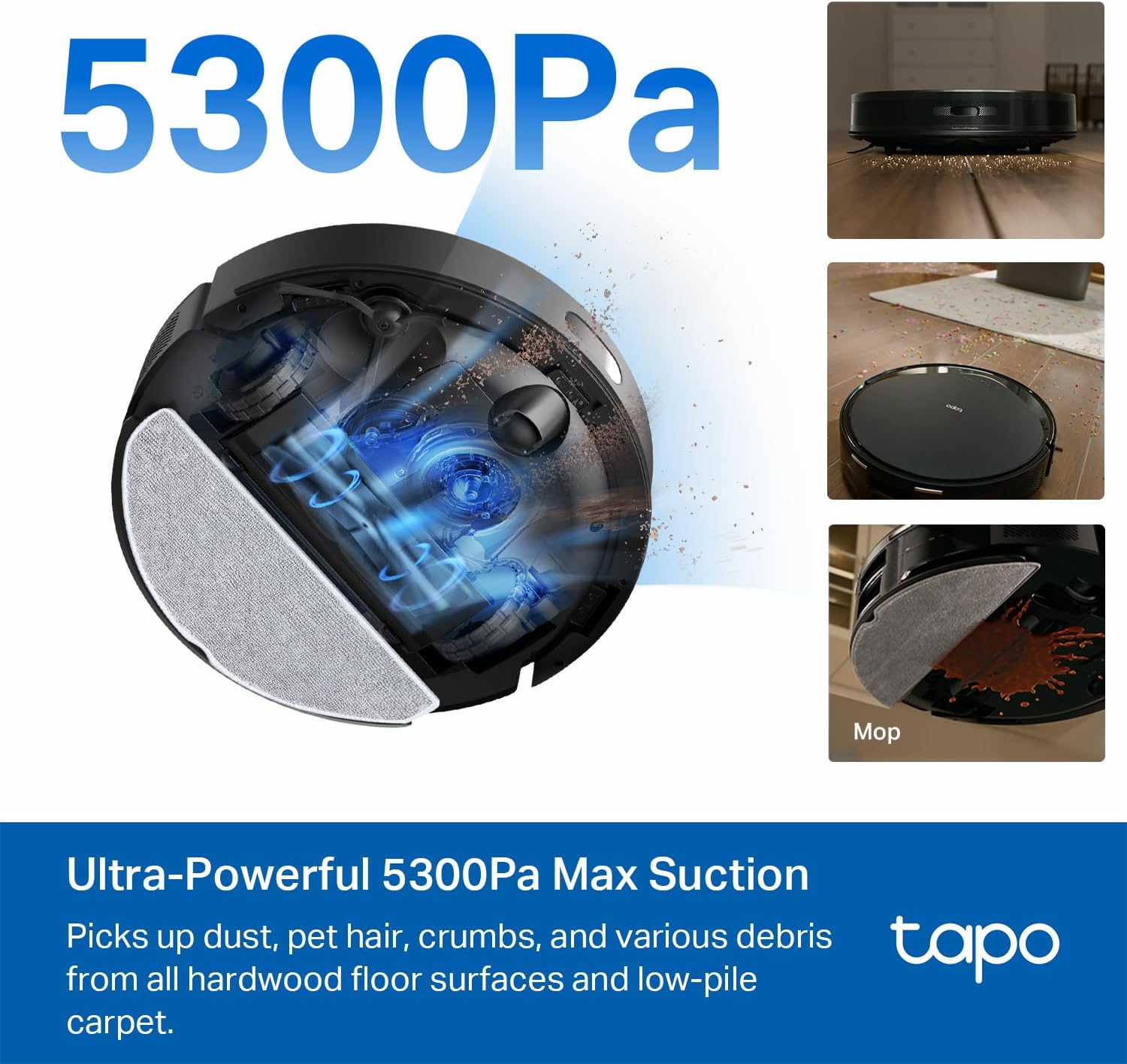
A visual representation highlighting the robot vacuum's powerful 5300Pa maximum suction, showing dust and debris being pulled into the device.

The Tapo RV20 Max robot vacuum shown cleaning underneath a sofa, illustrating its ultra-slim 3.27-inch design.

An image depicting the robot vacuum utilizing advanced LiDAR navigation to create a precise map of its surroundings, indicated by blue light beams.

The robot vacuum in mopping mode, with water droplets on the floor indicating its ability to adjust water flow for different floor types.

An overhead view of the robot vacuum cleaning a kitchen floor, showing a grid-like cleaning pattern to ensure no spots are missed.

The robot vacuum intelligently distinguishing between hardwood and carpeted areas, indicating its ability to adjust cleaning modes accordingly.

A schematic diagram of a house showing the Tapo RV20 Max robot vacuum navigating and mapping different rooms, highlighting its IQ+ Smart Cleaning system.
Setup
Initial Setup
- Unpack the robot vacuum and all accessories. Remove all protective films and packaging materials.
- Attach the side brushes by pressing them onto the square posts on the bottom of the robot until they click into place.
- Place the charging dock against a wall in an open area, ensuring there are no obstacles within 1.5 meters (4.9 feet) in front and 0.5 meters (1.6 feet) to the sides. Connect the power adapter to the dock and plug it into a power outlet.
- Place the robot vacuum on the charging dock. Ensure the charging contacts on the robot align with those on the dock. The robot will power on automatically and begin charging.
Connecting to the Tapo App
- Download the Tapo app from the App Store (iOS) or Google Play Store (Android).
- Open the Tapo app and log in or create a new TP-Link ID.
- Tap the "+" icon in the top right corner to add a new device. Select "Robot Vacuum" and follow the on-screen instructions to connect your RV20 Max to your home Wi-Fi network (2.4 GHz band only).
- Once connected, the app will guide you through the initial mapping process.
Video: An official video demonstrating the features and operation of the Tapo Robot Vacuum and Mop.

Image: Scan this QR code for quick access to setup and maintenance videos, FAQs, parts & accessories, and technical support on the Tapo website.
For more detailed support, visit the official Tapo support page: https://www.tapo.com/us/support/tapo-robot-vacuum/
Operating Instructions
Starting a Clean
You can start a cleaning cycle using the Tapo app or the physical buttons on the robot.
- App Control: Open the Tapo app, select your RV20 Max, and choose your desired cleaning mode (Auto, Room, Zone, Spot). You can also set schedules for automated cleaning.
- Physical Buttons: Press the Power button on the robot to start or pause an auto-clean cycle. Press the Home button to send the robot back to its charging dock.
Cleaning Modes
- Auto Clean: The robot intelligently navigates and cleans your entire mapped area.
- Room Clean: Select specific rooms from your map in the Tapo app for targeted cleaning.
- Zone Clean: Draw custom cleaning zones on your map in the Tapo app for focused cleaning in particular areas.
- Spot Clean: Place the robot in a specific dirty area and activate spot clean for intensive cleaning of a small area.
Mopping Function
To use the mopping function:
- Fill the water tank of the mopping attachment with clean water.
- Attach the mopping pad securely to the mopping attachment.
- Slide the mopping attachment into the designated slot on the robot vacuum.
- In the Tapo app, select the desired water flow level (3 options available) based on your floor type.
- The robot will automatically avoid carpeted areas when the mopping attachment is installed.
Smart Navigation and Obstacle Avoidance
The RV20 Max uses advanced LiDAR navigation to create accurate maps of your home, ensuring efficient cleaning paths and preventing redundant coverage. Its integrated sensors help reduce the risk of the robot getting stuck or colliding with obstacles.
Virtual Walls and No-Go Zones
Use the Tapo app to set up virtual walls and no-go zones. This allows you to define areas where the robot should not enter, such as pet feeding areas, children's play zones, or areas with delicate items.
Maintenance
Regular maintenance is crucial for optimal performance of your Tapo RV20 Max. Always power off the robot and disconnect it from the charging dock before performing any maintenance.
Cleaning the Dustbin and Filter
- Press the dustbin release button and pull out the dustbin.
- Open the dustbin cover and empty its contents into a trash can.
- Remove the HEPA filter from the dustbin. Tap the filter gently to remove loose dust. The filter is washable; rinse it under running water and allow it to air dry completely before reinserting.
- Rinse the dustbin with water if necessary and allow it to air dry completely.
- Reassemble the filter and dustbin, then reinsert the dustbin into the robot.

Image: A close-up image of the robot vacuum's dustbin and filter, illustrating the amount of dust and debris collected after a cleaning cycle, emphasizing the need for regular cleaning.
Cleaning the Main Brush and Side Brushes
- Flip the robot over. Press the release tabs on the main brush cover and remove the cover. Lift out the main brush.
- Use the cleaning tool (included) to remove hair and debris tangled around the main brush. You can also rinse the main brush under water if heavily soiled, ensuring it is completely dry before reinstallation.
- Remove the side brushes by gently pulling them off. Remove any tangled hair or debris.
- Reinstall the main brush and side brushes.
Cleaning Sensors and Charging Contacts
Wipe the following components with a clean, dry cloth:
- Cliff Sensors (located on the bottom of the robot)
- Charging Contacts (on the robot and charging dock)
- Universal Wheel (on the bottom of the robot)
- LIDAR Sensor (on top of the robot)
Image: The underside of the Tapo RV20 Max robot vacuum, displaying the main brush, side brushes, and various sensors that require periodic cleaning for optimal performance.
Troubleshooting
If you encounter issues with your Tapo RV20 Max, refer to the following common problems and solutions:
| Problem | Possible Cause | Solution |
|---|---|---|
| Robot does not power on or charge. | Charging contacts are dirty; power adapter not connected; battery depleted. | Clean charging contacts; ensure power adapter is securely plugged in; place robot on dock for several hours. |
| Robot gets stuck frequently. | Too many obstacles; tangled wires/cables; dark surfaces/cliffs. | Clear obstacles; use virtual walls/no-go zones; ensure sufficient lighting. |
| Poor cleaning performance. | Dustbin full; filter clogged; brushes tangled/worn. | Empty dustbin; clean/replace filter; clean/replace brushes. |
| Cannot connect to Wi-Fi. | Incorrect Wi-Fi password; 5GHz network selected; robot too far from router. | Verify password; ensure 2.4GHz network is used; move robot closer to router. |
For more extensive troubleshooting, please refer to the Tapo app's help section or the official Tapo support website.
Specifications
| Feature | Detail |
|---|---|
| Brand | Tapo |
| Model Name | Tapo Robot Vacuum (RV20 Max) |
| Special Feature | Wet/Dry, 2-IN-1 Vacuum and Mop, Scheduling, Auto-Docking, Washable Filter |
| Color | Black |
| Product Dimensions | 13"L x 13"W x 3.3"H |
| Included Components | Robot Vacuum x 1 |
| Filter Type | HEPA Filter |
| Battery Capacity | 2600 mAh |
| Battery Life | Up to 150 minutes |
| Power Source | Battery Powered |
| Control Method | App |
| Compatible Devices | Smartphones, Amazon Echo, Google Home |
| Wireless Connection | IEEE 802.11 b/g/n, 2.4 GHz band only and Bluetooth 4.2 (onboarding only) |
| Max Suction Power | 5300Pa |
| Vacuuming Area | 180 m² |
| Mopping Area | 200 m² |
| Climbing Angle | 20° (up to 0.87'' threshold) |
| Item Weight | 11.82 pounds |
| UPC | 810142822824 |
Warranty and Support
Warranty Information
The Tapo RV20 Max Robot Vacuum and Mop comes with a standard manufacturer's warranty. Please refer to the warranty card included in your package or visit the official Tapo website for detailed warranty terms and conditions specific to your region.
Customer Support
For technical support, FAQs, or to purchase replacement parts and accessories, please visit the official Tapo support website:
https://www.tapo.com/us/support/tapo-robot-vacuum/
You can also find helpful resources, including setup and maintenance videos, on the support page.


