1. Introduction
This manual provides detailed instructions for the Transformers TF-T07 Ear Hanging Wireless Headphones. Please read this manual carefully before using the product to ensure proper operation and to maximize your listening experience.
The TF-T07 headphones feature an ergonomic ear-hanging design, Bluetooth 5.4 connectivity, ultra-low latency for gaming, a high-quality microphone, and a sweatproof build, delivering clear audio with deep bass.
2. Package Contents
Upon opening the package, please verify that all the following items are included:
- Transformers TF-T07 Ear Hanging Wireless Headphones
- Charging Cable (Type-C)
- Charging Case
- User Manual (this document)
3. Product Overview
The Transformers TF-T07 headphones are designed for comfort and high-fidelity audio. They feature an open-ear, ear-hanging design, providing a comfortable fit without entering the ear canal.

Image: The TF-T07 headphones in their charging case, highlighting the non-in-ear design for comfortable wear.
Key features include:
- Bluetooth 5.4: For stable and efficient wireless connection.
- HD Voice: Enhanced call clarity.
- Game Low Latency: Minimized audio delay for gaming.
- Surround Sound: Immersive audio experience.
- Colorful Lights: Integrated lighting feature.

Image: Visual representation of the TF-T07's main features, including Bluetooth 5.4 and low latency gaming.
4. Setup and Charging
4.1 Initial Charging
Before first use, fully charge the headphones and the charging case.
- Connect the provided Type-C charging cable to the charging port on the case.
- Connect the other end of the cable to a USB power source (e.g., wall adapter, computer USB port).
- The charging indicator lights on the case will show charging status.
- A full charge typically takes approximately 2 hours.
4.2 Wearing the Headphones
The TF-T07 features an ergonomic ear-hanging design for a secure and comfortable fit.
- Identify the left (L) and right (R) headphones.
- Gently hook each headphone over your ear, ensuring the speaker portion is positioned correctly near your ear canal without entering it.
- Adjust for a snug and comfortable fit.
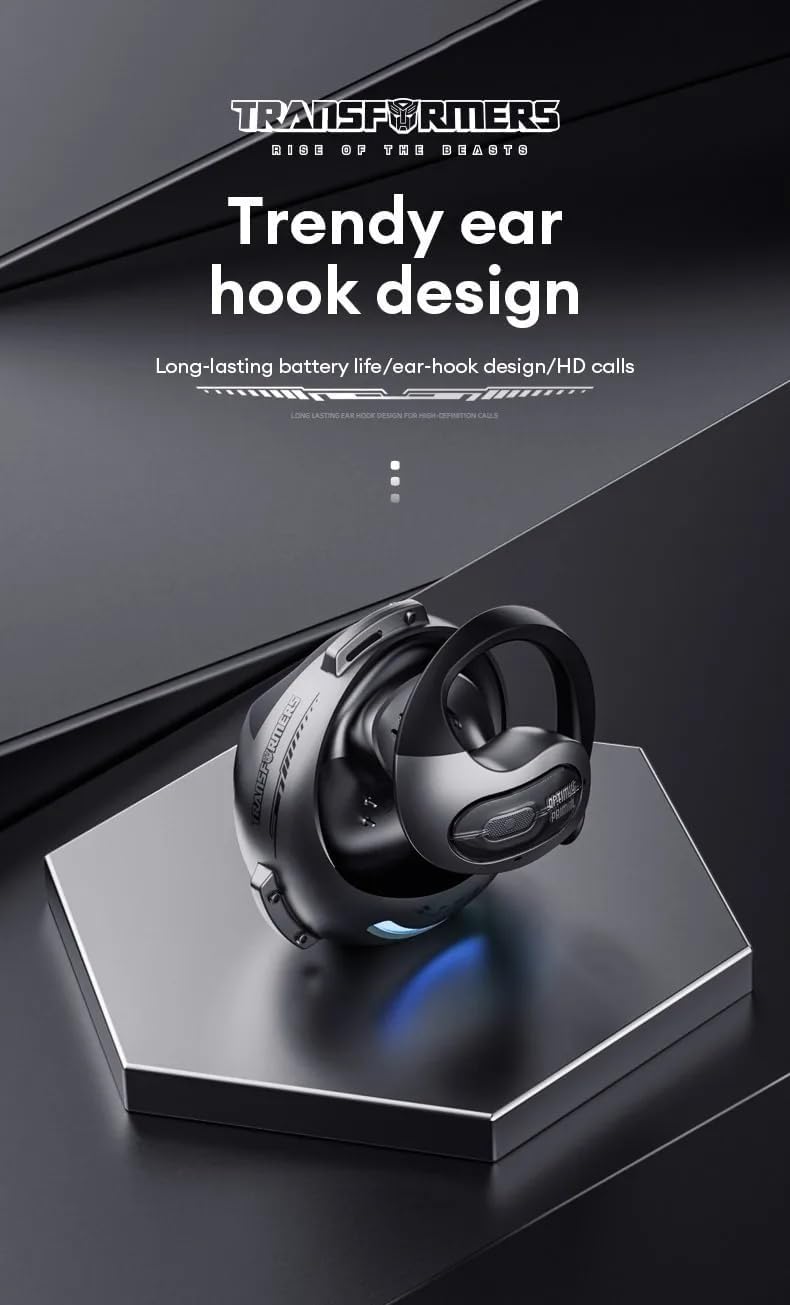
Image: Close-up of the TF-T07's ear hook design, emphasizing its ergonomic shape.
4.3 Bluetooth Pairing
To connect your headphones to a device:
- Ensure the headphones are charged.
- Open the charging case. The headphones will automatically enter pairing mode (indicated by flashing lights, refer to product specific light indicators if available).
- On your device (smartphone, tablet, computer), enable Bluetooth.
- Search for available Bluetooth devices and select "TF-T07" from the list.
- Once connected, the headphones will indicate successful pairing (e.g., a voice prompt or solid light).
- The headphones will automatically reconnect to the last paired device when taken out of the case, if Bluetooth is enabled on the device.
5. Operating Instructions
5.1 Basic Controls
The TF-T07 headphones feature integrated controls for easy management of audio and calls. Specific touch or button functions may vary; refer to the quick start guide included in your package for precise details.
- Power On/Off: Headphones power on automatically when removed from the case and power off when placed back in the case.
- Play/Pause: Single tap on either earbud.
- Volume Control: Adjust volume directly on the headphones (specific gesture/button location not detailed in product info, assume standard controls).
- Next/Previous Track: Double tap or long press (refer to quick start guide).
- Answer/End Call: Single tap during an incoming call.
- Reject Call: Long press during an incoming call.
- Activate Voice Assistant: Triple tap (refer to quick start guide).
5.2 Making and Receiving Calls
The built-in high-quality microphone with DNS noise reduction ensures clear communication.

Image: The TF-T07 headphones are designed for high-definition calls, even in noisy environments.
5.3 Gaming Experience
The TF-T07 headphones offer ultra-low latency, crucial for competitive gaming, ensuring audio synchronization with on-screen action.
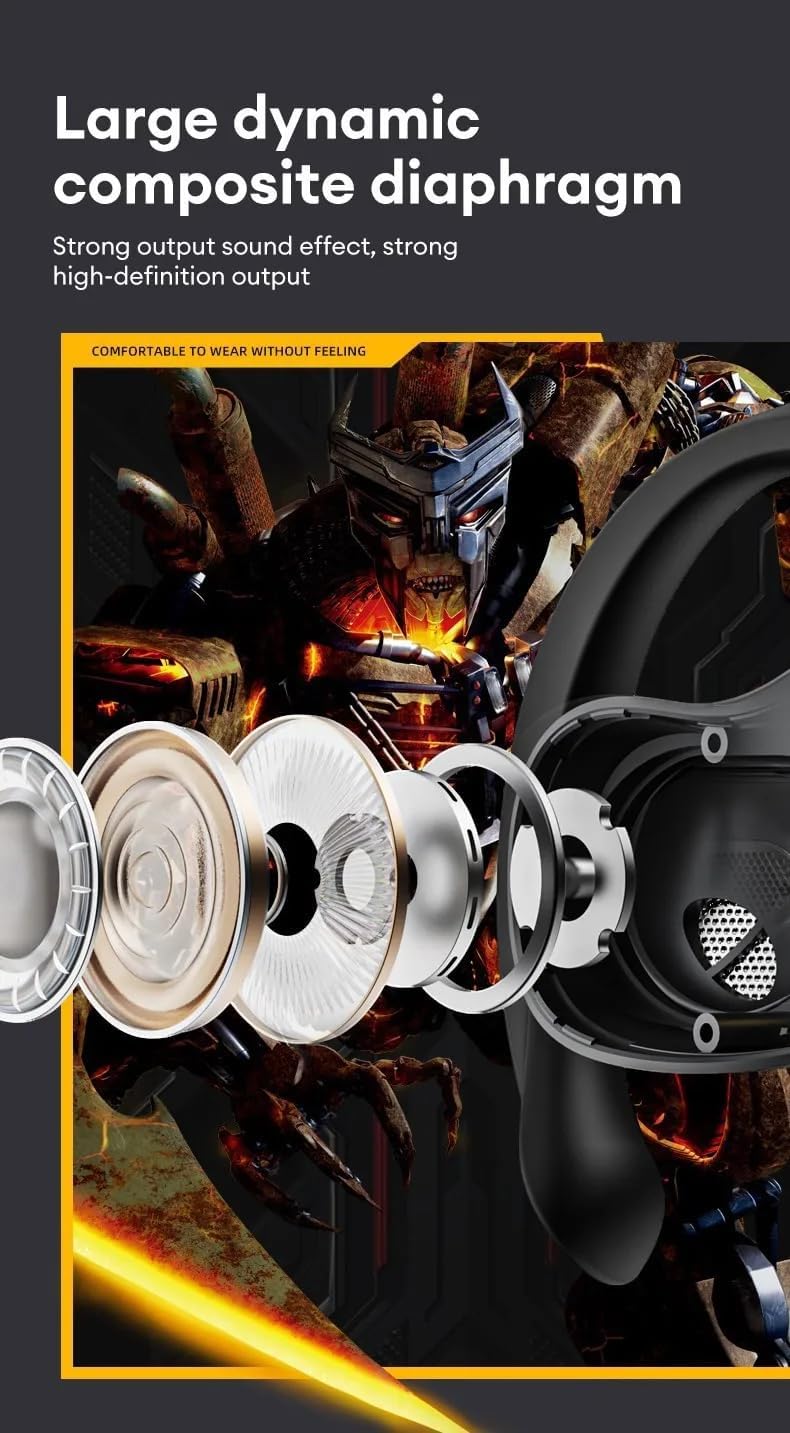
Image: Internal components of the TF-T07 headphones, highlighting the large dynamic composite diaphragm for strong sound output.

Image: The TF-T07 headphones provide a full spectrum listening experience with excellent sound transmission.
6. Maintenance and Care
To ensure the longevity and optimal performance of your TF-T07 headphones, follow these care guidelines:
- Cleaning: Use a soft, dry, lint-free cloth to clean the headphones and charging case. Do not use abrasive cleaners, alcohol, or chemical solvents.
- Sweatproof Design: The headphones are designed to be sweatproof, making them suitable for workouts. However, avoid submerging them in water or exposing them to heavy rain. Dry them thoroughly after exposure to sweat.
- Storage: When not in use, store the headphones in their charging case to protect them from dust and damage. Store in a cool, dry place away from extreme temperatures.
- Battery Care: To preserve battery life, charge the headphones regularly, even if not used frequently. Avoid fully discharging the battery for extended periods.
7. Troubleshooting
If you encounter issues with your TF-T07 headphones, try the following solutions:
- No Power:
- Ensure the headphones and charging case are fully charged.
- Check the charging cable and power source.
- Cannot Pair:
- Ensure Bluetooth is enabled on your device and the headphones are in pairing mode.
- Move the headphones closer to your device (within 10 meters).
- Turn off Bluetooth on other nearby devices to avoid interference.
- Forget "TF-T07" from your device's Bluetooth list and try pairing again.
- Restart your device and the headphones.
- No Sound or Low Volume:
- Increase the volume on both your device and the headphones.
- Ensure the headphones are properly connected to your device.
- Check if the audio output is set to "TF-T07" on your device.
- Poor Sound Quality:
- Move closer to your device to reduce interference.
- Avoid obstacles between the headphones and your device.
- Ensure the headphones are clean and free from debris.
If the issue persists, please refer to the warranty and support section.
8. Specifications
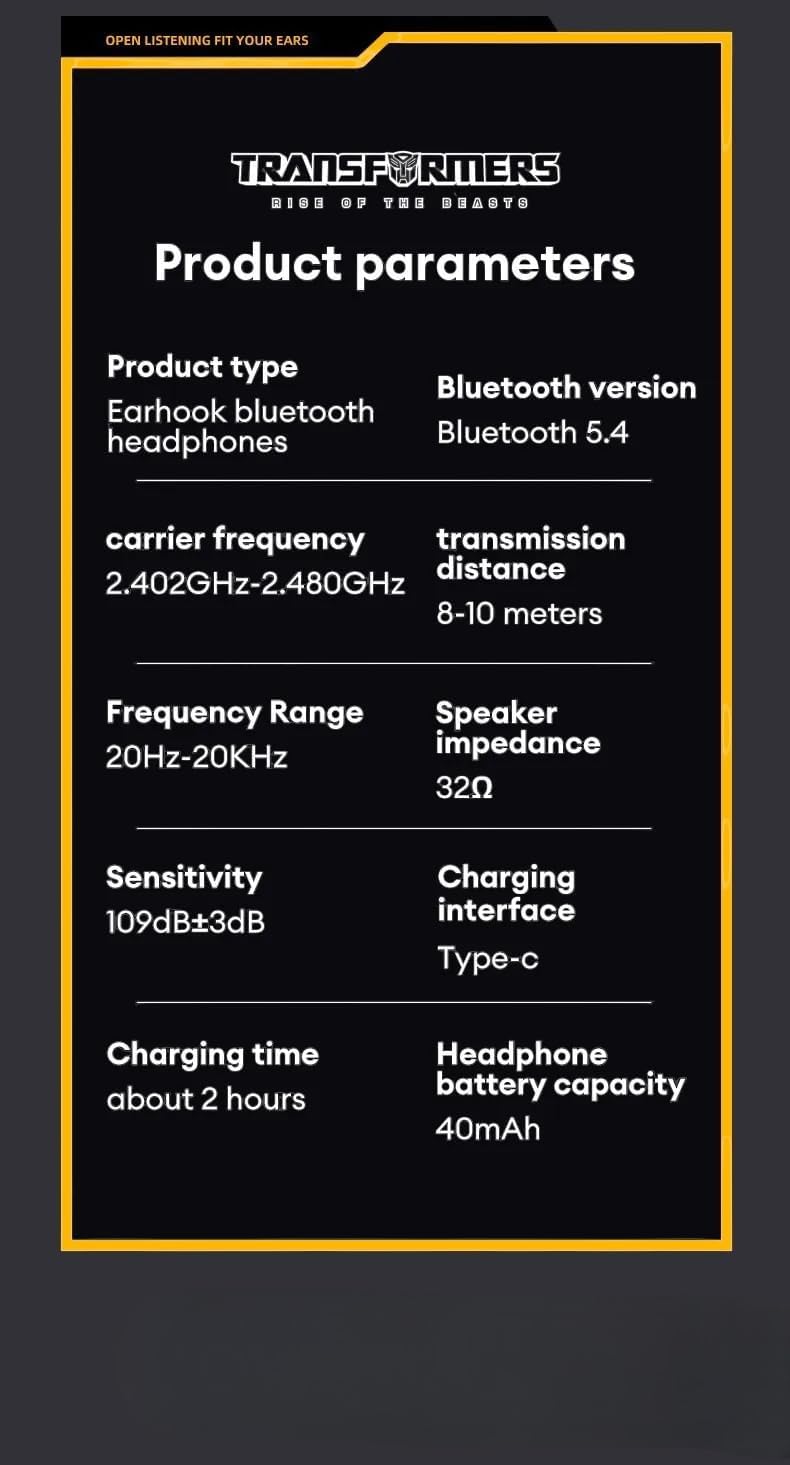
Image: Detailed product parameters for the TF-T07 headphones.
| Feature | Detail |
|---|---|
| Product Type | Earhook Bluetooth Headphones |
| Model Name | TF-T07 |
| Brand | Transformers |
| Connectivity Technology | Wireless (Bluetooth 5.4) |
| Bluetooth Version | Bluetooth 5.4 |
| Carrier Frequency | 2.402GHz - 2.480GHz |
| Transmission Distance | 8-10 meters |
| Frequency Range | 20Hz - 20KHz |
| Speaker Impedance | 32Ω |
| Sensitivity | 109dB ± 3dB |
| Charging Interface | Type-C |
| Charging Time | Approximately 2 hours |
| Headphone Battery Capacity | 40mAh |
| Special Features | Noise Isolation, Sweatproof Design, Ultra-Low Latency |
| Color | Grey |
9. Warranty Information
The Transformers TF-T07 Ear Hanging Wireless Headphones come with a Manufacturer's Warranty of 6 Months from the date of purchase.
This warranty covers defects in materials and workmanship under normal use. It does not cover damage caused by misuse, accidents, unauthorized modifications, or normal wear and tear.
Please retain your proof of purchase for warranty claims.
10. Customer Support
For further assistance, technical support, or warranty inquiries, please contact your retailer or the manufacturer's customer service department.
Please have your product model number (TF-T07) and proof of purchase ready when contacting support.


